Jev isn’t a chat model. It’s a decision model. You give it context and a question, and it returns an answer that your software can use.
That distinction sounds small, but it changes where AI fits in an application. A chat model might write a customer reply. A decision model can determine which team should receive the message first. It can check whether a review reports a defect, decide whether a support ticket mentions a deadline, or identify which product best fits a customer’s situation.
These are fuzzy micro decisions. They appear throughout ordinary software: filtering spam, sorting requests, analyzing posts, checking claims, and selecting the next step in a workflow. They’re too nuanced for a simple keyword rule, yet many don’t require a full generative response.
Jev makes those small decisions fast and inexpensive enough to use repeatedly. To use it well, I separate three ideas:
- Decision types describe the form of the answer: a probability, a choice, or a score.
- Decision shapes describe the job, such as classification, routing, ranking, or verification.
- Design patterns describe how several decisions work together inside an application.
That framework applies beyond Jev. As more decision models appear, the useful skill won’t be memorizing one product’s interface. It’ll be recognizing where software needs to interpret language and giving each interpretation a clear job.
Where a decision model fits
Most AI applications contain more decisions than writing tasks. Consider a support message about a failed upload. Before anyone drafts a response, the software may need to decide whether the issue is a bug, how disruptive it is, whether the customer has a deadline, and which team should handle it. A generative model can still write the eventual reply. It doesn’t need to make every earlier decision as a separate, relatively costly call.
The economics make that separation interesting. At the price listed by TypeSafe in the example I used, Jev costs 4.2 US cents per million input tokens, with no output token charge. If each request contains 1,000 input tokens, one million requests use one billion input tokens. At that listed rate, the token charge would be $42.
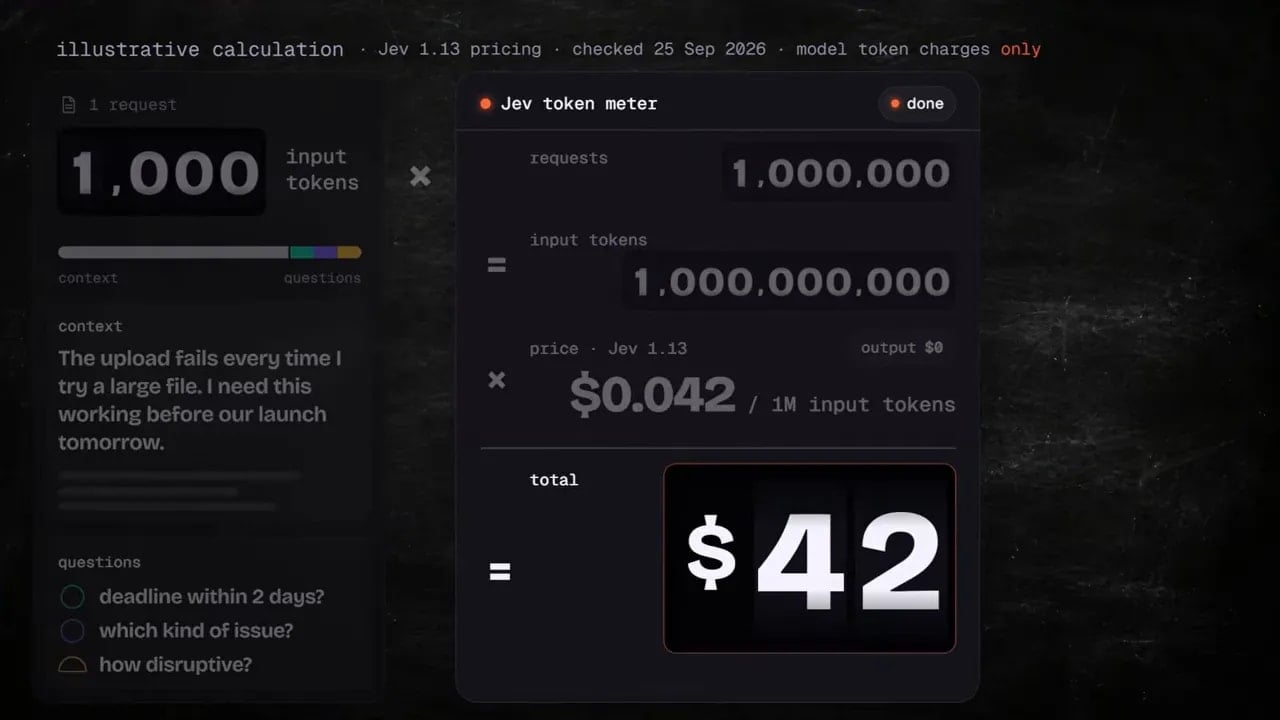
That’s an illustration, not a reason to send every possible question to a model. It shows why repeated checks become practical. I can consider analyzing an entire collection of records or adding several language checks to a workflow that runs frequently. The appropriate place for Jev is still a point where its answer changes what the application does.
TypeSafe’s introduction to Jev gives the product background. For application design, I find it useful to group opportunities into five areas.
Automation
An incoming support message can become a prioritized task in the right queue. A supplier email can be identified as an invoice query and sent to accounts payable. In each case, the decision model interprets the message. Ordinary software then creates the task or routes the email.
Real-time applications
Jev has been used in demonstrations involving gameplay, with decisions at speeds around 150 milliseconds. Games make the speed easy to see, but the same principle can serve a practical interface. If someone tells a drawing app to make an object bigger, the app needs to understand the instruction and select the enlargement action quickly. It doesn’t need an essay about the instruction.
Data processing at scale
A business might check product reviews for recurring complaints, examine support conversations for particular problems, or interpret large collections of time series records. Once the model has labeled the records, code can count the results by month, product, or version. The model handles the meaning; code handles the arithmetic.
Verification
A citation can appear beside a claim without supporting that claim. A drafted support reply can sound reasonable while promising a refund the policy doesn’t allow. A decision model can check a specific statement against the relevant evidence before the application uses it.
Harness engineering
An AI agent doesn’t operate alone. Software around it selects tools, checks results, and decides what happens next. That surrounding system is often called a harness. Decision models can provide focused checks and routing inside a harness for a coding agent or another custom agent.
These five areas look quite different on the surface. Underneath, they draw on the same few kinds of answers.
The three Jev decision types
A decision type tells me what comes back. Jev has three types: noul, choice, and score.
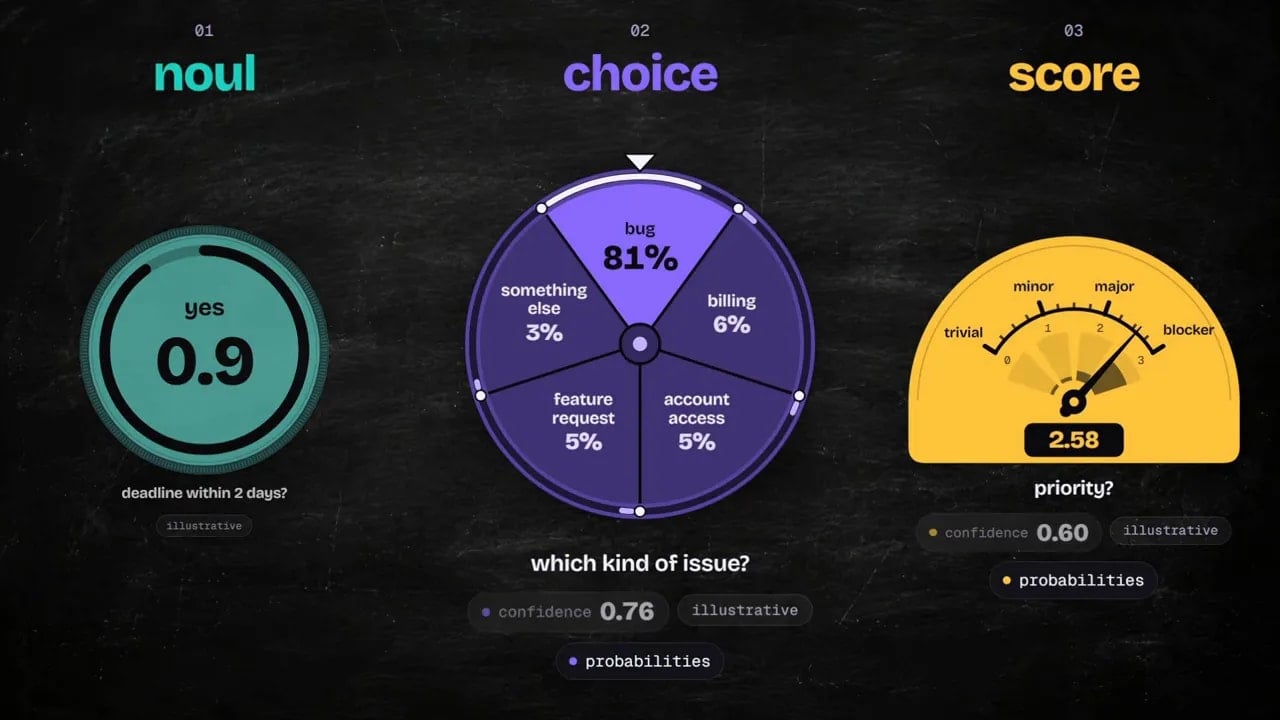
Noul: a probability for a yes or no question
A noul question asks whether a property is present. For example: Does this customer mention a deadline within the next two days?
If Jev returns 0.9, my application might add a deadline flag. The number matters because the answer isn’t always clear. A result near the middle signals uncertainty. My code can treat that differently from an answer close to yes or no.
This is useful for questions such as whether a message asks to stop further contact, whether a review describes a defect, or whether a draft makes a particular promise. The question should stay specific. “Is this a good message?” gives the application much less to act on than “Does this message request that contact stop?”
Choice: one answer from a defined set
A choice question supplies the possible answers. A customer request might be a bug, billing issue, account access problem, feature request, or something else. Jev selects from those options and provides uncertainty information that the application can use.
The categories need to reflect the actual workflow. If I want to send messages to teams, I should define categories that correspond to meaningful destinations. I’d also include an appropriate fallback where requests don’t fit the expected options. A model can’t select a useful category if the available categories don’t describe the work.
Score: a position on an ordered scale
A score works when the answers have an order. A software issue could range from trivial to minor to major to blocker. Jev can return a position that falls between those levels.
The scale needs a purpose. A disruption score can help prioritize engineering work. A clarity score can help identify help articles that need editorial revision. Defining the levels makes the number meaningful; the application then decides how to use it.
Choice and score also provide probability and confidence signals. I’ll use those signals later to decide whether software should act, ask for clarification, or send an item for another check.
Ten decision shapes: what job does the answer do?
The type describes the answer’s format. The shape describes the job I’m trying to complete. A choice can classify a ticket, route a request, or help search a document. Those are different jobs even though the underlying answer type may be the same.
1. Classification
Classification gives an item a category. A message about an upload failure might receive the label “bug.” In a shared company inbox, messages might be labeled as invoices, sales pitches, or delivery updates.
Choice fits classification because I already know the categories I want. The label gives my application something concrete to use for sorting, reporting, or further processing.
2. Detection
Detection asks whether a particular property appears in the material. Suppose a sales reply asks the sender to stop making contact. A noul question can estimate whether that request is present, and my application can use the result to choose the appropriate path.
Detection is narrower than classifying the whole message. One email might be a sales reply and contain a request to stop contact. Those answers serve different purposes, so I’d ask different questions.
3. Scoring
Scoring is both a decision type and a decision shape. As a shape, it means evaluating something along a useful scale. How disruptive is a bug? How clear is a help article?
For a bug, I might define levels from minor inconvenience through blocker. For an article, I’d define levels that distinguish clear guidance from confusing guidance. The resulting score can inform the order in which people review the work.
4. Routing
Routing selects what happens next. An order status question can go to a database lookup. A product question can go to an assistant with product documentation. An unresolved dispute can go to support.
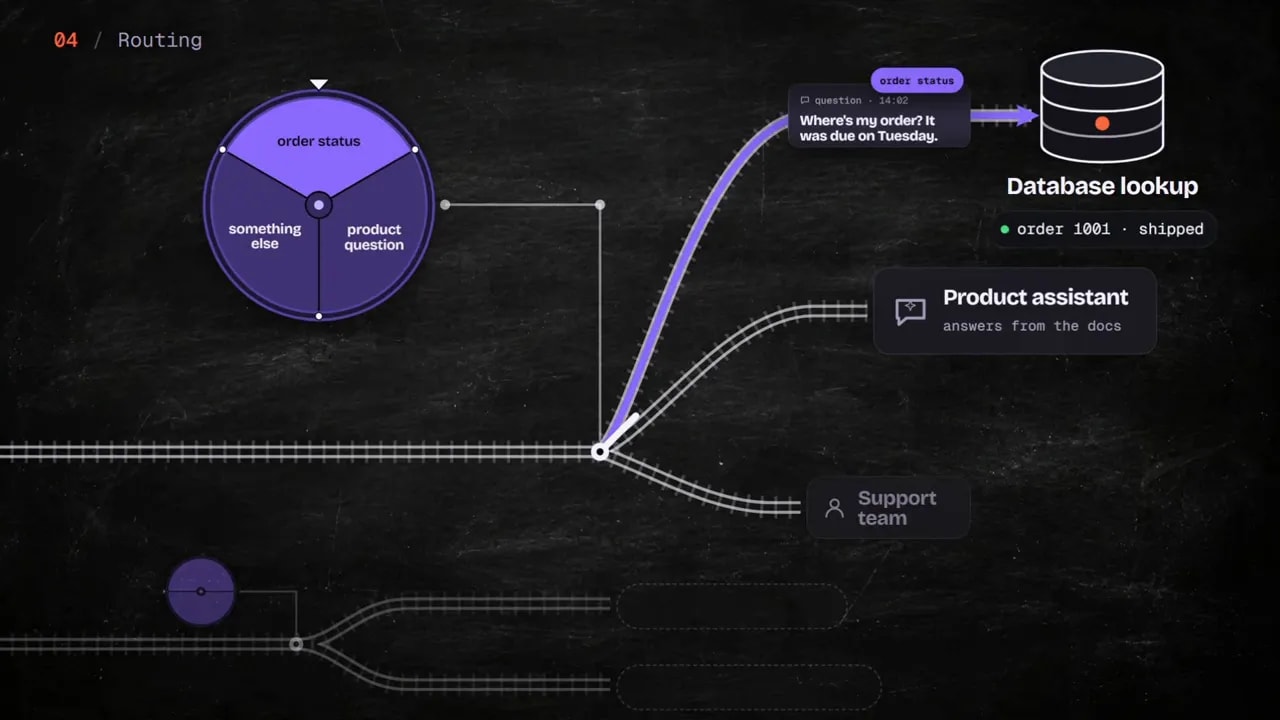
Here, the decision isn’t the end result. It’s the junction between the request and a handler. I’ve also used this approach to select between AI models within an application.
5. Search
Search finds candidates by meaning rather than relying only on matching words. TypeSafe’s line-by-line search example works through a document and evaluates its lines against a question. In its GitHub terms of service example, a choice question helps identify relevant lines, while a noul question checks whether the document contains an answer.
That doesn’t turn a decision model into a complete search engine. It gives a search system another way to judge which pieces of text matter.
6. Retrieval
Retrieval gets the right evidence into the next step. Imagine a support assistant preparing an answer about returns. It could select the policy passages that apply to the customer’s region and purchase, rather than handing the assistant every returns passage available.
I think of this as filtering for the next stage. Search helps find candidates. Retrieval selects the evidence that the next action needs.
7. Ranking
Ranking puts candidates in order. Suppose a customer wants a backpack for a laptop and a rainy bike commute. The application has ten backpacks and their descriptions. Jev can evaluate how well each description matches those requirements, and the software can sort the candidates.
The distinction between search, ranking, and retrieval is useful: search finds, ranking orders, and retrieval supplies. A product application may use all three, but they don’t do the same job.
8. Verification
Verification checks a particular claim or failure mode against evidence. A quoted passage might exist, yet the sentence citing it could still draw the wrong conclusion. A support reply might mention a refund even though the policy and case details don’t justify it.
I’d give the model the proposed claim and the material it must check. A narrow question makes the result easier for my application to use than a broad request to judge whether an entire response is “correct.”
9. Feature extraction
Feature extraction turns language into signals for another model. If I already use a forecasting model, I might evaluate customer messages for buyer intent or product interest. I could then test whether those signals improve a demand forecast.
The decision model isn’t replacing the forecast. It’s converting information in language into inputs the forecasting process can use.
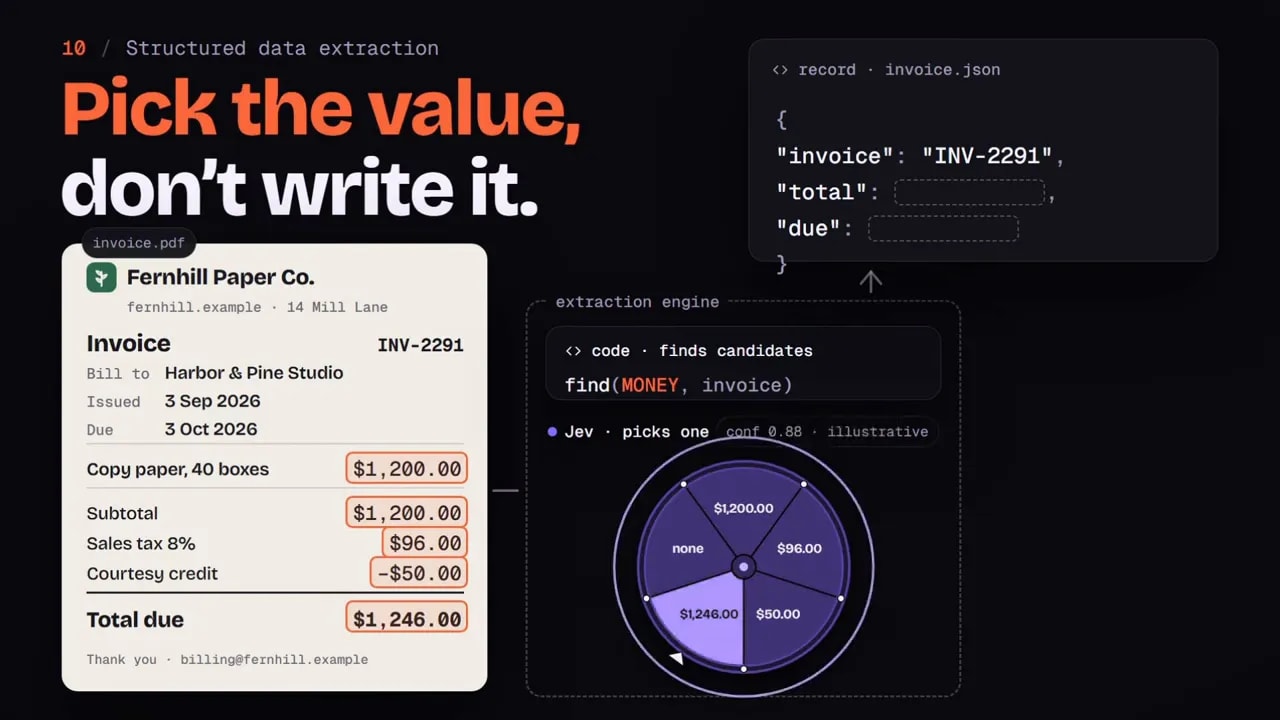
10. Structured data extraction
Structured extraction identifies values needed in a defined output. Large language models can do this well, but they may be slower and more expensive than I need for a repeated selection task.
Code might first find candidate amounts in an invoice, then Jev could decide which candidate is the total. Another approach is to provide the raw material and ask the model to identify the relevant value. Either way, the question should identify the value’s role. Finding an amount on a page isn’t the same as determining that it’s the invoice total.
Those ten shapes cover a lot of ground, but a working application usually needs more than one decision. That’s where design patterns help.
Four Jev design patterns for working systems
TypeSafe’s design patterns describe ways to organize decisions. I focus on four because they solve common problems in AI automation: avoiding unnecessary round trips, handling uncertainty, combining separate judgments, and directing requests to the right handler.
1. Speculative fanout
Imagine a support ticket about a failed upload. I want to know its category, how disruptive the issue is, whether the customer has a deadline, and whether they supplied steps to reproduce it.
These questions don’t depend on one another, so I can ask them together in a single request. My code uses the answers it needs after the results arrive. If the ticket turns out to be a billing issue, the answer about reproduction steps may be irrelevant. That’s fine.
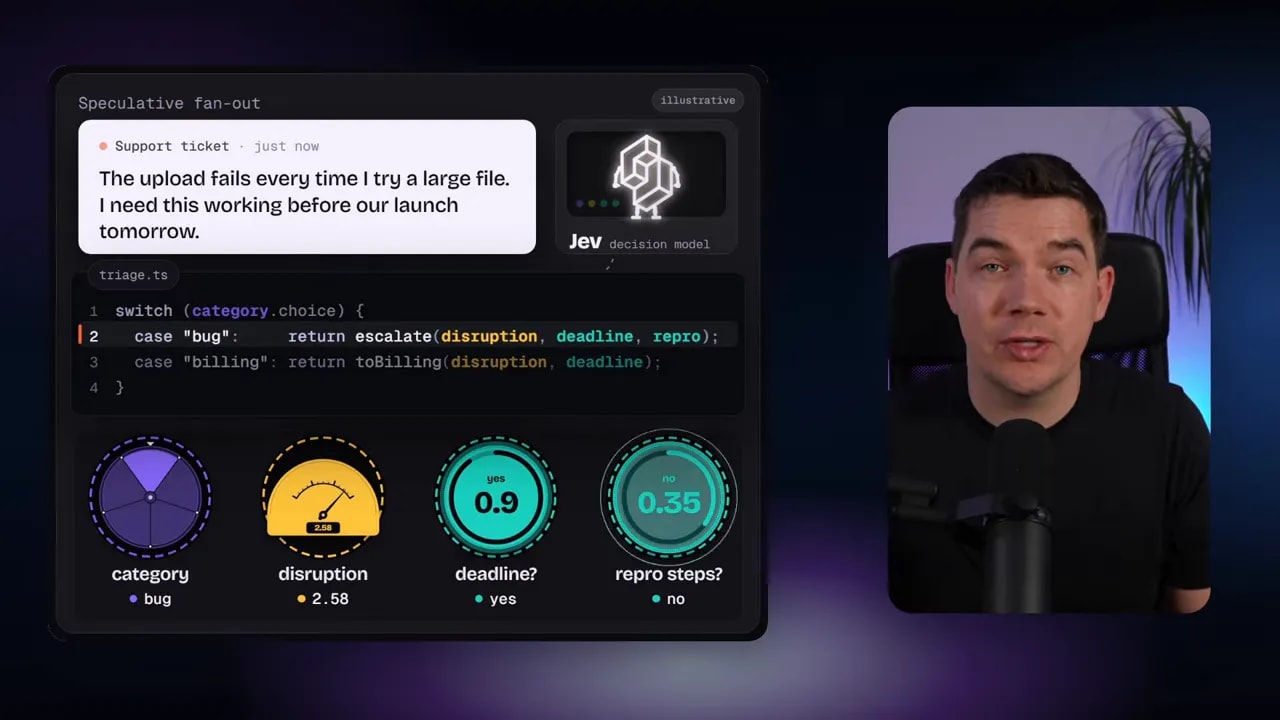
The pattern is speculative because I ask a potentially useful question before I know whether I’ll need its answer. In the example, asking several questions in one request takes virtually the same time as asking one. That can avoid waiting for a series of separate model calls.
I wouldn’t force every question into the same request. If a later question genuinely needs an earlier answer, it belongs in another stage. Fanout works best for independent judgments about the same available context.
2. Confidence-gated routing
Sometimes the best available answer still isn’t clear enough to act on. Suppose someone writes, “Cancel it.” The application may have a subscription and an appointment associated with that person. Selecting either one without clarification could produce the wrong action.
With confidence-gated routing, a clear interpretation can move to the appropriate handler. An ambiguous interpretation goes to a clarification step instead. The uncertainty signal changes the route through the application; it isn’t just a number displayed for interest.
I’d test confidence thresholds against examples from the actual use case. The right cutoff depends on what happens after the decision. Misrouting a general question and canceling the wrong item aren’t equivalent mistakes.
Confidence also isn’t authorization. Even a clear interpretation must pass the application’s own permission checks and confirmation rules. I wouldn’t let a model’s confidence replace business logic, especially for actions that change an account or cancel a service.
3. Composite scoring
A single score can hide important differences. In a product recommendation system, I might want to evaluate three things separately: how well a product matches the customer’s intended use, how well it fits their preferences, and whether it fits their budget.
I can ask for each score, then combine the results using weights that I control. For a customer who emphasizes price, budget might carry more weight. For another situation, suitability for the intended use might matter most.
This pattern separates the model’s judgments from the application’s priorities. Jev evaluates the aspects I ask about. My code determines how much each aspect matters in the final ranking. I could also use a decision to choose weights based on the situation, but I’d still make the weighting rule explicit in the system.
The separate scores are useful for another reason: they make a recommendation easier to inspect. If a backpack ranks lower because it fits the commute but exceeds the budget, I can see that difference rather than receiving one unexplained number.
4. Intent routing
Intent routing places a decision at the entrance to several handlers. “Reset my password” belongs in a reset flow. “How do I configure this?” belongs with an assistant that has the relevant documentation. An unresolved account dispute belongs with support.
The person’s intent selects the path. Confidence determines whether the application has enough information to take that path yet. If the request could mean several things, clarification is more useful than a confident-looking guess.
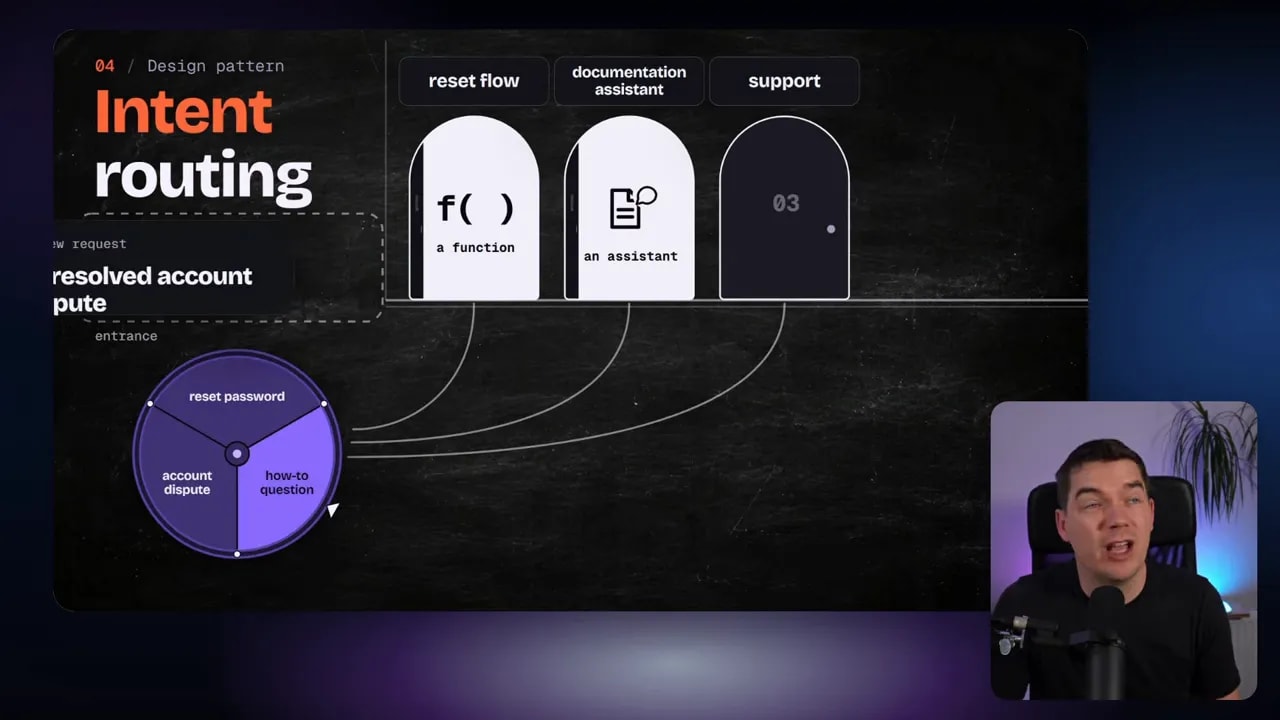
Intent routing and confidence-gated routing work naturally together. The first defines the possible destinations. The second determines whether a decision is clear enough to send there.
Putting the patterns together in customer support
Here’s how I’d turn those ideas into one support workflow. A customer reports that uploads keep failing on large files. They also say they need the upload working before a launch.
First, I send the message and a set of focused questions to Jev. I ask for the ticket category, a disruption score, whether there’s a near-term deadline, and whether the message includes useful reproduction steps. That’s speculative fanout: the independent answers arrive together.
Next, the application checks which answers are clear enough to use. A clear bug classification can send the ticket to an engineering queue. The disruption score and deadline signal can inform its priority. If an important answer is uncertain, the workflow shouldn’t silently treat it as certain. It can request clarification or take another appropriate path.
Then ordinary code selects the handler and sets the priority. Jev doesn’t need to create the queue, enforce access rules, or decide which actions the customer has authorized. Those responsibilities stay with the application.
Finally, if the customer needs a written response, a generative model can draft it using the relevant evidence. The decision model interprets and checks focused points. The generative model handles the writing. Each part has a defined job.
This division is the important part of the design. I don’t need to treat every customer message as one large prompt that asks an AI model to understand the issue, choose a queue, set a priority, find policy, and write a reply all at once. Smaller decisions let the application control how those steps fit together.
How I choose the first decision to build
I start with a workflow I already understand. Then I find a point where software has to interpret fuzzy natural language. I look for the smallest useful question whose answer changes the next step.
For a shared inbox, that question might be, “Which of these categories describes this message?” For an existing support flow, it might be, “Does this message mention a deadline within two days?” For a drafted reply, it might be, “Does this promise a refund that the supplied policy doesn’t permit?”
Once I have the question, I make three decisions of my own:
- Choose the answer type. Do I need a yes probability, one choice from a defined list, or a position on an ordered scale?
- Define what the application will do. Which answer changes the route, adds a flag, selects evidence, or triggers a check?
- Plan for uncertainty. When should the application act, ask for clarification, or leave the decision for another step?
That gives me a concrete starting point. Jev supplies intelligence for a focused decision. My application remains responsible for the workflow around it, including permissions, confirmations, and the actions that follow.