Jev can now make decisions about images, rather than just text. You describe what it should check, supply a picture, and get a structured answer. A new box question type can also return coordinates around an object or relevant area.
That makes image analysis much easier to add to an automation. Tasks that might previously have needed a specially trained computer vision model can now start with a written question. The feature is still in beta, though. Fast answers don't remove the need to test whether those answers are reliable.
I created a support-ticket app to explore both sides: how quickly Jev can assess screenshots, and how safely an app can act on its decisions.
Checking Whether a Screenshot Supports a Bug Report
My app takes a support ticket and checks whether its attached screenshot provides visible evidence of the reported issue. If the image doesn't support the claim, the workflow could return the ticket and ask for a better screenshot.
There are three possible routes:
- Accept: The screenshot supports the reported problem.
- Return: The relevant issue isn't clear enough, or the screenshot doesn't match.
- Human review: Confidence is too low, or separate checks disagree.
In my first test, Jev processed 200 public bug reports in about four seconds, at a cost of roughly two US cents. Bounding boxes highlighted the areas relevant to its decisions.
The review count matters as much as the speed. Of those 200 tickets, 112 went to human review and 79 were accepted. That's useful first-pass sorting, but it isn't evidence that the system can handle every ticket independently.
What Image Questions Can Do
The examples in the TypeSafe playground show how different answer types work together.
One example contains a shelf with several liquids and a lemon. A boolean question asks whether anything is drinkable. Jev returns a true-or-false answer with a probability, but that answer doesn't locate the item.
A box question does something different. Given a flammable-hazard pictogram, Jev identifies the grain alcohol as the matching item. The symbol doesn't need to appear on the shelf. The model uses the image in the question to interpret the products in the supplied photo.
Another question asks where the lemon belongs on a pictured pH scale. Jev uses box coordinates to select the area around pH 3. So a box can identify an answer within a reference image, rather than simply outline a physical object.
I also tested a phone-damage example. The claim describes a phone falling onto a tiled floor, cracking, and no longer turning on. The damage question provides categories with explicit definitions. Jev selects severe damage rather than extreme damage, because extensive cracking differs from a visibly crushed phone.
Clear criteria give the model a meaningful decision to make. A label such as “severe” needs a definition if you want consistent classification.
The Bounding Box Limitation You Need to Handle
The box answer type always returns a box. It doesn't have a “not found” response.
If you ask it to locate a dog's head in a photo containing only a cat, it still returns four edges. An application that treats any box as proof of detection could therefore act on something that isn't there.
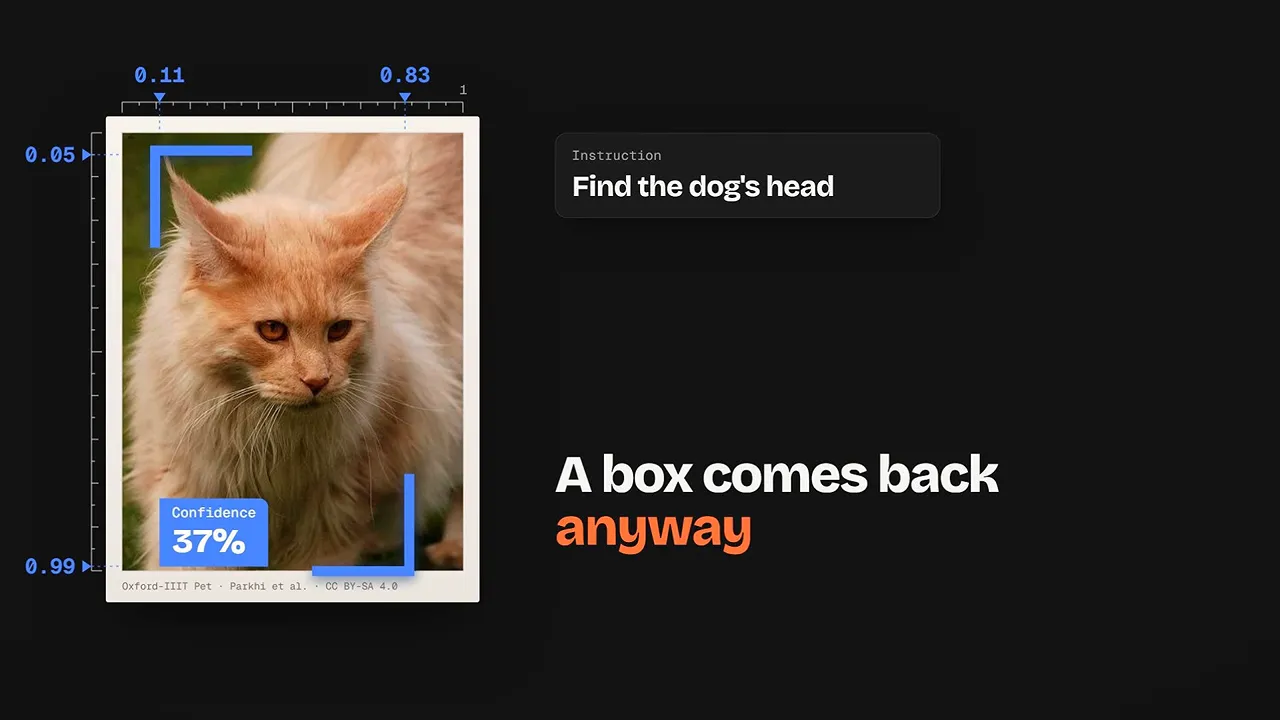
The safer pattern is to add a separate question that checks whether the target exists. If that check says it isn't present, ignore the box output. Presence and location are separate decisions. The bounding box documentation provides the implementation details.
More Patterns for Image-Based Automation
Images can appear in the supplied information, instructions, or decision criteria. That opens up several useful patterns beyond basic classification.
- Compare against a reference: Check whether a photo shows the same product, person, or place as a known picture.
- Define choices visually: Supply example images for each answer option instead of relying entirely on text descriptions. One playground example chooses a suitable reaction meme using image-only criteria.
- Detect changes: Compare two still frames and choose between options such as motion, an animal appearing, a person arriving, or no change.
- Inspect large images in stages: Split a high-resolution image into tiles, ask which tile contains the issue, then inspect a detailed crop of that tile.
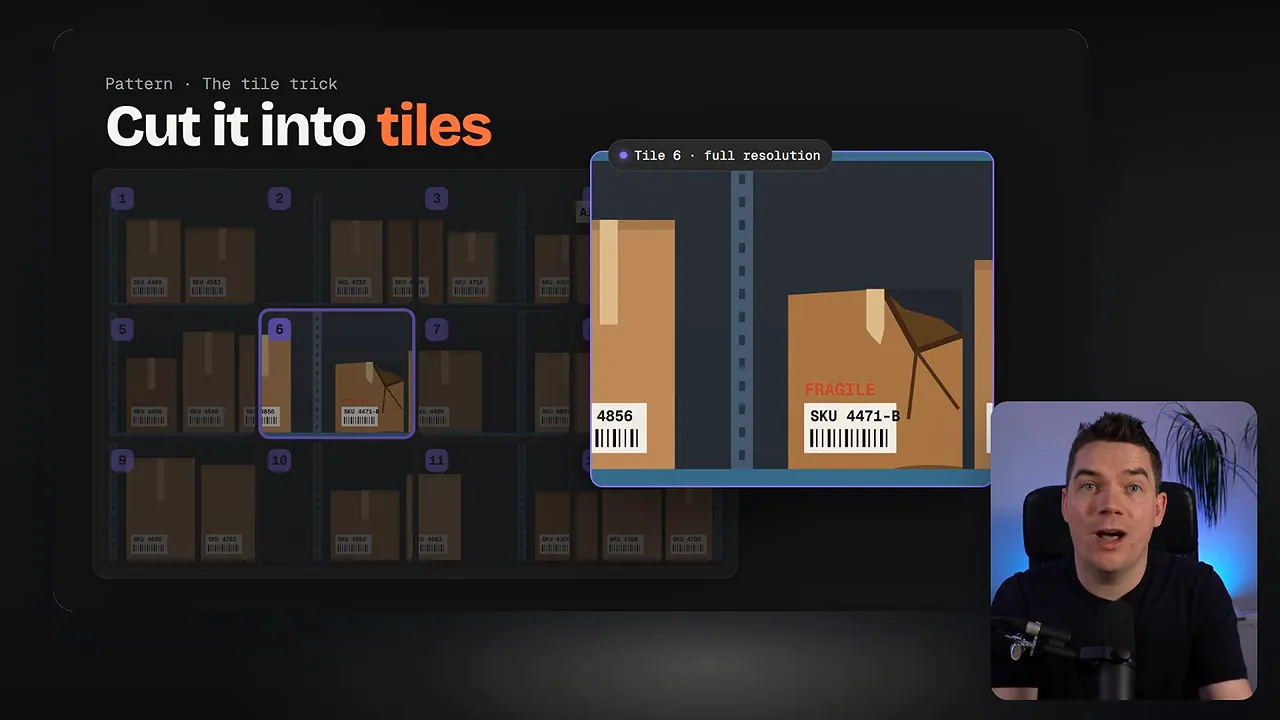
Jev isn't a generative text model. You need to supply the options it can choose from. That suits workflows such as damaged-packaging checks, inappropriate-image filtering, photo-library classification, and a second pass on security alerts.
Testing 1,000 Controlled Tickets
Public bug reports help test realistic inputs, but controlled cases make accuracy easier to measure. I created 1,000 tickets with synthetic screenshots and matching bug-report text, so the expected answers were known.
Using batches of 16, the app processed roughly 50 tickets per second. The full run took about 20 seconds and cost around 11 US cents.
With a 65% confidence cutoff, the routing results were:
- 724 tickets returned because the screenshot didn't support the report.
- 175 tickets accepted.
- 101 tickets sent to human review.
Those routing totals aren't the same as accuracy. To understand reliability, I separated three checks.
Accuracy: How Often Was the Answer Right?
Jev got 934 of the 1,000 controlled cases correct, giving it 93.4% overall accuracy. It made 66 mistakes.
Confidence: Which Answers Should the App Act On?
I used Jev's confidence score to decide which cases needed review. Answers below the 65% threshold went to a person.
All 899 automatic decisions were correct in this test. The 66 mistakes fell within the 101 cases sent for review. The other 35 review cases were correct, but the app still held them back.
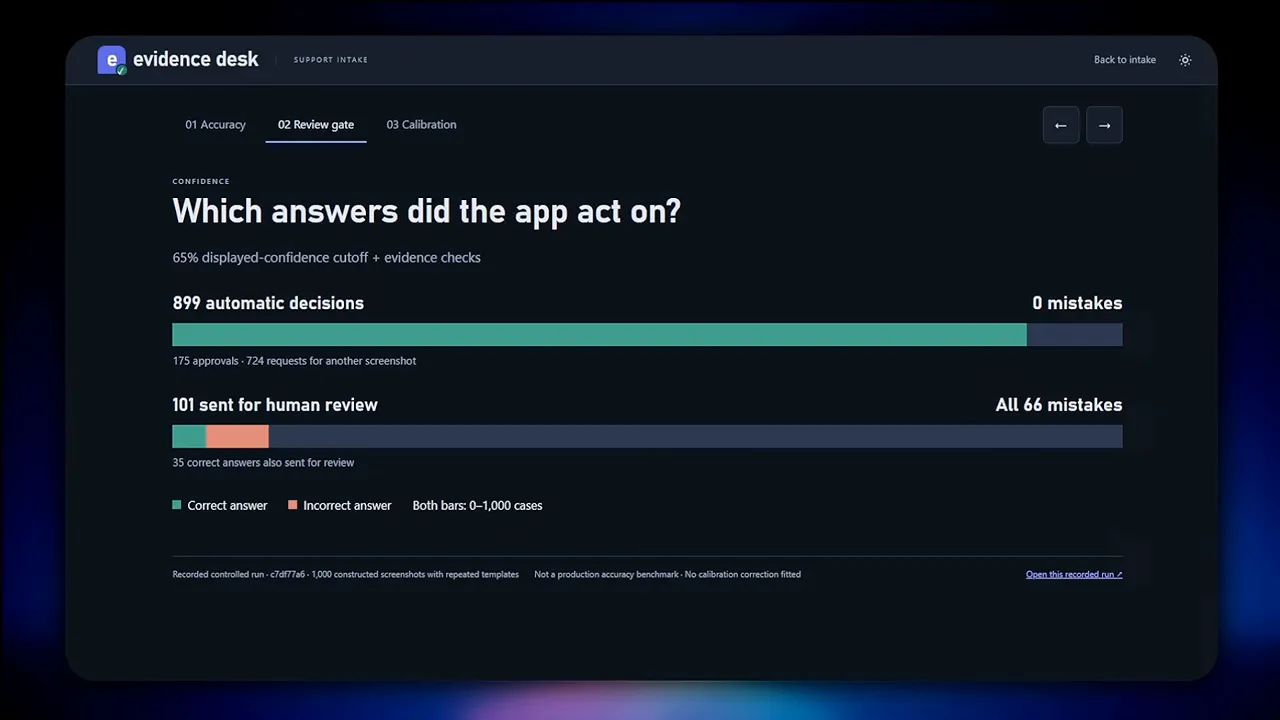
That's an encouraging result for this dataset. It doesn't guarantee that the same cutoff will protect a different workflow or set of images.
Calibration: Do the Probabilities Match Reality?
Calibration asks whether the model's reported probabilities line up with its actual results.
The 899 automatic decisions had an average probability of 95.3%. That implies roughly 42 expected mistakes, yet there were none. Jev was underconfident in that group.
For the review group, the average probability was about 48%, while actual accuracy was around 34%. There were 66 mistakes rather than the roughly 52 implied by those probabilities. Here, it was overconfident.
The distinction matters: I used confidence to control routing, then checked probabilities against known outcomes to assess calibration. Neither score replaces testing on representative cases.
Practical Limits Before Deployment
At the time of my test, Jev supported still images in PNG or JPEG format. Each image could be up to 16 MB, and the complete request body couldn't exceed 32 MB. Resolution limits also applied.
Cropping, resizing, and preparing images before submission can help meet those requirements. The beta feature requires setting the Typesafe-Danger-Zone-Images API header to true. The image input documentation covers the requirements.
Jev isn't the only multimodal decision model. Cloudflare's Clef and open-source alternatives also accept images. For my support-ticket app, the useful finding wasn't speed alone. It was the combination of inexpensive image checks, visible evidence boxes, and a review path that kept uncertain decisions out of the automatic workflow.