Small AI decision models are getting interesting. Models such as Winnow, Decider, and Laya can make decisions on your own hardware. That gives you options if you want to keep inputs inside your infrastructure, run without a network connection, or put a decision step directly into software and automations.
But a local model is useful only if it can handle the decisions you actually need to make. A high accuracy score won’t help if the model can’t accept your list of answers. A fast response to a short question won’t tell you how it performs after you add a full policy handbook.
I built Jev Arena to test those trade-offs. I compared 13 decision-model configurations across more than 7,000 cases. I wanted to know how often each model chose the right answer, how quickly it responded, which tasks changed the ranking, and what it would take to run the local options.
The headline result is straightforward: hosted Jev finished first overall. The useful result is less straightforward. Winnow and Decider came surprisingly close, a 400-million-parameter model led one task, and long inputs completely reversed the local models’ speed advantage.
What a decision model does
A decision model receives some information, a question, and a fixed set of allowed answers. Instead of writing a free-form response, it evaluates those answers and returns scores or probabilities for them.
Here’s a simple example. A returns policy requires a receipt and says the purchase must have happened within 30 days. A customer bought an item 12 days ago but has no receipt. The question is whether issuing a refund is permitted. The allowed answers are true and false.
The purchase meets the time requirement, but it doesn’t meet the receipt requirement. The correct decision is false. That example also shows why the input matters: the model must apply every required condition, rather than notice one satisfied condition and stop there.
Other decisions need a different set of answers. A shipping workflow might ask for the final confirmed delivery method, with several methods to choose from. A customer-support workflow might assign a score for the likelihood that a customer will leave, using options that range from no sign of dissatisfaction to immediate departure.
Those are three distinct formats: a yes-or-no decision, a choice among named options, and a score on a defined scale. I included different formats because real systems need all three. A model that handles one format well might not be the right choice for another.
How I set up the comparison
Jev was the hosted reference point. It runs through the TypeSafe model API, so using it doesn’t require you to host model weights. The local candidates included Winnow 12B, Decider 4B, Laya, Plumb 4B, SemIf, also called OpenJev, CLM 8B, and Nimble 9B.
I also included other approaches for comparison. One used Qwen 3.5 4B as a language model producing structured JSON. Another used ModernBERT. Finally, I added a deliberately simple control that always chose the first answer.
That last control matters more than it sounds. If “no” happens to be the first answer for most examples in a dataset, a model that always says “no” can appear accurate without reading a single question. The control helps reveal when a good-looking percentage reflects the dataset rather than good decision-making.
Some of the local decision models start with an existing language model and receive additional training for this type of task. Winnow is based on a Gemma model, while Decider is based on Qwen 3.5 4B. In these configurations, I read scores for the allowed choices rather than ask the model to generate a paragraph. I didn’t fine-tune any of the models for this comparison.
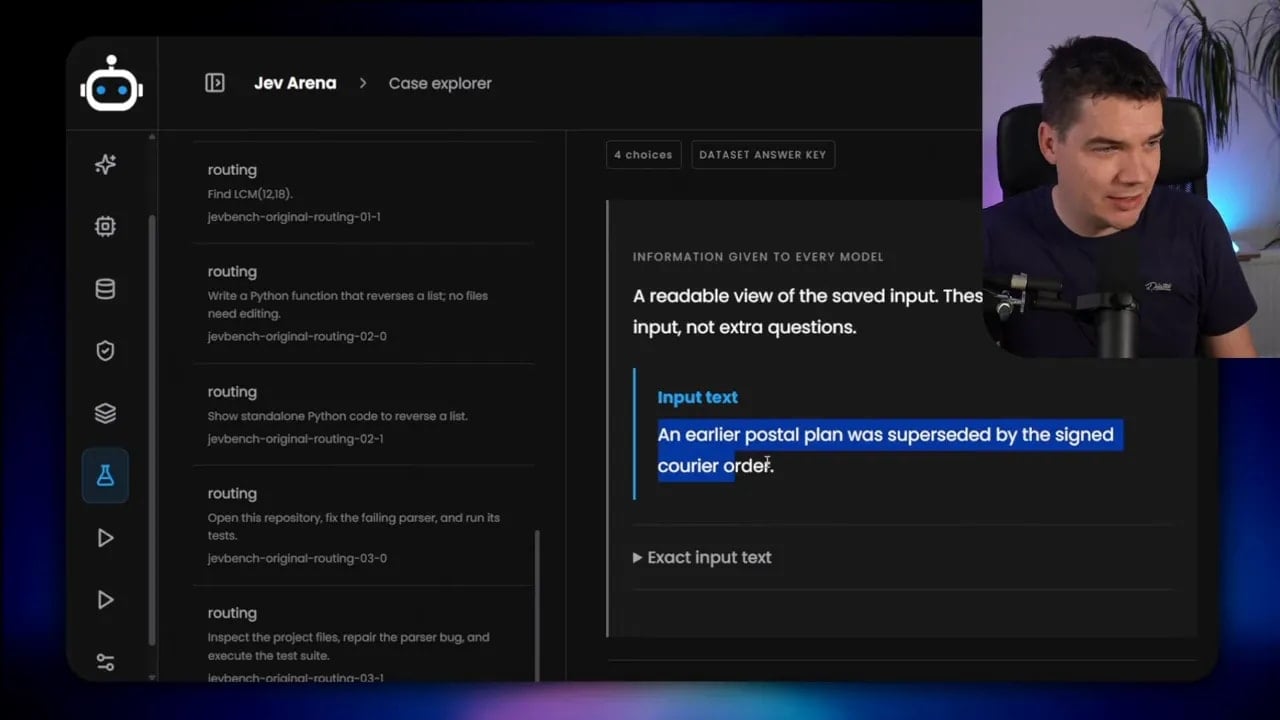
The test collection contained 7,671 cases drawn from several datasets. They covered tasks including news classification, multilingual entailment, document relevance, banking intents, and customer-support conversations. Some inputs were short. Others supplied a substantial handbook or a longer conversation before asking the model to decide.
For each case, I supplied the information, question, and permitted answers, then compared the model’s choice with the answer key. I also tracked response time and whether the model could process the case at all. That final measure is essential: an unsupported request isn’t an incorrect answer. It’s a task the model couldn’t attempt.
Overall accuracy: Jev won, but the gap was small
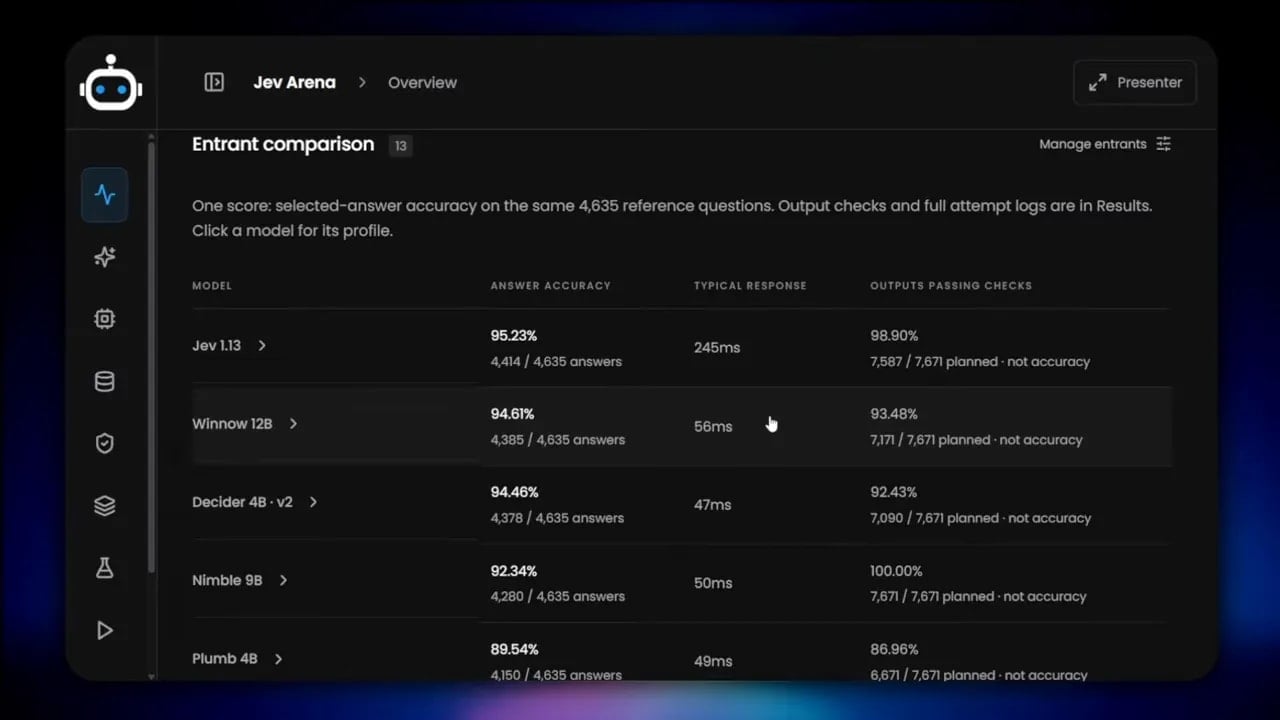
Across the supported comparison shown in the arena, Jev reached 95.23% accuracy. Winnow 12B followed at 94.61%, and Decider 4B reached 94.46%. Nimble 9B was around 92%.
On the 4,635 answers in that direct comparison, Winnow finished just 29 correct answers behind Jev. That’s a meaningful result if you need to keep inference local. You’re looking at a much smaller model running on your own machine, not a hosted service, and the overall accuracy difference in this test was narrow.
I wouldn’t choose a model from those percentages alone, though. An overall score blends several kinds of questions. It can hide a model that excels at your task, and it can hide a model that fails at precisely the mistakes you can’t afford.
It also doesn’t tell you whether every model answered the same number of cases. Input-length and answer-count limits prevented some candidates from attempting entire categories. Before comparing two accuracy figures, I check which cases each figure includes.
Short requests favored the local models on speed
On short, repeated decision requests, the local models were very fast on my workstation. Winnow took about 56 milliseconds, and Decider took about 47 milliseconds. Hosted Jev took about 245 milliseconds in the same short-input comparison.
I ran the local tests on a workstation with an RTX 5090. That hardware is relevant to the timing results, but it isn’t a minimum requirement for using these models. In the configurations I checked, Winnow 12B needed roughly 13 GB of video memory, including room for the input context. Decider 4B needed roughly 8 GB. Laya, at 400 million parameters, could run with less than 2 GB.
So there’s a practical range here. The choice isn’t simply between a cloud API and a machine with 32 GB of video memory. Your hardware, expected input size, and model configuration determine which local options make sense.
The model ranking changed by task
The most interesting part of the arena wasn’t the overall leaderboard. It was what happened when I filtered the results.
Take news-topic classification. Laya didn’t match the larger Gemma- and Qwen-based models across every task. But on the news category I tested, this tiny model led the group, ahead of Jev, Decider, and Nimble. It has around 400 million parameters, compared with Winnow’s 12 billion.
That doesn’t mean Laya is the best general decision model. It means a small specialist can be excellent at a narrower job. If your automation repeatedly sorts items into a stable set of categories, that’s a different problem from applying a lengthy policy to a complicated customer case.
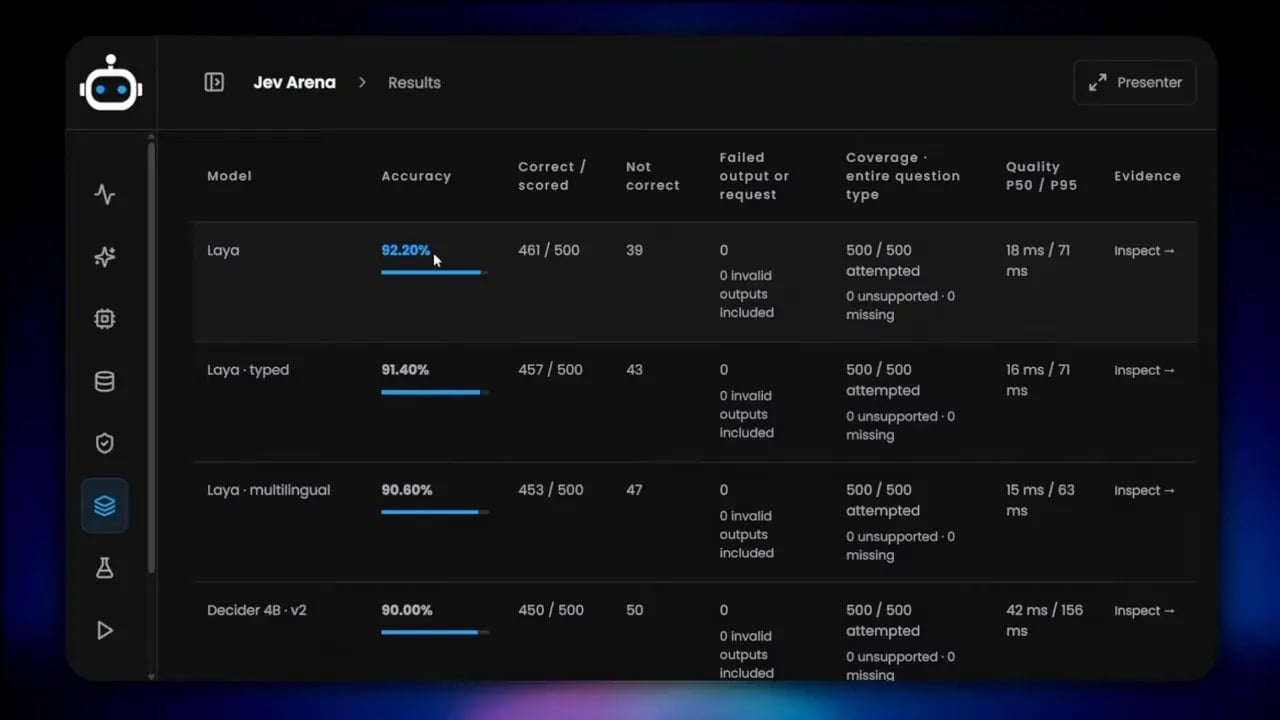
I also compared which news questions Laya and Jev got right. Laya correctly labeled 34 cases that Jev missed, while Jev correctly labeled 14 that Laya missed. Looking at disagreements like these tells me more than the ranking by itself. It shows whether two models fail on the same examples or bring different strengths to the task.
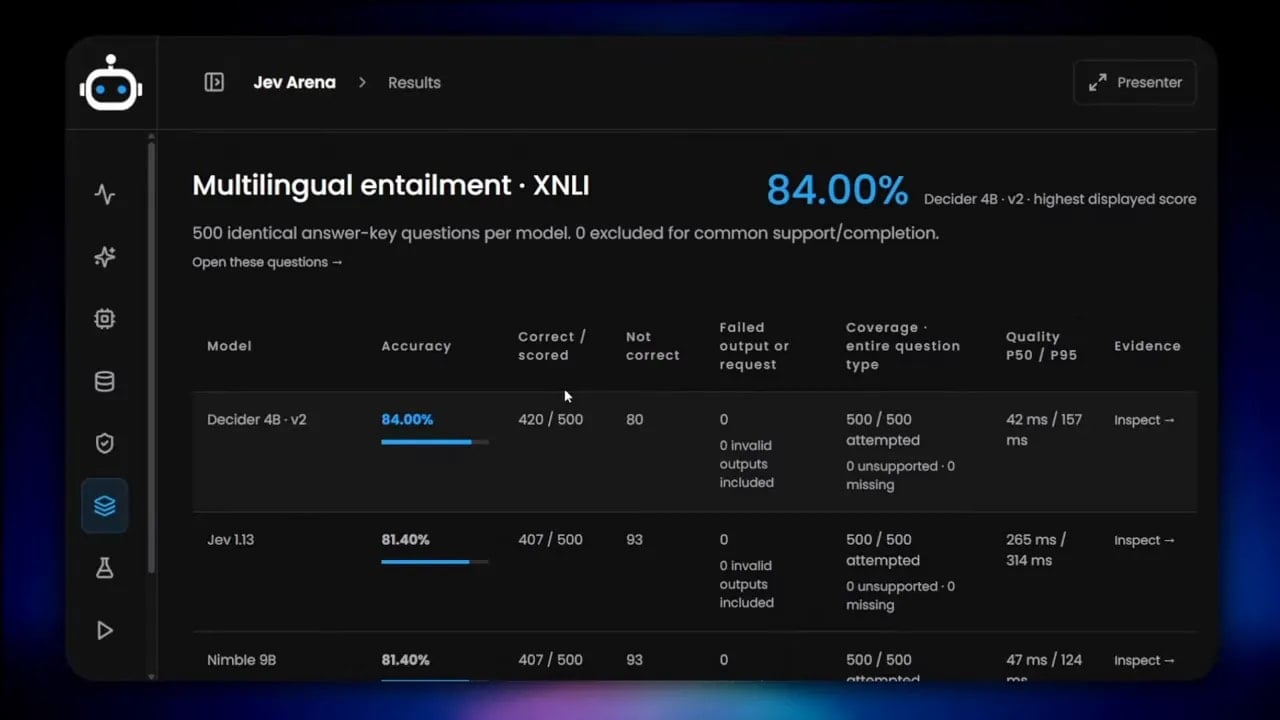
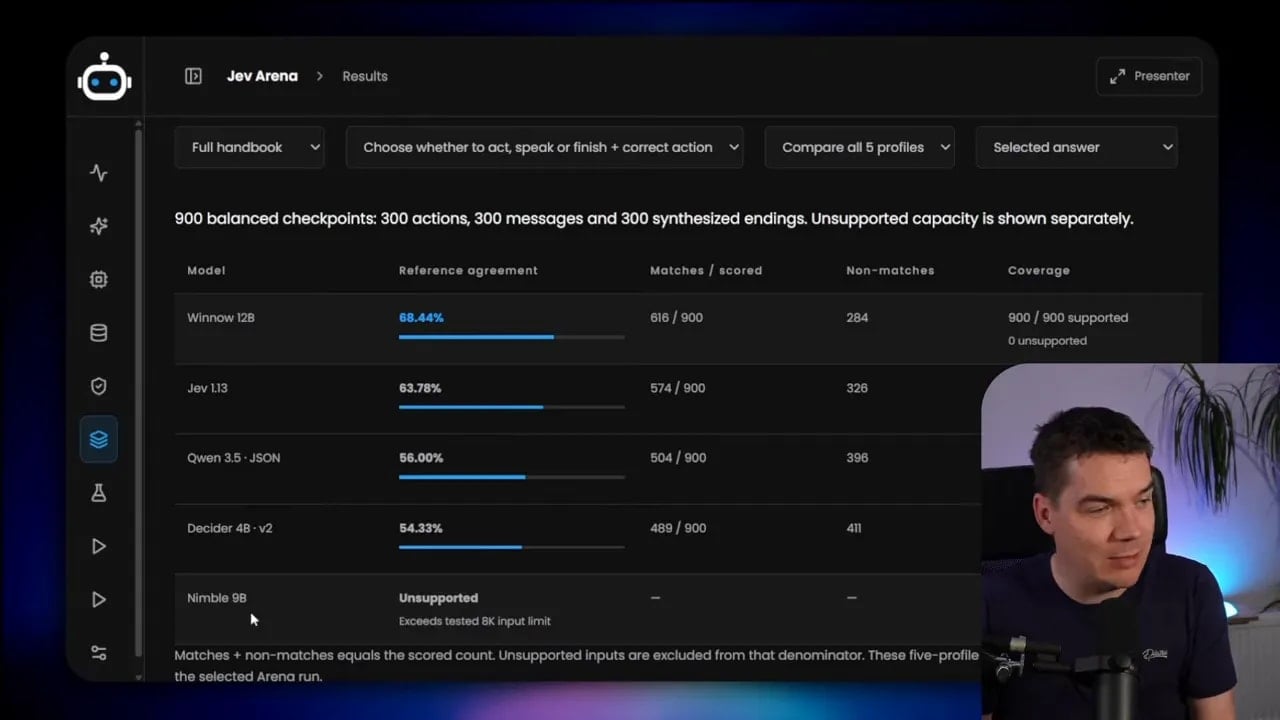
The order changed again for multilingual entailment. In that category, Decider 4B reached 84% accuracy and ranked above Jev. Then, on the longer ABCD customer-support cases, Winnow performed better than Jev. Those cases supplied a handbook alongside the other information and questions, creating a much larger input than the short classification tasks.
This is why I’d test the actual shape of a workflow before choosing a model. “Classification” covers a lot of ground. Sorting news topics, finding a banking intent, applying a policy, and judging whether a document supports a claim all ask for different behavior.
A high accuracy score can conceal the wrong mistakes
Document relevance provides a good example. In a search or retrieval-augmented generation system, a decision model might decide whether a document provides useful evidence for verifying or refuting a claim. It receives the claim and a document, then answers yes or no.
One test contained 500 documents, but only 47 were relevant. The simple control that always chose the first option scored 90.6% accuracy by calling every document irrelevant. It got the 453 irrelevant documents right and missed all 47 relevant ones.
That 90.6% sounds respectable until you consider the job. A relevance filter that rejects every useful document would be a serious problem for a retrieval system. It might prevent the next stage from receiving the evidence it needs.
Jev found 40 of the 47 relevant documents. It also incorrectly marked 25 irrelevant documents as relevant. Those are two different kinds of error. Rejecting a relevant document loses potentially useful evidence. Passing an irrelevant one adds noise to the next step.
Which error matters more depends on the system. For a search workflow, I’d pay close attention to useful passages that the filter throws away. In a ticket-routing workflow, I’d look at the cost of sending a customer request to the wrong team. A single overall accuracy figure won’t express either cost.
A practical way to handle uncertain decisions is to set a confidence threshold. The decision model can handle clear cases, while an LLM reviews cases where the scores don’t provide enough confidence. That approach doesn’t remove errors automatically. It gives you a way to decide which requests need a second step.
The broader lesson is to inspect what the model missed, not just how many answers it got right. A baseline, a task-level breakdown, and examples of false positives and false negatives make the numbers useful.
Check whether the model can accept your answers
Some models couldn’t attempt a test because the question offered too many choices. The banking-intent category makes this easy to see. A request asks which banking intent best describes what a customer wants, and some cases provide 77 allowed answers.
Plumb 4B and SemIf could accept only up to 16 choices per question in the tested setup. They were unsupported for that banking-intent test. Neither model got a chance to select the right answer, regardless of how well it might understand the customer’s request.
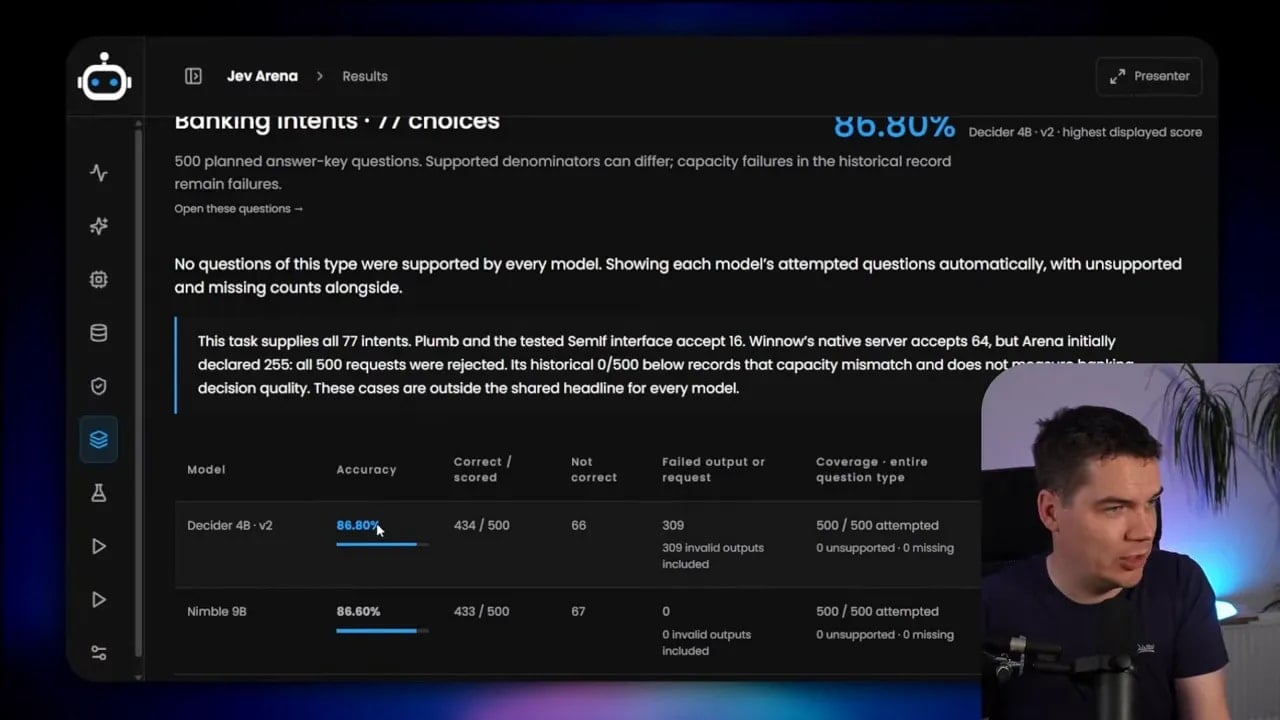
That kind of limit is easy to overlook during an early test. You might try five labels, get good results, and then discover that the production version has dozens of possible categories. At that point, the number of allowed answers stops being a minor detail. It determines whether the model is usable.
I’d check three things before trusting a model for a fixed-choice workflow:
- Maximum answer count: Can it accept the full list of choices your task requires?
- Answer format: Can it score the kind of choices you need, whether they’re yes-or-no labels, named categories, or a defined scale?
- Failure handling: What happens if a request exceeds a limit? The system needs to recognize an unsupported decision rather than treat it as a normal prediction.
That last distinction also matters for evaluation. If a model can’t process any 77-choice requests, I wouldn’t describe its performance on that category with an accuracy percentage. I’d report that the category wasn’t supported.
Long inputs exposed another hard limit
Answer count wasn’t the only compatibility problem. The customer-support test loaded a full policy handbook before asking its questions. That input exceeded Nimble 9B’s 8,000-token input limit in the tested configuration, so Nimble couldn’t process those cases.
A token is a small piece of text used by the model. The practical point is simple: a long handbook, conversation, or set of documents may not fit, even if the question at the end is short.
For these larger inputs, I could use options such as Jev, Winnow, or Decider. Winnow has a 64,000-token context window, which leaves much more room for substantial material. Capacity alone doesn’t settle the choice, though. As the next test showed, fitting a handbook into the request and processing it quickly are separate questions.
If a workflow needs a large amount of background information, I’d measure the size of the complete request. That includes the policy or documents, the customer situation, the question, and the allowed answers. Testing the question by itself can give a misleading picture of whether the real request will fit.
Long inputs reversed the speed result
The short-request timing made local inference look like the clear speed winner. Then I supplied a full policy handbook of roughly 20,000 tokens and ran 300 questions against it.
In that test, Decider took almost two seconds per decision. Winnow took almost three seconds. Hosted Jev took about 0.36 seconds. The local speed advantage had reversed completely.
That change is understandable if you consider the work the model has to do. A short request may contain only a few lines of information and a handful of answers. A handbook request asks the model to process a great deal of text before it can make the same kind of decision. The fact that both requests end with “yes or no” doesn’t make their processing costs alike.
This matters for automations that run many decisions in sequence. A few milliseconds versus a few hundred milliseconds may affect responsiveness. A few seconds per request may change the design of the whole workflow. I wouldn’t assume local deployment makes a decision faster without measuring the input size the system will use.
Retrieve the relevant policy sections instead
One alternative is a retrieval-augmented approach. Rather than send the entire handbook every time, the system first finds the sections that relate to the current question. It then supplies those sections to the decision model.
I tested that approach, and Winnow and Decider became much faster. The model still had policy information to work from, but it no longer had to process the whole manual for each decision.
That creates another responsibility: the retrieval step must find the right material. If it misses a required rule, even a capable decision model won’t receive the information it needs. It’s a useful trade-off, not a free speed improvement.
The choice between a full handbook and retrieved sections depends on the workflow. A full input gives the model access to everything that fits but costs more time. Retrieval reduces the amount of text, but its quality becomes part of the decision process. I’d evaluate the complete system, including any retrieval step, rather than judge the decision model in isolation.
Which model would I use?
For the simplest deployment, Jev is hard to ignore. It’s a hosted API: provide a key, integrate it into the software, and send decisions. It led the overall accuracy comparison, and it was much faster than the tested local models on the large-handbook requests.
If decisions must stay inside your infrastructure, if you need a fully disconnected setup, or if you want to train a model on your own data, I’d look at the local options. For short decision requests, Winnow and Decider are the first two I’d investigate. Both came close to Jev in the overall comparison, and both responded quickly to short inputs on my workstation.
I’d lean toward Decider 4B when video memory is tighter. It needed about 8 GB in the configuration I tested, compared with roughly 13 GB for Winnow. Winnow 12B is especially interesting if I need more input capacity or I’m working with a task resembling the longer customer-support cases where it performed well. In either case, I’d test the exact questions and answer lists before committing.
For a narrow classification task, I wouldn’t overlook Laya. Its news-topic result showed how well a small model can do on a focused job. Its size also makes it an option when the available hardware is limited. I wouldn’t generalize that news result to policy decisions or long conversations, but I would include Laya in a test of similar classification work.
I’d treat Plumb and SemIf differently if my task has a large answer list. Their 16-choice limit ruled them out of the 77-choice banking-intent test. Likewise, I’d check Nimble’s input limit early if my requests include long documents. A model doesn’t need to be bad to be the wrong fit. Sometimes the request simply exceeds what it can accept.
My selection checklist now looks like this:
- Define the real request. Include the full information, question, and allowed answers that the system will send.
- Check hard limits first. Confirm that both the input and the number of choices fit.
- Measure task-specific accuracy. An overall leaderboard can conceal a specialist that does better on your category.
- Examine costly mistakes. Count relevant documents rejected, tickets misrouted, or policy conditions missed.
- Time short and long inputs separately. The fastest model for one request size may be much slower for another.
- Include the full workflow in the test. If you retrieve policy sections or send uncertain cases to an LLM, evaluate those steps too.
Other decision-model benchmarks, including JevBench and DecisionBench, provide additional comparisons. I built this arena because I wanted to test different datasets on my own workstation and see the practical limits alongside the accuracy numbers.
The result I keep coming back to isn’t that local models beat hosted Jev, or that Jev makes local models unnecessary. Neither statement fits the tests. Jev led overall. Winnow and Decider were close enough to deserve serious consideration for local decisions. Laya stood out on a focused classification task. And the best-looking choice could change as soon as I increased the answer count or replaced a short prompt with a full handbook.
For AI decision models, the request itself is part of the benchmark. Once I know its length, its allowed answers, and the cost of each kind of mistake, the model choice becomes much clearer.