
When an AI agent goes looking for information and comes back empty-handed, the usual assumption is that the answer was missing. A lot of the time, that is not the real problem. The answer may have been sitting right there in the source material. It just didn’t survive the trip into a machine-readable format.
That issue sits upstream of almost every useful AI system. Coding agents depend on documentation. Knowledge agents depend on reports, PDFs, web pages, manuals, and internal docs. Before any of that content can be searched, ranked, or cited, it usually gets flattened into text. Most pipelines convert everything into Markdown or plain text because that is the easiest format for large language models to consume.
That works well enough for simple pages. It works far less well for anything visually rich.
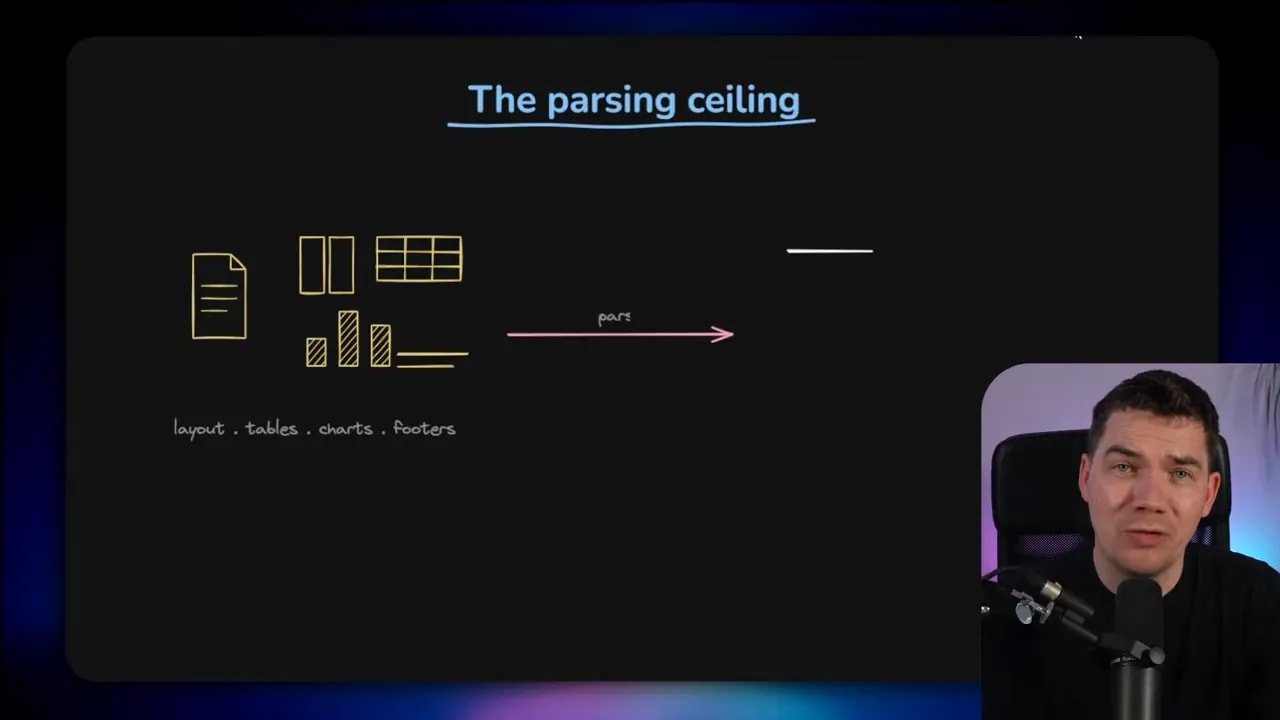
Tables break. Charts vanish. Diagrams lose meaning. Layout disappears. Footnotes get mixed into the body. Multi-column documents become a mess. Once that happens, the retrieval system may still run perfectly, but it is searching a damaged version of the original source.
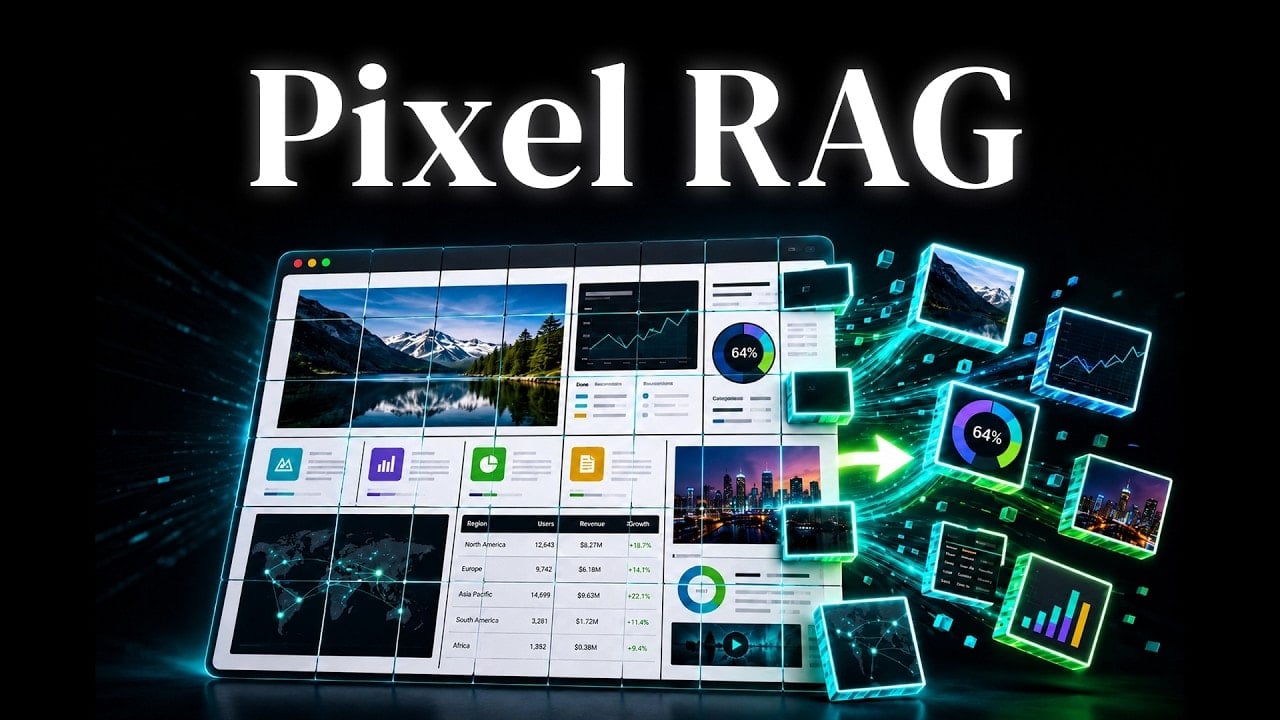
That is the core problem PixelRAG tries to solve. Instead of converting a page into text first, it treats the page as an image, embeds the visual tiles, and retrieves screenshots for a vision-language model to read directly.
It is a simple shift in idea, but it has big consequences.
Why traditional RAG loses information
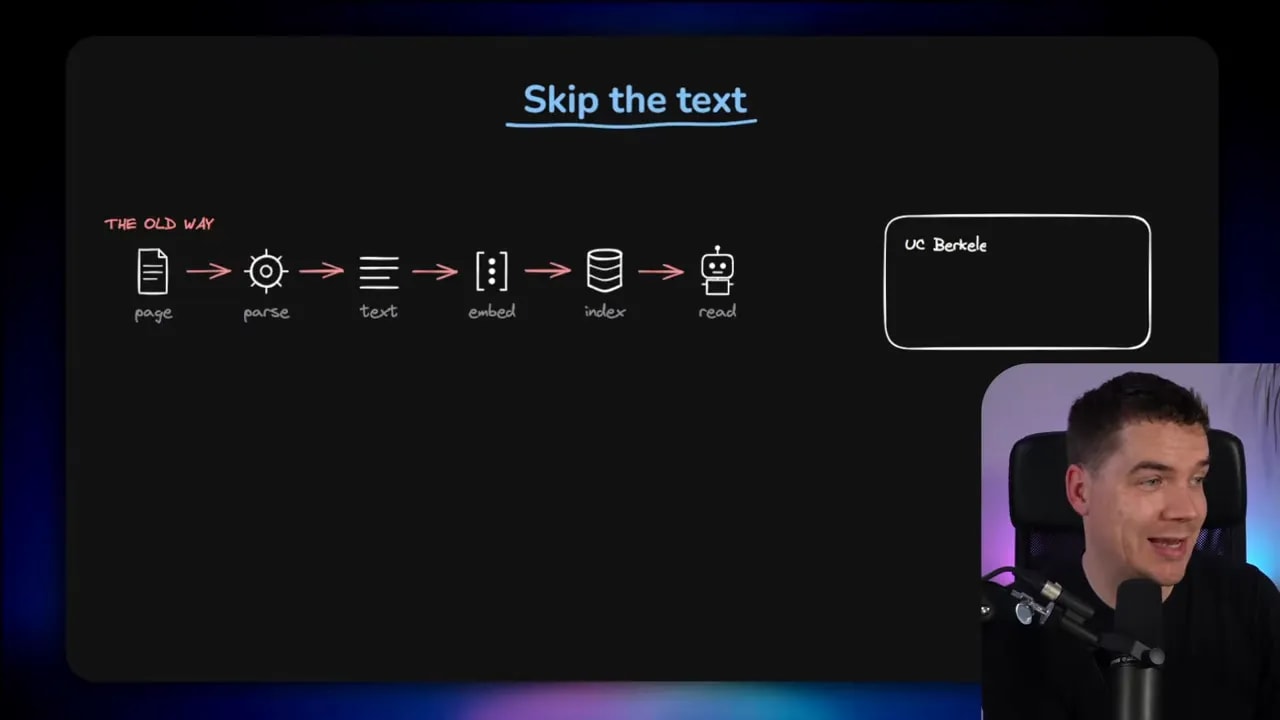
Most retrieval-augmented generation systems follow the same broad pattern:
- Take a source such as a web page, PDF, or document
- Parse it into text
- Split that text into chunks
- Create embeddings
- Store them in a vector database
- Retrieve relevant chunks when a question comes in
- Pass those chunks to an LLM to answer
That flow is standard because it is practical. Text is cheap to store, easy to chunk, and easy to search. The weakness shows up before retrieval even begins. If the parser strips away meaning, everything downstream inherits that loss.
I’ve covered tools like the PixelRAG paper and document parsers such as Docling because they tackle this exact pain point. Better parsers can preserve far more structure than a naive HTML-to-text conversion. That matters a lot in production systems.
Still, there is a ceiling to how far parsing can go. No matter how clever the output format is, you are still translating a visual object into text. Some information is always going to slip through the cracks.
That is especially obvious with content like:
- sports formations
- scientific charts
- comparison tables
- annotated screenshots
- financial statements
- diagrams with spatial meaning
- pages where layout is part of the meaning
If a model needs to know what sits beside what, what is bold, what appears in a cell, or how items are arranged on a page, plain text often isn’t enough.
Parser loss is bigger than most people think
One of the most interesting parts of the recent research is that it put a number on this failure mode. The team behind PixelRAG, drawing from Berkeley, Princeton, EPFL, and Databricks research, looked at a factual QA benchmark across 1,000 Wikipedia questions and analyzed the failures.
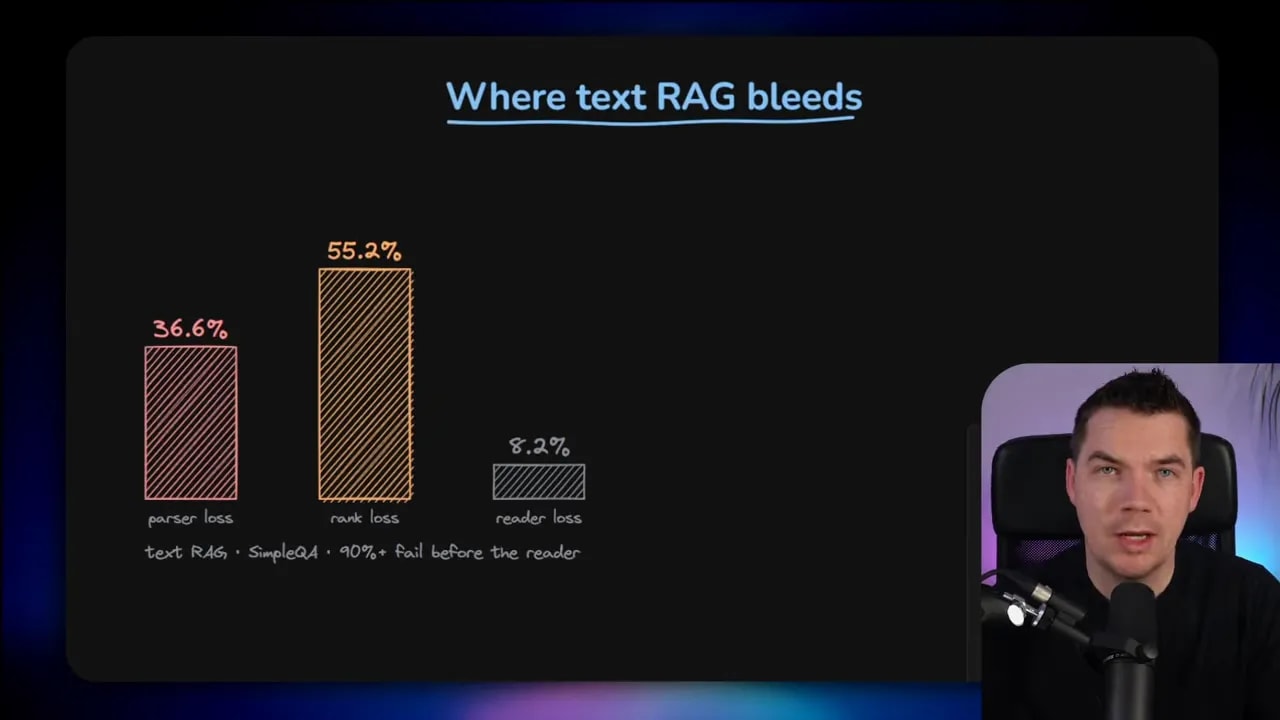
More than a third of the missed answers were linked to parser loss. In other words, the source held the answer, but the HTML-to-text conversion destroyed or degraded the content before retrieval even had a chance.
That is a useful framing, because it shifts the blame.
A lot of people assume the problem is the language model, or maybe poor prompting, or weak ranking. Sometimes that is true. But in many systems the damage happens earlier. If the source is mangled at ingestion time, the rest of the pipeline is working with a reduced version of reality.
I tend to be careful with benchmark claims because papers often compare against weak baselines that nobody would actually choose in a serious setup. Even so, the idea here is valuable. The exact percentage matters less than the architectural lesson: retrieval quality is often capped by the conversion layer.
What PixelRAG changes
The old pattern is text first. PixelRAG asks what happens if you never do that conversion at all.
Instead of parsing a page into text and embedding the text, the system does this:
- Render the page as an image at a fixed width.
- Split that long image into smaller vertical tiles.
- Create visual embeddings for those image tiles.
- Store those embeddings in a vector database.
- At query time, retrieve the most relevant tiles.
- Pass the screenshots to a vision-language model that can read the page directly.
No text extraction sits in the middle of that retrieval pipeline.
That is the key. The system removes the lossy conversion step entirely.
So if a table is still a table, a chart is still a chart, and a diagram is still a diagram, the model gets to reason over the same visual structure a human would use.
It is almost OCR in reverse
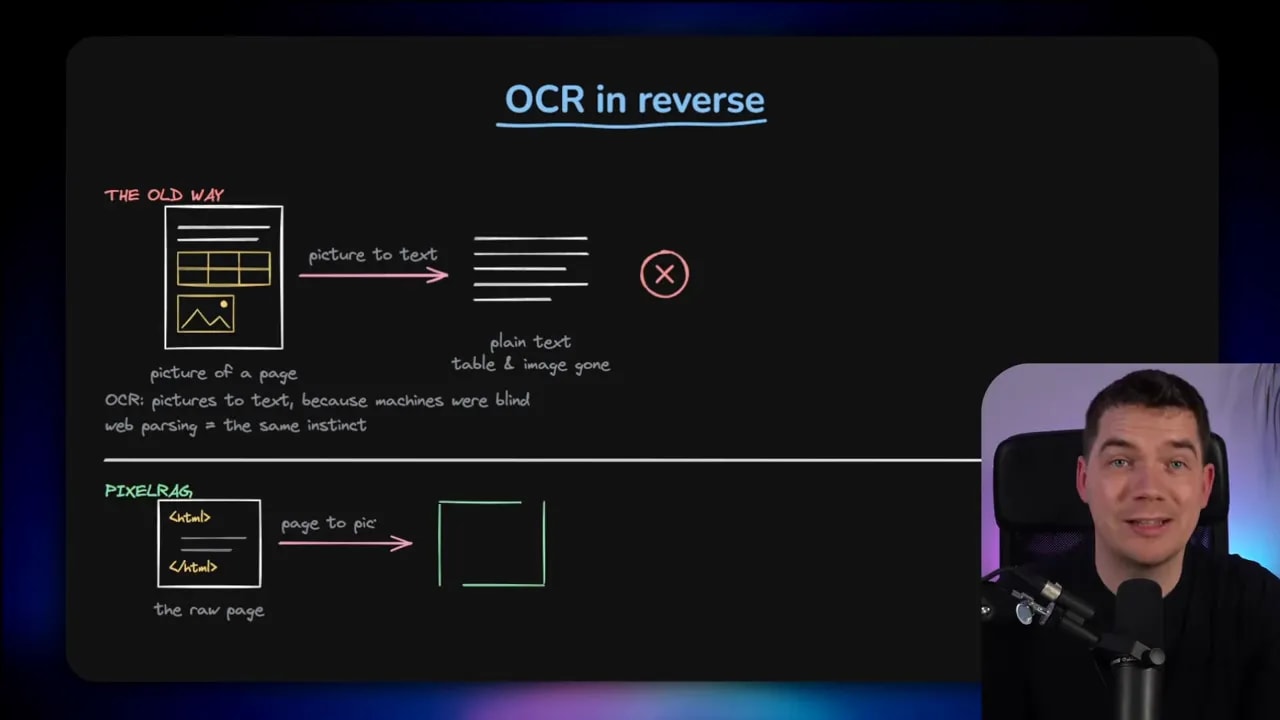
The easiest way to think about this is to compare it with OCR.
Traditional OCR takes an image of a document and turns it into text because older systems were effectively blind. They could not make sense of the page visually, so everything had to be reduced into characters.
Web parsing comes from the same instinct. You flatten a rich page into plain text because text is what the model can handle.
But modern vision-language models have changed the equation. They can read rendered pages far more naturally. They can pick up text, hierarchy, tables, emphasis, and layout inside an image.
So PixelRAG flips the older workflow on its head. Instead of turning images into text for a blind machine, it turns pages into images for a model that can see.
That doesn’t mean text-based retrieval is obsolete. It means the old assumption that everything should be reduced to text is no longer always the best choice.
A quick demo of visual retrieval at scale
The demo that stands out here indexes more than 7 million Wikipedia pages as around 30 million screenshot tiles. That is a useful stress test because it shows the approach isn’t limited to a tiny toy dataset.
One mode of the PixelRAG demo acts as a visual search engine. If I search for something like “The Starry Night,” the system returns tiles that are visually similar to that query.
What is interesting is that the matches are driven by the visual embedding model, not by extracted text or manually added keywords. Some returned tiles contain imagery related to the topic. Others are mostly text but include the phrase in the screenshot. The system is still doing retrieval over images.
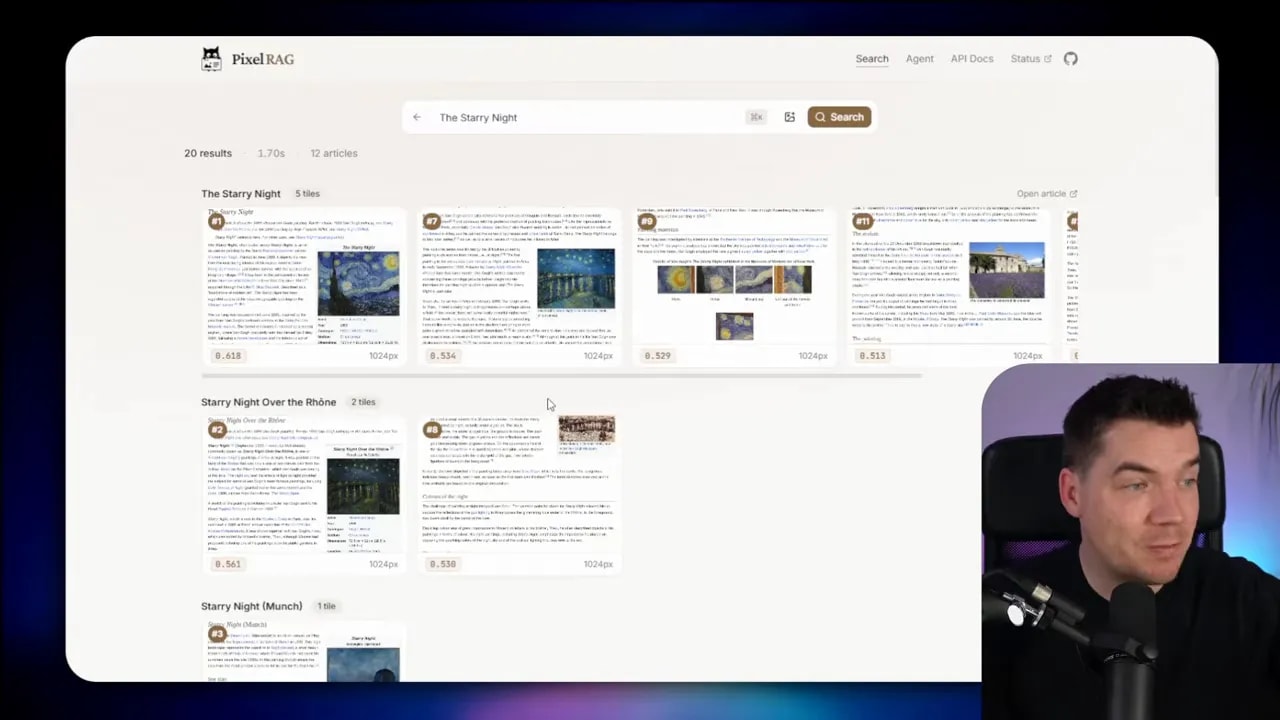
That is a subtle but important distinction. The retrieval layer is not searching a text index in disguise. It is searching visual representations of rendered content.
Then there is the agent mode. In that setup, the system uses the same visual retrieval step, but instead of stopping at relevant tiles, it feeds the screenshots into a vision-language model so the model can answer a question based on what it sees.
I used an example asking how many shots on target Inter Milan had in the 2010 Champions League final. The system searched the visual index, returned screenshots, and then the model read the screenshots to form a text answer.
That sounds straightforward, but it reveals something important. A large part of RAG doesn’t actually require text as the intermediate representation if the model at the end can interpret images well enough.
Why this matters for live agents as well as knowledge bases
It is easy to think of PixelRAG as a knowledge-base trick for offline indexing, but the same idea applies to live agents.
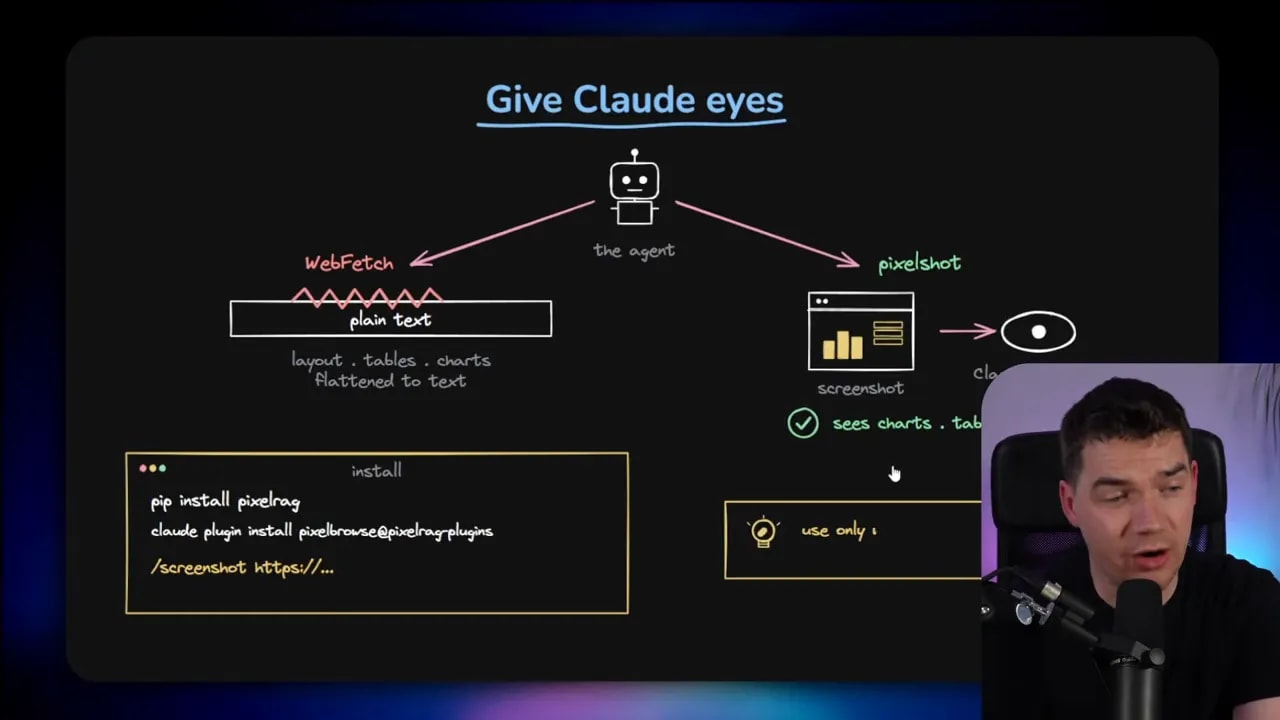
Take a coding agent using a tool like WebFetch. The typical behavior is to fetch a web page, convert it into Markdown or plain text, and then reason over that text. For ordinary documentation pages, that often works fine.
The cracks show up when the answer lives in a diagram, a chart, or some visually arranged block that does not translate cleanly.
The PixelRAG team made this idea practical by releasing a PixelShot skill that can be used inside Claude Code. Instead of relying on a text fetch, the agent can take a screenshot of the source page and pass that screenshot to a multimodal model such as Claude Opus.
That gives the model something closer to actual sight.
The Claude Code example that makes the case clearly
The most convincing example in this whole discussion is a formations diagram on a football match page.
I asked Claude Code to identify the formations for the two teams from a Wikipedia match page. Using the standard WebFetch approach, it could not really do it. That makes sense. WebFetch converts the page into Markdown, and the formation is fundamentally a visual diagram on a pitch.
Once the page had been flattened into text, the layout meaning was gone.
Using the PixelShot skill instead, the agent took a screenshot of the page and read the formation directly from the diagram. In that case, it correctly identified Inter’s setup as 4-2-1-3 and Bayern’s as 4-2-2-2.
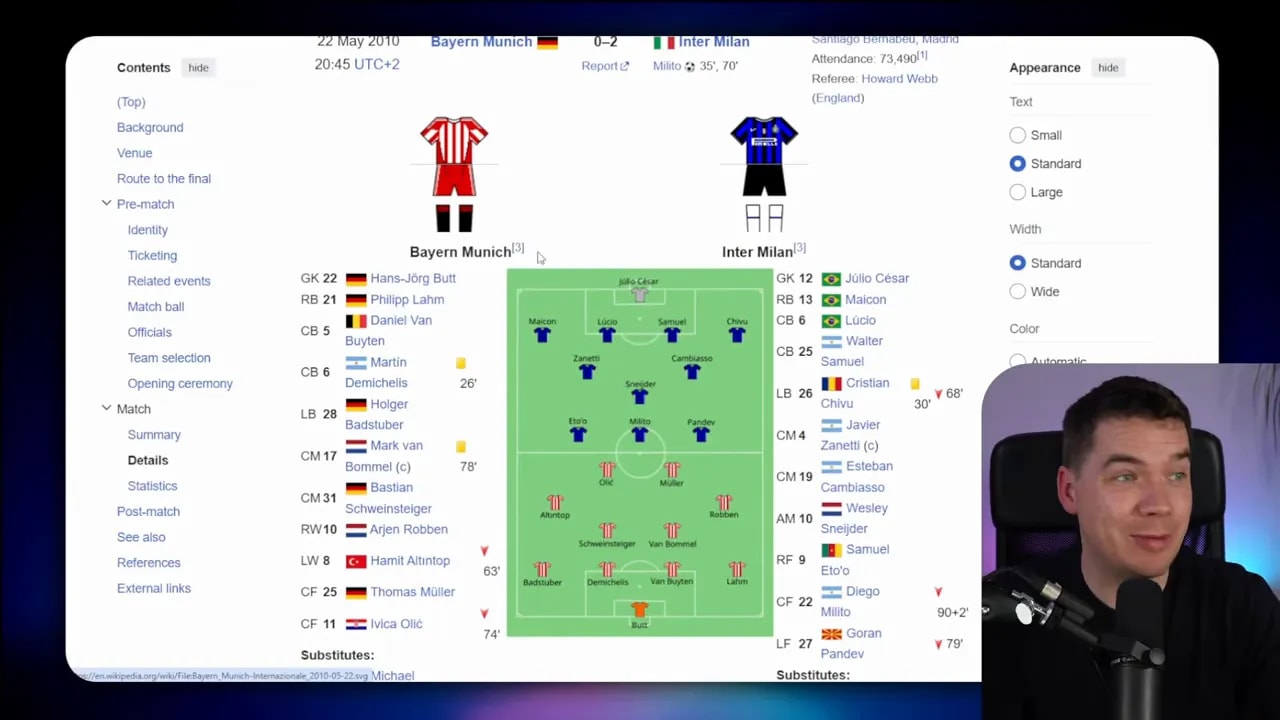
This is exactly the kind of use case where pixel-based retrieval shines. The answer is present. It is visible. But it is visible in a way that plain text does not preserve well.
That example also keeps the broader idea grounded. PixelRAG is not magic. It doesn’t invent missing information. It simply avoids deleting useful information before the model gets a chance to reason over it.
The architecture in plain English
Under the hood, the pipeline is fairly understandable once you strip away the jargon.
1. Render the page
The source page is rendered visually at a fixed width. Think of it like creating a clean screenshot of the page rather than scraping only the text.
2. Split it into tiles
Because web pages and PDFs can be very long, the full image is sliced into smaller, fixed-height tiles. Each tile becomes a searchable unit. That is similar to chunking in text RAG, except the chunks are image snippets rather than text segments.
3. Create visual embeddings
Each tile goes through a vision embedding model, which turns the image into a vector. That vector captures semantic information from the image itself. It is not just storing OCR output.
4. Store those embeddings
The vectors are placed in a vector database. At this point the system has built a visual index of the source material.
5. Retrieve tiles at query time
When a question comes in, the system uses the visual embedding space to find relevant screenshot tiles.
6. Let a VLM read the images
The final step is passing the retrieved screenshots to a vision-language model, which reads the images and answers the question.
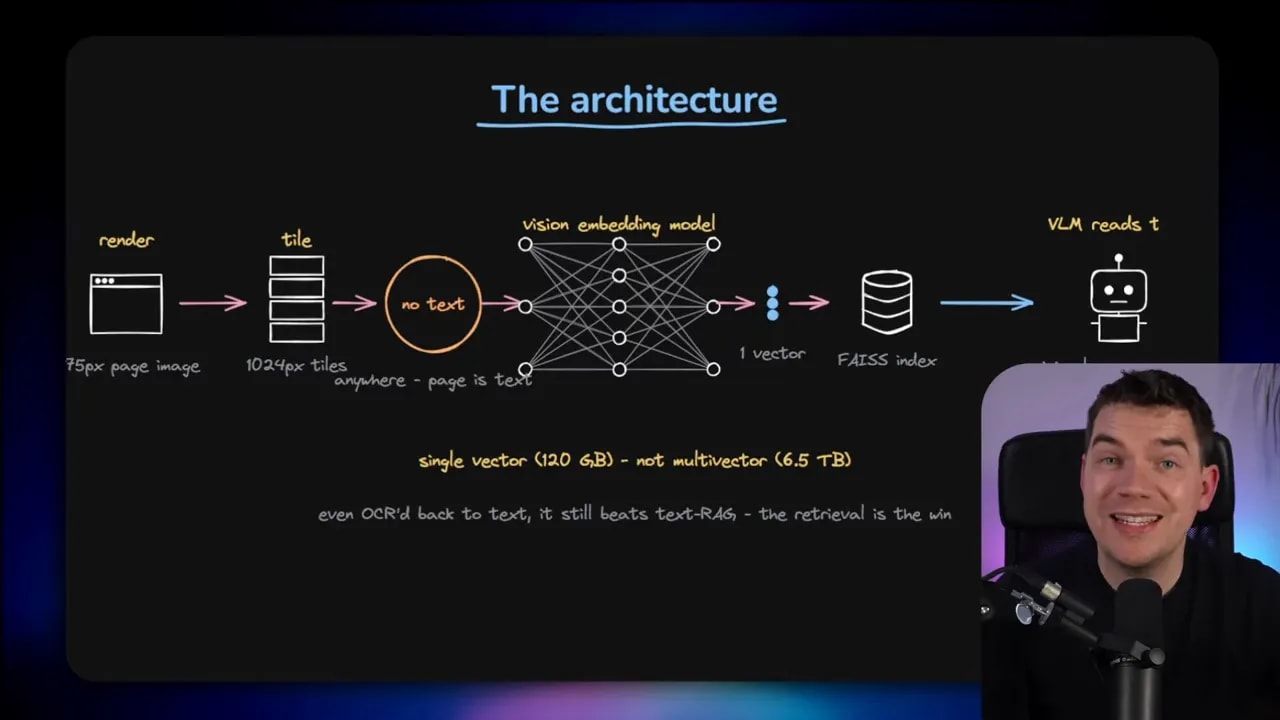
That pipeline is worth studying even if you never build PixelRAG exactly as shown. It opens up a different way to think about document retrieval. Instead of asking how to improve text extraction, it asks whether text extraction is needed for that source at all.
Even plain text questions can benefit
At first glance, you might assume this only helps for heavily visual content. If the question is plain text and the answer is just words on a page, why bother with screenshots?
The research suggests there can still be a gain.
The team compared two approaches after retrieval:
- have the VLM read the screenshot directly
- run OCR on the screenshot and answer from extracted text
The VLM reading the images did slightly better. That result makes sense if you think about parser loss again. Even when the page is mostly textual, converting it yet again can introduce mistakes or lose context. A strong enough vision-language model may simply do a better job reading the original rendered page.
This does not mean image reading always beats text pipelines. It does mean there are more cases where direct visual reading is sensible than most people assume.
Most failures were not the agent’s fault
Another point from the research that I found useful is this: the AI agent itself caused only a small minority of failures. More than 90 percent of the misses were tied to either parser loss or ranking issues.
That tells you where to look if your retrieval system is underperforming.
If the answer exists but retrieval never surfaces it, there are two common culprits:
- Parser loss, where the answer was damaged or erased during conversion
- Ranking failure, where the answer survives but sits too low in the retrieved results
That is one reason I focus so much on architecture instead of prompt tweaks. Prompting matters, but if the evidence reaching the model is poor, the best prompt in the world won’t fix it.
The token savings are real, but they come with a catch
One of the claims in the paper is that PixelRAG can reduce inference token usage significantly. In their multi-hop research-agent setup, the traditional text RAG approach consumed about 37.5 million prompt tokens, while the pixel-based setup used about 3.6 million.
That is about a tenfold reduction.
That sounds surprising until you think about what a screenshot tile can contain. A single tile can pack in dense information that would otherwise require a larger set of text chunks, more retrieval turns, and more accumulated context.
So the agent can often answer with:
- fewer searches
- less conversational history
- fewer retrieval passes
- less prompt bloat
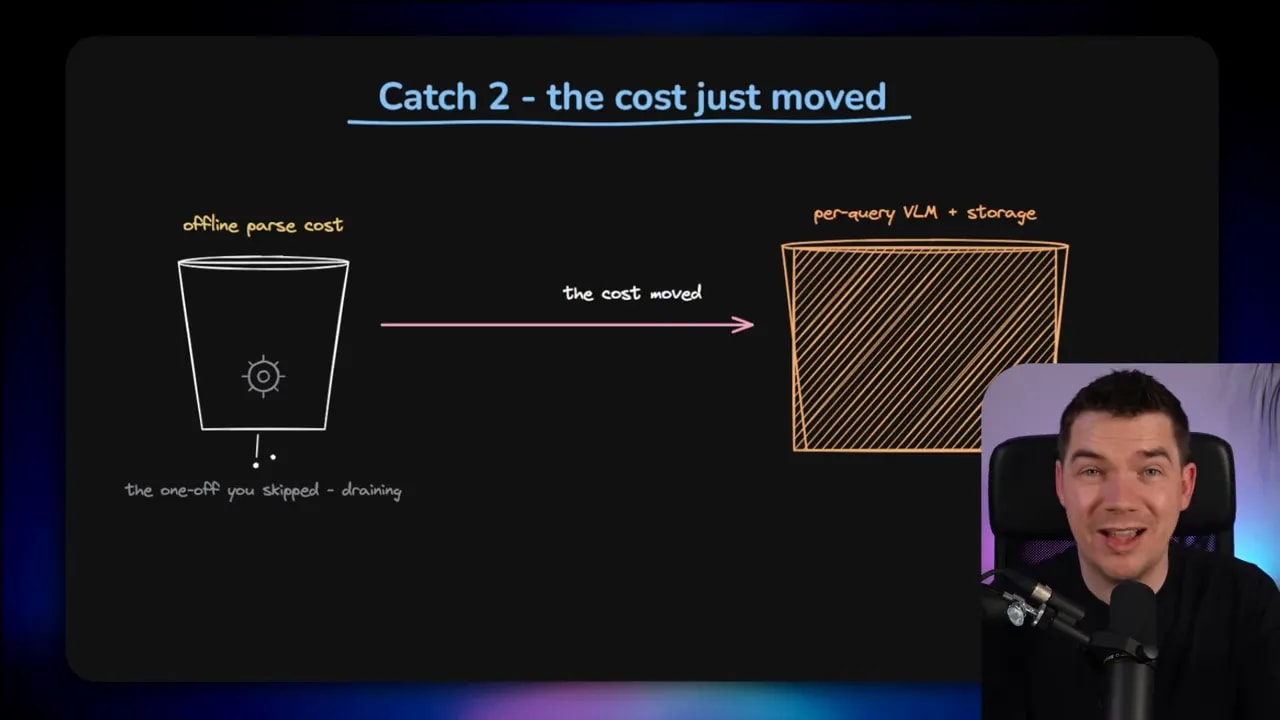
That said, the savings are mainly on the inference side. The cost does not disappear. It moves.
The cost has moved upstream
If you replace text parsing with screenshot rendering, tile generation, image storage, and visual embeddings, you are paying elsewhere.
In the Wikipedia-scale experiment, the ingestion pipeline used 800 CPUs for two full days across 7 million pages. The resulting 30 million raw image tiles took up more than 5 terabytes of storage.
That is not a small implementation detail. It changes the economics of the system.
Text RAG also has an ingestion pipeline, of course. You still need parsing, chunking, embeddings, and storage. But image-based retrieval introduces a different kind of overhead:
- you must render pages visually
- you need to store image tiles
- you still need embeddings
- you often need a vision model at query time instead of cheaper text-only processing
So if someone presents PixelRAG as a universal cost win, I would push back on that. It can reduce token usage during answering, but the total system cost depends on where and how often you pay.
There is also a model floor
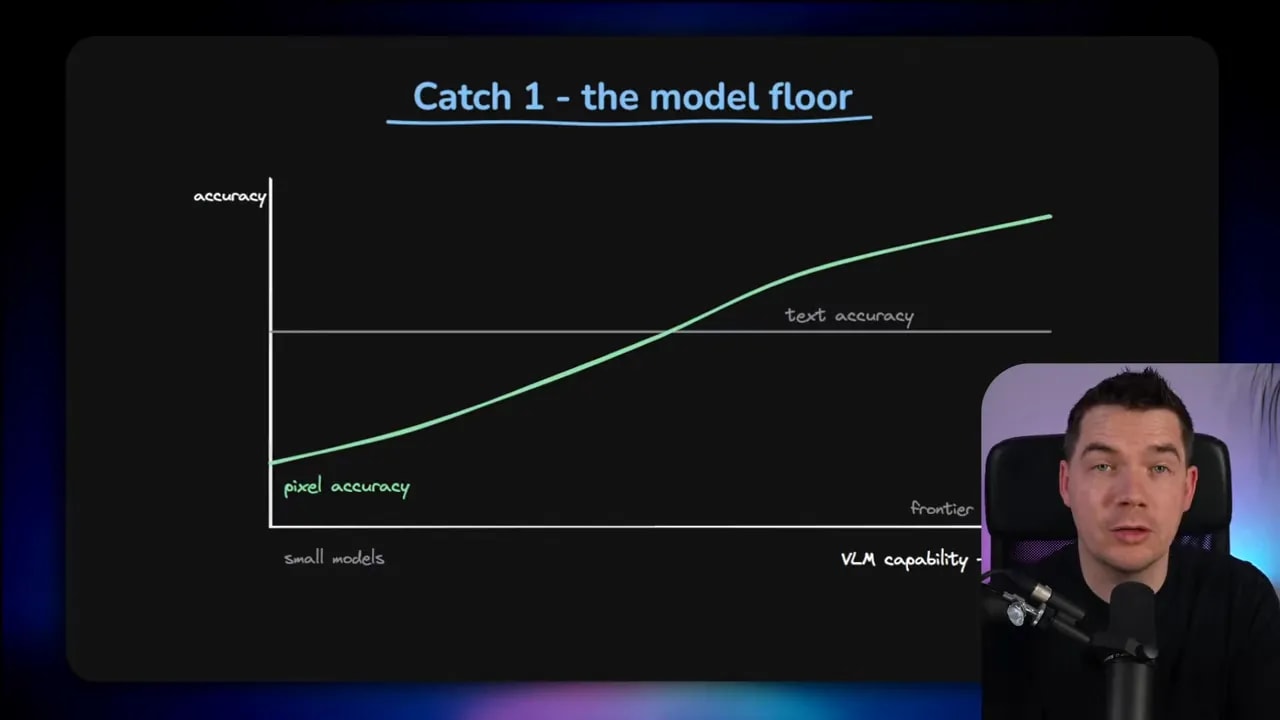
This approach depends heavily on the quality of the vision-language model. Below a certain capability level, reading screenshots becomes unreliable.
According to the research, smaller VLMs can lose more than 12.5 benchmark points because they simply are not strong enough at reading rendered text inside images. The crossover point appears to sit around the 4 billion parameter mark.
That is an important operational detail.
If you are using frontier models, this is less of a concern. Models like Claude Opus are already strong multimodal readers. If you are trying to run locally on consumer hardware, then capability matters a lot more. You cannot assume that any small VLM will handle page screenshots well enough to replace text retrieval.
So the architecture only works if the model can actually read what you hand to it.
This idea is not completely new, but the scale is notable
PixelRAG did not appear out of nowhere. There are related ideas in earlier work like ColPali and VisRAG. There is also relevant OCR efficiency work such as DeepSeek-OCR.
The reason PixelRAG stands out is not that it invented visual retrieval from scratch. It is that it pushed the concept across millions of Wikipedia pages and made the case in a way that is easy to test.
If you want to explore it directly, there is a live PixelRAG demo and an open source GitHub repository available.
Where I would actually use this
I would not throw away existing text RAG pipelines just because pixel retrieval is interesting. That would be an overreaction.
Text RAG is still excellent for many tasks. It is lighter, simpler, and well understood. For sources that are already clean and mostly linear, plain text remains hard to beat.
Where pixel-based retrieval becomes attractive is in situations like these:
- documentation with meaningful screenshots or diagrams
- PDFs with complex layout
- tables that lose alignment during parsing
- charts or schematics where spatial structure matters
- live web pages where text fetch fails to preserve the important bit
- multi-column reports or papers that get scrambled by extractors
In those cases, a screenshot-first approach can act as a fallback or a specialist tool.
The real production answer is probably hybrid retrieval
This is the part that matters most in practice. I do not think the future is text retrieval or pixel retrieval. I think it is hybrid retrieval.
That can mean a few different things.
Option 1: Route different content types differently
You might keep a normal text index for straightforward content and a visual index for diagram-heavy or layout-sensitive documents. During ingestion, the system decides which route makes sense for each source.
Option 2: Give the agent multiple retrieval tools
An agent could have access to:
- a text search tool
- a structured database query tool
- a visual retrieval tool
- a document exploration tool
Then it chooses the right tool for the job.
Option 3: Use pixels as a fallback when parsing fails
This is the most practical short-term pattern for many teams. Start with text retrieval because it is faster and cheaper. If the answer seems tied to a visual component or the parser struggles, switch to screenshots.
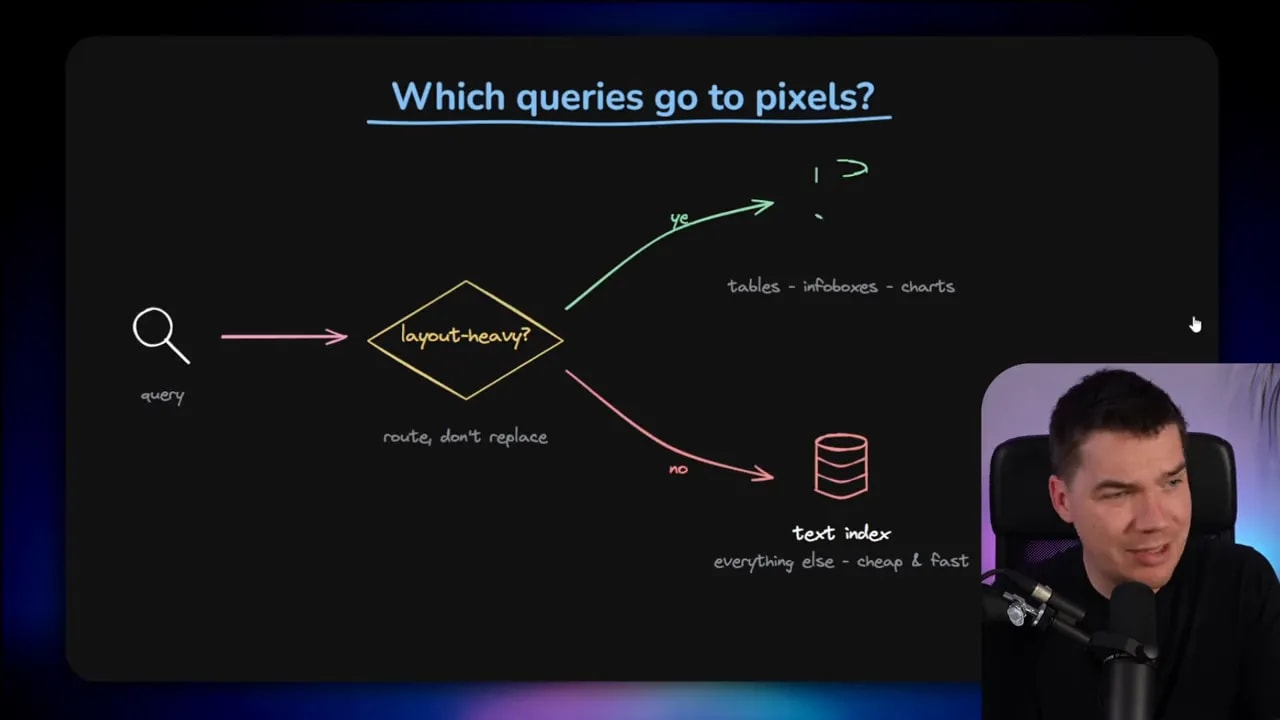
That approach lines up with how I’d use the PixelShot skill in Claude Code as well. It is slower than a standard WebFetch flow, so I would not use it by default for every query. I would use it when the ordinary path fails or when I know the answer likely lives in a visual structure.
Practical tradeoffs before adopting PixelRAG
If you are evaluating this approach, these are the tradeoffs I would keep front of mind.
1. Better fidelity
You preserve layout, diagrams, tables, and visual hierarchy much more faithfully than text parsing can.
2. Heavier ingestion
Rendering, tiling, storing, and embedding screenshots can get expensive fast.
3. Stronger dependence on multimodal models
The whole approach rises or falls on the model’s ability to read images accurately.
4. Potential token savings at inference
If retrieval becomes more compact and fewer turns are needed, prompt costs can shrink.
5. Higher storage requirements
Images are bulkier than text chunks. That matters at scale.
6. Slower live use in some cases
Taking screenshots and processing them visually is generally slower than fetching and parsing text.
7. Best used selectively
It is strongest where layout or visuals carry meaning.
The bigger lesson for agent builders
The real value here goes beyond PixelRAG itself.
The deeper lesson is that retrieval pipelines often fail before the model ever starts reasoning. If your source conversion step is weak, every downstream component inherits the problem. Better prompts, better rankers, and bigger models can help, but they are all working around damage that already happened.
Pixel-based retrieval is a reminder to look earlier in the stack.
Sometimes the fix is a better parser. Sometimes it is a richer document format. Sometimes it is a compiled knowledge layer. And sometimes the right answer is to stop flattening the source into text at all.
That is why I find this line of research genuinely useful. Even if you never deploy a screenshot-only RAG system, it pushes you to ask a better question: what representation preserves the source most faithfully for the task at hand?
For simple text, that may still be text. For complex visual material, pixels may be the better substrate.
And once you start thinking that way, retrieval architecture gets a lot more interesting.
