

Boris Cherny, the creator of Claude Code, recently made three big claims that caught my attention. He said modern Claude models can run autonomously for days or weeks. He said Claude Code is no longer demonstrably prompt injectable. And he said his team deleted more than 80% of Claude Code’s system prompt after the launch of Opus 5.
There’s genuinely useful advice in all of this. There’s also a fair bit that needs context.
I think the most valuable part is not the claim that coding is solved, or that a model can run for two weeks. It’s the practical operating model underneath it: remove stale instructions, stop over-specifying every implementation detail, give agents difficult tasks, and make sure they can verify whether they succeeded.
That last part is the bit that many people still get wrong.
What Opus 5 changed for long-running agentic coding
One of the more interesting capabilities of newer frontier models is their ability to work for much longer without stopping. Combined with auto mode in Claude Code, Boris described tasks that can continue for days or even weeks until the system needs input or hits a real blocker.
This is a big shift from earlier coding assistants. Older tools were mainly autocomplete systems. They could suggest a line, complete a function, or answer a question about a repository. The current generation can inspect files, change code, run tools, test its own output, split work into sub-tasks, and repeat that cycle.
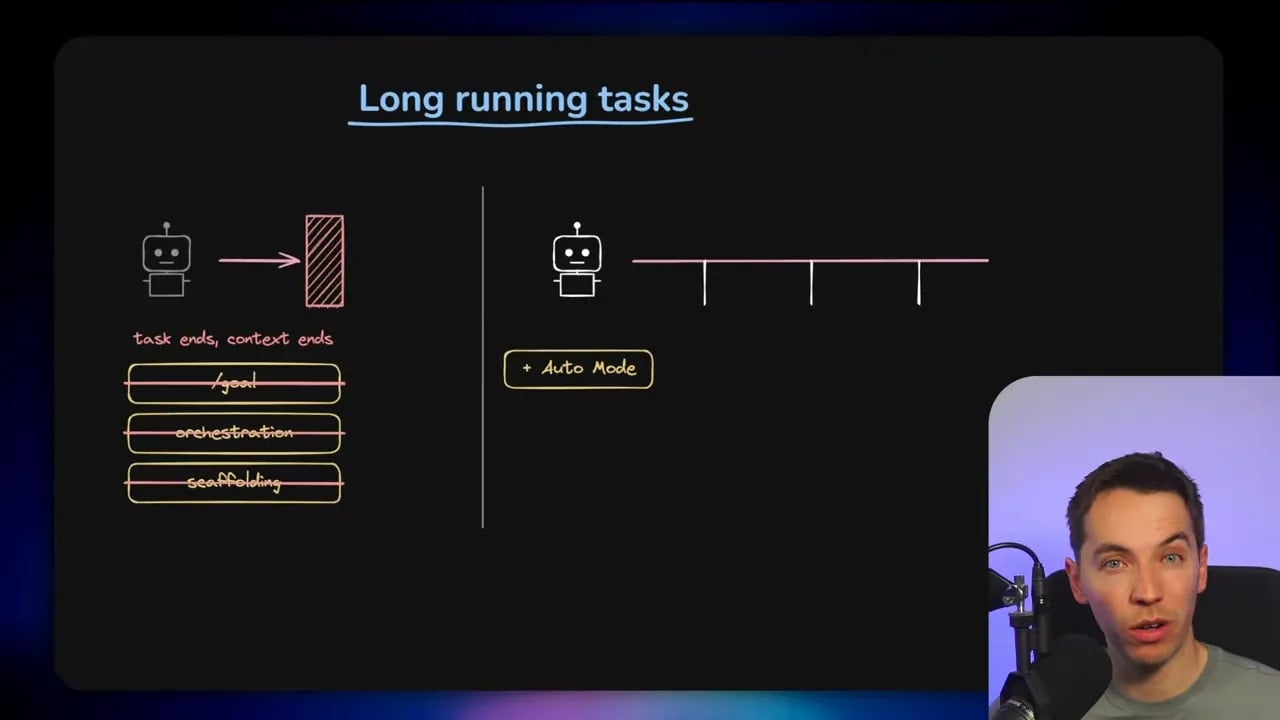
That doesn’t mean every project suddenly needs a fully autonomous agent. The usefulness of long-running work depends heavily on the task, the quality of the environment, the available tests, and the cost of running it.
Boris works at Anthropic and has access to a token budget that most people and companies simply don’t have. That matters. A workflow that can comfortably consume millions of tokens may be a reasonable internal experiment for a model company. It might be a very expensive gamble for a small product team using API credits.
Still, the underlying trend is real. Models are improving at maintaining context, using tools, and recovering from failure. The main question is whether a given task deserves less scaffolding or more.
The claim that Claude Code is no longer prompt injectable
Boris said Anthropic can no longer demonstrate prompt injection against Claude Code in the way it could before. That’s an extremely strong statement, and I wouldn’t interpret it as “prompt injection is solved.”
What he described is a layered defence model:
- A more strongly aligned model, improved through years of safety research.
- A prompt injection classifier that runs across traffic.
- An auto mode classifier intended to stop dangerous commands.
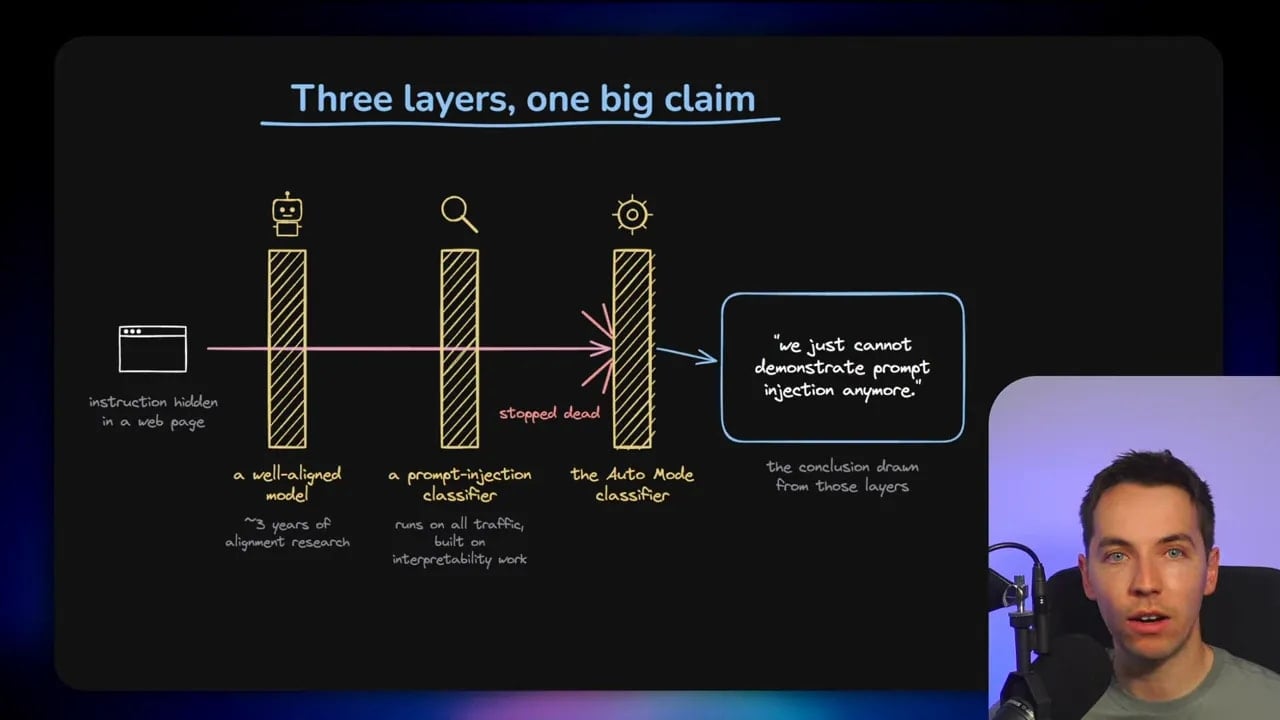
Those layers are meaningful progress. A better base model helps. Classifiers can identify suspicious inputs. Tool-level checks can prevent certain destructive actions. Combined, these protections can make attacks much harder and reduce the chance that a malicious instruction succeeds.
But “we can’t demonstrate an injection right now” is very different from “the system is impervious to injection.” Security claims need to survive hostile conditions, new attack methods, tool integrations, external data sources, and unusual workflows. A model that reads web pages, tickets, documents, emails, logs, repositories, or Slack messages is exposed to text it can’t fully trust.
I would treat the current state as improving resistance, not immunity.
That’s especially important for agentic systems with access to terminals, databases, cloud infrastructure, production credentials, or customer data. Better alignment can lower risk. It doesn’t remove the need for permissions, isolation, denial rules, review gates, and limits on what an agent can do.
Why Anthropic deleted 80% of the Claude Code system prompt
When Opus 5 shipped, the Claude Code team reportedly deleted more than 80% of its system prompt. That sounds dramatic, but the reasoning makes sense.
A large amount of prompting exists to compensate for weaknesses in a particular model. A model might need explicit reminders to inspect a file before editing it, use a specific tool, make a plan, run tests, or avoid a known failure pattern. When a stronger model arrives, many of those reminders can become unnecessary, redundant, or even harmful.
Behaviour tuned for one model generation often doesn’t transfer cleanly to the next. A prompt that corrected an old weakness can distract a newer model, conflict with its natural reasoning process, or create strange failure modes.
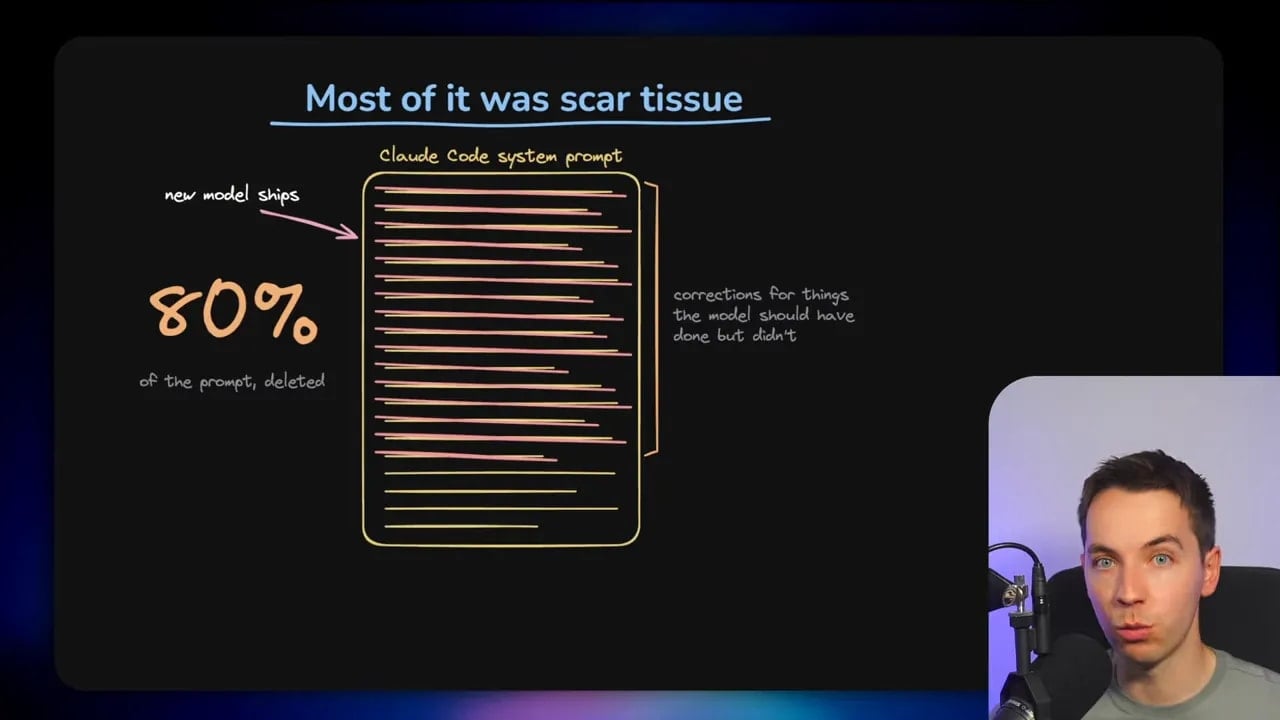
This is why prompt accumulation is a real problem. Teams often keep adding instructions after every mistake:
- Always use this library.
- Never modify this folder.
- Follow this sequence of steps.
- Ask for approval before this action.
- Use this coding pattern.
- Do not do what happened in a previous edge case.
After enough iterations, the system carries a large pile of old scar tissue. Some of it may still help. Much of it may no longer pull its weight.
The lesson is not that every instruction file is bad. The lesson is that instructions should earn their place.
Two ways to test how much prompting Claude Code really needs
Boris highlighted two useful levers for experimenting with Claude Code’s prompting. These are helpful because they let you see how the model behaves when you remove assumptions and reduce prompt baggage.
Set a custom system prompt
The first option is the Claude Code --system-prompt flag. It lets you replace the default system prompt with your own prompt for a run. The full syntax and options are available in the Claude Code CLI reference.
I demonstrated the basic idea using a deliberately silly instruction that told Claude to speak in Klingon. It immediately changed its output style. That example isn’t useful for production work, but it proves the point: system prompting has a visible effect on behaviour.
A more practical experiment would be to create a small, controlled task and compare outcomes across several setups:
- Your normal CLAUDE.md and normal project setup.
- A reduced instruction file.
- A minimal custom system prompt.
- A prompt that contains only the task, the constraints, and success criteria.
Track what changes. Does the model miss important conventions? Does it become more effective? Does it run fewer unnecessary steps? Does it make more risky changes? You need evidence from your own codebase, not assumptions.
Use simple mode as an ablation test
The second option is the CLAUDE_CODE_SIMPLE=1 environment variable. According to Boris, Anthropic uses this internally to strip back system prompting and tool prompting so the team can assess what those instructions are contributing. The available environment variables are documented in the Claude Code environment variable reference.
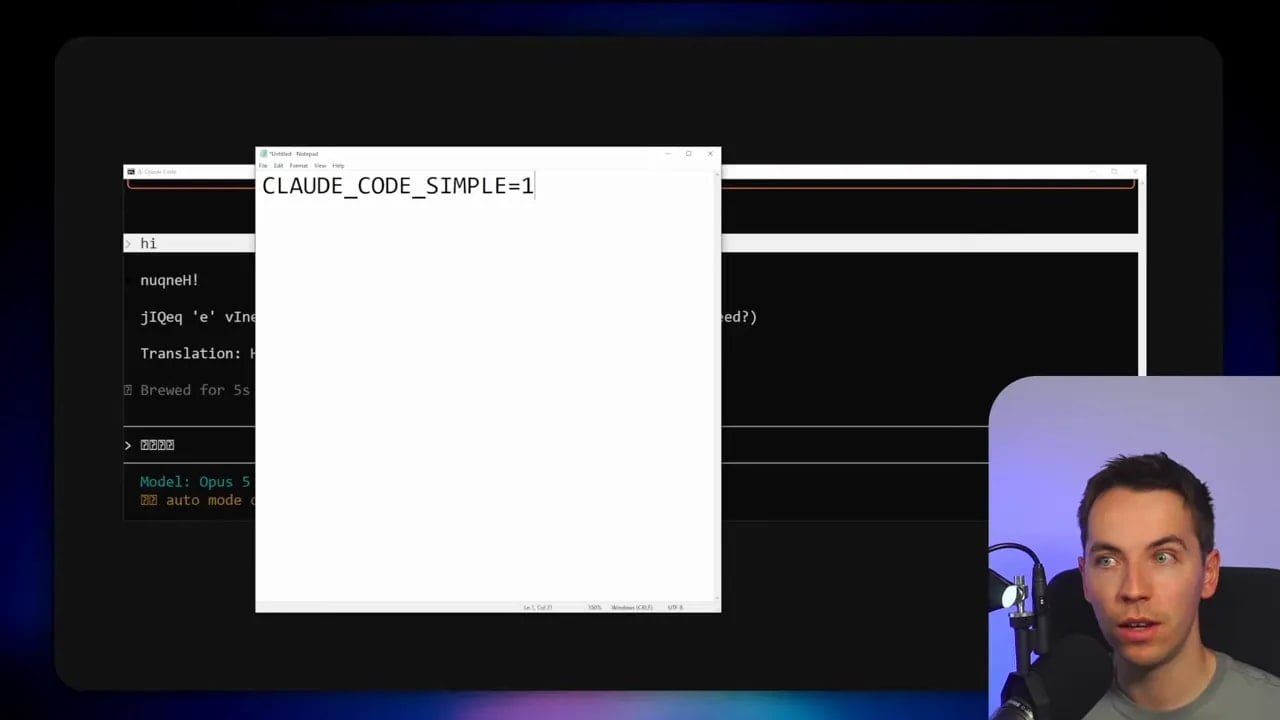
This is an example of ablation. In simple terms, ablation means removing a component and measuring the drop in performance. If nothing changes when you remove an instruction, that instruction probably isn’t doing much. If performance falls sharply, you’ve identified something important.
The Claude Code team reportedly does this with prompting and tools. They remove a component, measure what breaks, and add back only what proves useful. That creates a far cleaner system than endlessly adding more rules.
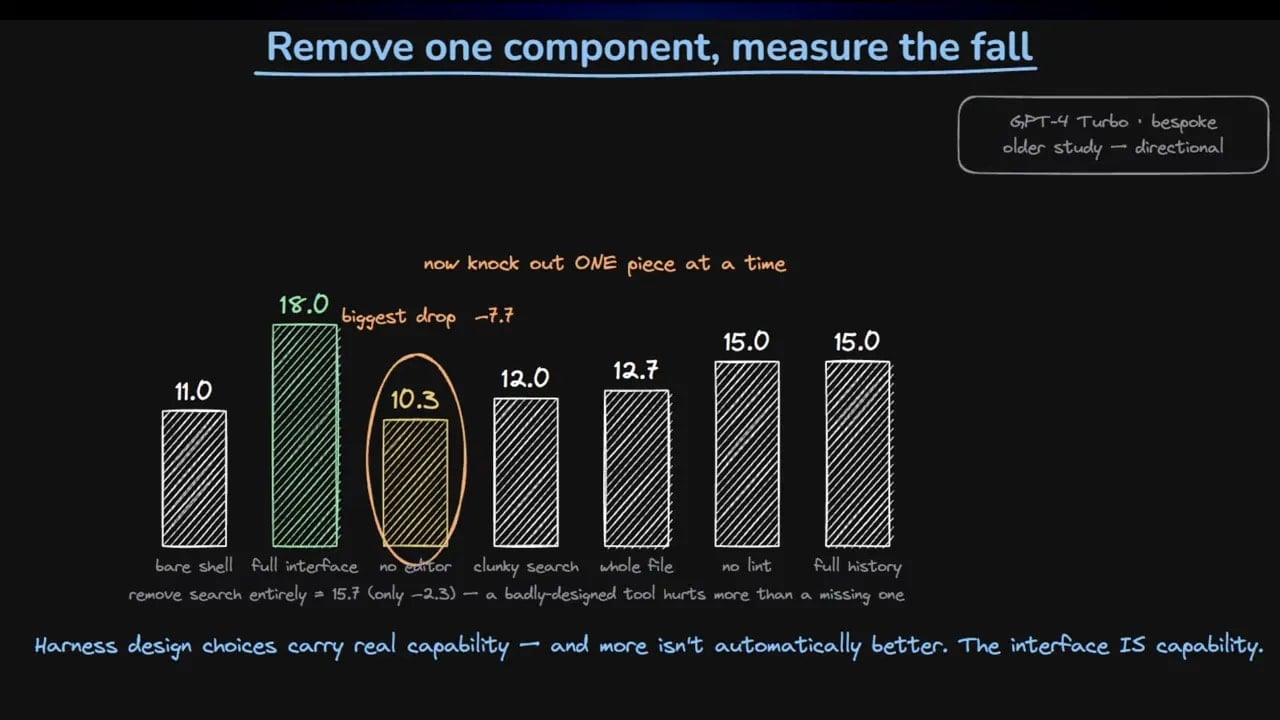
I think the general principle is right. Every six months or so, it’s sensible to review your CLAUDE.md files, skills, hooks, meta-prompts, and agent instructions. Remove stale preferences. Remove rules that only existed because an older model struggled. Test whether the setup still earns its complexity.
What I would keep, whatever the model can do
This is where I’d add an important qualification to the “delete your CLAUDE.md” advice. Instructions and enforcement are not the same thing.
A model may outgrow a style preference or a verbose workflow reminder. It does not outgrow the need for a policy that blocks a destructive database command. It does not outgrow a compliance rule. It does not outgrow a deny list that prevents access to sensitive files.
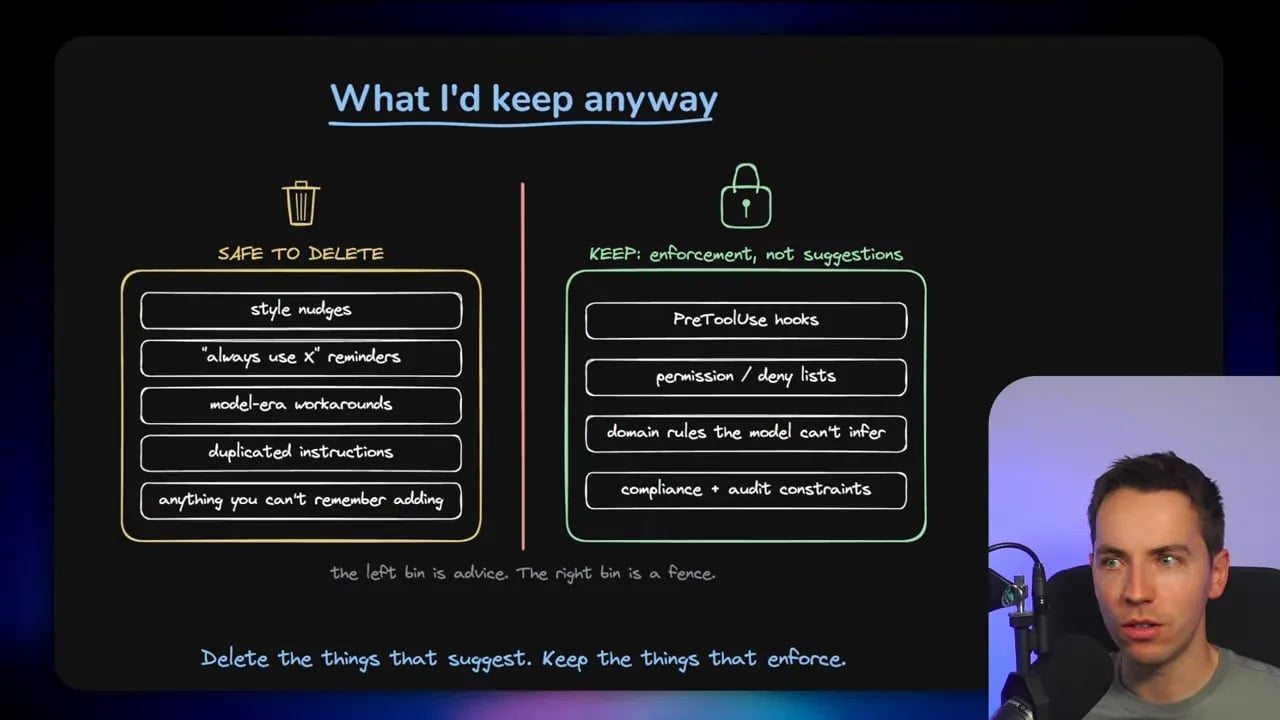
Keep controls that actively enforce safety, security, and required business rules. Examples include:
- Hooks that block destructive commands.
- Deny rules for protected paths, secrets, or environments.
- Required approval steps for sensitive changes.
- Compliance constraints that must apply regardless of model quality.
- Permission boundaries for production infrastructure.
- Checks that prevent an agent from merging or deploying unreviewed work.
These aren’t “dead weight” prompts. They are guardrails implemented outside of the model’s own judgment.
A useful test is simple: if a rule exists because you prefer a coding style, test whether it’s still needed. If it exists because an error could delete data, expose credentials, violate policy, or damage a production system, keep it enforced.
Product overhang, hobbling, and the other side of the gap
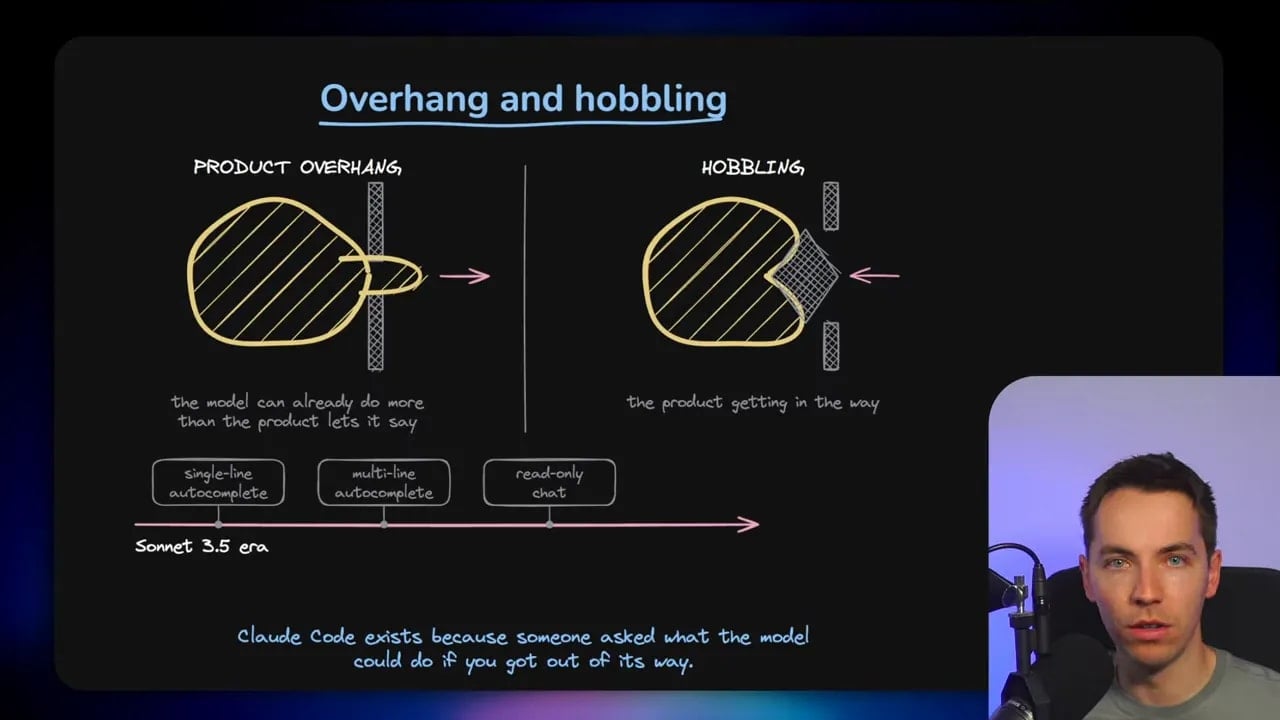
Boris used the idea of product overhang. This happens when the model can do more than the product allows it to express. The model has capability, but the interface, workflow, or product design holds it back.
He described the early Claude Code period during the Sonnet 3.5 era. At that time, coding products often focused on single-line completion, multi-line completion, and read-only code chat. Yet the models could already write functions and files. The product interface was lagging behind the capability.
Claude Code took a different approach. It reduced the UI, gave the model terminal access, and allowed it to work directly across a codebase. That was a smart move. It gave the model room to act instead of trapping it inside a narrow autocomplete interface.
However, the opposite condition is just as common. I think of it as product underhang. This is where the product promises more than the model can reliably deliver.
You see it in polished demos that work only on the happy path. You see it where a supposedly autonomous workflow needs constant human correction. You see it when an agent starts a long task confidently, then gradually drifts away from the actual objective.
The key skill is identifying which situation you have:
- Overhang: the model can do the work, but your product or harness restricts it unnecessarily.
- Underhang: the task exceeds current model reliability, so your product needs more structure, verification, and human review.
If you’re in overhang territory, simplify the interface and remove unnecessary restrictions. If you’re in underhang territory, do the opposite. Build a deliberate, domain-specific harness. Add clear state, checks, retries, permissions, review points, and better feedback.
There is no universal rule that says less scaffolding is always better. The correct amount depends on the task.
Stop over-specifying every implementation detail
One of Boris’s strongest points is that people often over-specify work for Claude Code. I’m definitely prone to this because I come from a software development background. I often have an idea of the exact architecture or implementation path I want, then I tell the agent to follow it step by step.
Sometimes that’s correct. In critical systems, architectural constraints matter. Existing patterns matter. Security, performance, maintainability, and integration details matter.
But there are cases where excessive prescription actively makes the result worse. It can force the model down a narrow route when it has a better solution available. Someone with less coding knowledge may occasionally get a stronger outcome because they describe the result they want instead of dictating every internal step.
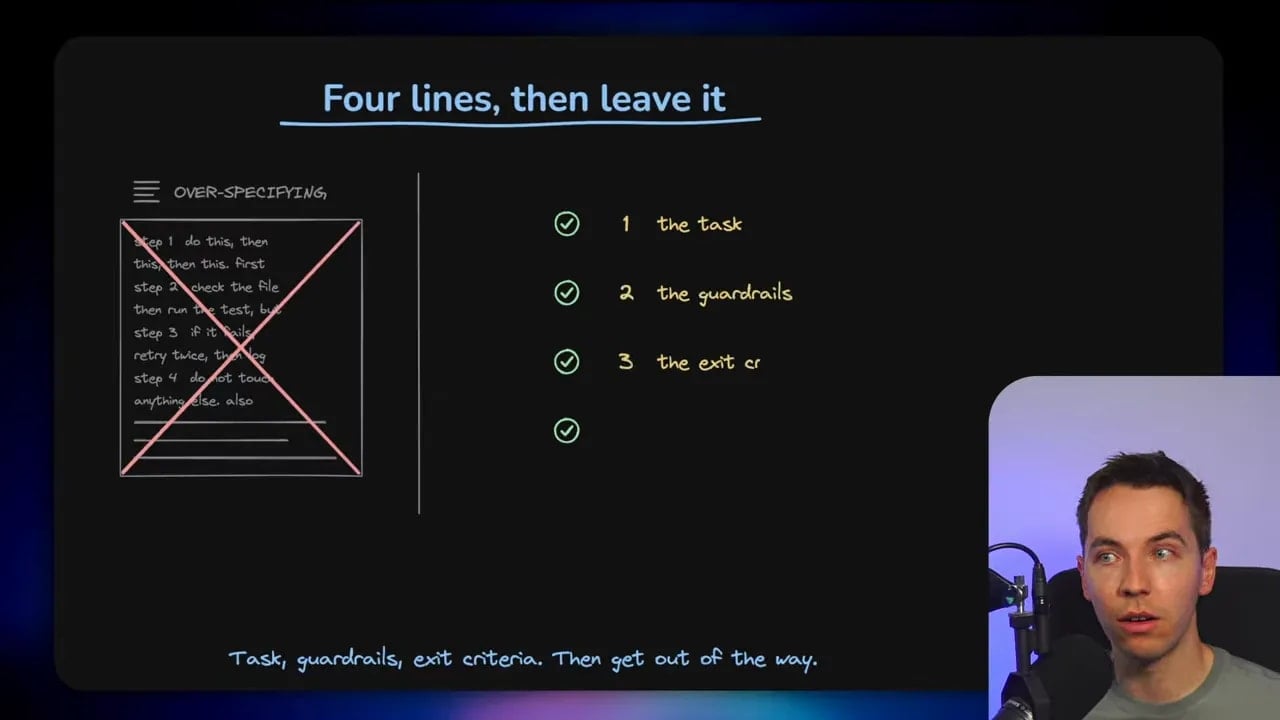
A more useful prompt structure is:
- Define the task. State what needs to exist or change.
- Define the guardrails. Set the important constraints, boundaries, and non-negotiables.
- Define the exit criteria. Explain what proves that the work is complete.
- Let the model work. Avoid prescribing every implementation decision unless it truly matters.
This gives the model enough freedom to explore while keeping it anchored to the real outcome. It also makes gaps obvious. If you can’t clearly define success, the agent can’t reliably verify it either.
The Bun Zig-to-Rust rewrite in 11 days
The most striking example in the discussion involved Bun, the open-source JavaScript runtime used by Claude Code. Bun was written in Zig, a low-level systems language where memory management requires careful attention. Earlier models had reportedly been used to find and fix memory leaks one at a time.
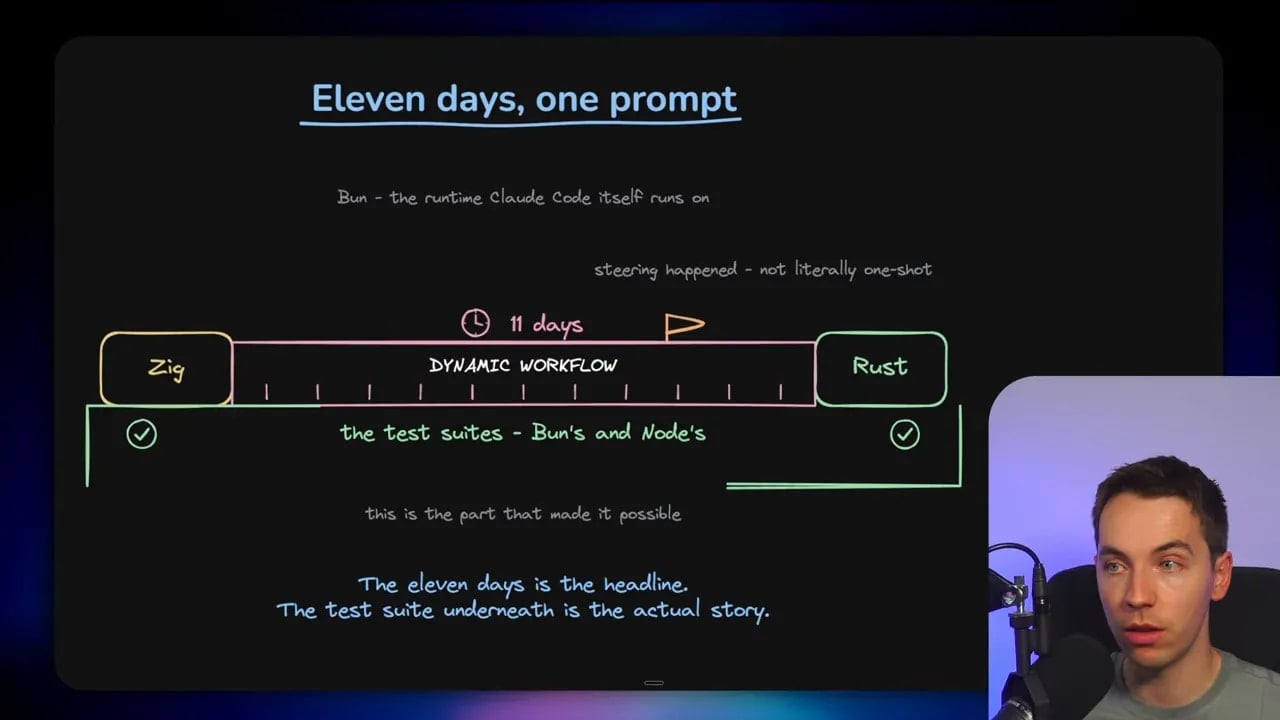
Then the team began giving each newer model generation a much larger task: rewrite the codebase from Zig to Rust. Boris said the right model was eventually able to do it, using a dynamic workflow over 11 days of runtime.
The project went from Zig to Rust with substantial agent activity, large volumes of tokens, and steering throughout the process. The Bun repository provides the public codebase context, while the Bun documentation explains the runtime itself.
This is an impressive result. It’s also easy to misunderstand.
It was not a single prompt followed by an unattended miracle. The process used dynamic workflows, many agents, ongoing steering, and an existing test suite. Those tests gave the system a way to determine whether changes worked. Without that feedback loop, a large rewrite could quickly become a large collection of plausible but incorrect code.
That’s why the test suite is arguably more important than the headline. The agent had something tangible to test against. It could write code, run checks, inspect failures, revise the work, and continue.
Verification is the real skill in agentic systems
Boris tried to sidestep the rotating job titles around AI work: prompt engineer, context engineer, loop engineer, graph engineer, and whatever comes next. His core principle was much simpler.
Give the model a task that is slightly too difficult, then make it possible for the model to verify its own work.
I think that’s a very useful framing. The difficult part is often not generating code. The difficult part is building a reliable feedback loop.
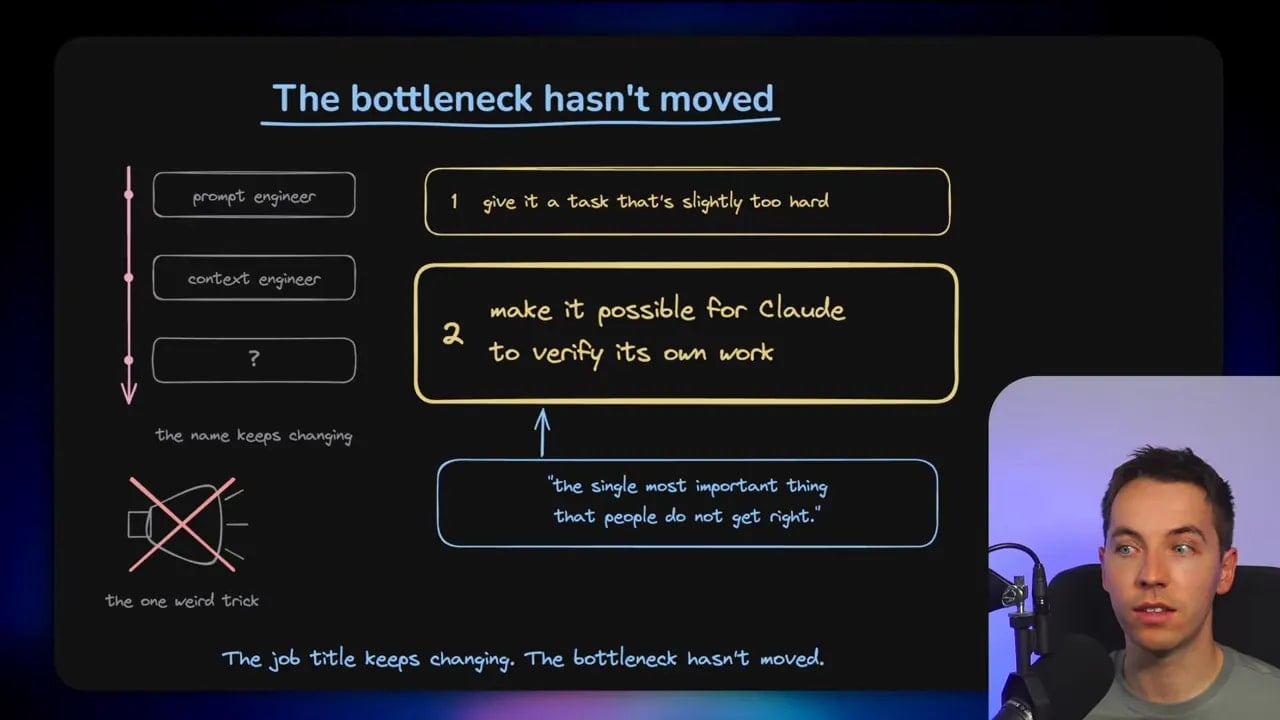
For a coding agent, verification might include:
- Automated unit and integration tests.
- Static analysis and type checking.
- Build checks.
- Database migration validation.
- Linting and formatting rules.
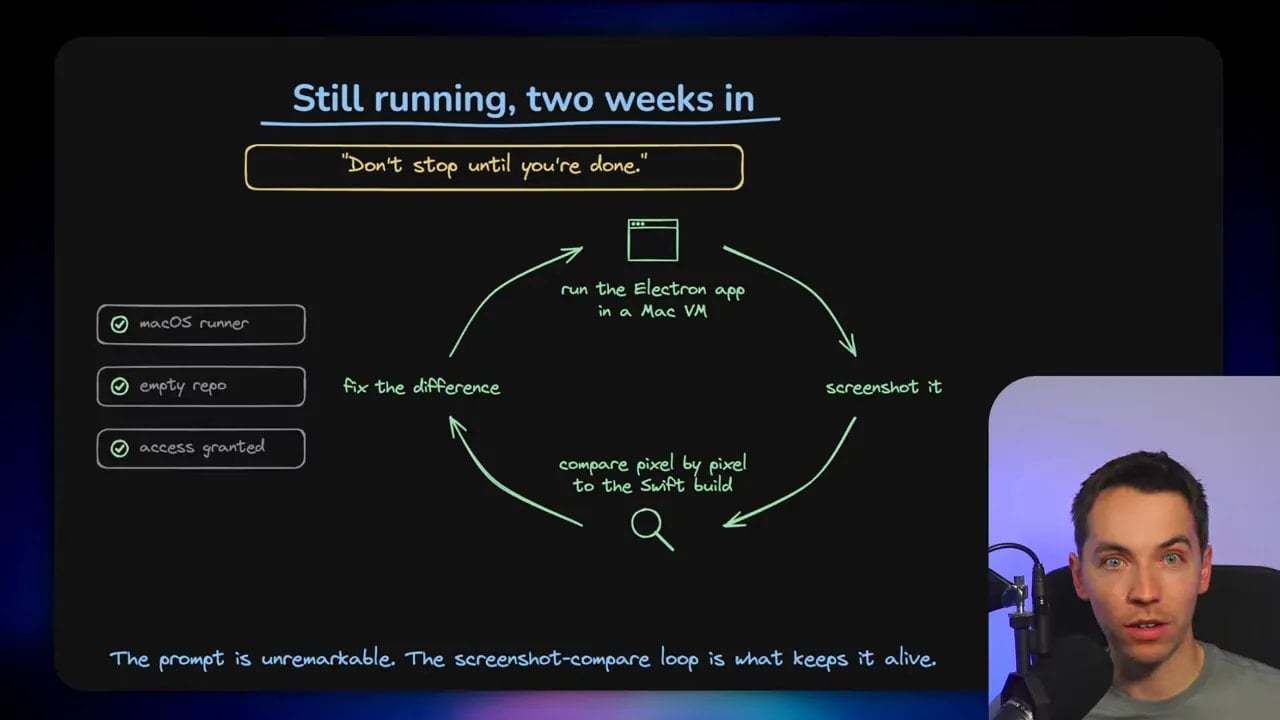
- Screenshot or UI checks where appropriate.
- Acceptance tests tied to user-facing requirements.
- Clear logs and observable results for external workflows.
The model needs a way to tell the difference between progress and failure. If every response simply says “done,” the workflow has no reliable feedback mechanism. It may continue confidently in the wrong direction.
This is also why long-running agents often fail in practice. Small deviations compound. A minor misunderstanding early in a task can lead to more incorrect assumptions, more code built on top of them, and a result that looks productive while moving away from the intended goal.
Using Claude Code beats collecting endless tricks
Boris joked that becoming a top 1% Claude Code user might involve ignoring LinkedIn influencers. There’s a real point behind the joke.
It’s easy to get stuck collecting tips, prompt templates, workflow diagrams, and new techniques without applying them to real work. That produces a kind of tutorial loop where every new trick feels important, but little changes inside an actual project.
I’d get a far better return by giving Claude Code tasks in my own codebase and learning from the outcome. Try something slightly harder than feels comfortable. See where it succeeds. See where it gets confused. Identify what information, tools, tests, or boundaries were missing.
The right level of autonomy varies widely:
- A personal dashboard or internal prototype may be fine with a loose one-shot prompt.
- An internal tool with low-risk data may benefit from a lightweight agent workflow.
- A customer-facing product needs stronger review and testing.
- A critical system needs strict controls, explicit architecture, and careful change management.
The important thing is to match the harness to the consequences of failure.
What a two-week Claude Code run actually costs
Boris also described a native version of the Claude Code desktop app. The existing desktop app uses Electron, and he wanted to explore what a native version might feel like. He used Claude Tag, a Claude-based Slack agent, to run the work.
At the time of the discussion, the run had been going for around 14 or 15 days and was still continuing.
That is not a casual experiment for most people.
Long-running frontier-model work consumes a huge amount of tokens. Even an efficient workflow can fan out into many sub-agents, tool calls, reviews, retries, test runs, and context updates. A plan with subsidised usage may feel generous, but it still doesn’t provide the same capacity as an internal Anthropic experiment.
An online estimate cited in the discussion suggested that a $200 monthly Claude Max 20x plan could represent around $8,000 of equivalent API credit usage. Whether a specific estimate holds in every case isn’t the key point. The broader point is clear: multi-week agent runs can become extremely expensive on API pricing.
For an organization using frontier models at scale, a major long-horizon workflow could cost tens or even hundreds of thousands of dollars. Before running one, define the business value, budget ceiling, stop conditions, and checkpoints.
Cost isn’t the only issue. Drift is the other one. By day nine or ten, an agent may be a long way from the intended result unless tests, feedback, and human steering expose the problem early.
Dynamic workflows versus loops and routines
Boris distinguished between dynamic workflows and loops or routines. The difference matters because the terms often get mixed together.
Dynamic workflows are agent-created plans. You ask Claude to use a workflow, and it can write and trigger the workflow itself. Under the hood, Claude Code can use the Bun runtime as a sandbox and orchestrate many agents within it.
The workflow might fan out a large batch of sub-agents to research, edit, test, or inspect components. A smaller group can verify the results. The agent can then use those findings to create another batch of work. It is adaptive rather than a fixed sequence.
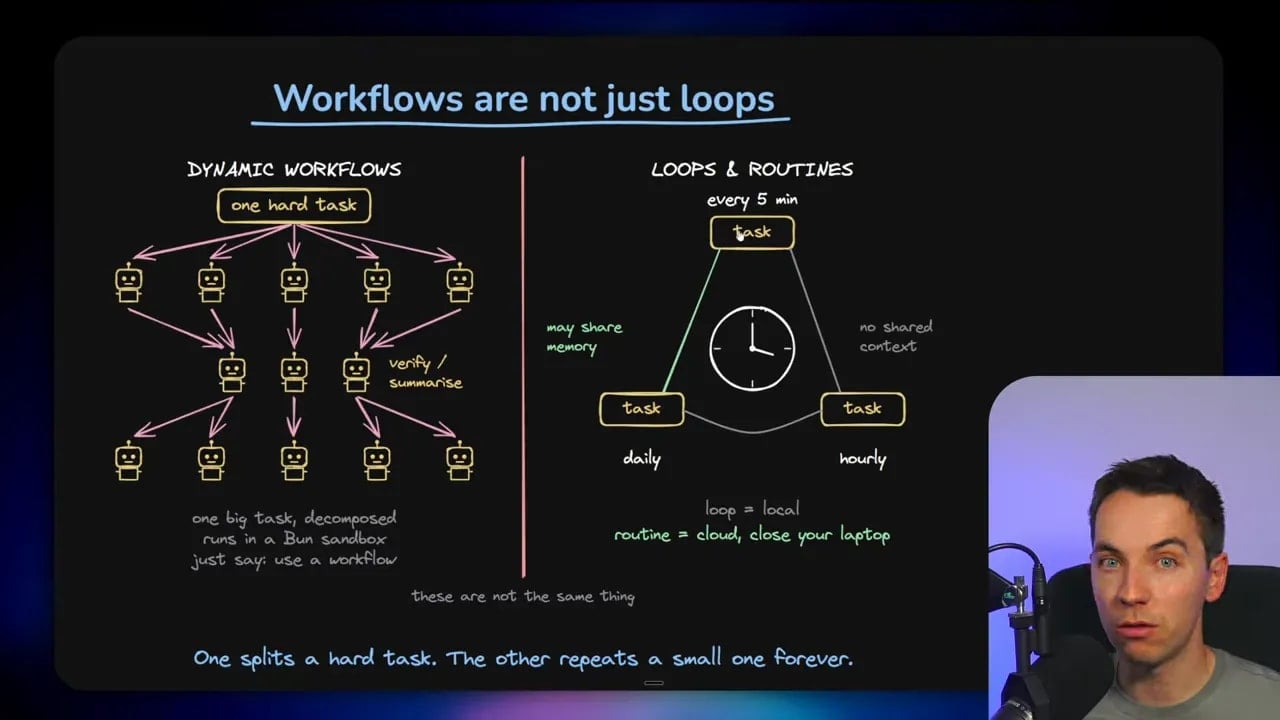
Loops and routines are simpler scheduled mechanisms. A local loop is effectively a repeated job on a machine. A cloud routine acts more like a cron job that runs on a schedule. These approaches can be useful for recurring checks, monitoring, report generation, or repeated maintenance tasks.
People also use “loop engineering” to mean goal-based agent loops. In that case, an agent repeats actions until it reaches a target condition. That can involve a standard while loop, a scheduled process, or a dynamic workflow that keeps iterating based on feedback.
Dynamic workflows are powerful because they can adapt to the work. They can also burn through an extraordinary number of tokens. A task that appears contained can expand into millions of tokens once multiple agents begin exploring, testing, and revising.
That doesn’t make them bad. It means the workflow needs a budget, observable progress, and a clear reason to exist.
Is coding solved? Only for some classes of work
Boris has often been quoted saying that coding is solved. In this discussion, he added an important qualification: coding is solved for the type of coding he does. It isn’t solved for everyone.
That distinction is essential.
Modern coding agents can be remarkably effective for contained applications, internal tools, prototypes, and tasks with clear requirements and good test coverage. They can build a surprising amount in one shot. They can also make developers much faster at iteration, debugging, scaffolding, refactoring, and exploring unfamiliar code.
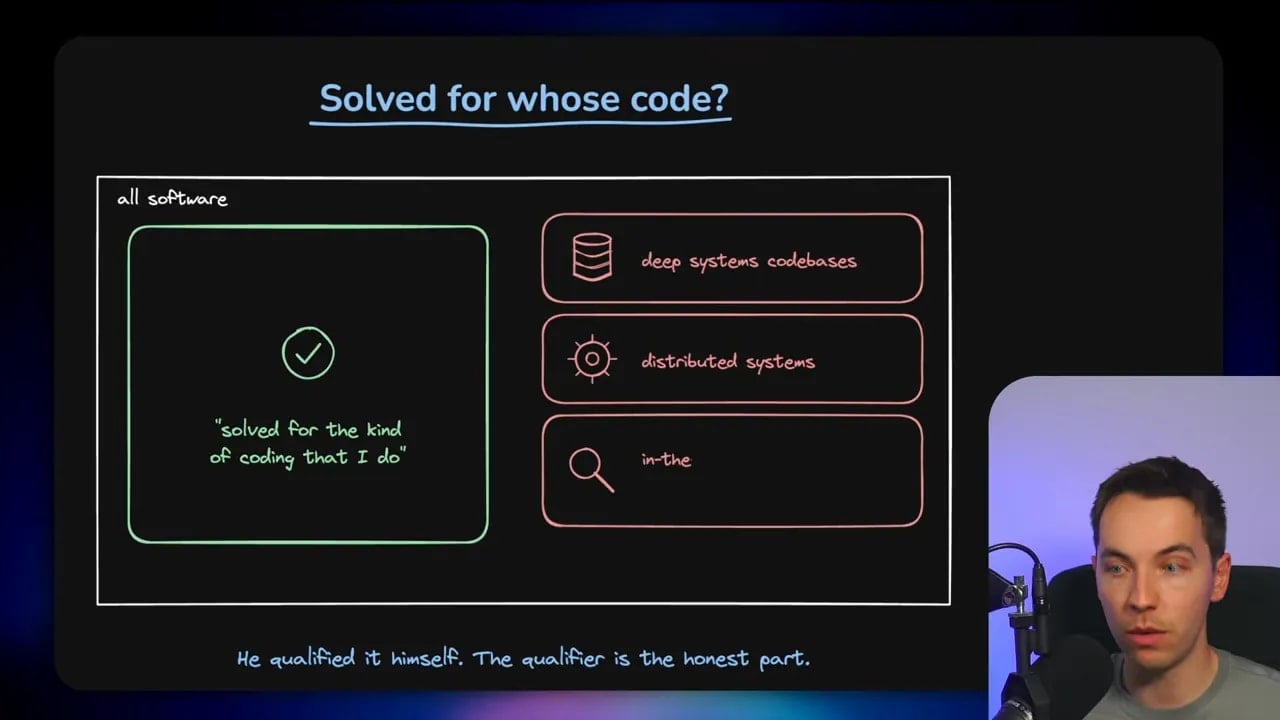
Yet many hard categories remain:
- Deep systems codebases.
- Distributed systems.
- Complex performance and reliability work.
- Low-level infrastructure.
- Detailed UI verification.
- Security-sensitive systems.
- Large products with unclear or changing requirements.
- Work where the acceptance criteria live mostly in human judgment.
“Coding is solved” may be true for a small, contained internal app with a clear outcome. It is very much not true for every codebase or every engineering problem.
What is still worth learning the hard way
The final point is the one I think matters most for people learning computer science or trying to work effectively with AI coding agents.
Learn the technical foundations, but also learn how to apply them. Build design judgment. Talk to users. Understand products. Learn business context. Learn data. Learn how requirements become systems.
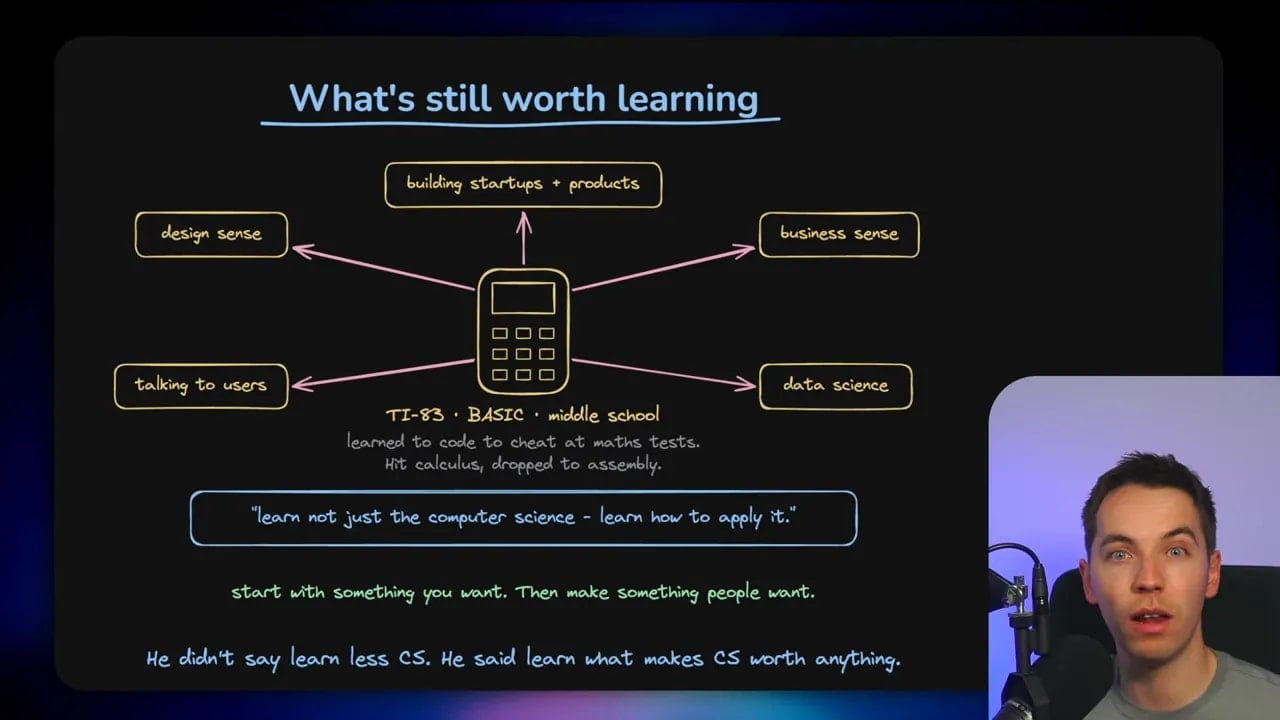
AI can help generate code once someone defines what should be built. The harder and more valuable work often comes before that: deciding what problem matters, identifying who has it, defining the constraints, setting success criteria, and choosing the right architecture.
Those are functional system requirements. They are the inputs that turn a vague idea into something an agent can actually build and verify.
I take a lot from Boris Cherny’s approach. I like the push to try harder tasks. I agree that people often over-constrain capable models. I think ablation is a great discipline for CLAUDE.md files, prompts, tools, hooks, and agent harnesses. I also think verification should sit at the centre of any serious autonomous workflow.
At the same time, I wouldn’t take every claim at face value. Claude Code is Boris’s product, and he has incentives and resources that most users don’t share. Prompt injection has not disappeared just because defences have improved. Multi-week experiments remain expensive. Long-running agents can drift badly without strong feedback.
The practical takeaway is simple: remove stale instructions, keep real enforcement controls, give the model room to solve problems, and build systems that can prove whether the work is actually correct.
