
A few weeks ago, Anthropic published a 36 page playbook on securing AI agents like Claude Code. The timing matters.
On one side, I can now give agents far more access than even a year ago. They can read files, call tools, connect to APIs, send messages, write code, and make decisions without stopping every few seconds to ask for approval. On the other side, the cost of attacking systems has fallen through the floor. What once took a specialist months can now be brute forced by a capable coding agent running around the clock.
That changes the security conversation completely.
There is some genuine value in Anthropic’s zero trust framework, even if it’s hard not to notice the convenient overlap between creating fear around powerful agent capabilities and then offering a security answer. I want to sidestep that noise and focus on what actually matters if you’re running Claude Code or building your own custom AI agent on any platform.
The basic mistake people make with AI agent security
Most people still secure systems using a castle model. You build a strong wall around the environment. You protect the perimeter. You verify identity at the door. Then, once something is inside, you treat it as trusted.
That mental model breaks down fast with agents.
I think the easiest way to picture an agent is as a brilliant but very literal intern. On day one, you hand this intern the office keys, access to your inbox, a to do list, some credentials, and permission to go do useful work. That sounds productive, but it should also make you uncomfortable.
When I break an AI agent down, there are five separate parts that matter from a security perspective:
- The model, which does the reasoning
- The tools, which let it act on outside systems
- The memory, which stores context and past interactions
- Its identity, meaning the credentials it carries
- Its autonomy, meaning how freely it can choose the next step
Every one of those is a door. An attacker does not need to crack your whole setup. They just need one door left open.
Why the old perimeter model fails
There are three reasons the old wall around your systems no longer holds.
1. Agents move at machine speed
There often isn’t a human approving every action. Once an agent starts working, tool calls can happen in sequence and at speed. That removes the traditional gatekeeper.
2. Agents read untrusted content all day
Emails, webpages, documents, tickets, chat messages, package documentation, issue threads. Any of these can contain hostile instructions hidden inside otherwise normal looking text.
3. Agents often carry standing access
Plenty of agents have always on credentials. The keys sit in their pocket all the time. If the agent gets manipulated, the attacker gets to borrow those privileges.
Put those together and the castle model falls apart. That model assumes there is a human gatekeeper and that what is inside the wall is trustworthy. Agents remove both assumptions.
What zero trust actually means for AI agents
Zero trust sounds like one of those phrases that gets thrown around until it loses meaning, but the idea is simple.
Never trust. Always verify.
If an agent makes a request, you verify it. If it calls a tool, you verify it. If it tries to write a file, access a secret, hit a service, or reuse a remembered instruction, you verify it again. Internal traffic does not get a free pass just because it came from inside your own system.
The second half of zero trust is just as important. You assume breach.
You do not design your system around the question, “What if someone gets in?” You design it as though the intruder is already inside, already wearing a valid badge, and already moving around. The only real question is how far they can go before you detect them and contain the damage.
The lethal trifecta is the core risk pattern
If I had to compress AI agent security into one idea, it would be the lethal trifecta. Simon Willison put a useful label on it, and it lines up perfectly with what I see in real deployments.
The three ingredients are:
- Access to private data
- Exposure to untrusted content
- The ability to take outbound action
Each of these on its own is usually fine.
An agent that reads the web but cannot touch internal data is not much of a threat. An internal model that can read data but cannot send anything out is much safer. A tool that sends messages but never sees sensitive context is also less dangerous.
The problem starts when all three show up together in the same system.
Then the attack path is obvious. Untrusted content sneaks in an instruction. The agent follows it. The instruction reaches private data. The agent then sends that data out through an external action.
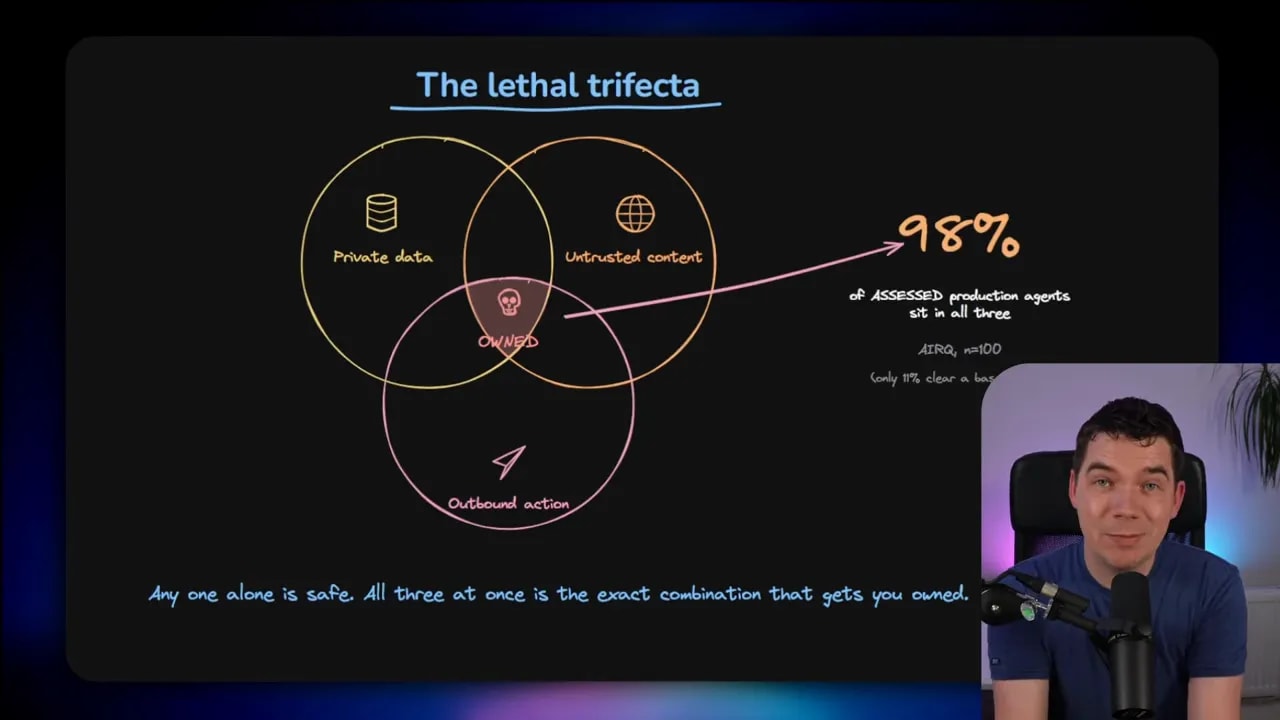
That is not some rare edge case. The Cloud Security Alliance assessed 100 commercial and public production agents and found that 98 percent sat inside all three parts of the trifecta at once. Only 11 percent passed a basic security bar. It is a small sample, yes, but it tells you the shape of the problem. This risky setup is close to the default when people build capable agents.
If you want the original writeup, the CSA lethal trifecta report is worth reading, and Simon Willison’s explanation of the lethal trifecta is one of the clearest descriptions of the pattern.
A real incident that shows the risk clearly
This all sounds abstract until you look at what already happened in the wild.
Someone published an MCP package on npm called Postmark MCP. It looked legitimate. It was for sending email. But in one version, the author slipped in a single extra line that silently added a BCC to every email. That meant every message sent by the agent also went to an attacker’s address.
That one line is the lethal trifecta in action:
- The agent had access to private email
- It installed an untrusted package through a tool chain
- It had permission to send email outward
The result was quiet and ugly. It reportedly affected around 300 organizations and copied thousands of emails per day. There was no crash. No dramatic failure. No obvious red flag.
That is what a supply chain attack looks like in an agent system.
The writeup on the Postmark MCP npm backdoor is a useful case study because it shows how boring these failures can look from the outside. Quiet compromise is often the real problem.
Ask one hard question about every control
One of the most useful ideas in the playbook is also one of the simplest. Judge every security control with one question:
Does this make the attack impossible, or does it just make it tedious?
A lot of security measures only create friction. They slow an attacker down a bit. They move a service to an unusual port. They add rate limits. They rely on obscure paths or unusual query formats. That might work against a lazy human attacker.
It does not work well against an automated agent with near zero cost per attempt.
A capable attacker can script millions of tries overnight. Friction is not the same as security.
The controls that matter are the ones that remove capability outright. Examples include:
- Short lived tokens that expire quickly
- Hardware bound credentials that only work on a specific machine
- Cryptographic identity that is signed and hard to fake
- Network segmentation where there is simply no path from one system to another
If a route does not exist, patience cannot create it. That is a much better place to be.
The five major attack families you need to care about
OWASP has catalogued 17 different agentic AI threats and mitigations. Anthropic compresses these into five broad families, which is a useful way to think about them.
The OWASP agentic AI threats and mitigations resource is helpful if you want the longer list, but here are the main families I focus on.
1. Prompt injection
This is the big one. Text that the model reads contains instructions that hijack its behaviour. That might come from a web page, an email, a PDF, a bug report, or even a code comment.
2. Tool and resource misuse
An agent can abuse the very tools that make it useful. That includes MCP servers, file access, shell commands, APIs, and third party integrations.
3. Identity and privilege abuse
The agent may inherit far more permissions than it actually needs. Once compromised, it becomes a very efficient insider threat.
4. Supply chain risk
Malicious packages, poisoned plugins, unsafe dependencies, and backdoored modules all belong here.
5. Memory and context poisoning
If you poison what an agent remembers, you may not see the impact immediately. The agent can behave incorrectly later, and the source of the problem can be hard to trace. The same goes for corrupted retrieval results in a RAG system.
Most of these map directly back to the five doors I mentioned earlier. Prompt injection targets the model. Identity abuse targets credentials. Tool misuse targets actions. Memory poisoning targets context. Supply chain attacks can ride across almost all of them. Autonomy is what makes every other problem move faster.
Identity is usually the weakest link
Another report that caught my attention came from Gravitee. It surveyed more than 900 executives and practitioners. The numbers were rough.
According to that report, 88 percent of organizations reported confirmed or suspected AI agent security incidents in the last year. It also found that more than two thirds of companies could not clearly distinguish agent actions from human actions, and 74 percent of agents had more access than they needed.
That is a serious operational problem. If you cannot reliably tell what the agent did, and you gave it too much access anyway, incident response gets messy very quickly.
The report itself is available as the State of AI Agent Security 2026 report.
The practical zero trust controls that matter most
The playbook lays out a maturity model with foundation, enterprise, and advanced levels. Most people should aim for foundation first. That is the baseline that gets you out of the danger zone.
Here are the areas I think matter most.
Agent identity and authentication
If agents talk to services or to other agents, static API keys are a bad habit. A lot of people still drop secrets into a .env file and move on. If a coding agent can read the project, it can read the .env file too. If it gets prompt injected, those secrets can walk straight out of your environment.
Use short lived tokens issued by an identity provider where possible. Auto refresh them. Better again, retrieve secrets from a proper vault when needed rather than storing them in plain project files.
Access control and authorization
Authentication alone is not enough. A perfectly authenticated agent can still do plenty of damage if it has broad rights.
Apply least privilege. Give the agent only the permissions required for the job. Keep roles narrow. Segment resources. Prevent easy movement into adjacent systems.
This is one place where deny by default matters. Write access and command execution should require explicit approval unless you have deliberately allowed them.
Auditing and observability
You need logs of agent actions with timestamps and enough context to reconstruct what happened. That includes being able to identify the specific agent, session, and user involved.
If you cannot answer who did what, when, using which credential, and through which tool, then you do not really control the system.
Behavioral monitoring and response
Know what normal looks like. Then detect when the agent goes off script.
That could mean a strange sequence of tool calls, odd volumes of requests, attempts to access unfamiliar resources, or commands that look suspicious even if they happen to fit an allowed pattern.
Input validation and output controls
Treat incoming content as untrusted by default. Sanitize it. Validate structure and length. Use allow lists where appropriate. Block known dangerous commands. Constrain outputs when an outbound action carries real risk.
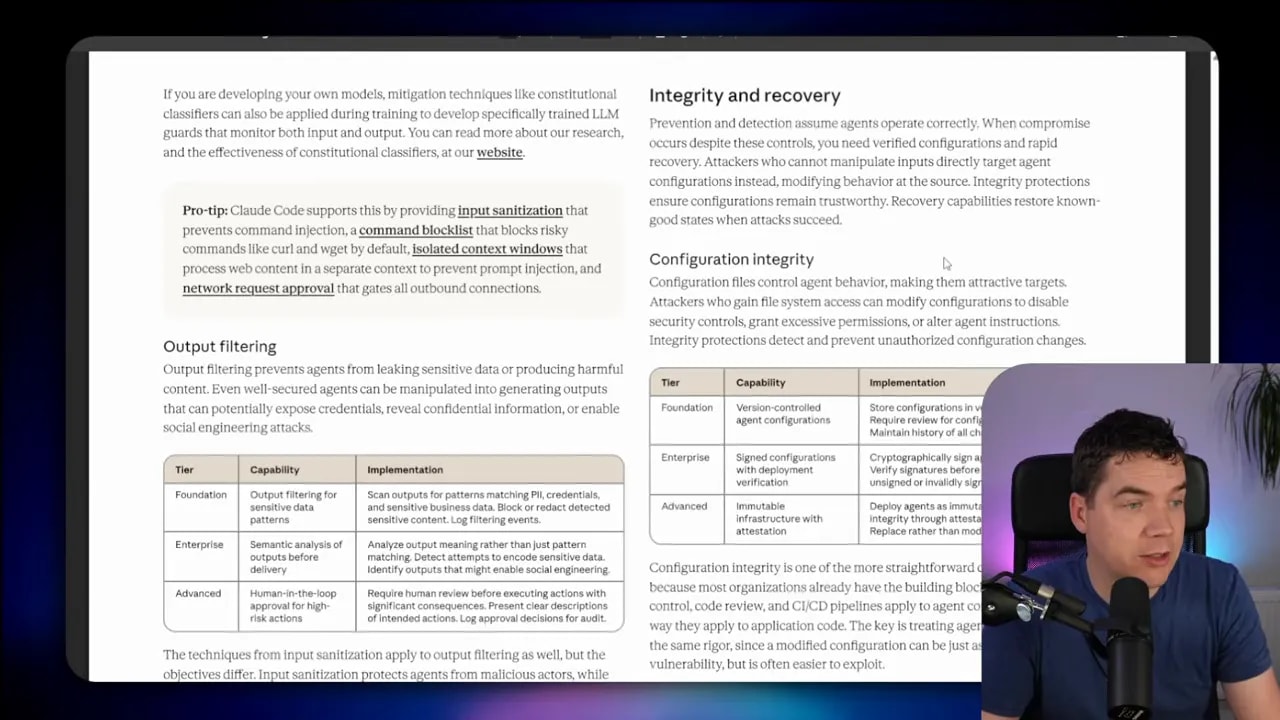
Recovery and rollback
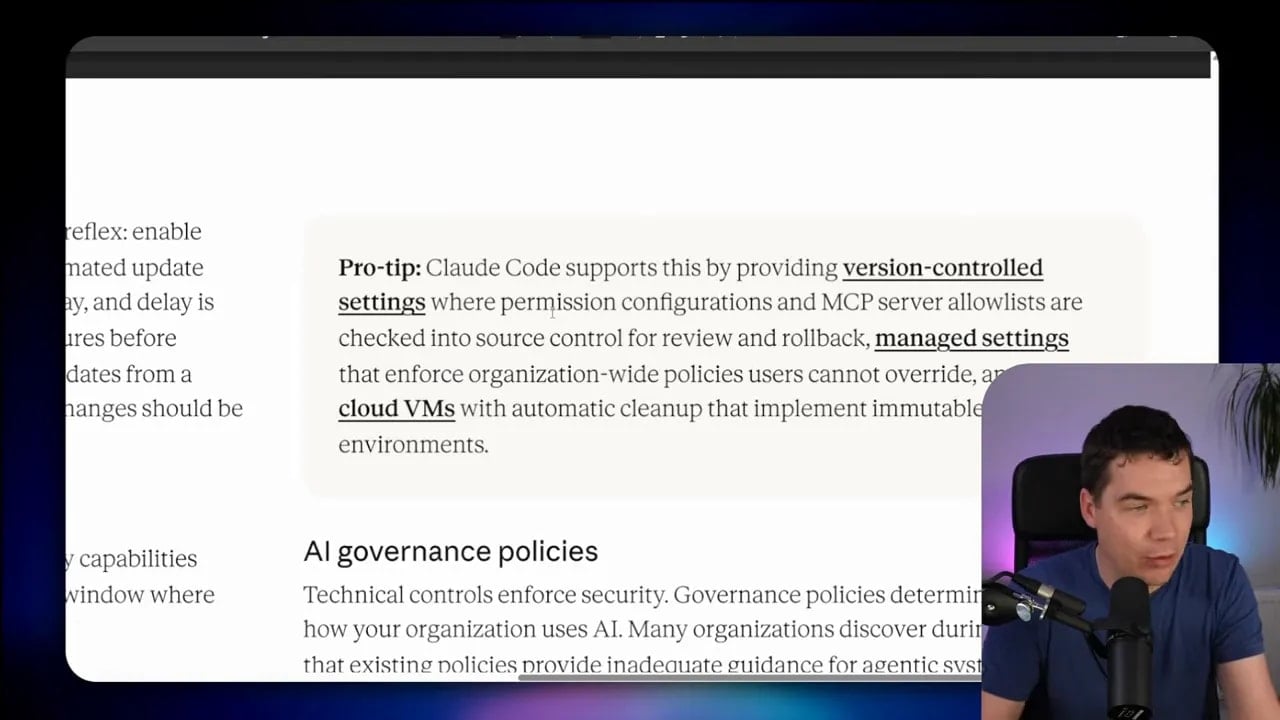
Agents themselves will become attack targets, but so will their configuration. You need approved versions of key configuration files and a documented rollback process so you can restore a known good state quickly.
How this maps onto Claude Code in practice
A lot of the discussion becomes more concrete once you look at Claude Code itself.
Claude Code already provides a few useful controls out of the box:
- Deny by default permissions for sensitive actions
- Explicit approval for writes and execution
- Sandbox execution support
- Write access restrictions
- Managed settings
- OpenTelemetry metrics and audit logging
- Command injection detection
- Input sanitization and command blacklists
- Session isolation for memory
That does not mean the defaults are enough. It means the levers exist. You still have to configure them properly.
The settings.json file is one of the most important pieces. That is where you define approved actions, blocked actions, tool permissions, human in the loop approvals, and more granular control over what the agent is allowed to do.
You can use ask parameters to force approval popups. You can apply rules globally or per project. You can also use pre tool hooks to validate parameters before a tool call runs.
Sandboxing is another big one. If code execution behaves unexpectedly, the sandbox becomes the blast shield. It won’t solve every problem, but it can stop a bad tool call from turning into a much bigger incident.
From a credentials perspective, Claude Code stores API credentials in the operating system credential store and supports helpers that can pull secrets from external vaults. That is far better than leaving them lying around in code or config files.
Memory isolation also matters. Session and user boundaries should be enforced so that context from one task cannot casually bleed into another.
A simple implementation workflow for secure agents
The playbook lays out an implementation workflow that is actually quite sensible. I would summarise it like this.
Phase 1: Identify requirements
Be clear about what the agent is supposed to do and what level of risk you are willing to accept. Security starts with scope. If the mission is vague, permissions expand.
Phase 2: Manage supply chain risk
Know what components your agent depends on. Anthropic borrows the idea of an AI Bill of Materials here. That is useful because agent stacks often include models, prompts, tools, data sources, packages, and external services. Every one of those dependencies can introduce risk.
Phase 3: Define agent boundaries
Assign a clear identity. Limit actions. Define approved and prohibited behaviours. Make high risk operations require explicit review.
Phase 4: Defend against prompt injection
Treat all inputs as hostile until proven otherwise. Separate instruction channels where possible. Validate content before it reaches the model. Reduce the amount of authority any one prompt can exercise.
Phase 5: Secure tool access
Constrain tools individually. Validate tool parameters. Use sandboxes for execution. Tools are where the model stops being a thought engine and starts touching the outside world.
Phase 6: Protect agent credentials
Move away from long lived secrets. Use token expiry, vault retrieval, and machine binding where possible. If someone steals a credential, make it useless or short lived.
Phase 7: Safeguard memory
Keep memory scoped. Isolate users and sessions. Be careful about what gets persisted. Poisoned memory creates delayed failures that are hard to diagnose.
Adding another policy layer with the Microsoft Agent Governance Toolkit
If you want an extra layer on top of native controls, the Microsoft Agent Governance Toolkit is a solid option. It is open source under an MIT licence and adds policy enforcement, zero trust identity ideas, sandboxing support, and auditability across different coding agent workflows.
There is also a native Claude Code package for it.
Once installed, you can inspect status, policy locations, and audit log paths. By default, it is very conservative. That is exactly what you want from a governance layer.
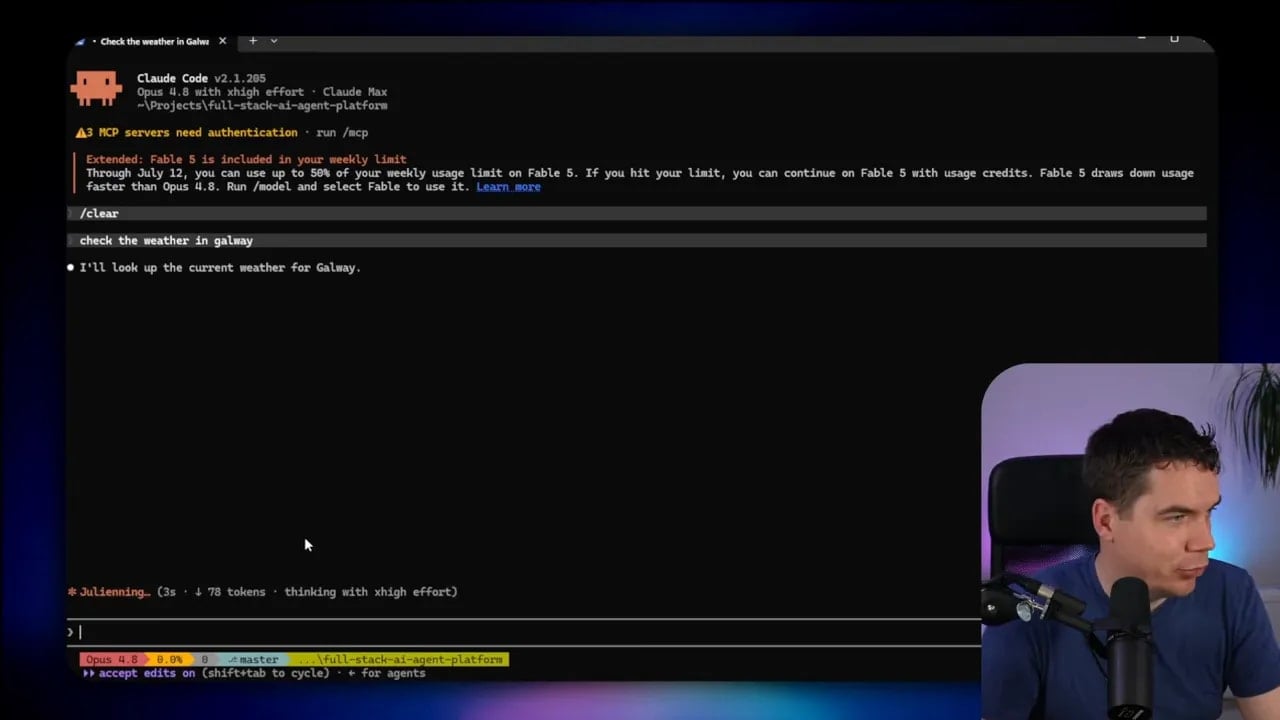
One useful detail is how it layers on top of Claude Code’s native permission system. If I ask the agent to do something like check the weather, that can trigger a pre tool hook and ask for approval before the action goes through.
The policy document looks very similar in shape to Claude’s own settings configuration. You can define:
- Allowed tools
- Blocked tools
- Tools that require human review
- Specific blocked operations such as recursive deletes
- Rules around secrets access
- Audit logging of all activity
That extra policy layer is useful if you want stronger governance without having to build everything from scratch.
Security should match the risk, not kill the workflow
Outside of enterprise settings, full zero trust can add a lot of friction.
If you enable every approval prompt in something like accept edits mode, the experience can become painful very fast. There is a reason many people ease off those controls for lower risk work.
That is why I think a risk based approach is the right way to think about this.
For lower risk projects, you may decide the native auto classifier in Claude Code is enough, especially if there is no sensitive data and no meaningful production impact. For higher risk work, that would not be enough.
I ran an autonomous agent on a hobby project a few months ago that operated continuously. To reduce risk, I spun it up inside an isolated VM on my hypervisor so it had no access to the rest of my filesystem. That isolation was useful. It was not perfect, because I had not tightly restricted which domains it could call out to. But the project did not involve sensitive data, and I was comfortable with that tradeoff.
That is the point. Security is not one size fits all. The right setup depends on the damage a mistake could cause.
Small practical steps that make a real difference
If you are not in a heavily regulated environment, here is the short list I would prioritise first.
- Stop giving agents standing access they do not need. Reduce permissions aggressively.
- Move secrets out of .env files where possible. Use a vault or short lived credentials.
- Put risky agents in isolated environments. Use a VM, container, or sandbox.
- Constrain outbound actions. Email, API calls, shell access, and file writes deserve extra scrutiny.
- Log everything important. Especially tool calls, writes, and credential use.
- Treat every external input as hostile. Web pages, documents, emails, and package code are all untrusted.
- Review your dependencies. MCP servers, packages, and plugins are all part of the attack surface.
Those steps are not glamorous, but they reduce risk fast.
Lock down the resources around the agent too
It is easy to focus only on the agent and forget the wider system around it.
Your external platforms often provide useful guardrails. Use them.
If you use API providers or routing layers, set spending limits and key restrictions. If a key only needs access to one project, scope it to that project. If a key should not be able to perform certain operations, disable them. Put hard limits on what damage an exposed key can do.
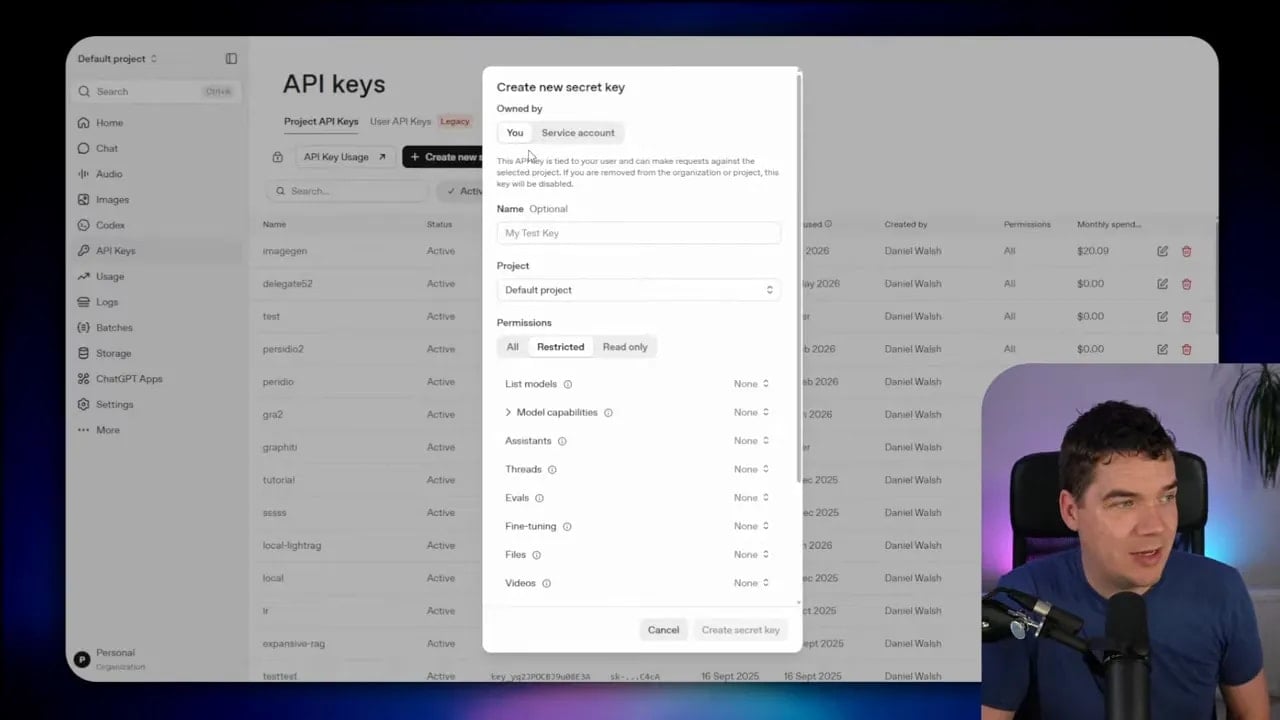
I also do see real value in proper secret management systems such as AWS Secrets Manager, Infisical, or Bitwarden for production environments. None of them are magic, and none are immune to compromise, but they are a much better place for important credentials than source code, config files, or scattered local notes.
If you want to look at the sources behind the framework itself, Anthropic’s Zero Trust for AI Agents playbook is the main reference point, and it is worth reading directly.
