DeepSeek keep doing something I wish more AI labs would do. They push model performance forward, then they open source the useful part.
This time, the release wasn’t a new language model. It was something more practical for anyone running local AI or serving models in production. It was DSpark, and the key thing to understand is this: DSpark is a speed layer.
The model itself doesn’t suddenly become smarter. The weights don’t change. The answers don’t change. What changes is the way the model gets served, so it can produce the same output faster.
DeepSeek reported a 60 to 85 percent speedup on their own V4 stack in production. That headline is real, but it also needs context. Those numbers come from a data center setup with many users sharing GPUs, and a big part of that gain depends on a scheduler that reacts to live load. On a single local GPU, the picture is a bit different.
So I wanted to test what this looks like on an actual local machine. I ran the DSpark Qwen3 8B checkpoint on my RTX 5090 with 32GB of VRAM. I tested it first inside DeepSeek’s own DeepSpec framework, then with the nightly build of vLLM where DSpark has already landed, and finally inside a real local AI agent app.
The result was impressive. In the right setup, I saw my Qwen3 model go from roughly 92 tokens per second to around 370 to 399 tokens per second depending on the task.
That sounds almost too good, so it helps to understand what DSpark is actually doing under the hood.
DSpark is about inference speed, not model quality
If you’ve been around local LLMs for a while, you’ve probably seen a familiar pattern. New models arrive, benchmarks improve, but response speed still feels like one of the biggest practical limits. That’s especially true if you care about running things locally.
DSpark attacks that exact problem.
It doesn’t retrain the base model. It doesn’t fine tune the model. It doesn’t alter the target model’s core intelligence. Instead, it changes the inference engine layer around the model so generation becomes much more efficient.
That matters because inference speed is often the difference between a model feeling usable and a model feeling frustrating.
For coding, tool use, retrieval workflows, and agent loops, speed compounds. If an agent needs to reason, write code, call tools, inspect outputs, and respond several times in one chain, every improvement in token generation speed makes the whole app feel far sharper.
Why LLMs are slow in the first place
To understand DSpark, it helps to understand how a language model normally writes text.
When you prompt a model, it doesn’t generate the full answer in one shot. It produces text one token at a time. A token is roughly a word, or maybe part of a word. The model looks at everything written so far, which includes your prompt plus its own generated text, then predicts the next token. After that, it appends the token to the sequence and repeats the process again.
That loop keeps going until the response is done.
Here’s the important part. The slow bit usually isn’t the arithmetic itself. The slow bit is moving the model’s weights through the GPU again and again for every token.
Take an 8 billion parameter model like Qwen3 8B. Every single new token means another pass through those weights. So if the answer is 100 tokens long, you’re effectively hauling the entire model through the chip 100 times.
Modern GPUs can do the math quickly. But memory movement is the bottleneck. The processor often ends up waiting for data more than it waits for compute.
That’s why generation feels slow even when the hardware is powerful.
Reading is cheap. Writing is expensive
There’s another detail that explains why speculative decoding works so well.
If you paste a long document into a chat, the model can usually process that input very quickly. It can read a lot of existing text in parallel. But when it writes an answer, it still has to crawl forward token by token.
So there’s a huge difference between reading and writing.
Reading or checking text can happen in parallel. Writing new text can’t, because each new token depends on the one before it.
I like to think of it like this:
- Writing an essay takes time because every sentence depends on the previous one.
- Marking an essay is much faster because you can scan and judge large chunks at once.
That same pattern holds for LLMs. Checking several candidate tokens in one pass can cost about the same as writing a single token, because the model is still doing one pass through the weights.
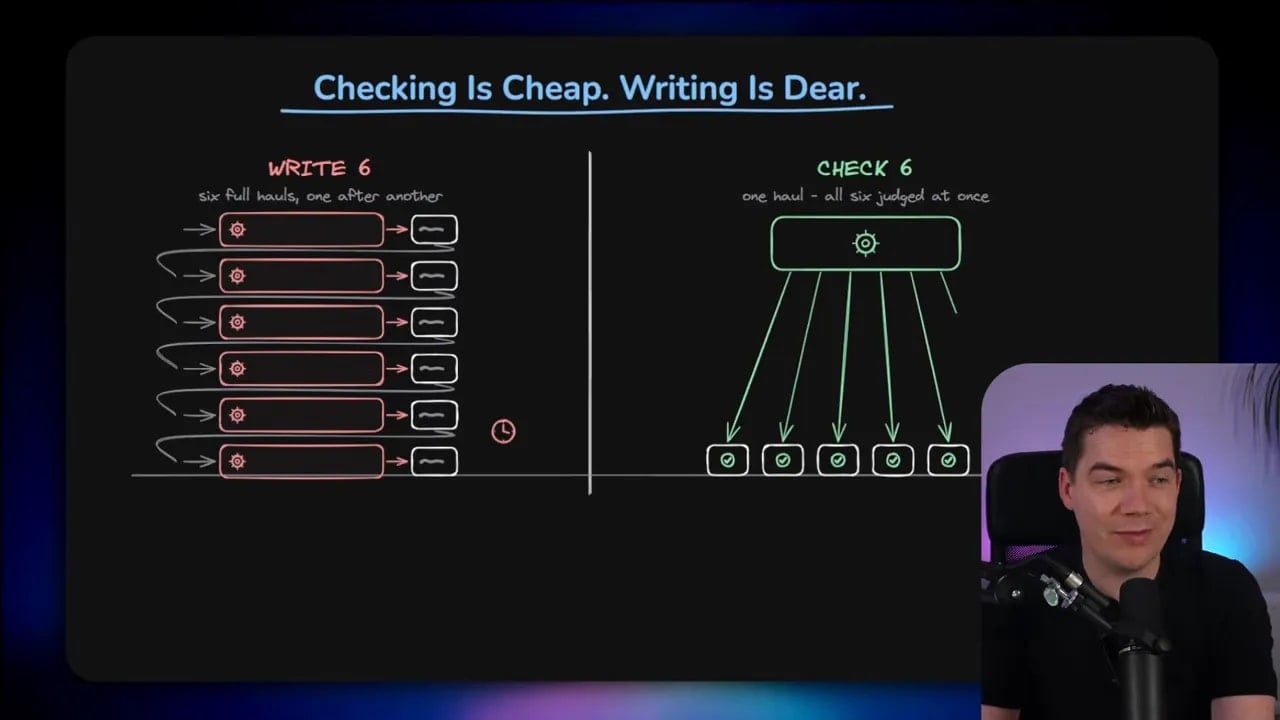
That’s the core opening DSpark uses.
Speculative decoding in plain English
The general trick behind DSpark is called speculative decoding.
The idea is simple. Instead of forcing the large model to write every token itself, you let a smaller and faster model guess a short block of upcoming tokens. Then the large model checks those guesses in one pass.
If the large model agrees with the guess, you keep those tokens. If it disagrees, you throw away the bad part and continue from the last accepted point.
Crucially, the large model still approves every final token. That means the output quality stays the same. In deterministic settings, the output can be byte identical to what the main model would have produced alone.
So the quality doesn’t drop just because a smaller draft model got involved. The draft model is just proposing text. The main model remains the final authority.
When the drafter guesses well, you skip a lot of expensive writing. When it guesses badly, the larger model catches the mistake and rejects it. So from a quality standpoint, this is one of those rare techniques where you don’t really have a downside. The question is simply how much speed you gain.
I used LM Studio first to visualize the idea
Before getting into DSpark itself, I wanted to show the vanilla version of speculative decoding because it makes the concept easier to grasp.
LM Studio already supports standard speculative decoding. I loaded a Qwen3 32B quantized model, asked it to generate a dummy HTML page, and watched the baseline run. Then I added a much smaller Qwen draft model and repeated the same task.
With the draft model active, LM Studio highlights accepted draft tokens in green. That’s the useful part visually. The green tokens show the places where the big model didn’t have to write from scratch because it accepted the smaller model’s guess.
In that example, the speed gain was real but modest. That’s what standard speculative decoding often looks like. It helps, but acceptance rates vary a lot depending on the task.
Predictable outputs tend to work best. Code and maths are usually easier for a draft model to guess. Open ended chat is less predictable, so acceptance rates fall.
That becomes important later, because the same pattern showed up in my DSpark tests too.
What makes DSpark different
Speculative decoding itself isn’t new. DSpark is DeepSeek’s improved version of it.
There are really two innovations here:
- A smarter drafter
- A load aware scheduler
If you’re running one local GPU, the drafter is the part that matters most. If you’re serving lots of users across shared GPUs, the scheduler becomes a big deal too.
The model never changed. The engine did.
One of the best things about DSpark is that the target model stays frozen. Same model, same base weights, same quality. The speed comes from attaching a small extra head and changing how the generation process is orchestrated.
That means the gain is operational rather than intellectual. You’re not upgrading the model’s reasoning. You’re removing wasted work.
Innovation one: a better drafter with a Markov head
The fastest way to draft a block of tokens is to guess the whole block in parallel, all at once.
That sounds ideal, but there’s a catch. If every token in the block gets guessed independently, each position doesn’t know what the token next to it chose. So the block can become incoherent.
You can end up with awkward local mistakes. For example, instead of producing “blue light,” a parallel draft might produce “blue blue light.” The positions were guessed independently, so they didn’t coordinate.
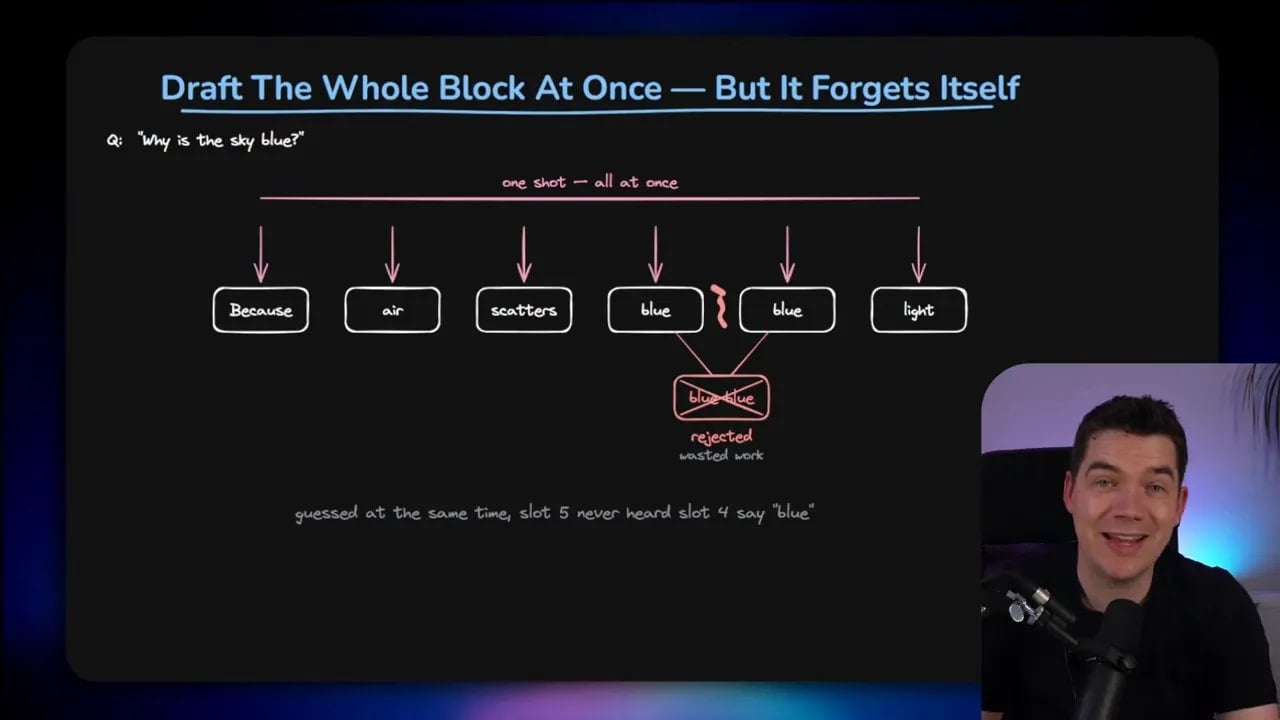
If the large model rejects that bad tail, the work was wasted.
DSpark fixes this by adding a tiny Markov head. Its job is to give each token a little awareness of the token immediately before it. So you still get the speed of block level parallel drafting, but with much better local coherence.
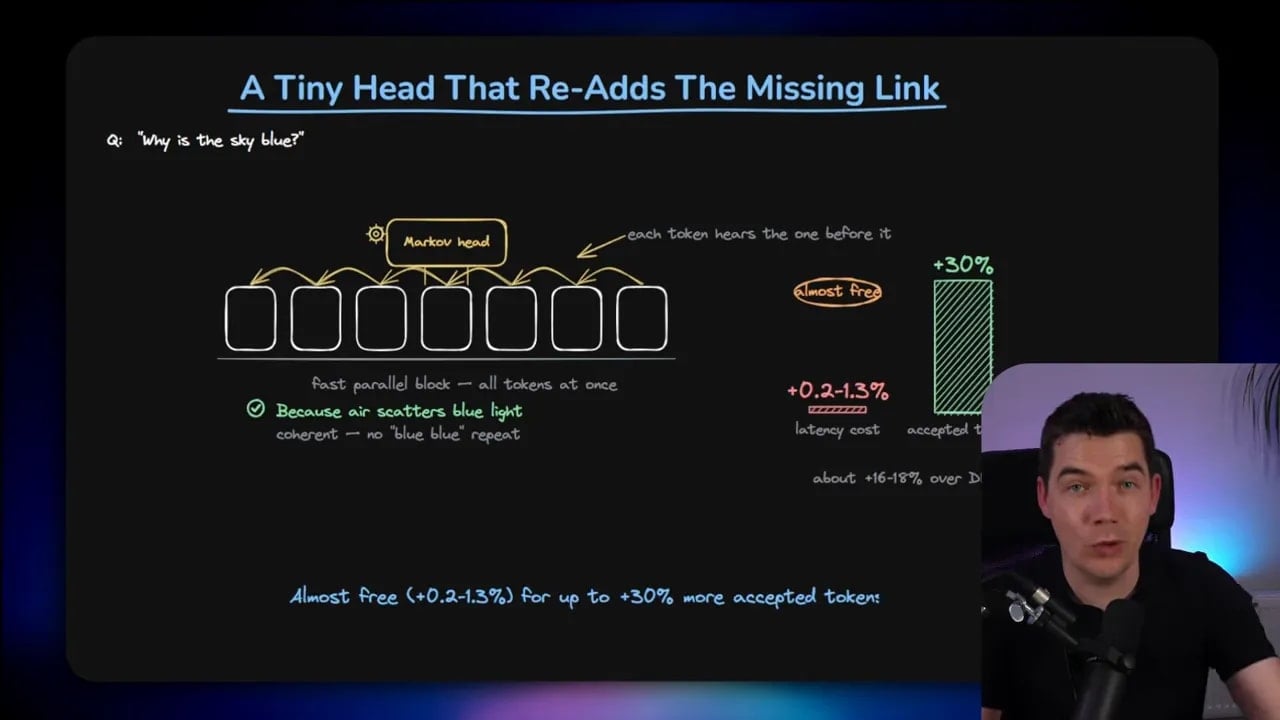
This extra head is lightweight, so it adds very little overhead. But DeepSeek reported that it can improve accepted tokens per pass by up to 30 percent. That’s a big deal, because accepted draft tokens are the whole game here.
Innovation two: a scheduler that reads the room
The second part of DSpark is the scheduler.
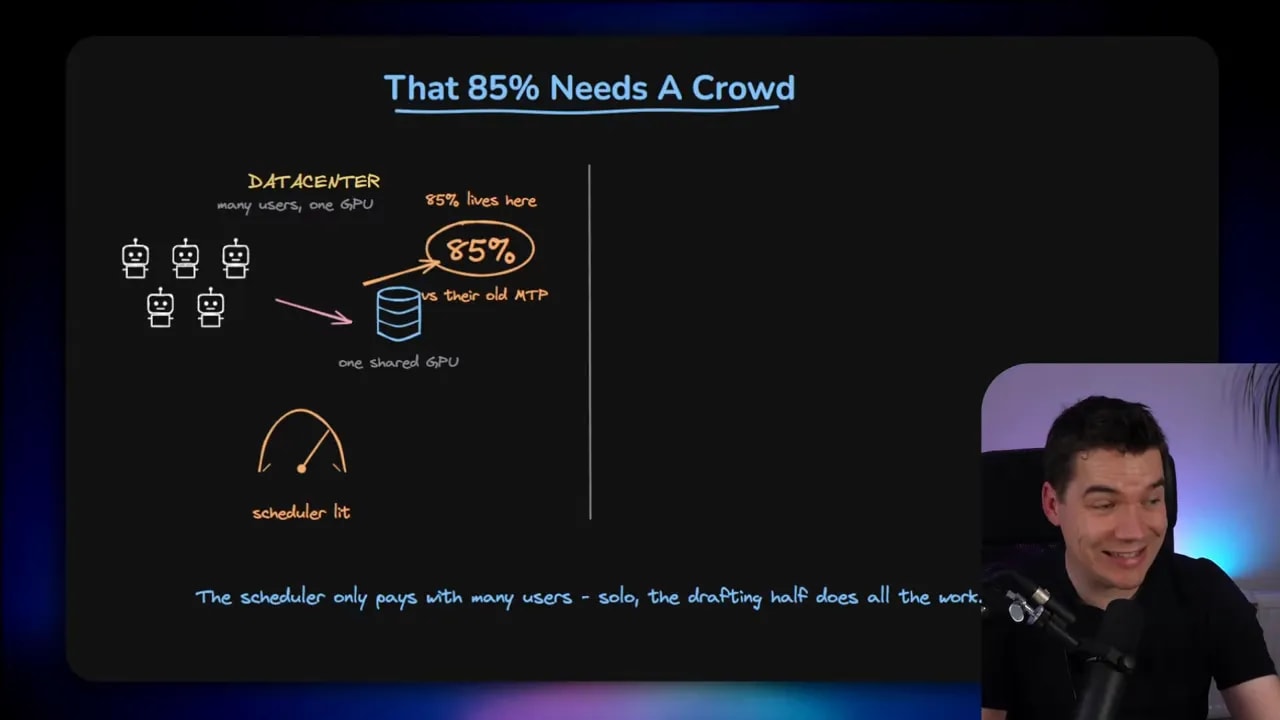
Earlier I said checking is almost free. That’s true when the GPU has spare compute capacity. But if a shared server is already busy, extra checking isn’t free anymore. It starts competing with real requests.
So the right amount of verification depends on current load.
DeepSeek’s scheduler keeps track of how busy the GPUs are and adjusts verification depth dynamically. If things are quiet, it can verify more tokens per pass. If the server is slammed, it backs off to protect throughput.
This is a huge part of why DeepSeek can quote 60 to 85 percent gains in production. Those are data center numbers, where many users share the same pool of compute.
On a single local GPU, I don’t need that scheduler. There’s no crowd to coordinate. The GPU is mine. So for local use, the scheduler isn’t the main source of benefit. The improved drafter is.
Why the “85 percent faster” headline needs context
It’s worth slowing down here because this is where people can get confused.
The 60 to 85 percent improvement DeepSeek reported is legitimate, but it compares DSpark against their previous production stack, which was already tuned with MTP style speculative decoding. It also assumes a many user environment where adaptive scheduling matters.
For local AI, the practical question is simpler:
How much faster does the model feel on one GPU when I switch to a DSpark checkpoint?
That’s what I tested next.
My DeepSpec race on an RTX 5090
I built a small dashboard and benchmark flow called DSpark Arena so I could compare approaches side by side. It uses DeepSeek’s DeepSpec framework under the hood and lets me run benchmark races against different speculative decoding methods.
For the first test, I used three DeepSpec task presets:
- Code
- Math
- OpenChat
I requested 256 tokens per run and used a best of three timing setup. The target model was Qwen3 8B in BF16, loaded onto my RTX 5090.
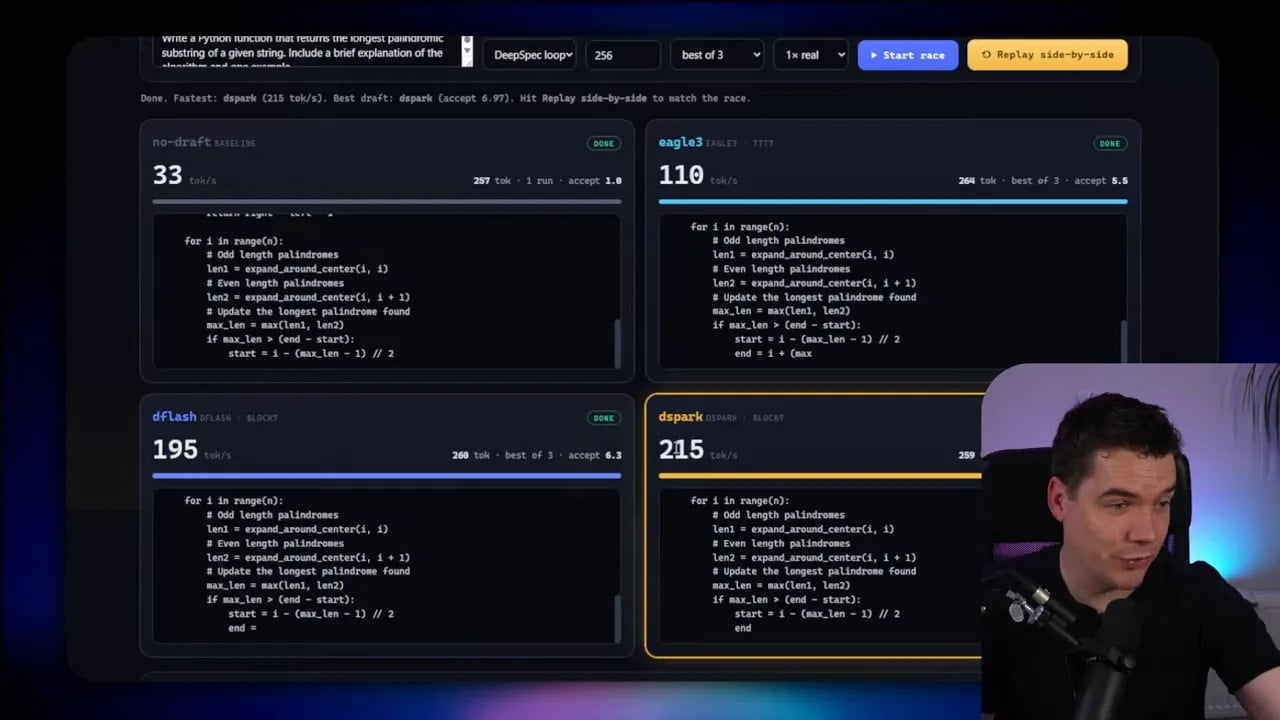
The setup compared:
- No draft baseline
- EAGLE 3
- DFlash
- DSpark
In one of the code races, DSpark finished around 215 tokens per second, ahead of DFlash at about 195 tokens per second.
But raw speed wasn’t the only thing I looked at. The more meaningful metric was acceptance length, which tells you how many draft tokens got accepted per pass.
That’s important because GPU behavior varies a bit run to run. Different tasks also stress the model differently. So if I ran the same race ten times, DSpark wouldn’t necessarily win every single timing sample. There’s always some variance.
What mattered more was that DSpark generally achieved higher accepted draft lengths than DFlash. That lines up with the Markov head idea. Better local coherence means more useful draft tokens survive verification.
Code and math did especially well
When I switched to the math preset, performance stayed strong. That makes sense. Maths and code tend to have more structured, repeatable outputs, which helps the drafter make better guesses.
That’s also why coding models often run with lower temperature. You want consistency and precision more than creativity.
OpenChat was slower, and that was expected
OpenChat told a different story.
Accepted draft lengths dropped sharply. In one sample, DSpark was around 2.8 accepted tokens versus 2.6 for DFlash. Still better, but nowhere near the acceptance levels from code or math.
This is a general rule worth remembering:
- Speculative decoding works best for predictable tasks
- It helps less for creative or open ended generation
So if your main workload is coding, structured reasoning, or deterministic tool chains, DSpark becomes much more attractive.
My vLLM test showed the dramatic jump
After the DeepSpec race, I wanted to see how this looked in vLLM, since DSpark has already been merged into the nightly build through this vLLM PR.
I started with a plain Qwen3 8B model in vLLM as the baseline. That gave me around 92 tokens per second.
Then I unloaded it and loaded the Qwen3 8B DSpark checkpoint. The difference was immediate.
- Code: about 370 tokens per second
- Math: about 399 tokens per second
- OpenChat: about 172 tokens per second
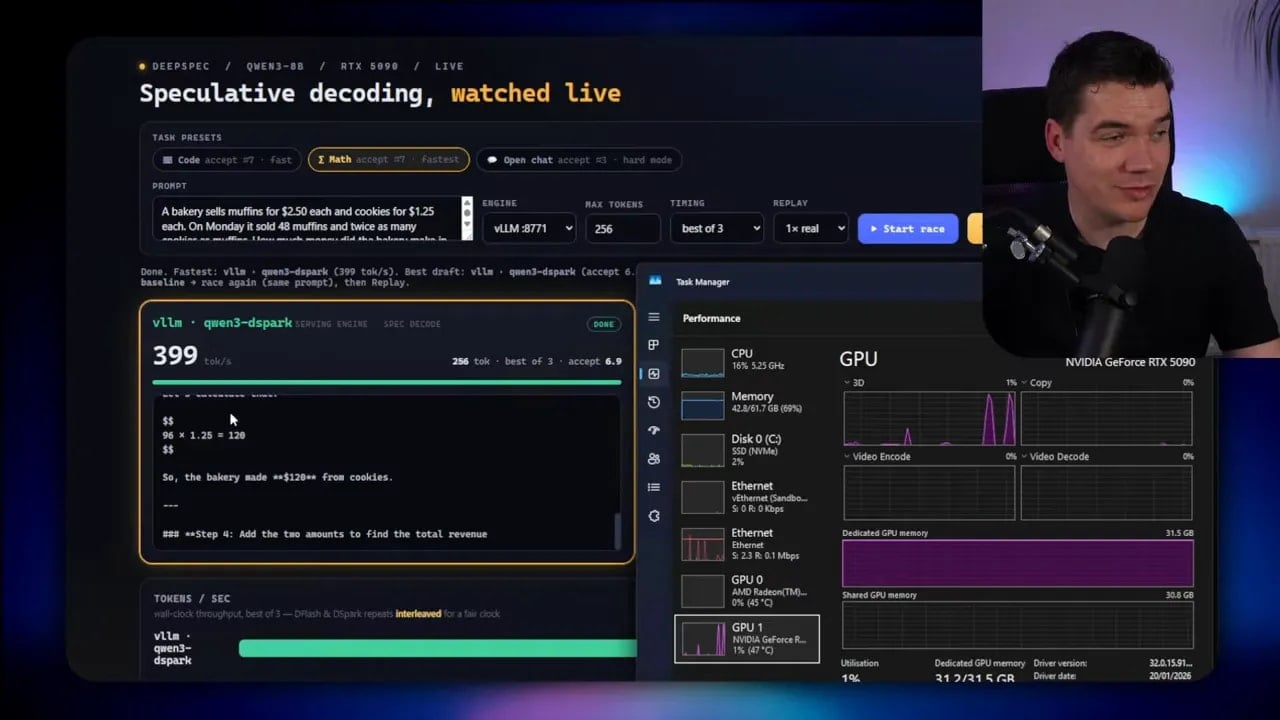
That’s a dramatic step up from the 92 token per second baseline.
Again, the task mix matters. OpenChat was still much lower because the draft model can’t reliably guess as many tokens in more creative settings. But even there, the speedup was meaningful.
For deterministic runs, the results were also repeatable because sampling was essentially disabled. The model kept producing the same outputs and the same acceptance pattern each time.
What this means in a real app
Benchmarks are useful, but I care more about whether this changes the feel of an actual AI application.
So I wired the DSpark powered Qwen3 8B checkpoint into the local AI agent platform I’ve been building. It’s a fully local agentic RAG app with:
- Knowledge base and document storage
- Vector and hybrid search
- Tool use
- Local sandboxed code execution
- Folder and document traversal
In a coding task, the model generated code and iterated on its own output very quickly. It also handled tool calls through isolated containers that spin up and get destroyed after use.
That’s the sort of workflow where raw token speed really matters. Agents don’t just answer once. They think, act, inspect, revise, and continue. Faster generation makes the entire loop feel sharper.
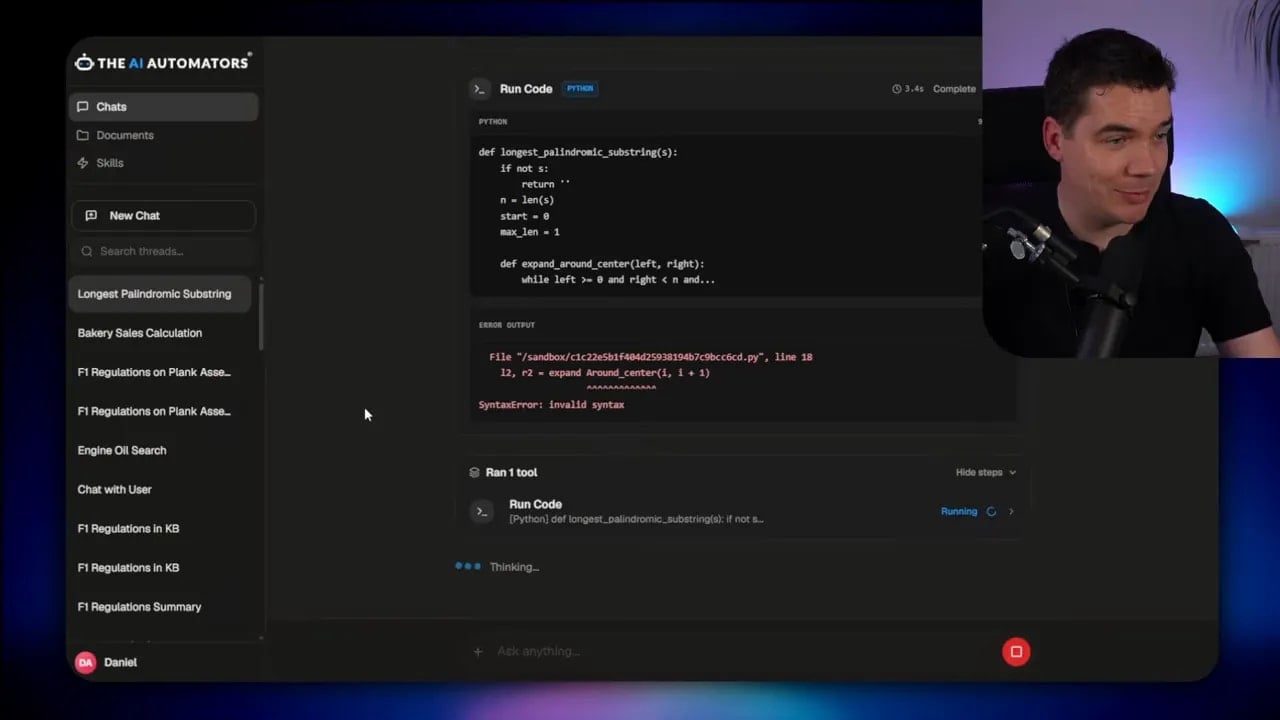
I also tested more open ended interactions, including the ability to trigger web search and ground responses in retrieved information. Then I asked it to check a knowledge base containing Formula 1 regulations from an earlier build. It could search documents, traverse folders, and respond quickly inside the app.
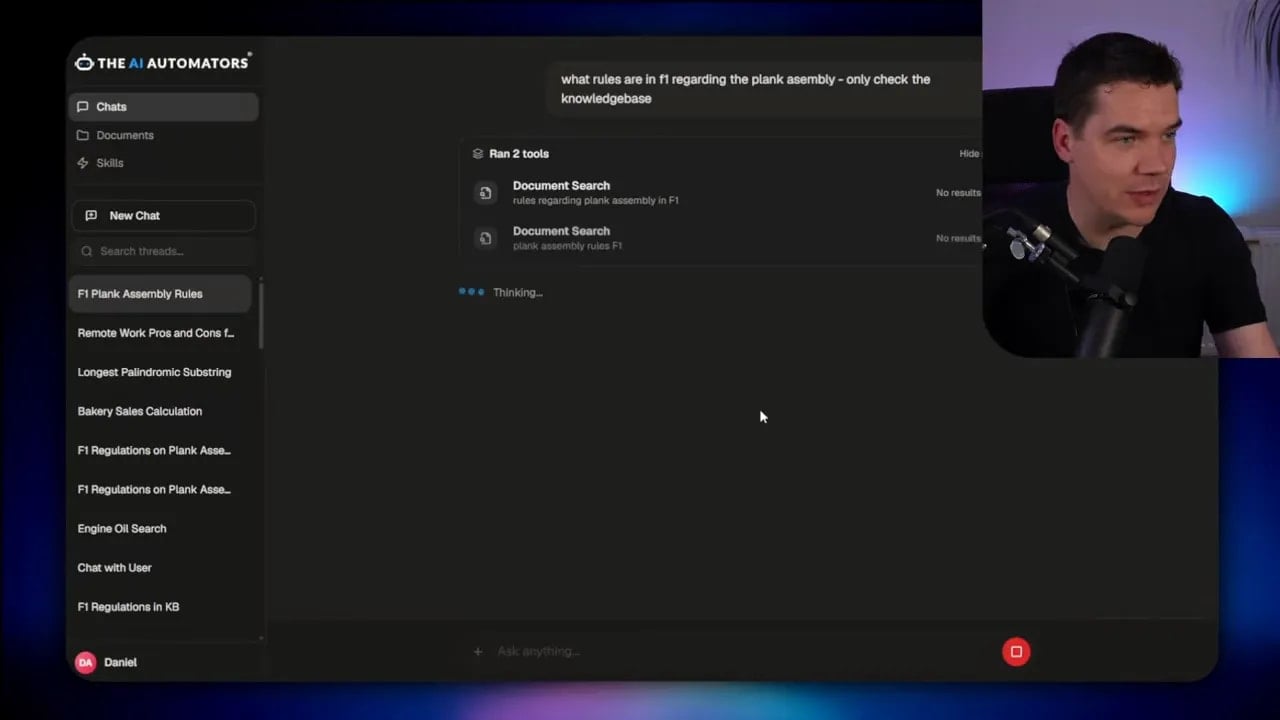
Now, to be clear, an 8B local model is still an 8B local model. You’re not getting frontier cloud model intelligence. But what surprised me was how usable it felt once the speed improved this much.
That’s the real story for local AI. Faster models aren’t just nicer benchmarks. They widen the range of workflows that feel practical on your own hardware.
What you can run right now
If you want to test this yourself today, you can. But there are a few limits to keep in mind.
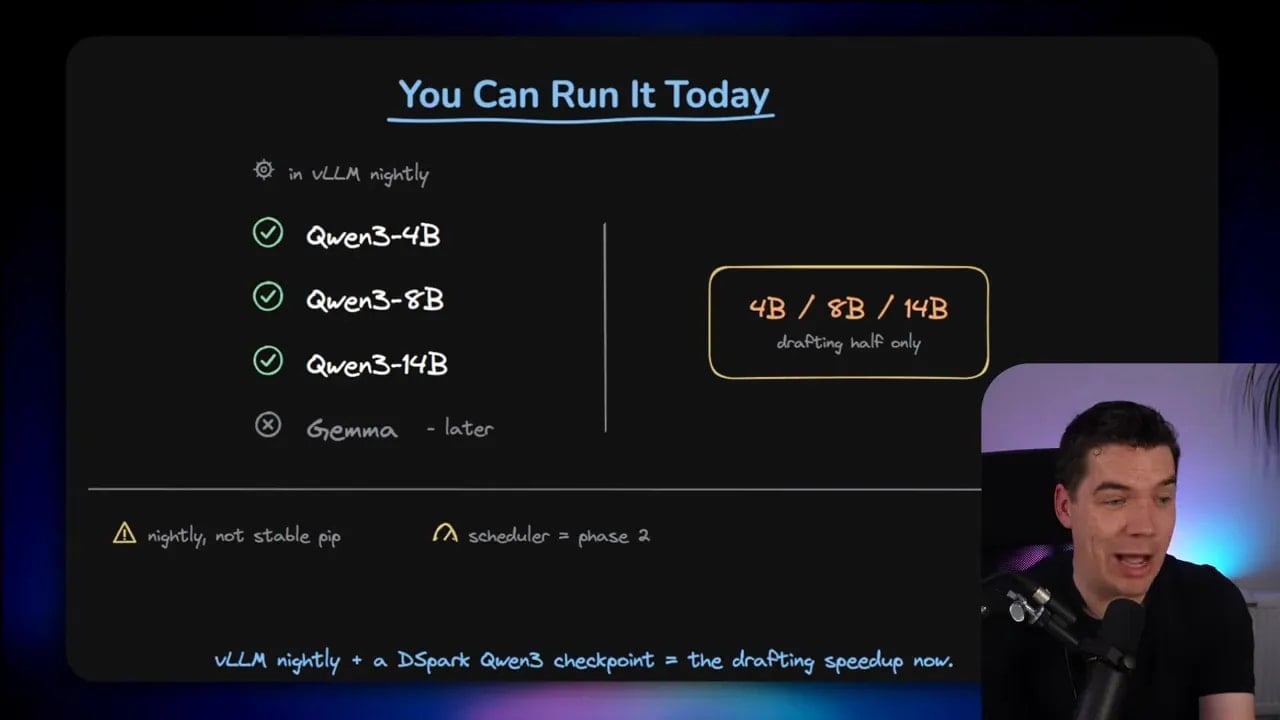
Right now, the easiest path is:
- Use the vLLM nightly build
- Load one of the released DeepSeek DSpark checkpoints
- Stick to the currently supported Qwen3 variants
At the time of my test, that meant DSpark checkpoints for:
- Qwen3 4B
- Qwen3 8B
- Qwen3 14B
You can browse the released checkpoint family from DeepSeek on Hugging Face here: DSpark Qwen3 checkpoints.
There was also mention of Gemma 4 support in the release package, but at the time of my test that wasn’t yet supported in the vLLM path I used.
The current caveats
This part matters.
DSpark is promising, but it’s not a magic switch you can flip on any model you happen to like.
Here are the main caveats:
- It’s in vLLM nightly, not stable
- The scheduler piece isn’t in the local vLLM path yet
- You’re limited to models that already have trained DSpark heads
- It isn’t a universal add on for every LLM
That last point is especially important.
The DSpark head is trained to mimic a specific target model. So the Qwen3 4B head is for Qwen3 4B. The 8B head is for the 8B model. The 14B head is for the 14B model. If you want DSpark on some other model, somebody needs to train a matching head for that exact model.
That’s one reason DeepSeek open sourced the DSpark paper and the DeepSpec codebase. DeepSpec is effectively the recipe for training and evaluating these heads.
So the long term potential is bigger than the current list. But today, support is still model specific.
Also, if your preferred local stack is based on LM Studio or llama.cpp, you’ll need to wait for that part of the ecosystem to catch up with native DSpark integration.
Why I think this matters for local AI
For me, the exciting thing about DSpark isn’t just that a benchmark went up.
It’s that it points to a broader trend. We’re getting better at squeezing real usability out of smaller local models without changing the models themselves. That’s a big shift.
For a long time, the main story in AI was “bigger model equals better result.” That’s still partly true. But another story is now becoming just as important:
better serving can make existing models feel radically better in practice.
If I can take the same Qwen3 8B model and make it feel several times faster in the right workload, that changes the kinds of local apps I can build around it.
It makes coding assistants more responsive. It makes RAG pipelines more practical. It makes tool using agents feel less sluggish. It makes local experimentation cheaper in time, not just money.
That’s why I think DSpark is worth paying attention to even if you’re not running a giant serving cluster.
For local builders, the full 85 percent production claim isn’t the headline. The headline is this:
I swapped in a DSpark checkpoint for Qwen3 8B on one GPU and saw speed jump from about 92 tokens per second to roughly 370 to 399 on structured tasks.
That’s a meaningful improvement. And because the model still signs off on every accepted token, I don’t have to trade away output quality to get it.
I also put the benchmark dashboard and scripts into my DSpark Arena repo, because having a clean way to compare these methods side by side made the whole thing much easier to test.
Right now, DSpark feels like one of those releases that starts small, looks a bit niche at first glance, then quietly changes how people run models once tooling catches up.
Same model. Same answers. Faster engine.