
Baidu recently released an open weights vision language model called Unlimited-OCR, and the name tells you the pitch straight away. The idea is simple. Feed it a long document and let it transcribe the whole thing in one pass, page after page, without the usual slowdown that hits most models as output grows.
That grabbed my attention for two reasons.
First, long document OCR is still awkward. Plenty of models can read a page. Far fewer can keep going across dozens of pages while staying fast and stable. Second, Baidu didn’t build this from scratch. They fine-tuned DeepSeek-OCR, which already made waves for shrinking document inputs through optical compression.
So I downloaded the model from GitHub, spun up a small local app, and tested it on real PDFs. It does work. The more interesting question is whether it’s actually useful enough to change how I’d build a document pipeline.
What Unlimited-OCR is trying to solve
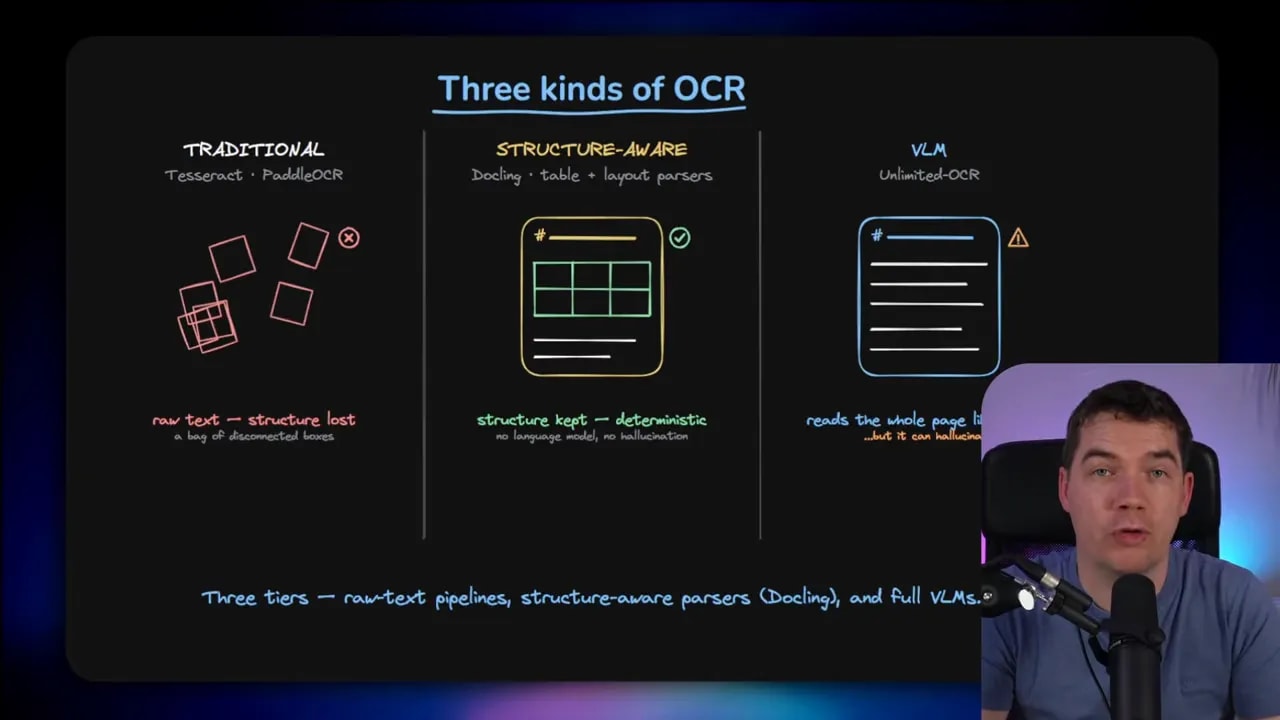
Most OCR conversations get muddled because people group very different tools together. If you want to understand where Unlimited-OCR fits, it helps to split OCR into three broad approaches.
1. Traditional OCR
This is the classic route. Tools like Tesseract and PaddleOCR usually follow a detect-then-read pattern. One step finds where the text sits on the page. Another step reads the characters inside those regions.
That approach still makes a lot of sense.
- It’s fast.
- It’s cheap.
- It can run on a CPU.
- It’s predictable, so you tend to get the same answer each time.
The tradeoff is that page structure often gets lost. You may recover the text, but not the meaning carried by layout.
2. Structure-aware document parsers
This is the middle ground, and for a lot of production work it’s the sweet spot. Tools such as Docling and structured pipelines in PaddleOCR go beyond raw text extraction. They also try to understand reading order, tables, forms, and layout blocks.
That matters for invoices, reports, forms, and manuals. If the table structure matters, or if headings and sections matter, a structure-aware parser can preserve that without needing a large language model at all.
3. Vision language models
This is where Unlimited-OCR sits. A VLM looks at the page more holistically. Instead of running a rigid OCR pipeline, it treats the page more like a visual scene and generates text from what it sees.
That makes VLMs useful for messy documents, unusual layouts, handwriting, and cases where rigid detection pipelines start to break.
But there’s a downside. When a traditional OCR system is unsure, it often fails in obvious ways. A VLM can be more flexible, but when it’s unsure it may invent something plausible. That’s a serious issue if you care about accuracy.
Why VLMs struggle with long documents
The core problem comes down to tokens.
A vision model doesn’t read a page the way a human does. It splits the page into small visual patches. Those patches get turned into tokens. So a document page becomes a sequence of visual tokens, much like a sentence becomes a sequence of text tokens.
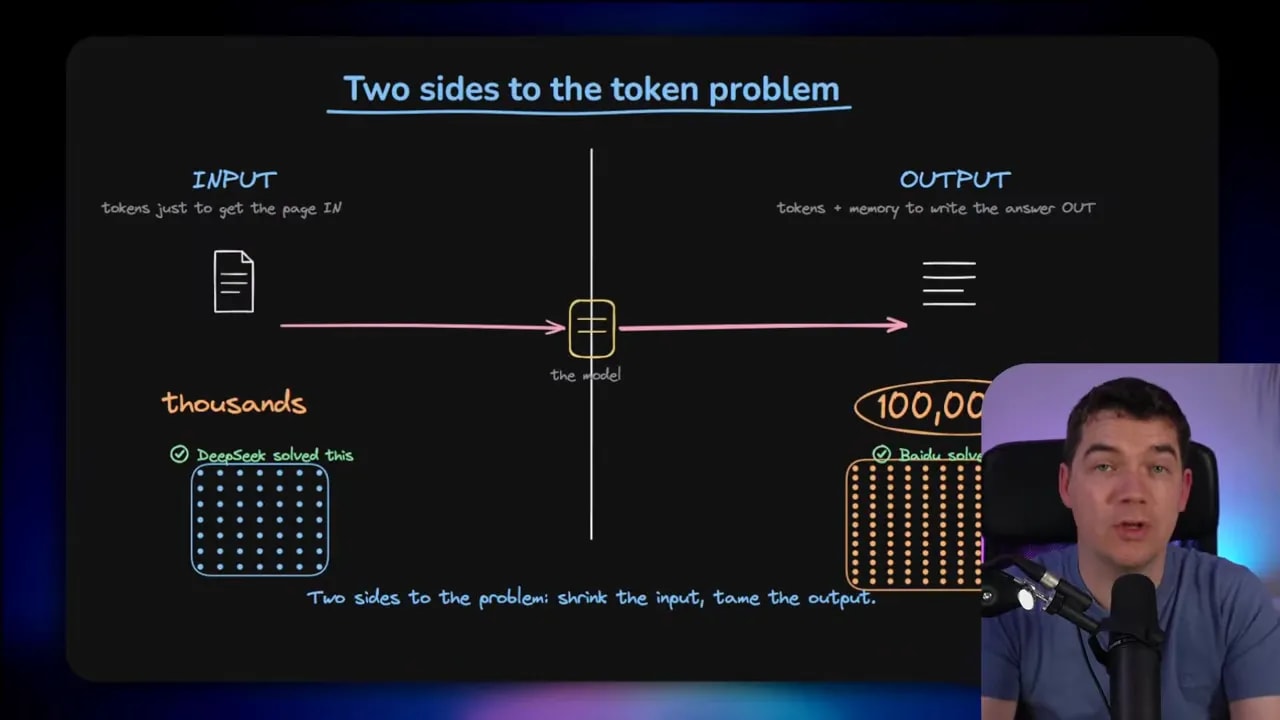
From there, two separate costs show up.
- Input cost, which is the cost of representing the page inside the model.
- Output cost, which is the cost of generating the transcription and holding the growing memory of what the model has already written.
People often focus on the first problem. That makes sense because scanned pages can be expensive to feed into a VLM. But long document OCR has a second problem that is often worse. Once the model starts writing a full transcription, its memory footprint grows token by token.
That growing memory is usually tied to the KV cache. As output gets longer, the cache gets larger. Attention becomes more expensive. The model slows down as it keeps writing.
That means a model may be perfectly fine on short pages, then become painfully slow as you ask it to transcribe 20, 30, or 40 pages in one go.
DeepSeek-OCR already solved half the problem
Unlimited-OCR builds on DeepSeek-OCR, so it’s worth understanding what DeepSeek got right first.
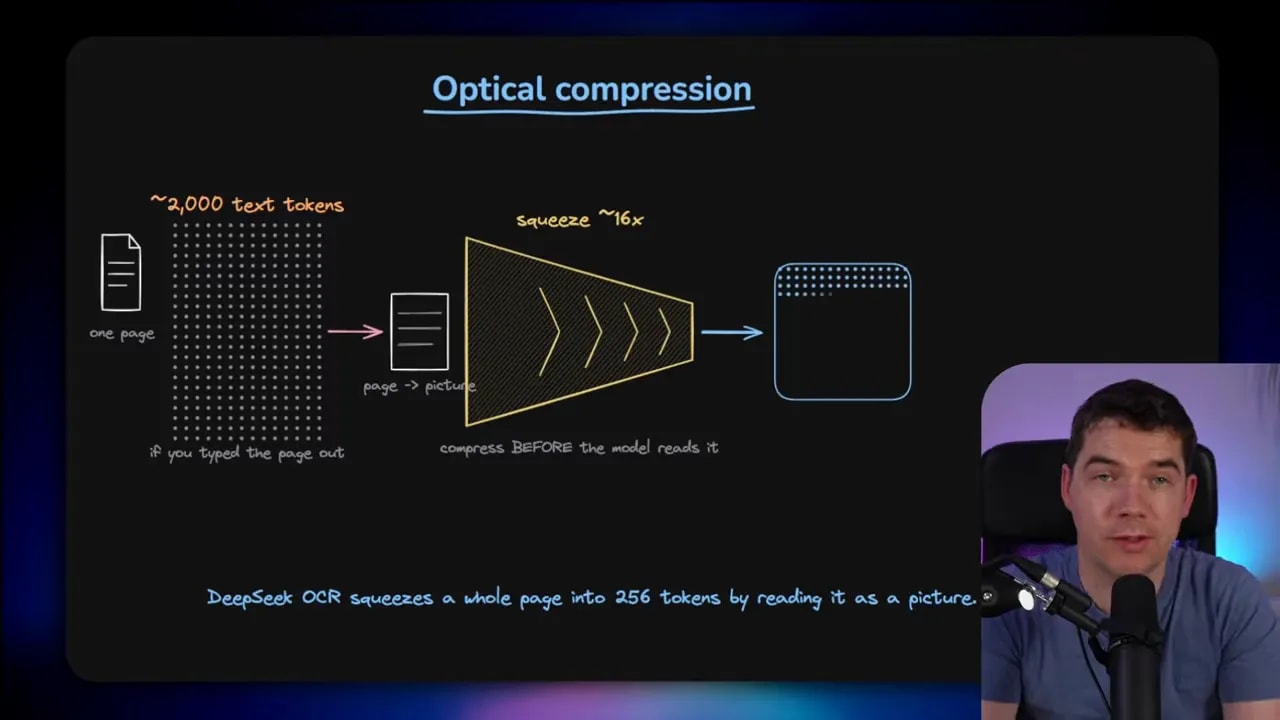
DeepSeek’s key idea was optical compression. Instead of feeding the page into the model at full detail in a very expensive way, it compresses the page into a much smaller set of vision tokens. You still keep the page as an image-like representation, but the token count drops sharply.
That’s the trick that made DeepSeek-OCR interesting. A page that would have cost a huge number of text-like tokens can be squeezed down into a much smaller vision representation.
The benefit is obvious. Lower input cost means lower compute and faster processing. You can keep more pages in context.
There is, however, no free lunch here. Compression trades detail for efficiency. At moderate compression, accuracy stays surprisingly high. Push it too far and quality drops off quickly.
So optical compression doesn’t remove the tradeoff. It just gives you a much better deal than you had before.
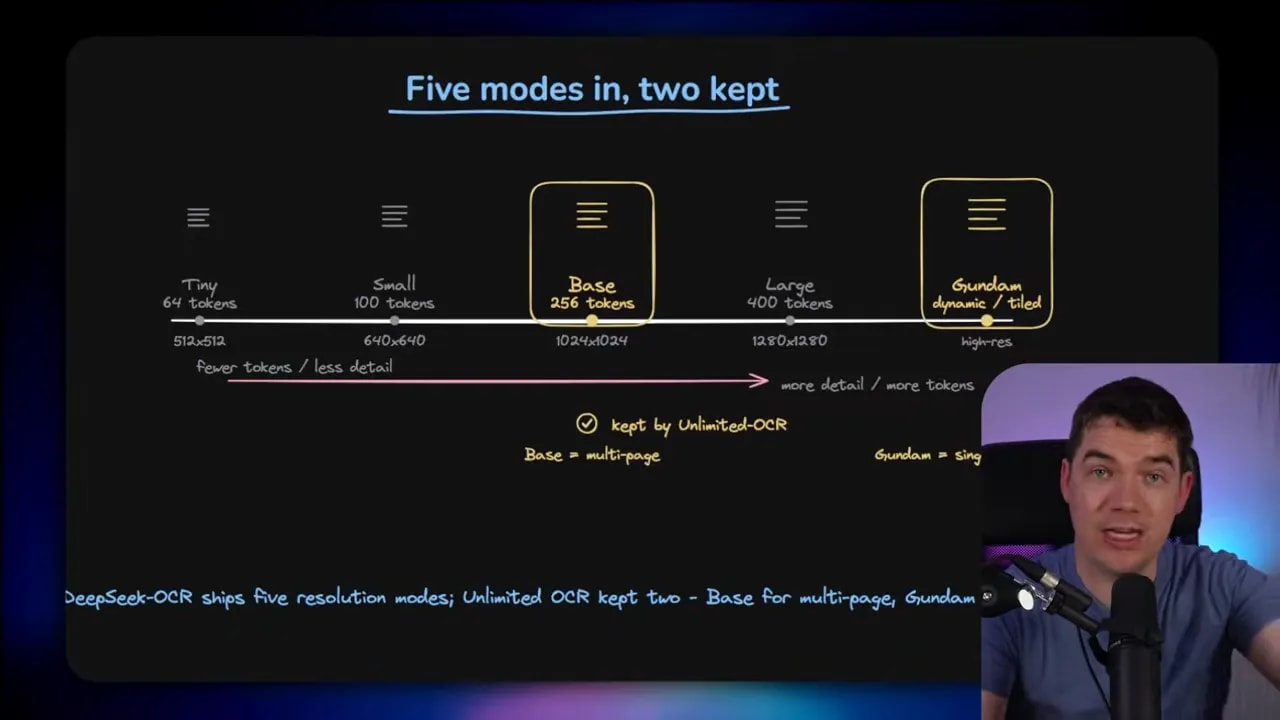
DeepSeek-OCR shipped with five resolution modes that let you adjust that tradeoff. At the low end, a tiny mode uses very few tokens and gives lower detail. In the middle, you get a base mode. At the high end, a dynamic tiled approach called Gundam focuses on preserving fine details from high resolution pages.
That matters because Unlimited-OCR doesn’t keep all of those modes. It supports only Base and Gundam.
- Base mode is the lower resolution option that can place the full document into context.
- Gundam mode is the high resolution tiled option, but it only works one page at a time.
That means the headline claim about long single-pass processing mainly applies to Base mode. The more detailed mode still needs page-level handling.
The new idea: fixing the output side with R-SWA
This is the part that actually makes Unlimited-OCR interesting.
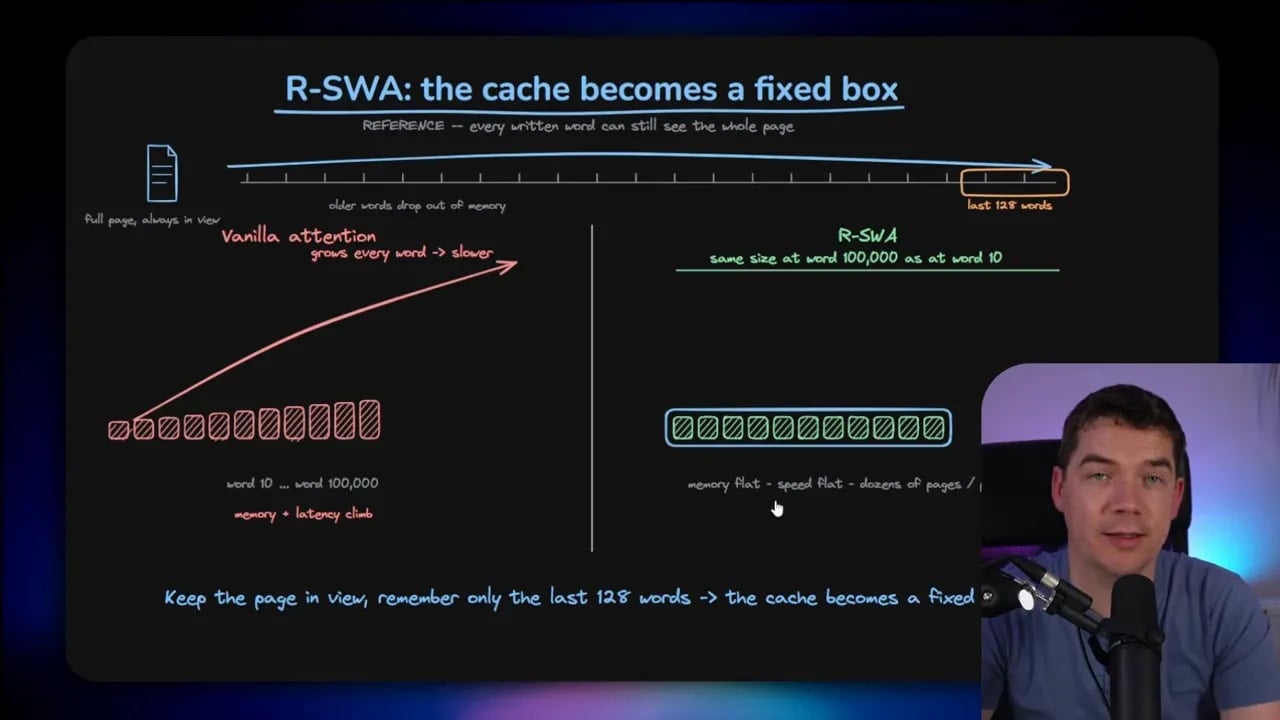
DeepSeek dealt with input cost. It did not solve the growing output memory problem. If you asked it to generate a very long transcription in one shot, the cache would still expand and the model would slow down.
Baidu’s answer is something called Reference Sliding Window Attention, or R-SWA.
The easiest way to understand it is with a manual copying analogy.
If I’m copying a long book by hand, I don’t keep re-reading everything I’ve already written. If I did that, I’d never finish. I mainly keep my eyes on the source page and only glance at the most recent words I wrote so I can stay coherent and continue the current sentence.
That’s basically what R-SWA does.
It keeps the source page fully available as a reference, but when looking back at already generated text, it only keeps a small recent window in play. In Baidu’s setup, that window is the last 128 generated tokens.
So the model still sees the full visual input, but it doesn’t drag the entire generated history around with it forever.
The result is simple and important.
- Memory stays much flatter.
- Generation speed stays more stable.
- Long outputs avoid the usual dramatic slowdown.
That’s the genuinely new contribution here. It’s a smart fit for transcription because the task is much more local than open-ended writing. For page transcription, the model usually doesn’t need to reason over everything it generated 20 pages ago. It mostly needs the current visual source plus a short recent text window.
What I saw when I tested it
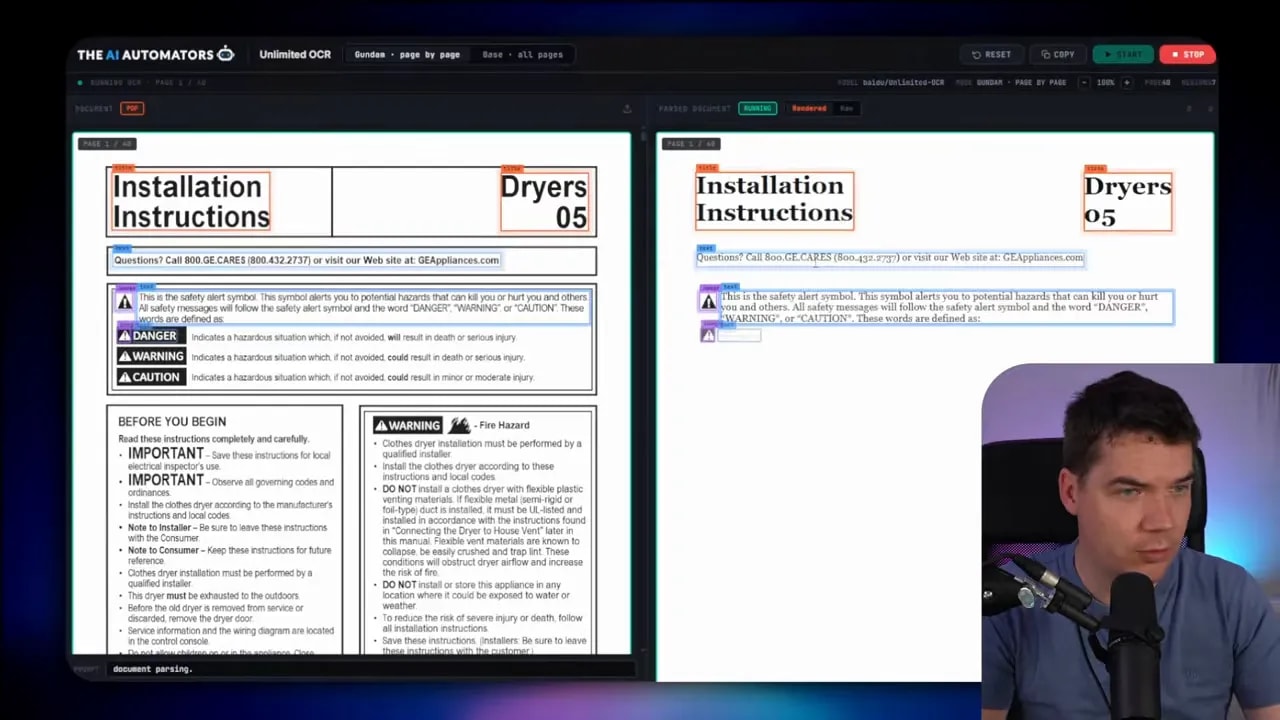
I built a simple interface to run the model against long PDFs locally. I tested it with a roughly 50 page document and saw the output stream through while also capturing layout, coordinates, and structural information.
On the surface, it looked promising.
The app showed:
- the source PDF pages,
- raw generated text,
- layout-aware extraction,
- bounding information on page.
Base mode processed quickly. Gundam mode gave higher detail but had the single-page constraint. GPU usage spiked during processing, which was expected, though some of the heavier memory usage was also down to how I had the SGLang Docker container configured.
In practical terms, the model did what it claimed. It could handle a long document and keep moving without the obvious crawl you often see in long generations.
That said, “it works” and “I should use this in production” are very different statements.
Why the name is a bit misleading
The biggest marketing problem is the name itself.
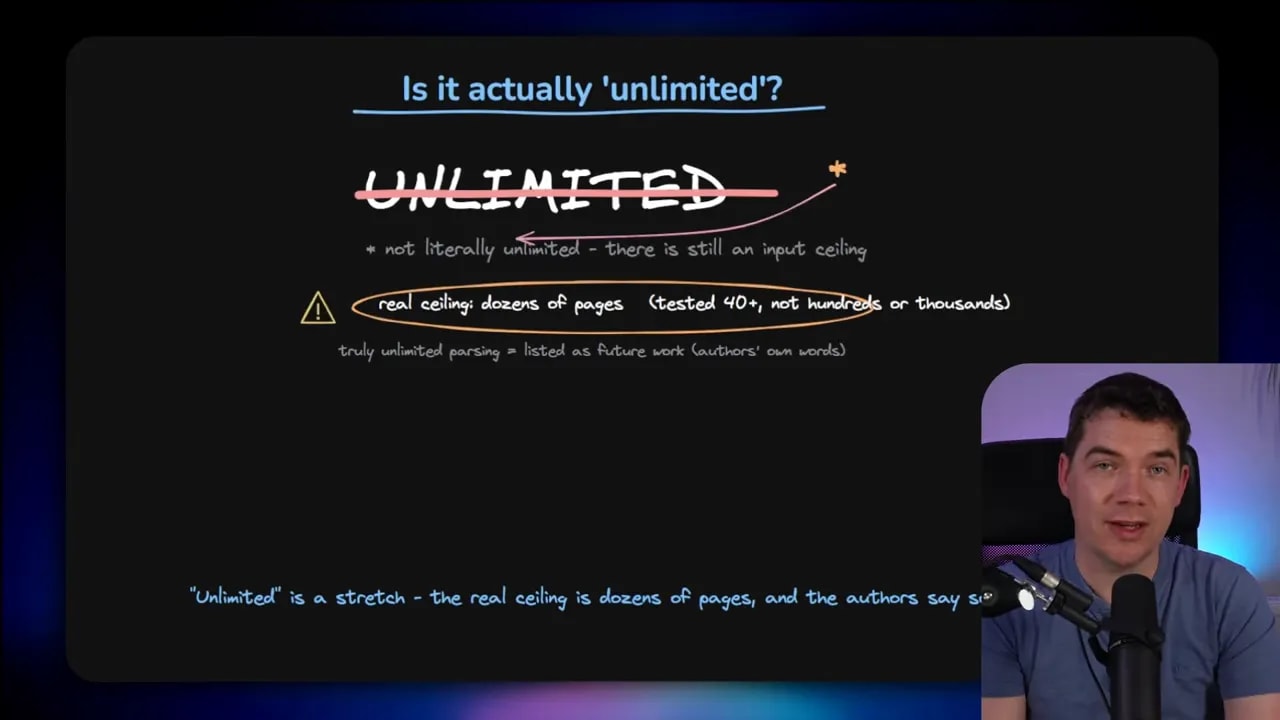
Unlimited sounds like you can throw anything at it. That isn’t true.
There is still an input cap of 32,000 tokens. Baidu does mention expanding that in future work, but right now there is a ceiling. So this isn’t a system for endless books or giant archives in one pass.
In practice, the tested use case is more like tens of pages, not infinitely long documents.
There’s another important limitation. The high resolution Gundam path can’t process the entire long document in one shared context. That only works in Base mode. So if you care about small text or fine layout details, the one-pass story becomes weaker.
It’s also not the accuracy leader
This part matters a lot.
Unlimited-OCR is interesting because of the memory mechanism. That does not automatically make it the best OCR model overall.
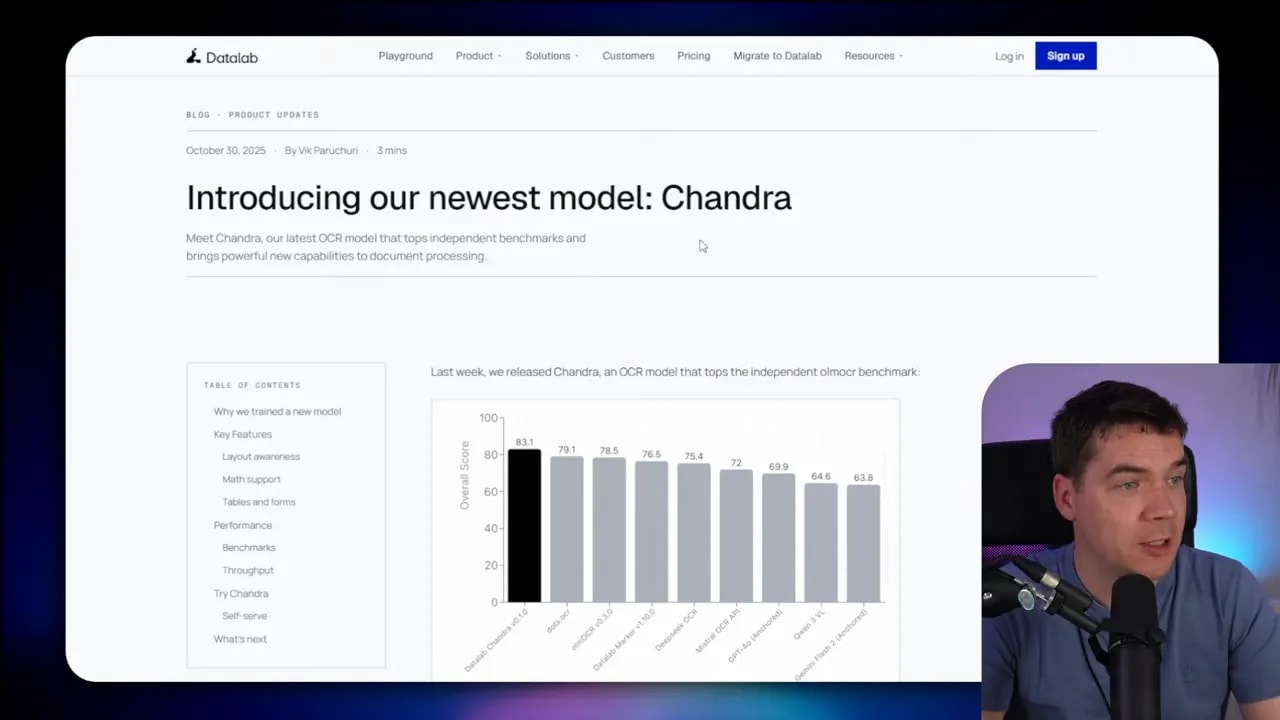
On the benchmark Baidu highlights, it performs strongly. But the comparison set isn’t complete relative to newer OCR-focused VLMs and other recent systems.
Several other models have posted stronger results on relevant OCR benchmarks, including systems that arrived after DeepSeek and before or around this release. So if your goal is simply to get the strongest possible OCR accuracy, Unlimited-OCR is not clearly the default winner.
That’s why I’d separate two questions:
- Is this a clever systems improvement for long generation?
- Is this the best OCR model I can use today?
For the first question, I’d say yes. For the second, I’d say no.
The bigger issue: I’d usually chunk the document anyway
This is the point that kept coming back as I tested it.
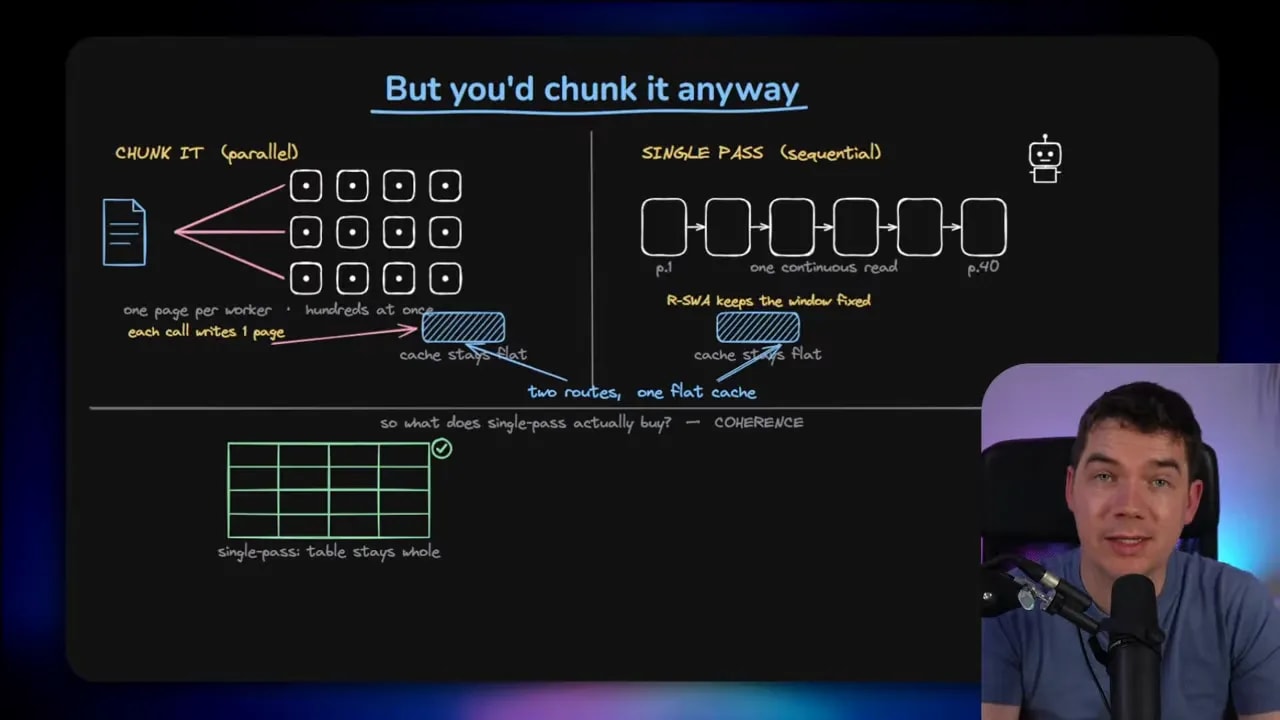
In most document ingestion pipelines, I don’t process a long PDF as one giant sequential task. I split it into pages or sections, process them in parallel, then combine the results afterward.
That gives me several practical advantages.
- Scalability. I can fan work out across many workers.
- Reliability. If one page fails, I can retry that page without restarting the whole run.
- Speed. Parallel page processing is often faster than one long sequential pass.
- Operational simplicity. Durable page-level jobs are easier to manage in production.
Once you do that, the KV cache growth problem becomes much less important because each worker handles a smaller piece.
In other words, Unlimited-OCR solves a problem that good pipeline design often avoids in the first place.
Where one-shot OCR really can help
There is still a real benefit to processing a document as one continuous sequence. It’s just narrower than the branding suggests.
The main win is coherence across boundaries.
If a sentence, paragraph, table, or structured block spans multiple pages, a chunked pipeline can slice it apart. Then you need stitching logic afterward. That stitching logic is annoying to build, annoying to test, and annoying to maintain.
A one-pass model can simplify that.
Instead of asking separate workers to interpret disconnected slices, you let the model move through the whole document in order. That can help with:
- tables that continue across page breaks,
- multi-page paragraphs or footnotes,
- documents where section continuity matters,
- cases where post-processing stitch logic keeps failing.
So there is a genuine advantage here. I just think it’s a specialized advantage rather than a broad replacement for chunked OCR pipelines.
Where I’d use Unlimited-OCR, and where I wouldn’t
If I’m being practical, I’d skip Unlimited-OCR for most standard document ingestion work.
Why?
- It’s not the strongest OCR model on pure capability.
- The “unlimited” label overstates what it can actually do.
- High resolution long-document handling still has limits.
- Parallel chunking is usually the better engineering choice.
For regular production workflows, I’d still lean on a structure-aware parser first. In my own stack, I tend to use Docling as the default document processing layer because it gives accurate and useful structured output for many real business documents.
If the document is harder and I really need a VLM, then I’d use a specialist OCR model locally or via an API. Datalab’s Marker project is also worth knowing about for document conversion workflows, and you can find it here: Marker.
That doesn’t mean Unlimited-OCR has no place. I think it makes sense in a narrower set of cases where chunking itself is the source of the pain.
Examples include:
- multi-page tables that keep breaking on page boundaries,
- sequential transcripts where continuity matters,
- translation pipelines that benefit from longer local context,
- documents where your stitching logic keeps creating errors.
In those cases, sequential processing may be worth the tradeoff.
The simplest way to think about it
Here’s the short version of how I see the model.
DeepSeek-OCR solved the input compression problem well. Baidu added a clever solution for the output memory problem with R-SWA. That combination makes long single-pass OCR much more feasible than it was before.
Technically, that’s impressive.
Operationally, it doesn’t change my default architecture very much.
I still think most teams should:
- start with traditional OCR for clean pages,
- use structure-aware parsers for tables, forms, and reports,
- bring in VLMs only when the documents are messy enough to justify them,
- chunk and parallelize unless continuity across pages is truly the bottleneck.
A better mental model for choosing OCR tools
If you’re non-technical, this may be the easiest framework to keep in mind.
Use traditional OCR when:
- pages are clean and mostly plain text,
- speed and cost matter most,
- you need predictable output.
Use structure-aware parsers when:
- layout carries meaning,
- you need tables and forms preserved,
- Markdown or structured export matters.
Use VLM-based OCR when:
- documents are messy or unusual,
- there’s handwriting or inconsistent layouts,
- rigid extraction pipelines fail too often.
And inside that third bucket, Unlimited-OCR is a specific kind of tool. It’s for cases where long sequential generation is the thing you care about, not cases where you simply want the strongest OCR output overall.
Resources worth keeping handy
If you want to explore the model and papers directly, these are the most relevant sources:
The paper is worth reading because the main value here isn’t hype. It’s the memory strategy. R-SWA is the part I’d pay attention to, especially if you build document systems and care about long sequential generation.
My actual verdict
I’m glad this model exists. It tackles a real issue in long-document VLM OCR, and the fix is smart. Flat memory growth during long transcription is a meaningful systems improvement.
But I wouldn’t mistake that for a universal recommendation.
If I needed the best practical setup for most document pipelines today, I’d still rely on structure-aware parsing first and bring in specialist VLM OCR only when the documents justify it. Unlimited-OCR becomes interesting when page chunking creates more problems than it solves.
That’s a real use case. It’s just much smaller than the name suggests.
