
I built and tested many Retrieval-Augmented Generation (RAG) systems over hundreds of hours. What I learned is simple: there is no single best way to build RAG. The right design depends on what you need your system to do, how fast it must respond, how much accuracy you require, and what resources you can afford.
This article lays out nine RAG design patterns that cover most real-world needs. I explain when to use each pattern, why model choice matters, how to manage trade-offs between speed and accuracy, and what I implemented in n8n to prove the patterns work in production.
How model choice shapes everything
The model you pick drives almost every architectural decision. Larger models tend to follow instructions better, call tools more reliably, and reason over complex context. Smaller models are faster and far cheaper, but they often struggle with tool calls and complex reasoning.
In practice, models below about 10 billion parameters are limited. They can handle basic instruction following but can be unreliable at tool calling. Between roughly 15 and 120 billion parameters you hit a sweet spot. Models in that range can reason and call tools reliably while staying much cheaper than frontier models.
A key point I learned: a smaller model with excellent retrieval often outperforms a large model that lacks the right context. If you inject the correct, high-quality content into the prompt, the model can produce a better, more accurate answer.
Four common RAG use cases and their priorities
I group most projects into four types. Each one asks for a different balance between speed, accuracy, cost, and scale.
1. Customer-facing chatbot
These run on public websites and must be very fast. A slow response costs conversions. That means you usually run smaller, fast models like Gemini 2.5 Flash or similar, apply strict guardrails, and prioritize latency and cost efficiency. You often combine deterministic retrieval flows with lightweight agent behaviors and favor answer verification so the bot answers only when it can ground claims.
2. AI assistant or co-pilot (enterprise)
Departments such as legal or finance need high accuracy. Speed is less critical. Here you use larger models, recursive retrieval, iterative reasoning, and more expensive calls. Model and retrieval choices prioritize correctness. These systems often live behind secure access controls and may be deployed as Slack or Teams assistants, or via cloud desktops integrated with an n8n node.
3. Background automation with RAG
These are scheduled agentic automations. I built an agentic blogging automation that retrieves facts from a knowledge base, builds outlines, generates articles, and publishes automatically. Latency is not a problem. The priority is resilience and repeatability. Deterministic flows and prompt chaining work well here.
4. Fully local RAG
Some teams require fully local deployments for privacy or cost reasons. Hardware limits what models you can run. With a single high-end consumer GPU you might only run a 20B-parameter model. Design choices should reflect the compute you can run in-house. The upfront cost is higher, but long-term per-user cost is often lower.
Overview of the nine design patterns
These patterns range from the simplest single-pass approaches to advanced multi-agent systems with routing and sequential chains. I show how I implemented each pattern in n8n, and what to watch out for when you build them.
- Naive RAG
- Deterministic RAG with Query Transformation, RAG Fusion, and Verify Answer
- Iterative Retrieval
- Adaptive Retrieval
- Agentic RAG
- Hybrid RAG (multiple datastore types)
- Multi-Agent RAG with Sub-Agents
- Multi-Agent RAG with Sequential Chaining
- Multi-Agent RAG with Routing
1. Naive RAG
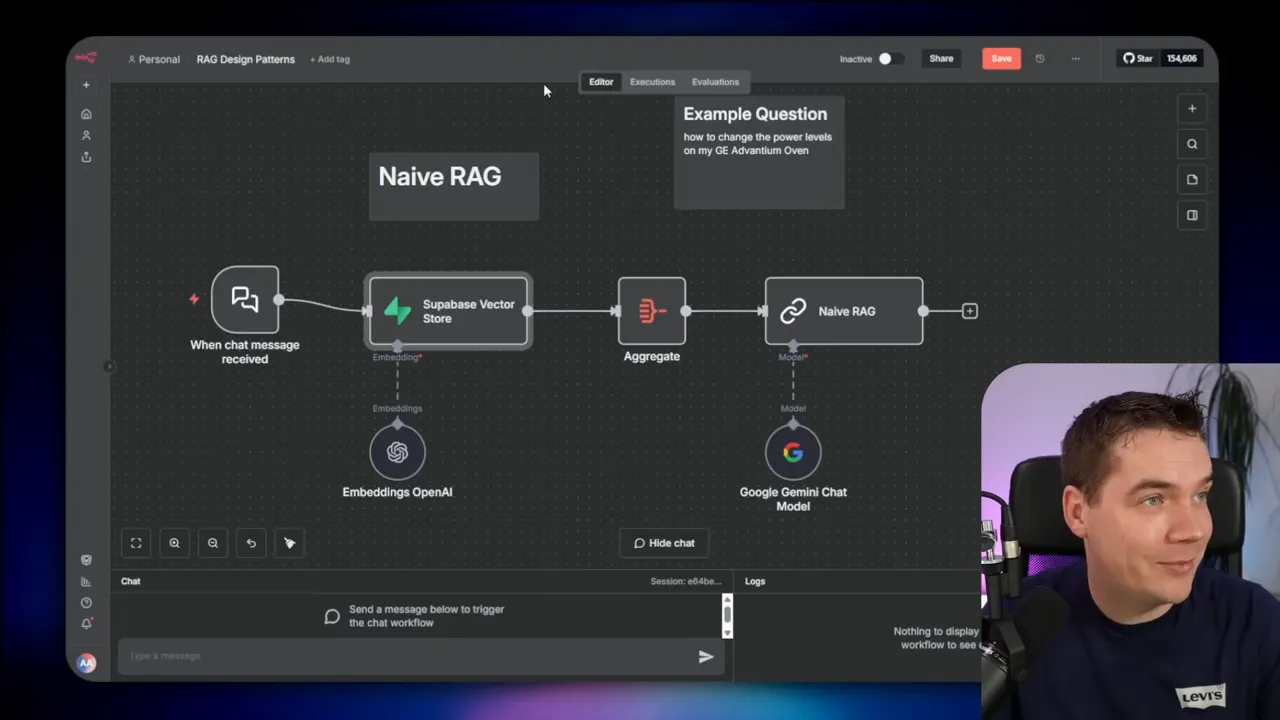
The naive approach is the baseline. A user message goes to the vector store, the system retrieves the top chunks, sends them to the LLM, and the LLM replies. It is fast and simple. It also fails in predictable ways.
I ran a test on a large vector store with 215,000 chunks. The user asked about changing power levels on a GE Advantium oven. The naive flow returned irrelevant chunks from a different GE model. The LLM was instructed to reply only when the retrieved chunks supported the answer. It answered “Sorry, I don’t know.” That single-pass nature is its weakness.
Naive RAG is useful when you need speed above all and when your knowledge collection is narrow and clean. It is not a good choice when queries can be ambiguous, conversational, or require careful grounding.
2. Deterministic RAG with Query Transformation and Verify Answer
After naive RAG, the next practical step is to transform and expand the incoming query before retrieval, fuse multiple retrieval results, re-rank them, and verify the final LLM output against the retrieved context.
This flow is deterministic: the logic path is explicit and repeatable. It works with small and large models because it keeps agent-like complexity outside the main LLM call. You can run this on a 5B parameter model up to much larger ones.
Key steps
- Decompose the user query into sub-questions.
- Rewrite and expand each sub-query with synonyms, alternative phrases, and angles of search.
- Run multiple vector searches to collect a broader candidate set.
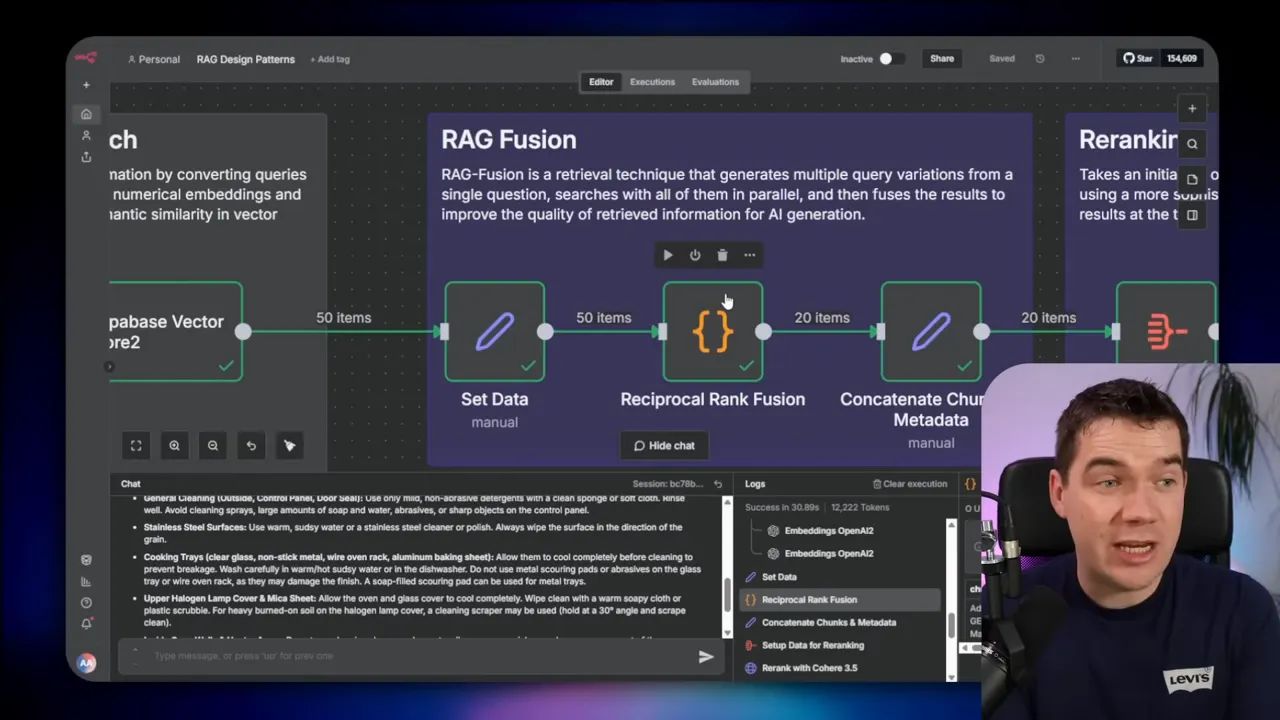
- Apply RAG Fusion to de-duplicate and combine lists.
- Use a re-ranker to order the top candidates precisely.
- Generate the answer using the top-ranked chunks plus chat history.
- Run verify answer: check the generated answer against the retrieved chunks. If it is ungrounded, loop once or twice.
I implemented this design in n8n. When a user asked about a fictional “GE Abacus mixer” and then clarified “I meant the GE Advantium oven”, the flow decomposed the initial question into “change power levels” and “clean it”. It ran five different queries for each sub-question and retrieved 50 chunks. RAG fusion collapsed these into 20 unique chunks and a re-ranker returned the top 10. The LLM then produced an accurate response and passed the verification step.
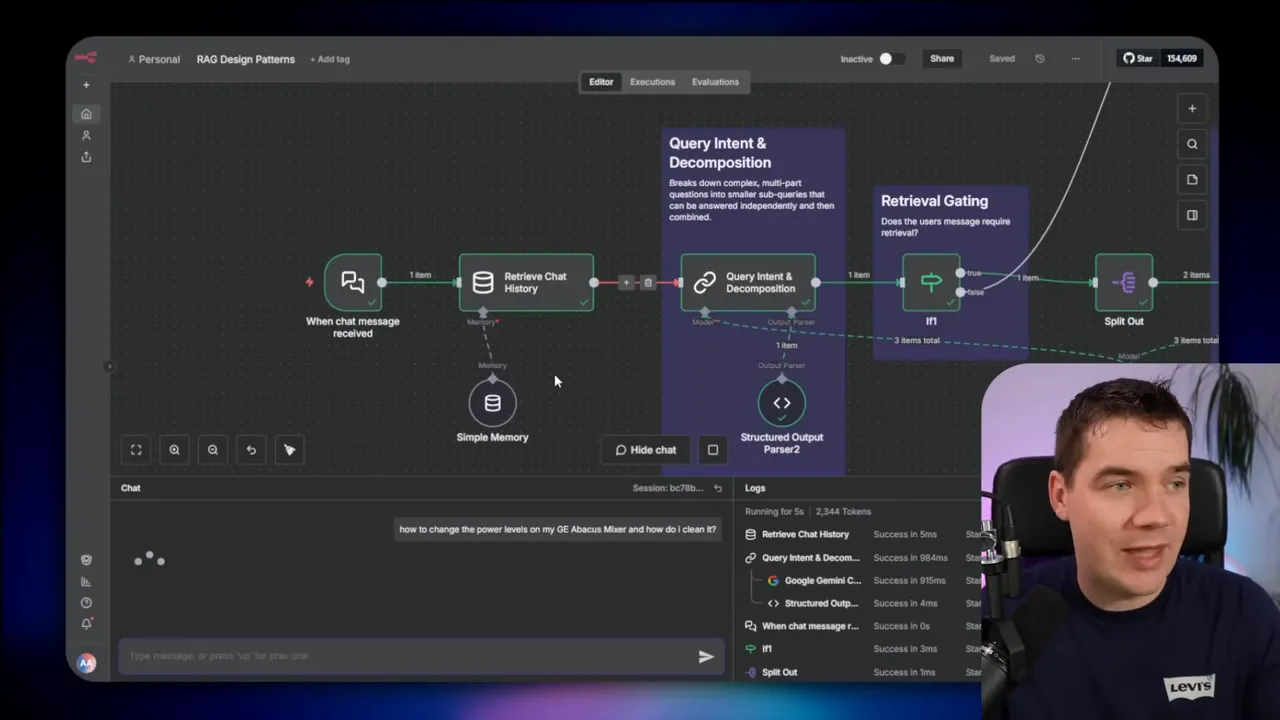
This pattern prevents irrelevant retrievals and improves accuracy. It took about 30 seconds end to end for a thorough retrieval and verification run in my tests. Most of that time was in verification and re-ranking.
Why verification matters
The verify answer stage reduces hallucination. The LLM receives a checklist: “Is every claim present in the retrieved context? Are there contradictions?” If the LLM finds unsupported claims, it rewrites the answer or returns a “I don’t know” response. That conservative behavior is critical for customer-facing or compliance-sensitive systems.
3. Deterministic RAG with Iterative Retrieval
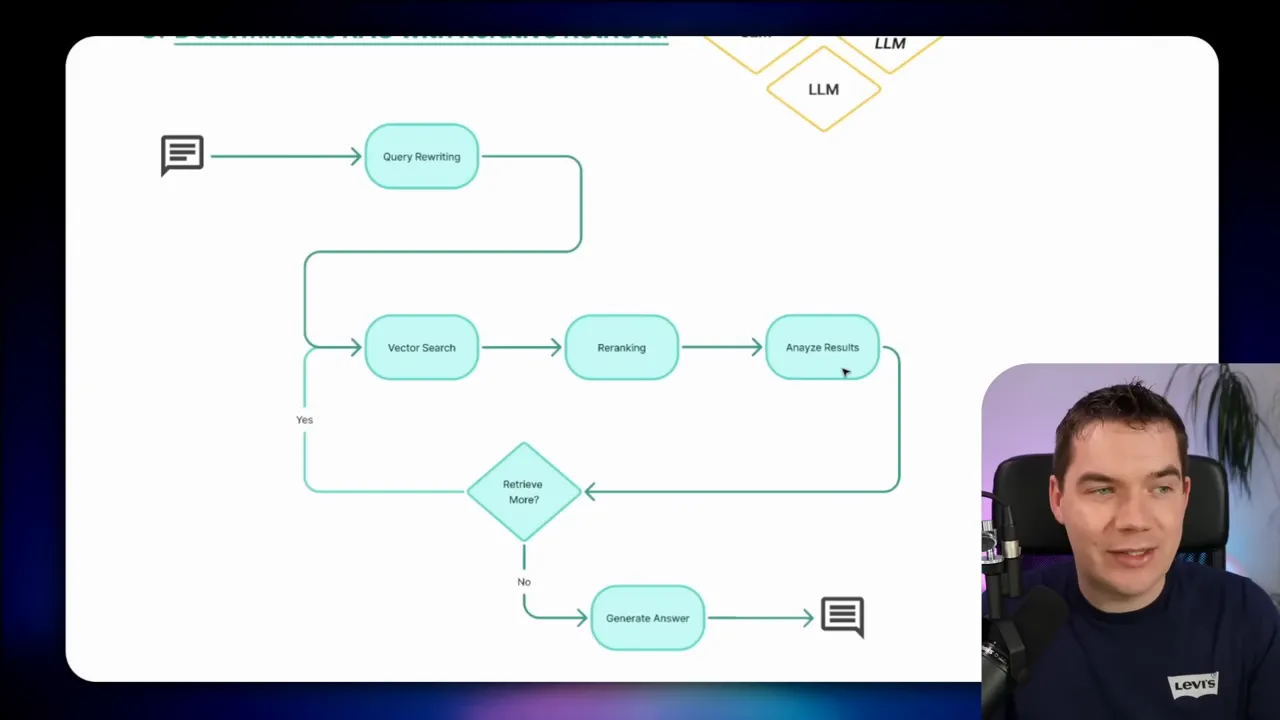
Some questions need deeper research than a single retrieval cycle can provide. Iterative retrieval adds a loop that decides whether more retrieval is required after inspecting re-ranked results.
The analyze results step asks the LLM to judge whether the current candidate set is sufficient. If not, the system generates new queries, retrieves more, and repeats. A counter prevents infinite loops. This pattern trades more time for higher answer quality.
Use iterative retrieval when the stakes are high and the knowledge base is large or noisy. It is suitable for legal research, long technical documents, or multi-step tasks where each step depends on precise facts.
4. Adaptive Retrieval
Adaptive retrieval automates the decision of whether to retrieve and how deeply to search. A query classifier inspects the incoming message and decides: no retrieval, single-step retrieval, or multi-step retrieval.
If the classifier says no retrieval, the LLM answers from its stored knowledge. If single-step, the system runs an expanded query and returns an answer. If multi-step, the system behaves like iterative retrieval.
This approach reflects production routers used in large services. Simple queries go to small, cheap models. Complex ones escalate to larger models or deeper retrieval. Adaptive retrieval helps control costs while maintaining accuracy where it matters.
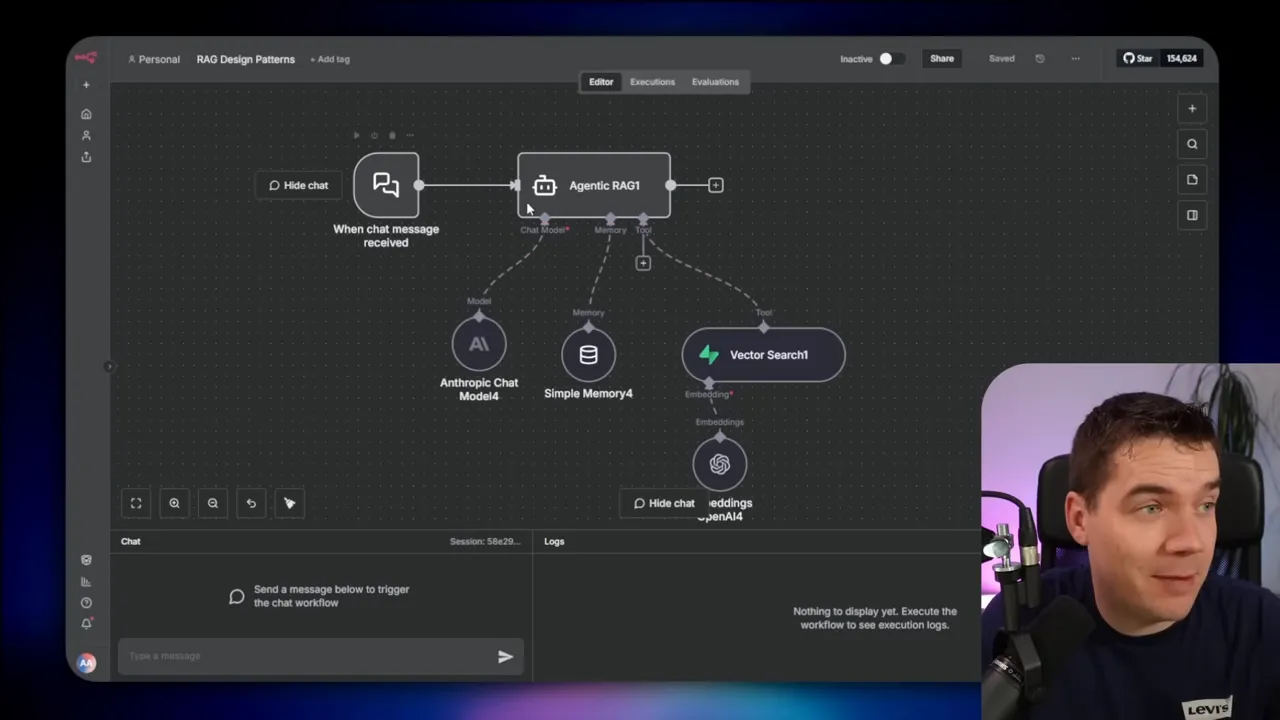
5. Agentic RAG
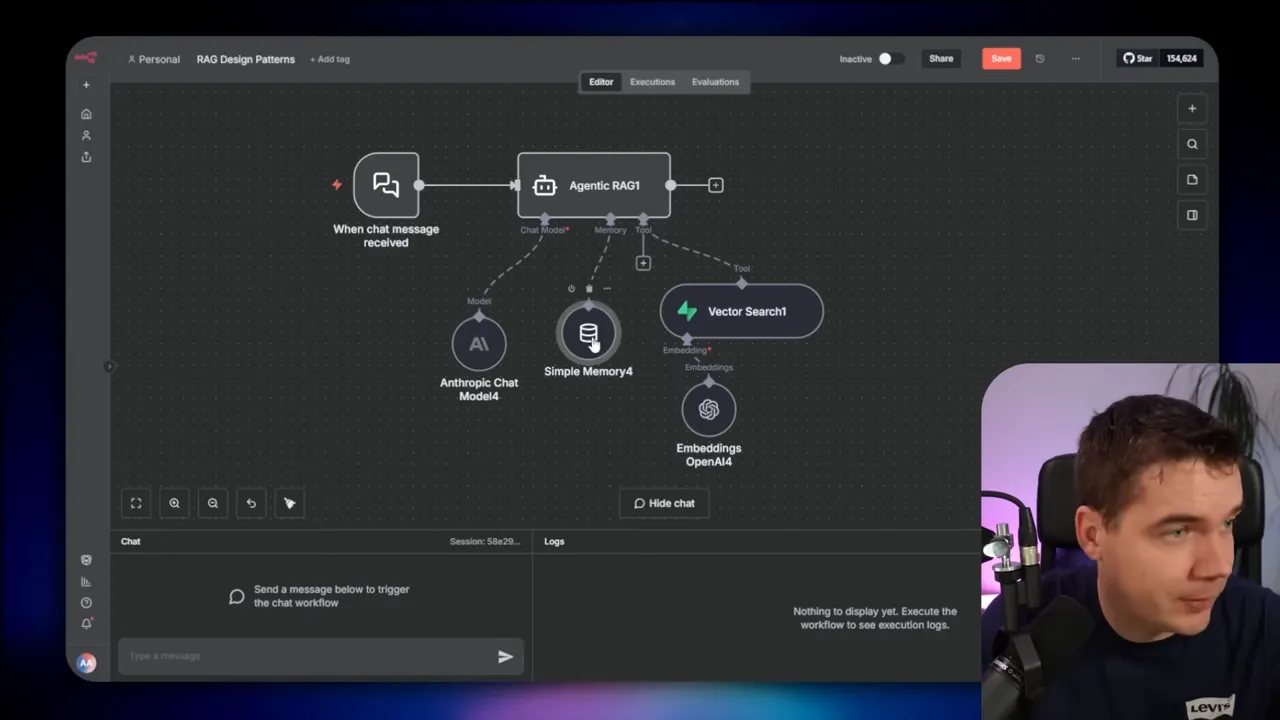
Agentic RAG uses a single AI agent with access to tools. The agent reasons, calls tools, and composes a response. This pattern lets the model drive retrieval behavior via tool calls instead of the system orchestrating every step.
Agents can call a vector search tool multiple times with different queries, hit web search, query databases, or run other functions. That capability collapses much of the query transformation logic into the model’s reasoning.
I tested standard agentic agents with two types of models: a frontier model and a 20B parameter model. The frontier model reliably refused to invent information and handled tool calls well. The smaller model could call tools but acted less consistently. At one point the smaller model fabricated appliance settings after getting asked the same question twice. Frontier models are smarter, but they cost more.
6. Hybrid RAG
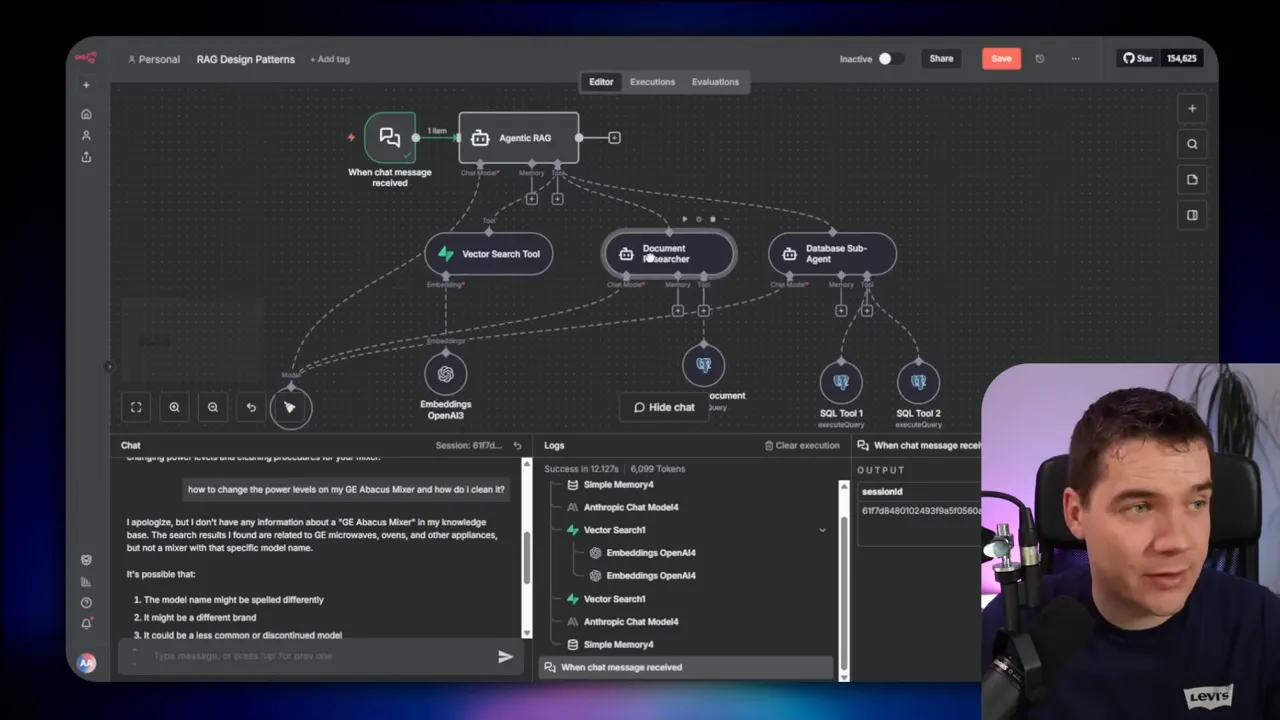
Hybrid RAG expands the agent pattern to support different datastore types. Your agent might need to query a vector store, a relational database, and a knowledge graph in the same flow.
That requires the agent to generate SQL, Cipher, or other query languages correctly. You can either give the agent examples and prompt it to write queries, or offload the query creation to specialized components. Hybrid RAG is ideal when your knowledge lives in structured and unstructured forms and you want a single control plane.
If you need reliable SQL or graph queries, I recommend providing a database sub-agent that specializes in those tasks. That makes the overall system more robust.
7. Multi-Agent RAG with Sub-Agents
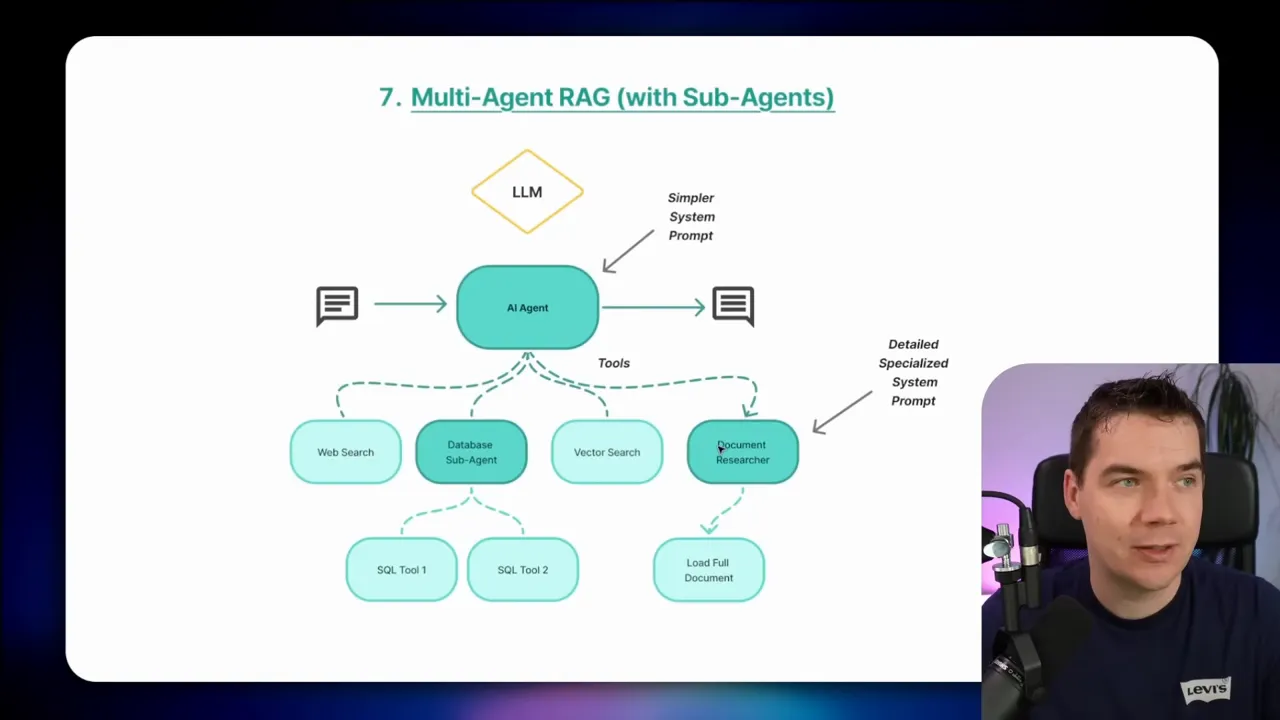
Multi-agent systems break complexity into smaller, focused agents. The orchestrator calls sub-agents that each have their own system prompts, context windows, and tools.
I use sub-agents to protect context windows and split responsibilities. For example, a document researcher loads and summarizes entire documents. Another agent focuses on complex SQL generation. Offloading heavy context or specialized queries prevents one agent from getting overwhelmed by mixed objectives.
Sub-agents help when documents need full visibility. If a user asks for a full-document summary, RAG fragments alone won’t do. The document researcher agent can load the entire file, summarize it, and return that summary for the main agent to use in later steps.
A warning: multi-agent systems can become unwieldy. I once built a system with 25 sub-agents orchestrated by a main agent. It quickly became hard to maintain. Each agent needs rigorous role definitions and testing. Start with a small number of sub-agents and add more only when you have a clear benefit.
8. Multi-Agent RAG with Sequential Chaining
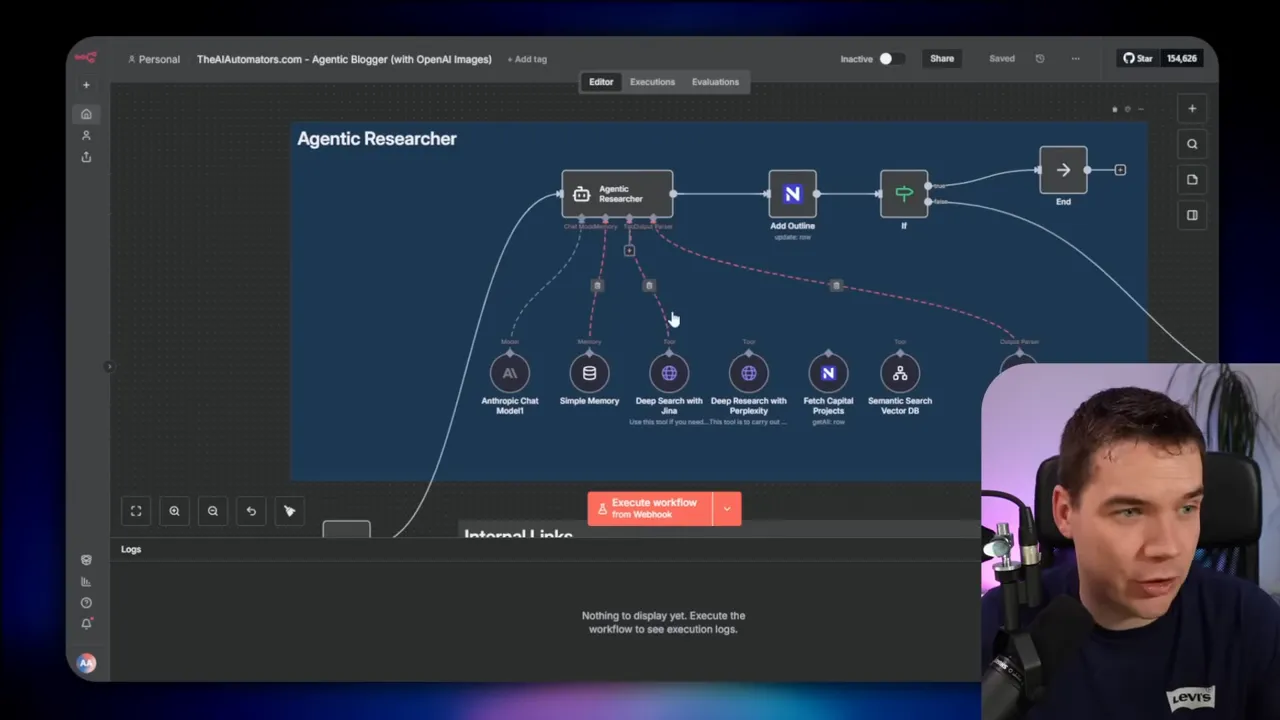
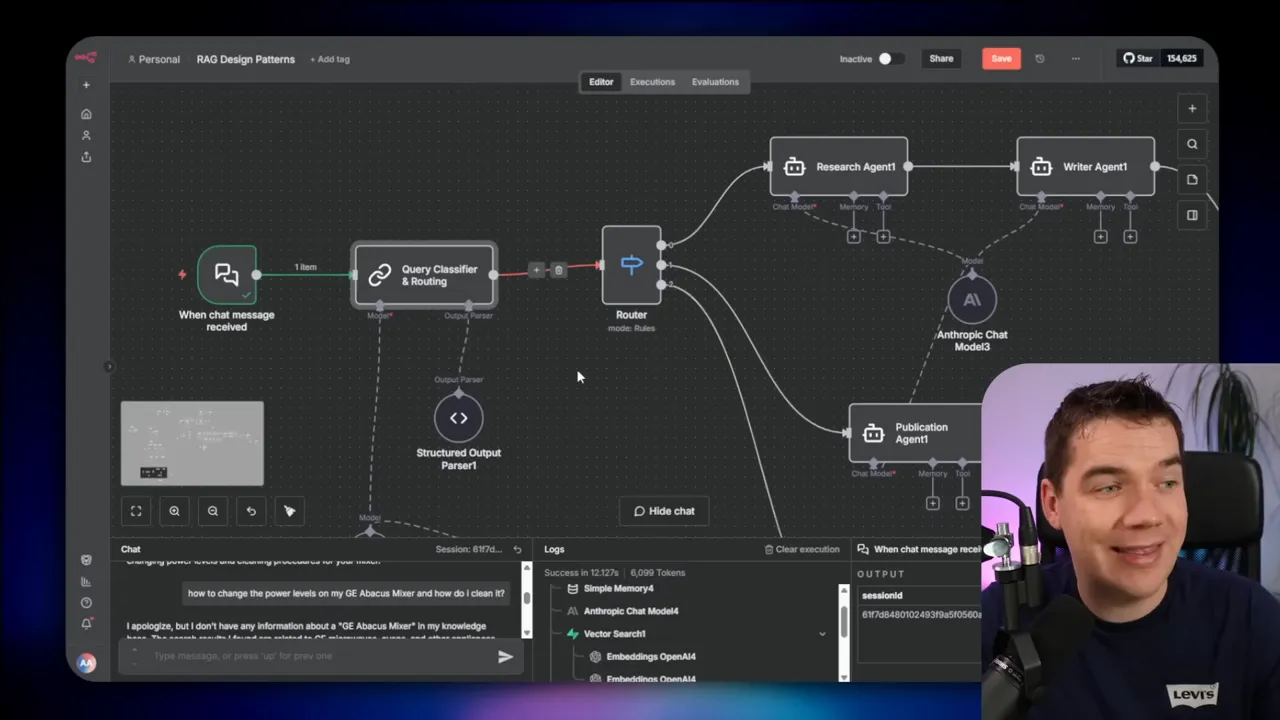
Sequential chaining lines up specialized agents in a deterministic pipeline. One agent does research, another drafts text, and a third publishes content. This pattern suits background automations and scheduled workflows.
I created an agentic blogging automation using this idea. The trigger sits in a task database. When a blog is ready for outlining, the researcher agent runs RAG searches, a writer agent drafts the post, and a publication agent uploads to WordPress. I included human review points. The workflow produces consistent, repeatable outputs and keeps responsibilities clear.
9. Multi-Agent RAG with Routing
Routing adds an upfront classifier that sends queries directly to the agent best suited to answer. If the question is simple, the router sends it to a light response generator. If the question requires writing or publishing, the router sends it to the corresponding specialist agent.
This pattern reduces latency. Instead of always going through a heavy orchestrator, queries hit the right agent immediately. You still get separation of concerns, simpler system prompts, and targeted tools for each agent.
Other useful patterns and techniques
There are many other tactics that I use depending on the task. A few that deserve mention:
- Self-RAG: Agents use internal reflection tokens to evaluate retrieval quality and decide whether to retrieve more.
- Corrective RAG: Use live web search as a fallback when your knowledge base lacks coverage.
- Guardrails: Apply filters and policies to prevent prompt injection, PII leakage, and unsafe outputs.
- Human-in-the-loop and human handoff: Escalate to a human when answer confidence is low or regulatory review is required.
- Multi-step conversational flows: Keep state and sequence intact for task-based chatbots that guide users through procedures.
- Context expansion: Grab neighboring chunks or entire documents for tasks like summarization when partial context is insufficient.
- Deep RAG: Create retrieval plans and execute them over a longer horizon for intensive, multi-step research.
- Lexical keyword search and dynamic hybrid search: Combine keyword search with semantic search to boost recall on highly specific queries.
Practical tips and trade-offs I use in production
I want to share a set of actionable rules I use when designing RAG systems.
Match model to use case
Pick small, fast models for customer chatbots and background tasks where latency and cost matter. Use larger models for helpers that need complex reasoning or high accuracy. Keep retrieval strong if you must run smaller models.
Start deterministic and add agentic features
Deterministic workflows are predictable and easy to test. They make debugging straightforward. I often start with a deterministic pipeline that includes query transformation and verification. Then I add targeted agentic behaviors for tasks that need flexible tool use.
Keep prompts focused and responsibilities clear
Long, complex system prompts confuse models. If you have many instructions, split them across multiple agents or steps. Give each agent or LLM call a single responsibility.
Use metadata filters and query routing to narrow searches
If your vector store has millions of chunks, use product categories, document types, or other metadata to reduce search scope. Use a classifier to detect product type or category and apply the metadata filter during vector search.
Re-rank always
Reciprocal rank fusion or a cross-encoder re-ranker dramatically improves answer quality. An initial semantic search gives breadth, but re-ranking with the user question produces depth.
Verify before answering public users
For public chatbots, have a verify answer stage. If the LLM cannot confidently ground an answer in the retrieved context, respond conservatively. That protects users and your brand.
Design for failures
Plan fallback strategies: clarify the query, offer safe default responses, or escalate to a human. Avoid indefinite loops; always include counters for iterative retrieval and verification loops.
Implementation notes from n8n experiments
I used n8n to prototype every pattern. n8n gives a visual flow builder and supports custom nodes for vector search, re-ranking, and LLM calls. Here are a few implementation tips based on those builds.
- Use a dedicated node to handle query decomposition and classification. Keep that logic explicit rather than hiding it inside a single LLM call.
- Put metadata filtering into the vector search node. It dramatically improves precision when you have large data volumes.
- Implement RAG fusion as a discrete step. Reciprocal rank fusion is simple and effective.
- Use a cross-encoder re-ranker to shrink candidate lists before sending them to the LLM. That limits token use and improves answer relevance.
- Separate verification into its own LLM call. Treat verification as a binary judge that returns grounded or not grounded. If not grounded, feed back a short instruction to the generator.
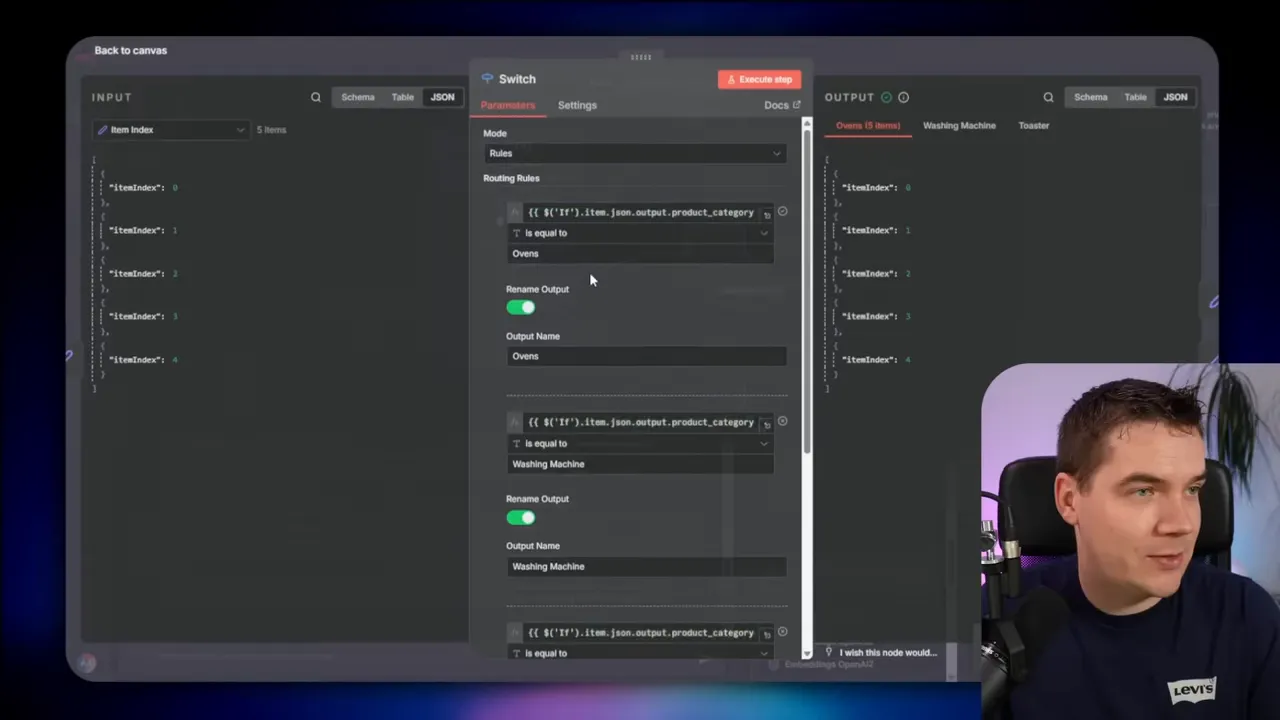
For agentic systems, n8n lets you attach tools and memory to an agent node. Give each agent a clear set of tools. If you need database access, make a database sub-agent that knows only how to generate and validate SQL queries.
Common pitfalls and how to avoid them
I ran into the same mistakes over and over. Here are the ones you should watch for and how I handle them.
Overloaded system prompts
A huge system prompt with many fallback rules confuses models. I split instructions into multiple agents or separate LLM calls. Each call has a small, focused task.
Too many agents too soon
A large multi-agent mesh can become brittle. I start with one sub-agent, verify it, and add more agents gradually. Test end-to-end each time.
Lack of grounding checks
If you skip verification, the system will hallucinate more often. Add a verify answer stage for public-facing or high-risk use cases.
Poor metadata design
Metadata is a cheap way to improve search focus. Define product categories, document types, and other useful fields up front. Then use them as filters.
Missing counters in loops
Retrieve loops and verification loops need stop conditions. I set conservative limits and return a fallback message when the limit is reached.
Example troubleshooting scenarios
I want to share two short examples from my testing so you can see how these patterns play out.
1. Wrong model returned irrelevant content
Problem: a naive RAG system returned chunks from the wrong appliance model. The LLM could not ground the answer and replied “Sorry, I don’t know.”
Fix: add a query rewrite step, classify product category, apply a metadata filter, run multiple queries, fuse the results, re-rank, and verify. That deterministic pipeline found the right manual sections and produced a grounded answer.
2. Small agent fabricates an answer on repeated prompting
Problem: a 20B model called the vector store and produced an answer that looked plausible but was not in the knowledge base. Repeating the question produced the same fabrication.
Fix: add verification and adjust the system prompt to instruct the model to refuse when the retrieved evidence does not support a claim. If the model has memory, ensure the memory update happens only after verification to avoid reinforcing hallucinations.
When to choose which pattern
The right pattern often comes down to three questions:
- How important is response latency?
- How sensitive is the domain to inaccuracies?
- How much tooling and structured data must the system access?
Use this quick guide:
- Latency critical, low risk: Naive RAG or simple deterministic RAG with verification.
- Accuracy critical, moderate latency allowed: Deterministic RAG with iterative or adaptive retrieval and strong verification.
- Need to access databases and graphs: Hybrid RAG or agentic hybrid with sub-agents for SQL/graph queries.
- Complex multi-step automations: Sequential multi-agent chaining.
- Large-scale, mixed query types: Multi-agent with routing and a small orchestrator for edge cases.
Operational checklist before launch
Before you deploy, run through this checklist I use on production builds:
- Define acceptable latency and cost per user.
- Pick a model range consistent with those constraints.
- Design metadata to narrow searches effectively.
- Implement query classification and routing.
- Include re-ranking and verification.
- Set conservative loop counters for iterative flows.
- Log retrievals, re-ranks, and verification decisions for debugging.
- Test guardrails and handle PII carefully.
- Plan human handoffs for edge cases.
- Start small: one sub-agent, then expand.
How I think about the balance between intelligence and cost
The classic trade-off is intelligence versus speed and cost. Frontier models like Claude Sonnet or GPT-5 deliver strong reasoning but are expensive. For high-scale customer channels, that cost is unsustainable.
I aim for the smallest model that meets the task without sacrificing correctness. That often means combining a capable mid-size model with strong retrieval and verification. I reserve frontier models for rare, high-value queries or for orchestrators that run only occasionally.
Final technical notes
A few final technical nuggets from my experiments:
- Re-rankers can be much lighter than the generator model. A small cross-encoder gives big gains.
- Reciprocal rank fusion is a robust way to aggregate multiple search results with minimal compute.
- Keep verification prompts short and direct. Ask the model to list which retrieved chunk supports each claim.
- When you allow tool calling, add usage budgets and rate limits to avoid runaway costs.
Building production-grade RAG systems is primarily an exercise in design choices. Each use case demands a different balance of speed, accuracy, cost, and maintainability. By combining deterministic workflows, smart retrieval strategies, and focused agent designs, you can construct systems that are fast, accurate, and reliable.
The nine patterns I describe provide a practical map you can adapt to your needs. Start simple. Add complexity when it brings measurable benefits. Keep verification and fallback mechanisms in place. If you follow those rules, your RAG project has a good chance of succeeding.
