I built a native Android app that lets a maintenance contractor search photos, voice notes and reports by describing a problem. It runs completely offline. There’s no cloud search service behind it, and the phone doesn’t need a signal.
That’s impressive enough on its own. What really interests me is that the app doesn’t treat each file format as a separate collection. A single search can bring back a photograph, a written report and a voice recording about the same issue.
Google’s EmbeddingGemma 2 makes this possible. It’s a small, open embedding model that can find related content across text, code, images, video and audio. Those different inputs share one search space.
I also built a desktop app for a fictional property management company. That gave me a broader collection to test, including videos, WhatsApp audio notes, PDFs and ordinary text files.
The results were encouraging, but a few details deserve attention. Finding a relevant video isn’t the same as understanding it. Search scores can lean toward one file format. Smaller vectors can save storage, but they still need testing.
Those distinctions matter more than a model announcement. They determine whether a useful demonstration can become a useful application.
A Maintenance App That Works Without a Signal
The Android app starts with a practical situation. A contractor is working in a building and needs to find records about a fault. Those records might include inspection photos, maintenance reports and voice notes from earlier visits.
In my first example, I selected Mercer Court and searched for blocked ventilation. The first result showed a blocked vent. A report about the ventilation history came next, followed by a voice note.
I didn’t need to remember a filename. There was no need to decide whether the answer would sit in a document or an image folder. I described the issue, and the app returned relevant material across formats.
That’s the main benefit of semantic search: it searches for meaning rather than relying entirely on matching words.
A photograph doesn’t need to contain the words “blocked ventilation” for it to be relevant to that request. The model can connect the visual content with the meaning of the search.
The phone stayed in airplane mode during the demonstration. A USB connection let me display the app, but the search itself ran on the device.
For a maintenance contractor, that’s a meaningful difference. A basement with no reception is exactly the sort of place where access to previous records could matter. An offline app doesn’t have to wait for a network connection before it becomes useful.
Searching with a photograph
Text isn’t the only way to ask for something. I also used the phone’s camera to photograph hoses from a tap. After selecting the photo search option and taking a picture, the app found similar photographs in about a second.
The first two results showed tap hoses.
This changes how someone can search on site. They don’t always know the right name for a component. Sometimes it’s easier to photograph what’s in front of them than describe it accurately.
Instead of turning that picture into a written query themselves, they can use the picture as the query. The app then looks for related content in the indexed collection.
Speaking a search request
I tested spoken input as well. After switching to another building, I described a cracked rubber foot underneath a water pump.
The app returned a report, a pump image and a voice note. The response took less than three tenths of a second.
There’s an important detail here. For that Android example, I used the phone’s native offline speech transcription. It converted my spoken request into text before the search.
EmbeddingGemma 2 supports audio, but this particular interaction used speech as a convenient way to enter a text query. Those are different paths through an application, even if they feel similar to the person using it.
All of this ran on a Samsung S21 Ultra. It isn’t a new phone, which makes the result especially interesting. Useful on-device AI doesn’t always require the latest hardware.
A Desktop Search App for a Mixed File Collection
The desktop version let me test a wider range of material. I created a collection for a fictional property management company and loaded hundreds of files into it.
That collection included:
- Property photographs and maintenance images.
- Video clips.
- WhatsApp audio notes.
- PDF documents.
- Text files and other written records.
These formats reflect a familiar business problem. Useful information rarely arrives in one tidy form. Someone sends a photograph by email. Another person records a voice message. A contractor produces a report. A short video captures an issue that’s hard to explain.
The records concern the same properties and problems, but their formats separate them.
My desktop app can index a selected local folder, including the folders nested inside it. That makes an existing folder collection a starting point for search, rather than requiring every item to be entered manually.
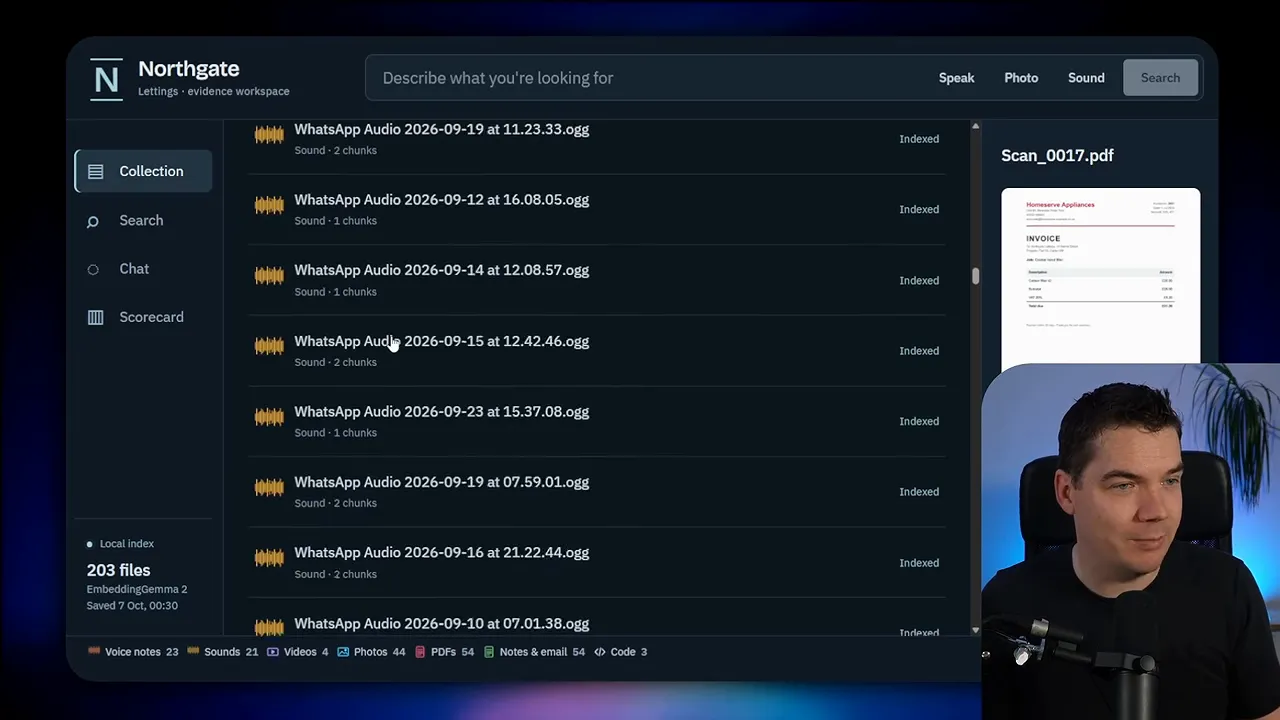
Once indexed, the collection supports direct search. I also added a chat interface. For example, a request for washing machine records and repair notes triggers a tool call that searches the collection and returns relevant media assets.
The search runs locally. The chat in my demonstration uses a hosted model through my Codex subscription.
That distinction is easy to miss because both appear inside the same app. A local search engine and a hosted chat model can work together, but that doesn’t make the whole system offline.
I’ll return to that separation because it affects both privacy and what the assistant can honestly say about the files it finds.
What EmbeddingGemma 2 Actually Does
An embedding model turns content into a list of numbers. That list represents aspects of the content’s meaning in a form a computer can compare.
The technical term for that list is a vector. You don’t need to read the numbers to use the system. Their purpose is to help the search engine identify which items are related.
EmbeddingGemma 2 has just under a billion parameters. Parameters are the learned values inside the model. Its relatively small size helps make local use practical, including on a phone.
Its standard output has 768 dimensions. In plain terms, that means each embedding contains 768 numbers.
The model also uses the Apache 2.0 license, which allows commercial use under its terms. That’s relevant if the goal is to build a business application rather than run a personal experiment.
The EmbeddingGemma 2 model page provides the model itself. Google’s developer guide provides further implementation context.
However, the most important feature isn’t the parameter count or the license. It’s the shared search space across different kinds of content.
Why a shared search space matters
A common way to make mixed media searchable is to turn everything into text first.
An image might go through a language model that writes a caption. An audio recording might go through speech recognition. The search system then indexes those written descriptions.
Another approach uses separate embedding models for different formats. That creates separate representations that don’t necessarily work together as one collection.
EmbeddingGemma 2 offers a different route. It can represent supported text, images, audio and video in the same search space.
That means the system can compare a text request with an image embedding, or a photo query with other relevant items. The search doesn’t have to stay inside the format used to ask the question.
This isn’t the first multimodal embedding model. The significance is the combination of broad format support, a shared index and a model small enough to run locally.
For my applications, that combination makes the architecture much more useful. I can build around one searchable collection instead of presenting separate search tools for each kind of file.
How One Query Finds Different Types of Files
I find it helpful to picture the shared search space as a map of meaning.
Items about ceiling leaks sit near other items about ceiling leaks. Alarm-related records form another group. Appliance records sit closer to other appliance records.
The map doesn’t organise everything purely by file extension. A leak photograph can belong near a leak report because they describe the same kind of problem.
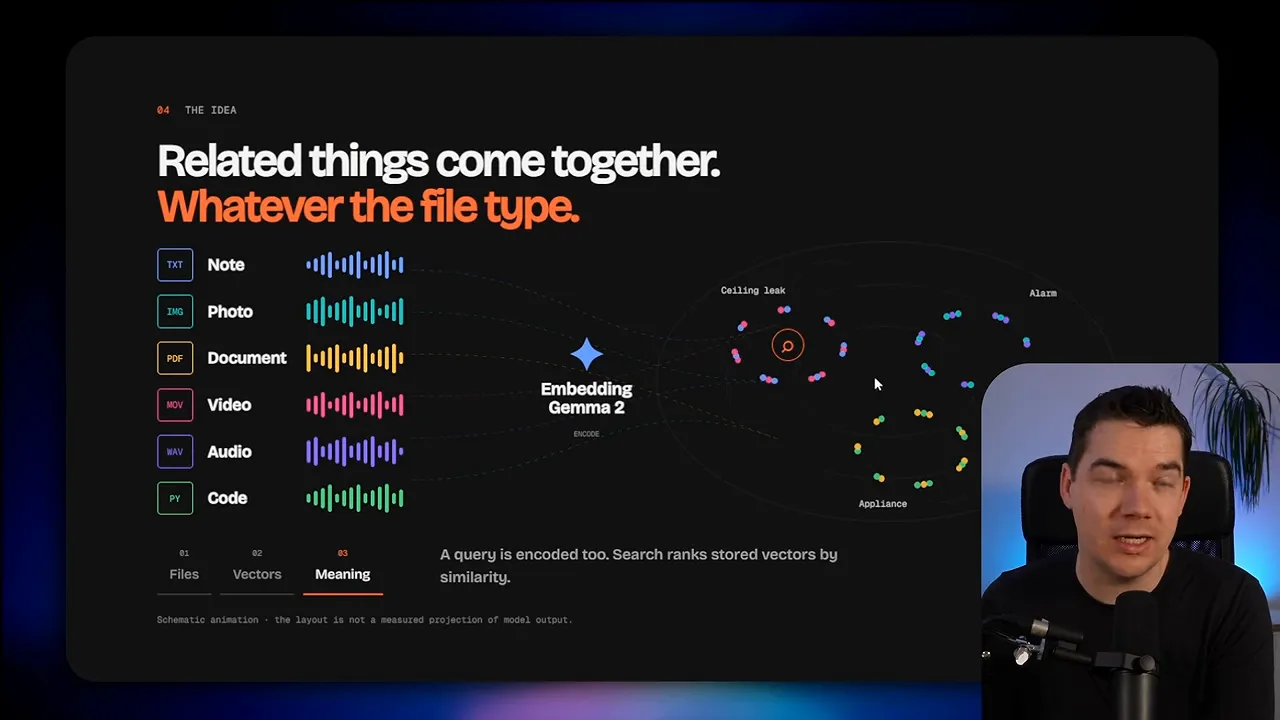
The search process follows a simple sequence:
- Index the collection. The system processes the content and stores its embeddings.
- Represent the query. The model turns the search request into an embedding too.
- Compare meanings. The search engine looks for stored embeddings close to the query.
- Return the matching items. The app presents the related files.
That’s what happened with the tap hoses. The photo became a query embedding, and the search engine looked for nearby matches.
A typed request follows the same broad pattern. The input format changes, but the comparison happens in the shared space.
A ceiling leak across several formats
In the desktop app, I searched for water coming through a ceiling. The results included video, photographs, a voice note and a PDF.
One item was a synthetic WhatsApp audio note. It described water entering a living room near a light fitting. Another result showed a video that could represent the sort of clip someone might send by email or WhatsApp.
The audio example was synthetic test material, rather than a real tenant recording. Its role was to test whether the search could connect a spoken description with the same issue expressed in other formats.
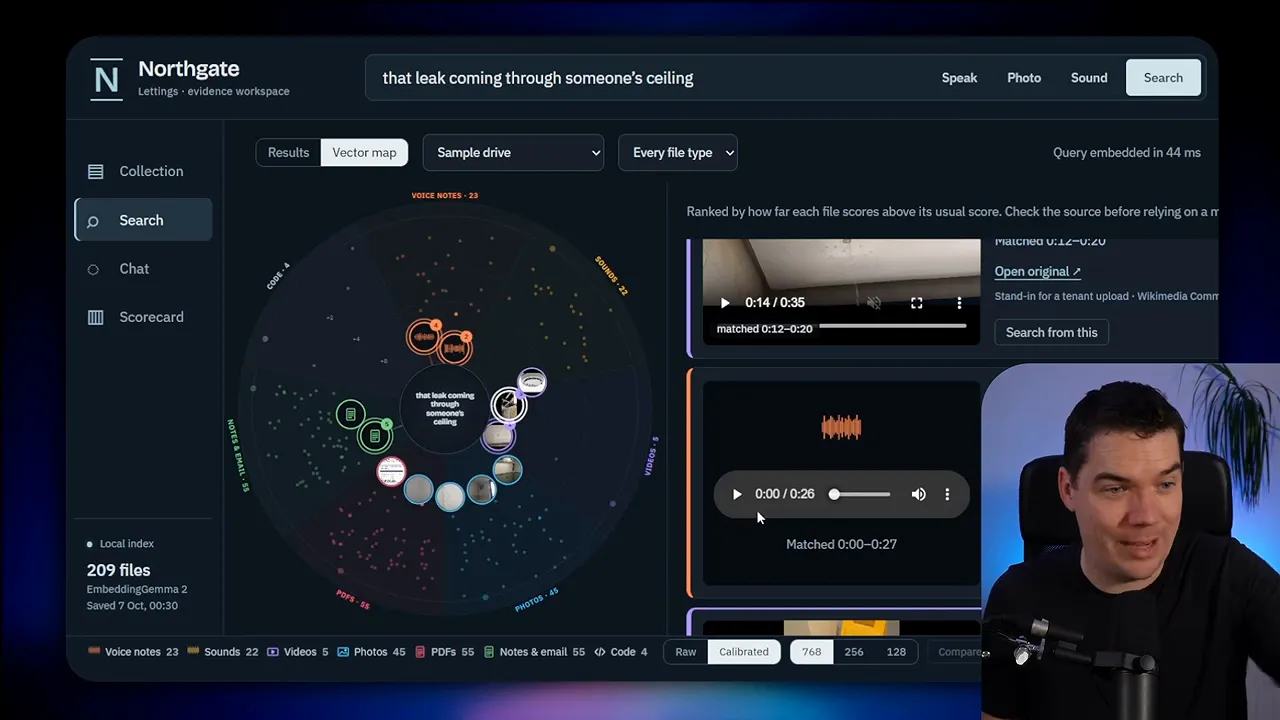
This is where multimodal search starts to feel different from a document search box. The request describes a situation. The results collect different records of that situation.
There’s no requirement for the person searching to know how the information originally arrived. They can start with the problem they remember.
That’s particularly useful in a property collection. A voice note may capture urgency, a photograph may show the visible damage, and a report may explain the earlier maintenance history. Each format contributes something different.
The Same Search Engine Can Support More Than Chat
It’s tempting to treat a new embedding model as another component for an AI assistant. That’s a valid use, but it’s only one option.
The broader opportunity is to work with useful information spread across several formats.
Finding forgotten marketing assets
A marketing team might remember a particular image without remembering which project produced it.
Searching project folders by name won’t help much if the project name is the missing detail. A meaning-based search gives the team another way into the archive.
Someone can describe the visual they remember and look for related assets. The search begins with the content, rather than the filing system.
I find that distinction important. People often remember what something showed more clearly than where someone stored it.
Routing incoming attachments
An automation could also use the model to help route incoming email attachments.
A photo of damage might belong in a maintenance queue. An invoice could go to the accounts team. An uncertain item could wait for human review.
In that setting, the embedding comparison supports a decision rather than displaying a list of search results.
The human review path matters. Similarity provides a useful signal, but an automation shouldn’t treat every match as equally certain.
I haven’t presented those examples as completed applications here. They illustrate how the same shared representation could support different workflows.
The common requirement is straightforward: the organisation has relevant information in several formats, and it wants to act on what that information means.
Finding a File Isn’t the Same as Understanding It
The biggest distinction in my desktop prototype is between search and synthesis.
Search identifies relevant items. Synthesis combines information into an explanation or answer.
EmbeddingGemma 2 handles the search representation. A separate language model handles the conversational response in my chat interface.
Those jobs can connect, but they aren’t interchangeable.
What the search tool gives the chat model
When I ask for washing machine records, the assistant can call the search tool and receive matching assets. That lets it identify relevant files.
However, the setup I demonstrated doesn’t automatically let the chat model inspect the contents of every returned image.
To understand an image directly, the model would need that image supplied in a supported form, such as image tokens. Returning a matching image as a search result doesn’t provide the same access.
Audio has the same general issue. A search system can locate a relevant recording without giving the answering model everything it needs to interpret that recording.
Video makes the handoff more involved again. My prototype’s assistant explicitly says it can’t establish what certain videos show.
That’s an appropriate limitation to state. A relevant search result is evidence that a file may help answer the question. It isn’t proof that the chat model has inspected and understood the file.
Why this matters for RAG
RAG stands for retrieval-augmented generation. In simple terms, an assistant retrieves relevant information before generating an answer.
An agentic RAG system adds the ability for the assistant to choose and call tools, such as a search function.
Multimodal retrieval broadens what that search can find. It doesn’t remove the need to pass usable evidence into the answering model.
I’d keep three questions separate when assessing such a system:
- Did the search find the right files?
- Did the answering model receive content it could actually interpret?
- Does its answer stay within the evidence it received?
A system can succeed at the first task and still fall short at the second. That’s why a convincing list of media results doesn’t automatically establish that the assistant can explain them.
Local search and a fully local assistant
My desktop search runs entirely on my machine. The chat uses a hosted model.
It’s also possible to pair the search engine with a local language model. That would provide a route to an entirely local, private agentic RAG system, provided the rest of the workflow stays on the device too.
The important point is to assess the complete path. Local embeddings describe the retrieval component. They don’t, by themselves, describe where every later processing step happens.
A Search Bias I Found in My Own Evaluation
I evaluated the model across a set of questions and found a pattern I hadn’t seen discussed in Google’s publication.
On my files, the scores tended to favour the same media type used in the query.
When I searched with a photograph, photographs were more likely to appear in the results. Audio queries showed a similar preference for audio files.
This doesn’t mean the shared search space failed. The model could still retrieve across formats. The issue concerned how the different formats ranked against one another.
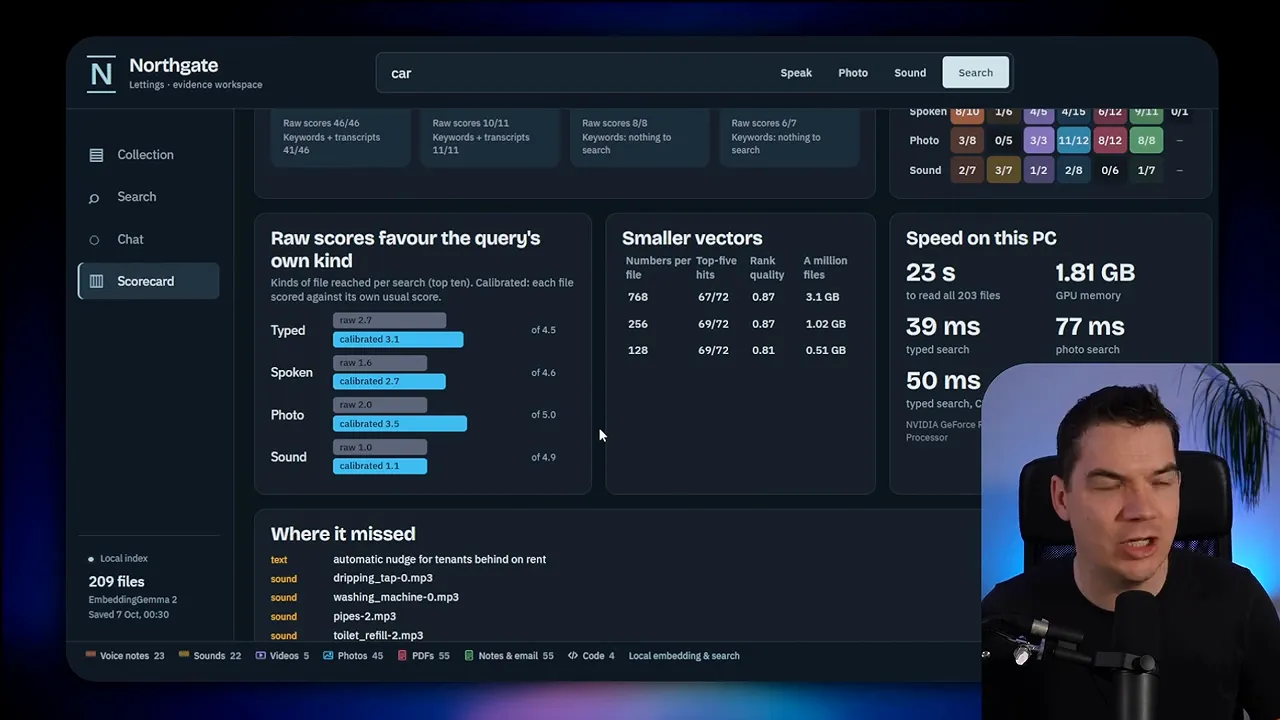
That difference matters in practice. If I photograph a maintenance issue, I may want the earlier written report as much as I want similar images.
A result list heavily weighted toward photos could make that report harder to find, even if the collection contains it.
I added a calibration step to even out the results across media types. Its purpose was to give the formats a fairer representation in the mixed result list.
I’m careful about the scope of this finding. It came from my evaluation and my collection. I don’t know whether it reflects a broader model behaviour or something specific to the files and tests I used.
My result is a reason to evaluate cross-format ranking, not a reason to assume every collection will behave the same way.
There’s also a product decision involved. A photo query doesn’t always imply a preference for photo results. The application needs to reflect what the person is trying to retrieve.
For a similar-image search, a photo-heavy result list may be appropriate. For a maintenance history search, a useful spread of photos, reports and voice notes may matter more.
Shorter Vectors Can Reduce Index Storage
EmbeddingGemma 2 supports shorter vectors as well as its standard 768-dimensional output. The available shorter sizes include 256 and 128 dimensions.
Since each dimension adds another stored number, reducing the dimension count reduces the space needed for the embeddings.
I tested 256 dimensions on my relatively small collection. I didn’t notice a drop in result quality.
That’s encouraging, but it isn’t a guarantee for every dataset. My test doesn’t establish that 256 dimensions will preserve quality for every task. It also doesn’t establish the same result for 128 dimensions.
The potential storage saving becomes more meaningful at a larger scale. In the example I discussed, the vector storage for a million items falls from roughly three gigabytes to roughly one gigabyte when moving from 768 to 256 dimensions.
Those figures concern the vector index, not the combined size of the original videos, photographs and documents. Shortening an embedding doesn’t shrink its source file.
I’d treat the dimension choice as a measurable trade-off:
- 768 dimensions: The standard representation and a useful baseline for comparison.
- 256 dimensions: A smaller representation that performed similarly in my limited test.
- 128 dimensions: A further reduction that needs its own quality assessment.
The sensible question isn’t simply which option produces the smallest index. It’s which option preserves useful retrieval for the collection and questions that matter.
Both prototypes contained hundreds of files. Embedding-based systems can work with thousands, tens of thousands or hundreds of thousands of items, but my demonstration wasn’t a large-scale benchmark.
Local processing also avoids a hosted embedding API charge for those operations. That doesn’t mean the application has no costs. It means the embedding work doesn’t depend on paying a remote service for each request.
How Fast Was Local Search?
Speed was one of the strongest parts of the experience. The Android app felt responsive, and desktop text searches completed very quickly.
In one desktop example, the query embedding took 46 milliseconds. That measurement describes the query representation step, rather than every possible part of the application.
I also compared typed searches with and without the desktop graphics card.
| Test | Reported time |
|---|---|
| Android pump search example | About 0.28 seconds |
| Desktop typed search using the graphics card | 39 milliseconds on average |
| Desktop typed search using the CPU | About 50 milliseconds |
| Desktop photo search | About 1.5 seconds |
The CPU result particularly interested me. Typed search remained fast without relying on the graphics card.
Photo search took longer, so I wouldn’t describe every input type as having the same response time. Still, about a second and a half is quite usable for that desktop interaction.
These are measurements from my setup, not universal performance promises. They also don’t describe how long it takes to index an entire folder or generate a chat answer.
Initial indexing, query processing, retrieval and answer generation are separate pieces of work. Keeping them separate makes the performance figures easier to interpret.
What I’d Check Before Building Around It
The most useful next step for a real application isn’t adding more interface features. I’d first test whether the search behaves well on representative files.
For a maintenance tool, that means checking ordinary requests like the ones I used: blocked ventilation, tap hoses, a damaged pump support and water entering through a ceiling.
Each request should have a clear expectation. A good answer might require several formats, rather than several examples of the same format.
I’d then check four things:
- Relevant results. Does the search return the records that would actually help someone do the job?
- Cross-format ranking. Do important reports disappear behind a long list of images or audio files?
- Storage choices. Does a shorter vector preserve the results that matter?
- The chat handoff. Can the answering model interpret the returned evidence, or can it only list the files?
Privacy needs the same practical attention. The Android example works offline. The desktop retrieval works locally. My hosted chat remains a separate component with a different processing path.
Google’s EmbeddingGemma documentation provides a reference for the model side. The application still needs its own evaluation, especially where search results support decisions or written answers.
What impressed me most wasn’t a single timing result. It was the ability to describe a real maintenance issue and retrieve its photos, reports and voice notes from one local collection.
A contractor in a basement doesn’t need to care about vectors or model parameters. They need the earlier record, even without a signal. That’s the kind of practical application that makes a small local model interesting.