
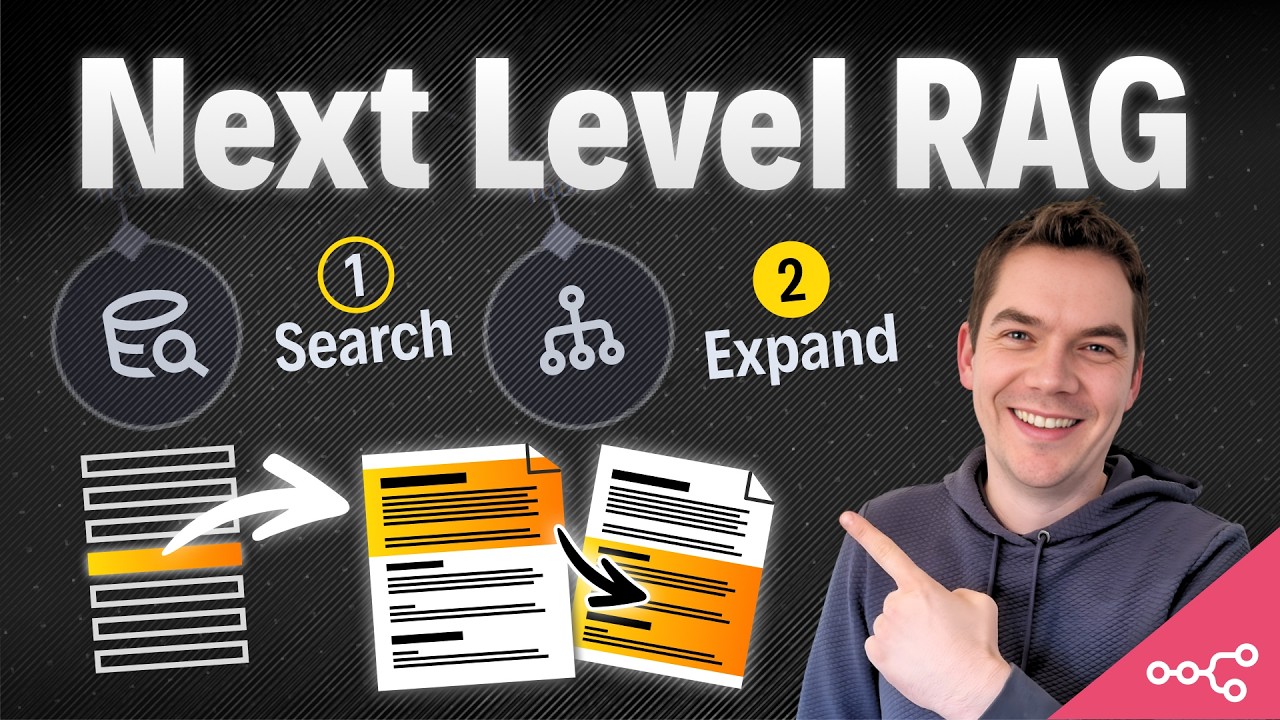
I built an automation that fixes the single biggest weakness in most retrieval-augmented generation systems. The problem is simple: agents retrieve isolated fragments of documents, but they have no idea where those fragments sit in the document structure. That missing structure strips away the meaning those fragments need. I call the solution context expansion. It gives agents the surrounding sections, parent headings, or even the full document so they can answer accurately and confidently.
What context expansion is and why it matters
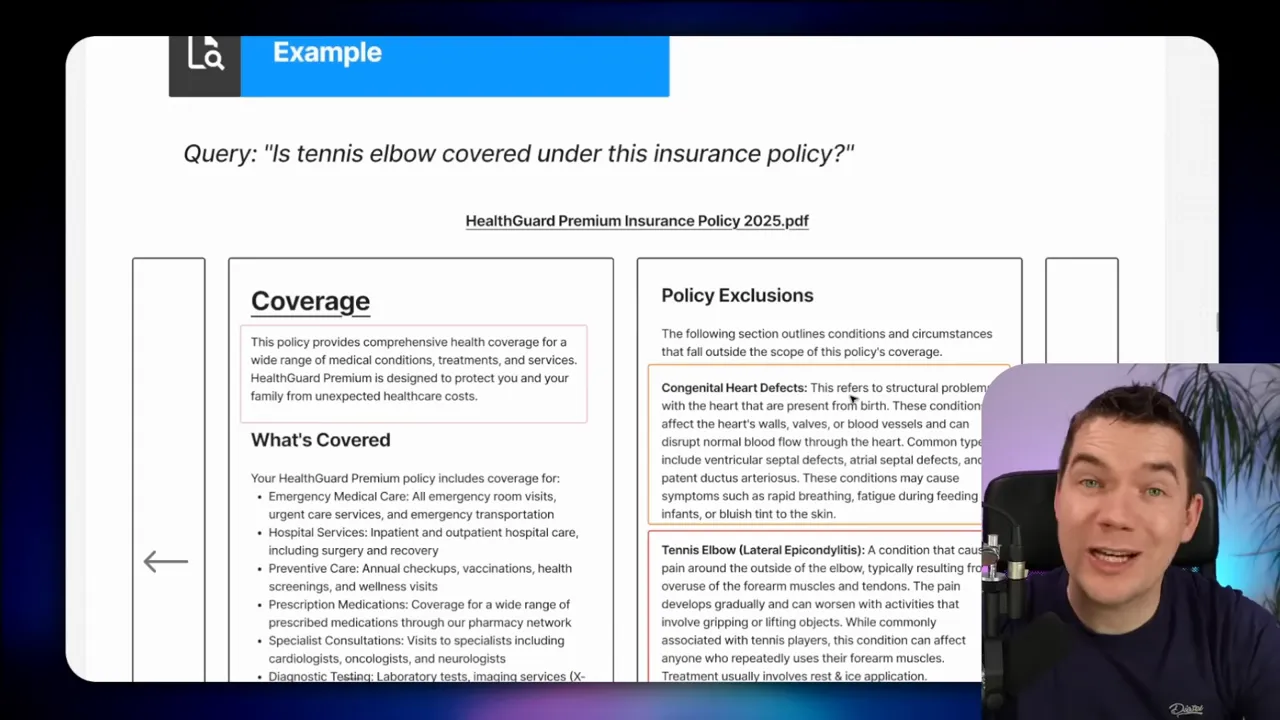
Vector and hybrid search do a great job narrowing down candidate chunks. They find the most likely fragments related to a query. But those fragments are often divorced from the document structure that gives them meaning. A paragraph saying “the policy was updated last month” doesn’t communicate what changed or why it matters. A sentence mentioning “tennis elbow” might be under a heading called “Policy Exclusions.” If the agent never sees that heading, it can confidently say the injury is covered when it is not.
Context expansion means deliberately pulling in the right additional material after the initial vector search. It could be the full document, neighboring chunks, a whole section, a parent heading, or multiple sections. The goal is to give the agent the context it needs to make faithful answers.
How this lack of context creates hallucinations
Hallucinations often look like model inventiveness, but many are actually the result of incomplete inputs. If a policy document is split into chunks and the vector store returns fragments that mention coverage and tennis elbow separately, an agent might stitch those fragments together and conclude the policy covers the condition. The agent is not lying. It is reasoning with incomplete information.
“They’re generating responses from isolated fragments of a document, but they’re completely blind to the document structure that gives those fragments meaning.”
Solving this requires either adding structure back into the chunks or fetching the structural context at query time. I implemented both approaches. One enriches chunks with short contextual snippets at ingestion. The other provides runtime expansion options so the agent can fetch more content only when it needs to.
Five practical context expansion strategies
Each approach trades off cost, latency, and precision. I explain their mechanics, pros, cons, and when to use them. I also describe how I implemented them inside n8n with a Supabase-backed vector store.
1. Full Document Expansion
What it is: After the vector search returns candidate chunks, the agent identifies the document ID of a “golden” chunk and loads the entire document into context.
Why use it: It guarantees the agent sees every relevant heading, table, and cross-reference. For short documents, this is the simplest and most accurate option.
Trade-offs: This is expensive and slow for long documents. It should only be used when the document is small, or when the agent determines that the specific document truly contains the answer.
How I implemented it: In my ingestion pipeline each chunk has a doc ID in metadata. When the agent finishes its vector search, it selects the chunk most relevant to the question and then issues a SQL select against the documents table to load all chunks that share that doc ID. I order them by chunk index, so the returned text matches the original flow of the document.
Tip: Save total character counts in the document metadata. Then add a deterministic check so the agent only triggers full document loads when the document is below a safe size threshold.
2. Neighbor Expansion
What it is: The agent fetches the chunk immediately before and after the selected chunk. This gives more local context around the fragment that matched.
Why use it: It’s cheap and easy to implement. It can fix cases where relevant content was split across chunk boundaries during ingestion.
Trade-offs: It can miss the real structure. The agent doesn’t know what it still doesn’t know. Fetching only adjacent chunks can be insufficient if the section spans many chunks or if the meaningful context sits elsewhere.
How I implemented it: Each chunk stores start and end line numbers in metadata. The neighbor query looks for chunks with the same doc ID and line numbers equal to one chunk before or after the target. That simple SQL query returns the previous and next chunks.
When to use it: Use neighbor expansion when documents are fairly linear and section boundaries are unlikely to split important information across non-adjacent chunks.
3. Section Expansion
What it is: Instead of grabbing arbitrary neighbors, the agent pulls every chunk that belongs to the same logical section (for example, an H2 or H3 heading and all content underneath it).
Why use it: Sections map more closely to human thinking about documents. If a chunk belongs to a “Cleaning and maintenance” section, loading that entire section gives the agent a complete view of instructions and relevant exceptions.
Trade-offs: You must extract document structure at ingestion time. That requires a smarter chunker and some additional metadata. The benefit is higher precision with moderate cost.
How I implemented it: I created a chunker that first splits the document by markdown headings (H2, H3, H4) to create section-level pieces, then applies a recursive character splitter inside larger sections. Each section is mapped to the chunk index range it produced. At query time the agent passes a chunk index and the system looks up the section range for that index, then fetches all chunks within that range.
When to use it: Use section expansion for structured documents such as manuals, policies, and research papers where headings reliably separate topics.
4. Parent Expansion
What it is: The agent fetches the parent heading content and all the child sections beneath it. For example, retrieving everything under a top-level “Coverage” heading, which may include subheadings like “Policy Exclusions.”
Why use it: Many decisions hinge on the broader parent context. A line about “tennis elbow” might be under a subheading, but the parent heading gives the rule that applies to all those sub-entries.
Trade-offs: Similar to section expansion, this requires a document hierarchy and mapping to chunk indexes.
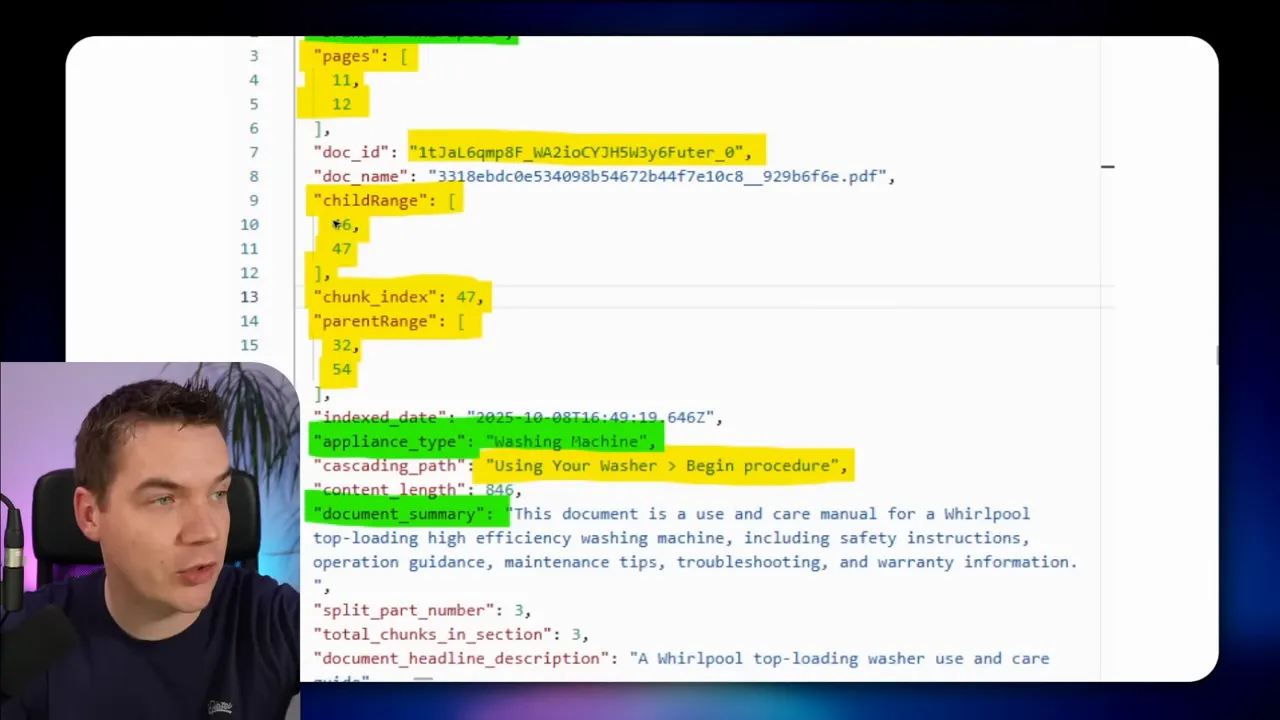
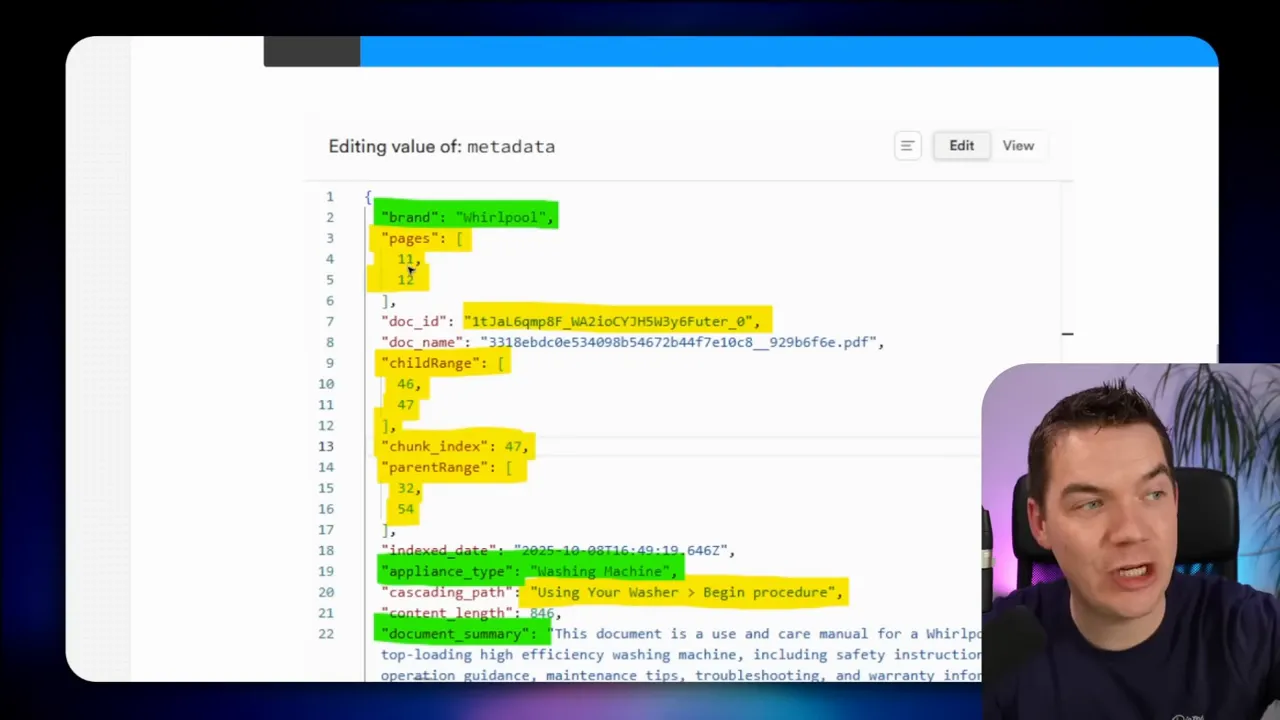
How I implemented it: Each chunk stores metadata that includes its cascading path of headings and the chunk index ranges for the child and parent ranges. When the agent wants the parent, it passes the mapped parent range to the database function and retrieves everything inside that span.
When to use it: Use parent expansion when the question appears to relate to policy, high-level rules, or aggregated rules that span multiple subheadings.
5. Agentic Expansion using a Document Hierarchy
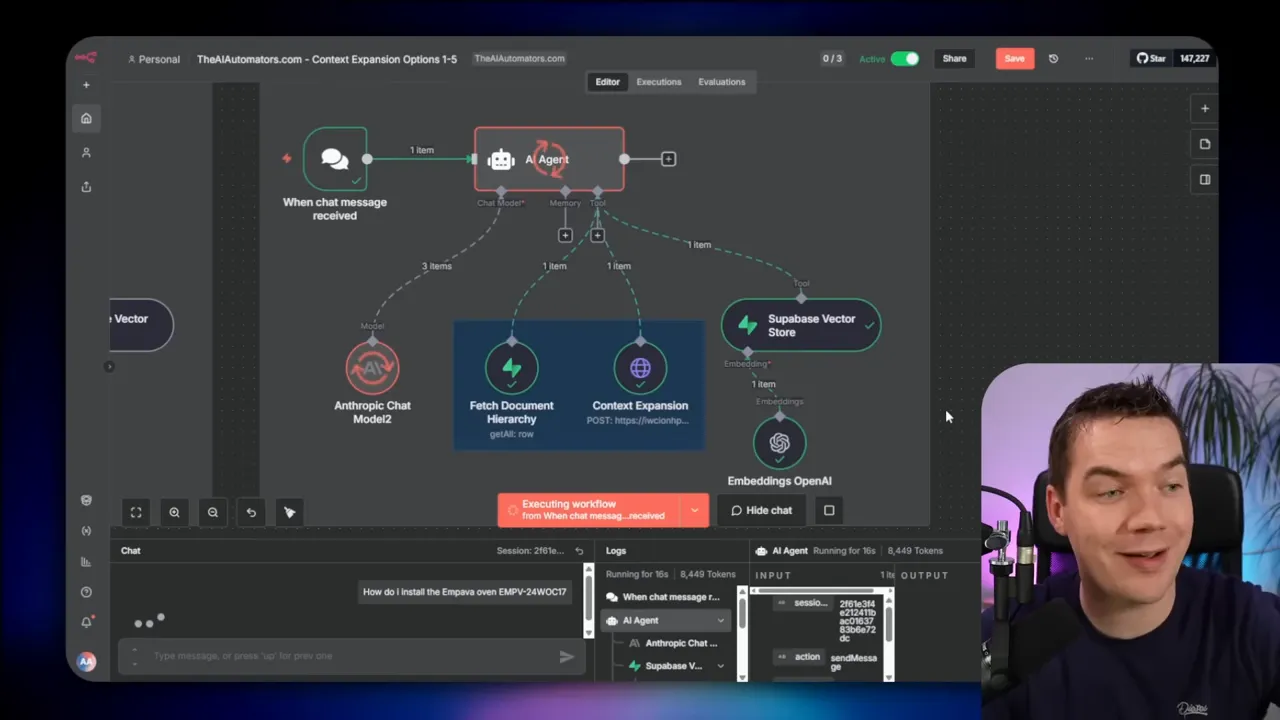
What it is: This is the most flexible approach. The agent retrieves a golden chunk, fetches the document hierarchy (a tree of headings and chunk index ranges), and uses that hierarchy to request multiple ranges that best answer the question.
Why use it: Documents often cross-reference themselves. A paragraph might reference an appendix, a definitions section, and a specific procedure. Agentic expansion lets the agent gather the exact combination of sections it needs to reason correctly.
Trade-offs: It needs a robust ingestion pipeline that extracts a hierarchy and maps sections to chunk ranges. That takes more development but pays off with fewer hallucinations and better accuracy.
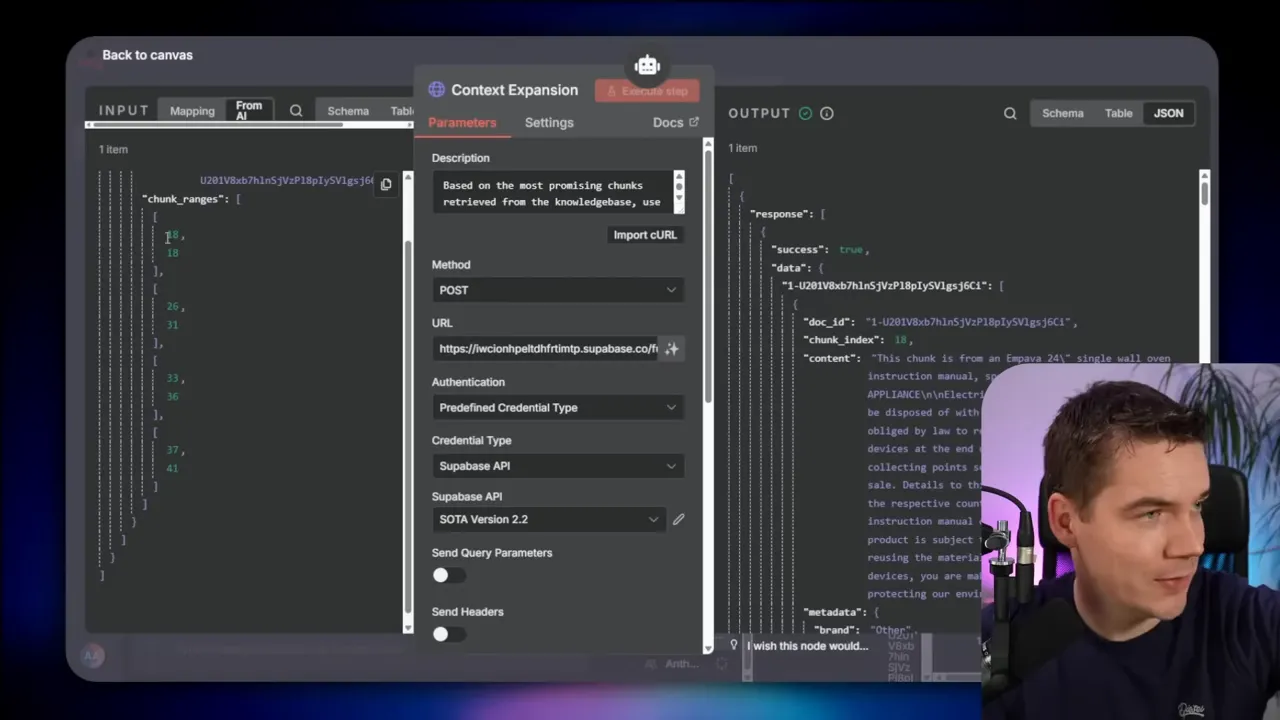
How I implemented it: I built three custom code nodes in n8n. The first parses the document and generates a smart markdown-first chunking. The second creates a section-to-chunk mapping. The third builds a hierarchical index and saves it in the record manager. At run time the agent fetches a golden chunk, reads the document ID, retrieves the saved hierarchy, and passes the desired chunk ranges into a Supabase edge function. The database function returns the requested chunks, which the agent uses to generate a comprehensive answer.
Agentic expansion is the method I reach for most when documents have a nontrivial structure and when users expect legal-like precision.
Why chunking strategy matters
How you cut documents into chunks determines how well vector search can match queries. The default approach in many toolkits is recursive character text splitting. It works by chopping text into fixed character sizes and then adjusting cut points to nearest delimiters like paragraph breaks. That gives reasonable coverage for long unstructured text, but it is crude for structured content.
Problems with character-based splitting:
- Chunks can span multiple topics. A single chunk might contain the end of one section and the start of another.
- Embedding models then receive mixed-topic fragments, weakening semantic signals.
- Context lost across chunk boundaries can lead agents to make wrong inferences.
A better approach for structured documents is two-step splitting:
- Split by headings so each section becomes its own subdocument.
- Apply recursive character splitting inside each large section to produce manageable chunks for embeddings.
This combination keeps chunks focused on a single topic while avoiding excessive chunk size. It also makes it straightforward to map sections to chunk index ranges. I implemented that exact strategy in my smart chunker.
Note: n8n’s native data loader does support markdown splitting, but it does not perform the two-step process by default. I wrote custom code nodes to first parse headings and then split large sections recursively. I also added a merging step to coalesce very small chunks into useful units. Tiny chunks can dilute retrieval quality because the vector store may return them instead of a more representative chunk.
Enriching chunks without per-chunk LLM calls
Contextual embeddings solve the structure problem by having an LLM summarize or label each chunk at ingestion. That label is stored as a snippet and used in reranking. It works well, but it requires an LLM call per chunk, which quickly becomes costly at scale.
I took a different route. I call an LLM once per document to extract a short document summary and key metadata fields, like brand, document type, and a few-word document summary. Then I attach the document summary plus the section heading to each chunk. That gives most of the benefits of contextual embeddings with a single LLM call per document instead of per chunk.
This small prefix at the top of each chunk helps the agent immediately understand where the fragment belongs. For example, a chunk might show this in its page content: “This chunk is from an Impava 24-inch single-wall oven instruction manual, specifically the installation section part two.” That snippet drastically reduces ambiguity.
Tracking provenance and page numbers
Traceability matters for many enterprise uses. Users want to know where each answer came from and on which PDF pages the text appeared. I preserved page numbers during ingestion by aggregating page-level OCR results. Each chunk stores the original page range it came from. That makes answers auditable and helps with compliance.
Mistral OCR was necessary here. The native PDF extractor in n8n doesn’t reliably extract heading markers. OCR lets me capture headings and exact page placements, which feed the heading-first chunking logic.
How I store and retrieve the hierarchy
Storing the document hierarchy is central to agentic expansion. I save a hierarchical index in a record manager table inside Supabase. Each row represents a document and contains a JSON structure describing heading levels and their chunk index ranges. That JSON looks like a simple tree where each node lists a start and end chunk index. When the agent requests context, it fetches that JSON, finds the ranges it needs, then calls an edge function that runs a database function to return chunks by range.
Why Supabase/Postgres? You need two capabilities in one place: vector search and flexible SQL queries over chunk metadata. Postgres gives you both. If you use other vector stores such as Pinecone, you can operate a separate Postgres instance to host the hierarchy and metadata, but having everything in Supabase simplifies operations.
Practical implementation details in n8n
Here is the high-level ingestion flow I built in n8n. You can use it as a checklist.
- Trigger on a new file in Google Drive or another source.
- Run OCR (I used Mistral OCR) to extract text with heading markers and page numbers.
- Run the smart markdown chunker: parse headings first, split large sections recursively, merge tiny chunks, and produce chunk index ranges for each heading.
- Call an LLM once per document to enrich the metadata (document summary, brand, appliance type, etc.) and save that to the record manager.
- Generate embeddings for each chunk and upsert them into the Supabase vector table, along with the enriched metadata and the hierarchical index stored in a separate column.
When answering queries, the runtime flow looks like this:
- User query hits the agent chain or LLM chain.
- Agent sends a rewritten or ranked query to the vector store to retrieve top candidate chunks (10 to 20).
- Agent selects the golden chunk or top chunk to expand on.
- Agent fetches the document hierarchy associated with that doc ID from the record manager.
- Agent decides which ranges to request (neighbor, section, parent, or multiple ranges) and calls the Supabase edge function with those ranges.
- Edge function runs a database function to SELECT chunks by ID range and returns them to the agent.
- Agent composes the final answer using the expanded context and returns it to the user.
I implemented the edge function as a small validation wrapper that calls a database function. The database function loops through the requested chunk ranges and performs a SELECT WHERE id IN the requested IDs. It then returns the ordered chunks to the agent.
SQL and ordering considerations
Ordering matters. When the agent pulls a full document or a range, I always ORDER BY chunk index ASC. That preserves the original flow and avoids returning disjointed paragraphs. If you imagine a manual that instructs assembly, keeping the steps in order is essential.
For neighbor expansion, I match on doc ID and on the stored line numbers or chunk index. The simple query checks “line_number_start = target_start – 1” for the previous chunk and “line_number_start = target_end + 1” for the next chunk. This approach assumes chunk boundaries are consistent with line numbering, which may need tuning if the text contains many consecutive blank lines.
Performance, cost, and model selection
Choose the expansion strategy based on document length, access patterns, and cost tolerance.
- Full document loads are best for very short documents or when you must guarantee complete coverage. They are expensive for long docs.
- Neighbor expansion is cheap and can salvage many boundary errors. Use it for quick fixes and lightweight documents.
- Section and parent expansion hit a good balance for manuals and policies. They return targeted context without overloading the model.
- Agentic expansion provides the highest accuracy for complex documents but requires more sophisticated ingestion and metadata storage.
You can also mix deterministic LLM chains with agents. I often use a small LLM chain to rewrite queries for better vector search, then use a second small chain to decide which chunk to expand. Finally, a larger model can generate the final answer with the expanded context. This hybrid approach reduces cost because the expensive model only runs once with the best possible context.
Practical tips and gotchas
- Save doc size metadata. Use it to gate full document loads and avoid heavy model calls on huge files.
- Merge tiny chunks. Tiny chunks can overshadow better chunks during retrieval. Merge them when they fall below a sensible size threshold.
- Use OCR for headings. Native PDF extractors may not preserve heading markup. OCR gives you clearer heading detection and page numbers for traceability.
- Store hierarchies in Postgres. Vector stores alone don’t hold complex hierarchical indexes well. A relational store lets you query ranges and maintain the tree structure easily.
- Include a short context snippet in each chunk. A five- to eight-word document summary plus the section heading often prevents the need for expansion for many queries.
- Order chunks consistently. Always return chunks in the order they appear in the source to maintain procedural sense.
A reproducible checklist for accurate RAG agents
- Extract text with headings and page numbers via OCR or a reliable parser.
- Split first by headings, then recursively split large sections.
- Merge very small chunks into larger ones where appropriate.
- Enrich documents with a single LLM call to generate a short document summary and metadata.
- Save chunk-level metadata: doc ID, chunk index, heading path, page numbers, and the prefix snippet.
- Store the hierarchical index in a record manager or relational table.
- Use vector search to fetch candidate chunks and identify the golden chunk.
- Fetch context with one of the five expansion strategies depending on the situation.
- Order returned chunks by index and pass them to the final model for answer generation.
- Record traceability information with each answer for auditability.
Common scenarios and recommended expansion strategies
Short product manual question
Scenario: A user asks, “How do I install the Impava oven?” Recommendation: Full document expansion if the manual is under your size threshold. This gives the step-by-step instructions in order and avoids missing substeps.
Policy coverage question
Scenario: “Is tennis elbow covered?” Recommendation: Parent or agentic expansion. Coverage questions are often decided at the policy-level headings. Pulling the parent “Coverage” heading plus the “Policy Exclusions” children is essential to avoid wrong answers.
Maintenance or repair instruction spanning multiple sections
Scenario: “How do I clean and dispose of the oven?” Recommendation: Section expansion to fetch cleaning, disassembly, and disposal sections. Agentic expansion can be helpful if the instructions reference appendices or cross-sections.
Why this approach reduces hallucinations
This approach addresses the root cause of many hallucinations: missing structure. When the agent can see the heading path for a chunk and fetch the containing section or parent, it no longer has to guess whether a phrase is an exclusion, a warning, or a general rule. The result is far higher faithfulness. The agent still reasons and synthesizes, but it reasons over complete, structured inputs rather than isolated fragments.
“This is essentially document navigation based off a structure.”
Final operational notes
Building a production RAG system is an exercise in trade-offs. My goal was to give agents enough context to answer reliably without forcing a full-document load every time. The architecture I implemented inside n8n keeps ingestion costs predictable while allowing runtime expansion on demand.
Breaking documents into meaningful sections first, enriching per-document metadata, and saving a hierarchical index unlock agent-level navigation. The agent can then pull the exact pieces it needs and assemble accurate answers. In many cases, that single change converts unreliable agents into trustworthy helpers.
