

People often treat an AI model as if it is the entire product. They compare Claude, Codex, Gemini, and local models, then assume the biggest model produces the best result. That misses a major part of what makes an AI coding agent useful.
I can take the exact same model, give it the same task, and get dramatically different results depending on the coding harness wrapped around it. The harness determines what the model can inspect, which tools it can call, how it edits files, how it manages context, how it recovers from errors, and which commands it is allowed to run.
That is why Pi has gained so much attention. It is not trying to beat Claude Code or Codex by shipping an even bigger package of built-in features. It takes the opposite approach. Pi starts with a small, inspectable core and lets me add only what I need.
That makes Pi incredibly interesting. It does not make it the right option for everybody.
The real question is not whether Pi will replace Claude Code. The question is which model and coding harness combination works best for the job I need done, in the environment where I need it done.
The Model Is the Engine, but the Harness Is the Car
I think of the model as the engine in a car. The engine provides raw power. Yet engine power alone does not decide whether a car gets me safely and efficiently from one place to another.
The steering, brakes, gearbox, dashboard, wheels, and suspension all matter. So does the driver’s ability to control the vehicle.
A coding harness plays that role around an AI model. It is the layer that turns a capable language model into an agent that can work with code, terminal commands, files, tests, documentation, and external services.
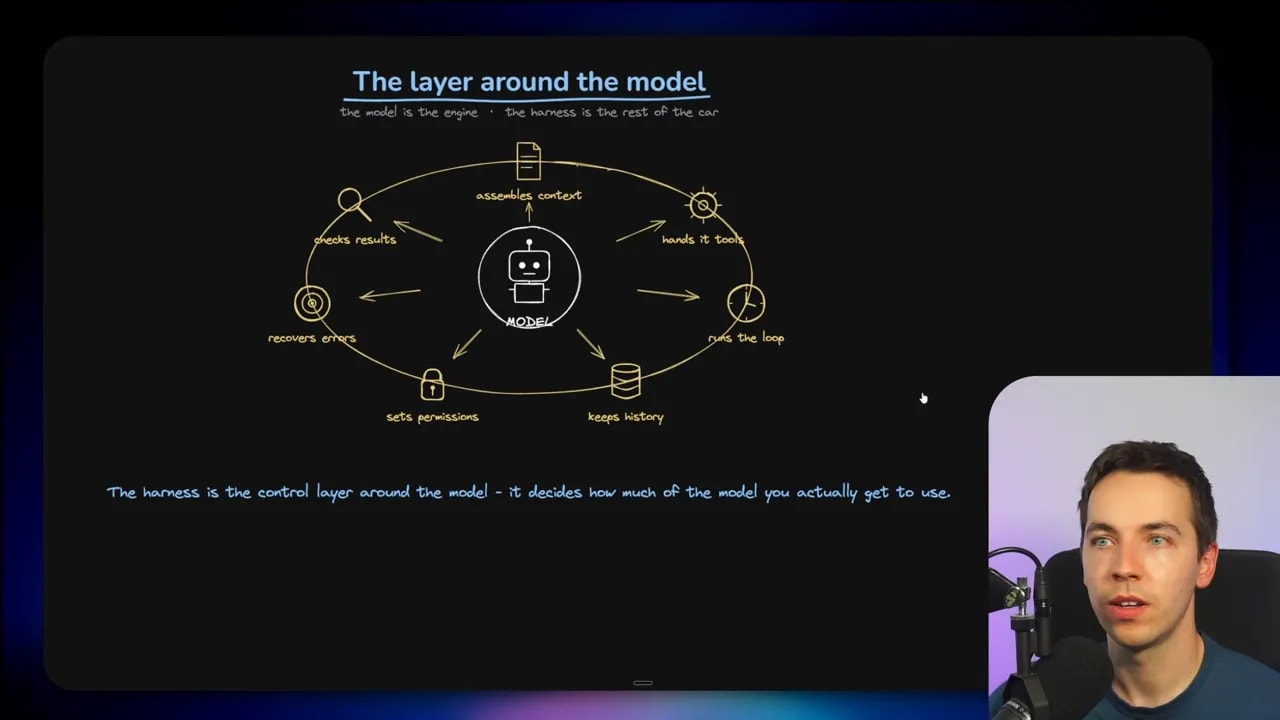
The harness decides several important things:
- What the model sees: It chooses which project files, search results, terminal output, system instructions, and previous messages enter the context.
- What the model can do: It provides tools for reading, searching, editing, writing, running commands, browsing the web, or calling external services.
- How work proceeds: It runs the repeated loop of reasoning, taking an action, receiving a result, and deciding what to do next.
- How context is managed: It stores history, truncates old material, summarizes information, and decides what to retain.
- What is permitted: It applies sandbox rules, permission prompts, and other limits on potentially destructive actions.
- How it handles failure: It determines whether the agent retries, revises a plan, checks tests, or stops when a tool fails.
All of this changes the quality of the outcome. A powerful model can perform poorly with weak tools or a clumsy workflow. A simpler harness can sometimes get surprisingly close to a much more feature-heavy system if its tools and context choices are well designed.
Two Competing Philosophies for AI Coding Agents
There are two broad approaches to building a coding harness.
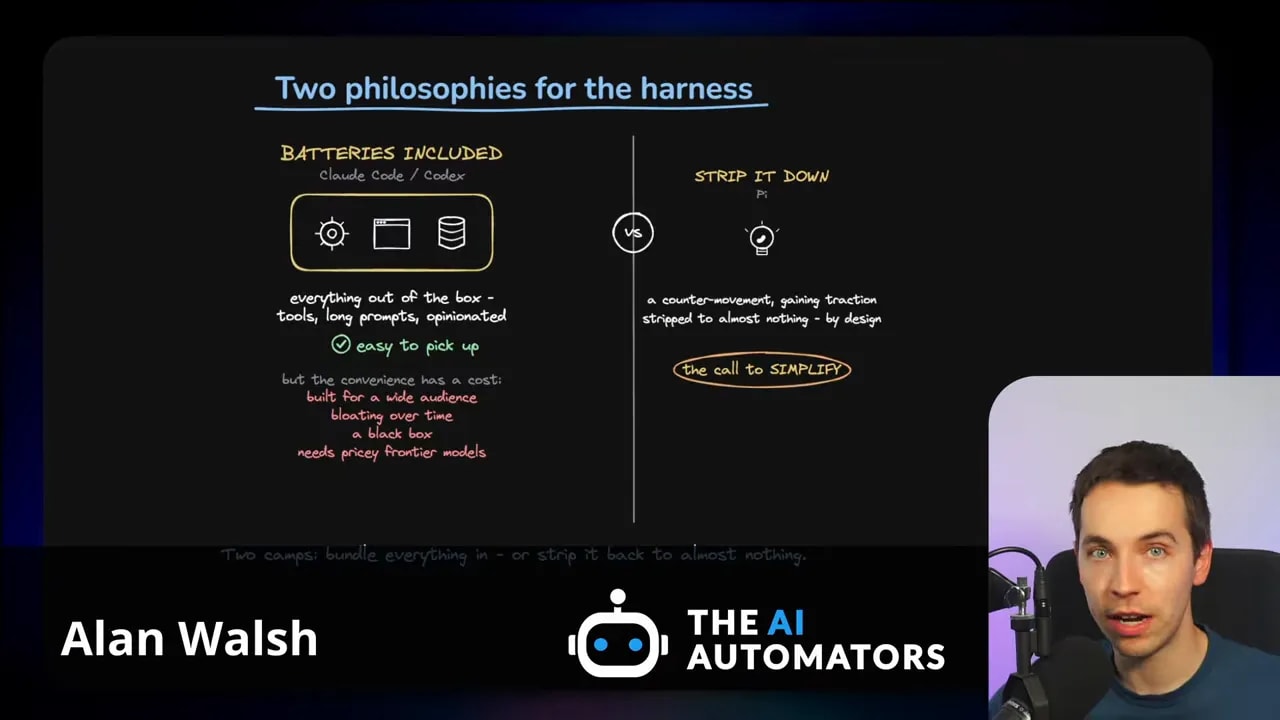
The first is the batteries-included approach. Claude Code and Codex sit in this camp. They provide long system prompts, extensive tool sets, Model Context Protocol support, permission popups, planning modes, task lists, sub-agents, and many other features from the start.
The second is the minimal core approach. Pi sits here. It gives me a small foundation, keeps its behavior visible, and expects me to decide what gets added later.
Batteries-included agents: convenience first
Claude Code and Codex are popular for good reasons. I can install one, authenticate, open a repository, and begin working quickly. I do not have to decide which extension supports planning, how permission prompts should work, or how to store session history. The agent already has an opinion about those things.
That experience is valuable, especially for people who do not want to assemble their own developer environment.
A batteries-included agent typically offers:
- A large built-in tool bundle
- Long, opinionated system prompts
- Automatic updates from the team building the product
- Permission flows for risky operations
- Planning and task-management features
- Support for extra tools and services through MCP
- Multi-agent workflows and delegated tasks
There is a clear benefit here. The initial setup is minimal, and the product works well without much configuration.
The trade-off is that all of this machinery adds bulk. Some features may not fit my workflow. Others may consume context or add steps that I cannot easily remove. If something behaves strangely, the internals can feel like a black box.
These agents also tend to work best with expensive frontier models that can handle large instructions, extensive tool definitions, and complicated task loops. That is reasonable for many professional workflows. It can be far less practical when I want to use a smaller or local model.
Minimal agents: control first
Pi takes a very different position. It starts deliberately small. Its core is not trying to predict every tool, workflow, or safeguard I might want. Instead, it gives me basic capabilities and lets me build upward.
This sounds less convenient because it is less convenient at the beginning. Yet it can be much more useful for people who need control over the entire environment.
A minimal coding harness has a few major advantages:
- I can inspect what it is doing rather than relying on hidden behavior.
- I can use a local model or any compatible model endpoint.
- I can avoid sending unnecessary instructions and tools into the model context.
- I can choose the exact security boundary for my use case.
- I can add features only when those features solve a real problem.
The danger is obvious too. Freedom means responsibility. If I remove the built-in guardrails, I have to create the right protection myself.
Benchmarks Show Why the Harness Changes Results
The impact of the harness is not just a matter of preference. Benchmarks show significant differences when the same model works through different coding agents.
The Terminal-Bench 2.1 leaderboard compares agents on terminal-based tasks. The results make the point clearly: models perform differently depending on the harness used around them.
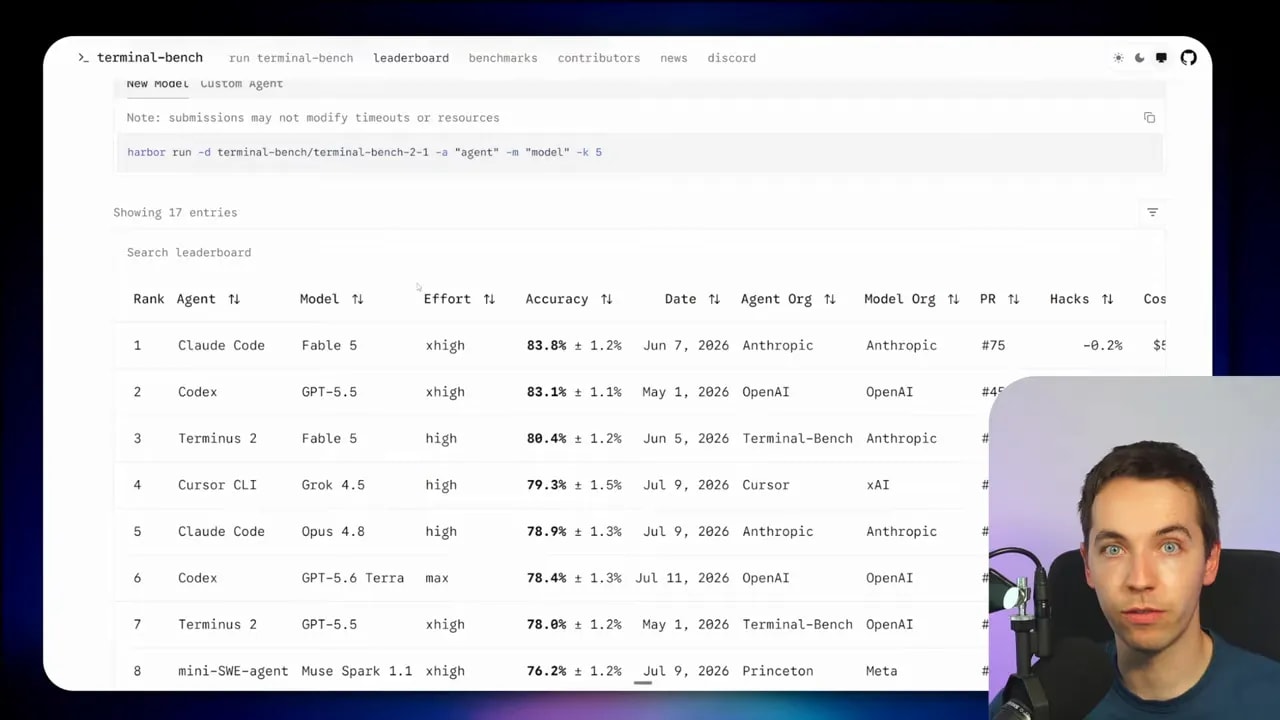
For Anthropic and OpenAI models, their own harnesses perform strongly. That makes sense. The model providers can optimize their products together.
Still, a minimal benchmarking harness called Terminus 2 performs nearly as well in some cases. With Gemini 3 Pro, it even outperforms Gemini CLI in the benchmark shown. That is a useful reminder that a bigger product does not automatically produce a better agent.
Tool design matters. Context design matters. The workflow loop matters.
What Harness Research Tells Us About Tools
A particularly useful reference here is the SWE-agent research paper, SWE-agent: Agent-Computer Interfaces Enable Automated Software Engineering. The researchers started with a very basic setup: a model working in a terminal with almost nothing around it.
That bare setup scored 11 on the benchmark used in the research.
They then added the complete harness and tooling. Using the same model, the score increased to 18. That is a large improvement from the surrounding system rather than a model upgrade.
The most revealing part came next. The researchers removed or changed individual pieces of the harness to measure what each decision contributed.
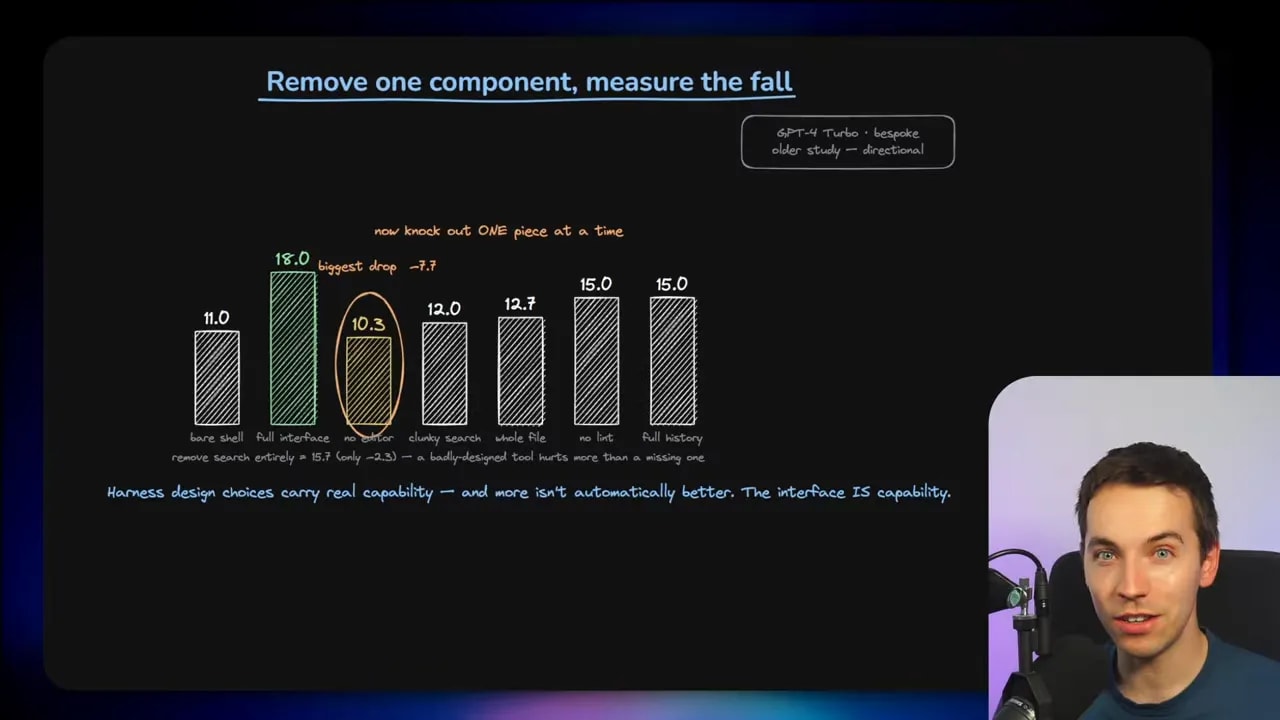
When they removed the dedicated editing tool, performance fell from 18 to 10.3. One component removed almost all of the gains delivered by the complete harness.
Search design mattered too. Replacing a well-designed search tool with a clumsy version that returned results one page at a time reduced the score by around six points. It performed worse than offering no search tool at all.
That is the important lesson. More tools do not automatically help. Poorly designed tools can distract the model, waste its context, create unreliable action loops, and lead it down the wrong path.
The same idea applies to file access. It may feel helpful to dump an entire file into the context. In reality, a focused window of around 100 relevant lines may work better. The model needs useful information, not the maximum possible amount of information.
Harness engineering is therefore a design problem. I have to ask:
- Does this tool help the agent complete the task?
- Does the tool’s output give clear information?
- Does it add noise to the context?
- Can the agent use it reliably?
- What happens if the tool fails?
What Pi Gives Me Out of the Box
Pi is intentionally sparse. When I start using it, I do not get a giant collection of tools and workflows. The default tools cover the fundamentals:
- read for reading files
- grep for searching file contents
- find for locating files
- list for inspecting directories
- bash for running terminal commands
- edit for modifying existing files
- write for creating or replacing files
That does not sound like much. It is still enough to accomplish a surprising number of real coding tasks. An agent can inspect a project, find relevant code, make changes, run tests, and interpret the results with this small group of tools.
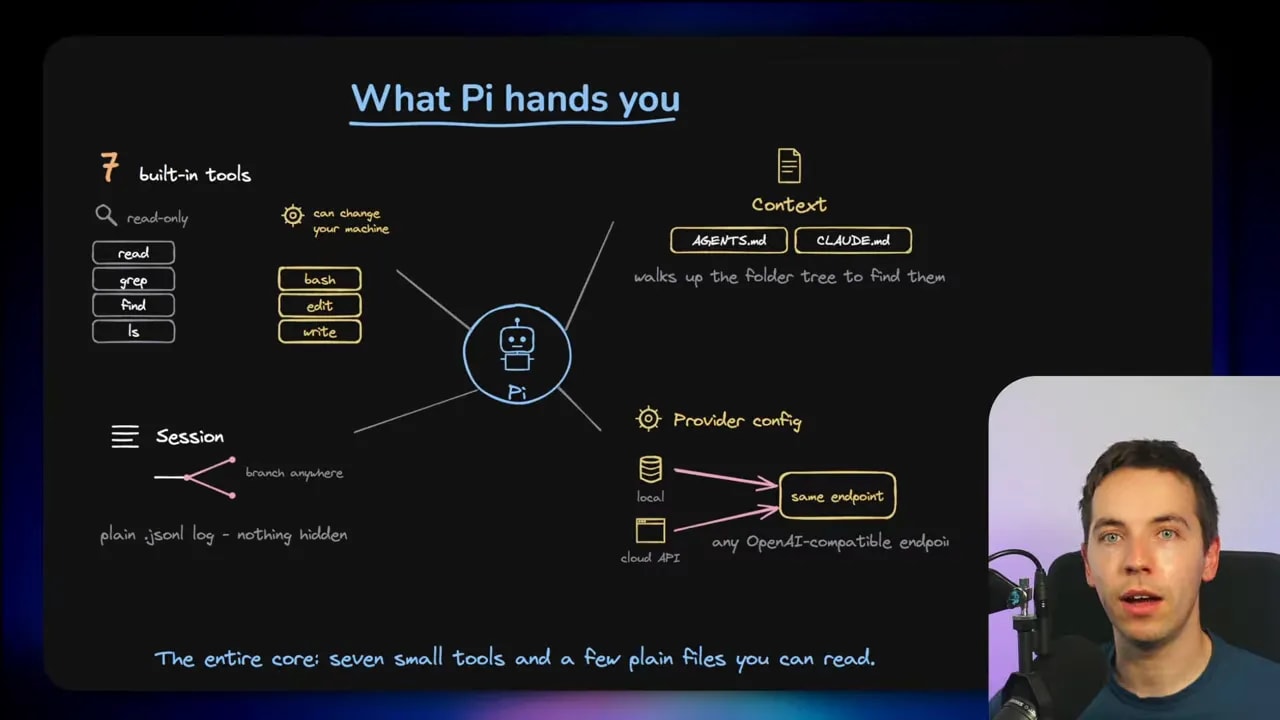
Pi also supports an AGENTS.md file. I can place project-level instructions in that file and Pi can read them automatically. This gives the agent a clear source of rules, conventions, and project context.
Its session storage is equally simple. Pi stores sessions as plain JSONL files, which are readable logs of everything that happened during a session. I can inspect them, understand the sequence of actions, and branch from an earlier point if I need to try a different direction.
Nothing is buried behind an inaccessible session layer. That is a major difference from a product where the history and tool loop are mostly hidden.
Model provider flexibility
Pi can connect to any OpenAI-compatible endpoint. That means I can use an API from a major provider, or I can point Pi at a local model running on my own machine.
This flexibility matters. Large batteries-included coding agents may carry system prompts and tool definitions that are too heavy for smaller models. A leaner setup can make local model experimentation far more realistic.
Using a local model does not mean I get the same capability as a frontier model. It does mean I can choose the cost, privacy, speed, and infrastructure that fit the task. Pi does not force a single provider or deployment model.
What Pi Leaves Out Is the Point
Pi does not ship with several features that people now expect from AI coding agents.
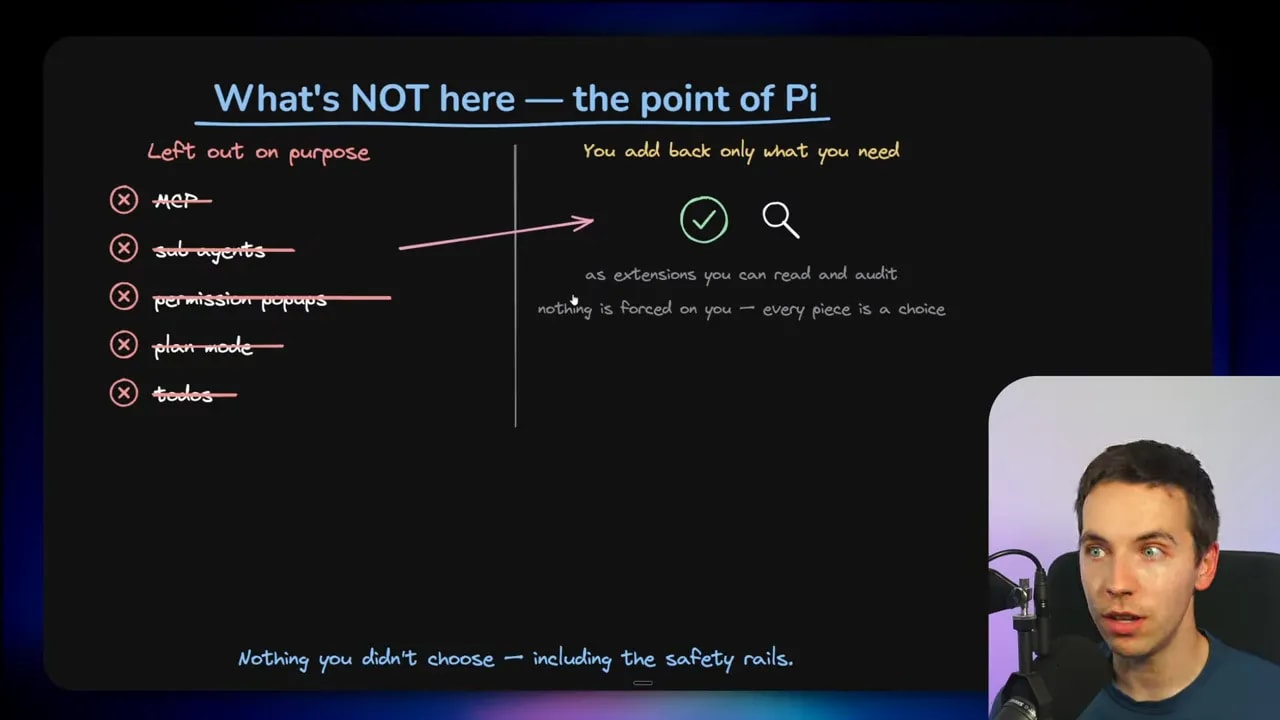
Out of the box, Pi does not include:
- MCP support
- Sub-agents
- Permission prompts
- Plan mode
- Built-in task lists or to-do workflows
- Default safety and security safeguards
At first, this can sound like a list of missing features. In Pi, it is a design choice.
I add features when I have a reason to add them. If I do not need web access for a repository task, I do not have to include it. If a planning tool adds friction rather than value, I can leave it out. If I need custom permissions for a company environment, I can build or install the rules that fit that environment.
Pi puts the harness back in the hands of the person running it.
That is also why I would not describe Pi as a universal Claude Code killer. Pi is not a direct replacement for everyone. It is a different way of thinking about coding agents.
Security Is Your Responsibility with Pi
The lack of built-in safeguards is the most important practical limitation to understand.
Pi can run shell commands. Without appropriate containment, a coding agent could execute destructive actions on a machine. It could delete files, modify the wrong project, expose credentials, or make changes outside the intended workspace.
That is why I strongly recommend running Pi inside a sandboxed environment, such as a Docker container. The goal is to limit the agent to a specific workspace and prevent access to the rest of the operating system.
A safe setup should make the boundary explicit:
- Mount only the project directory the agent needs.
- Keep secrets and unrelated folders outside the container.
- Control network access if the task does not need it.
- Use separate environments for risky experiments.
- Review which commands and permissions extensions introduce.
Security matters for every coding agent. Stories of agents deleting folders or making unintended edits exist across the category. Claude Code and Codex generally reduce the risk because they include established safeguards and permission checks.
With Pi, I must decide what those safeguards should be and make sure they exist. A minimal harness does not remove risk. It makes the responsibility more visible.
Installing Pi and Running a Simple Repository Task
Pi is straightforward to install through its documentation at pi.dev. After installation, I can log in through the command interface and choose an account or authenticate with an API key.
For the practical setup I used, I had Claude Code create a Docker container so Pi could only access files inside the chosen workspace. That gives the agent a clear and limited area in which to operate.
Once Pi was running, I started simply. I gave it a basic greeting, confirmed that it responded, and then asked it to summarize a to-do application repository that I had cloned into the workspace.
To do that job, Pi used its default tools. It listed directories, found relevant files, read project content, and formed a summary from what it discovered.
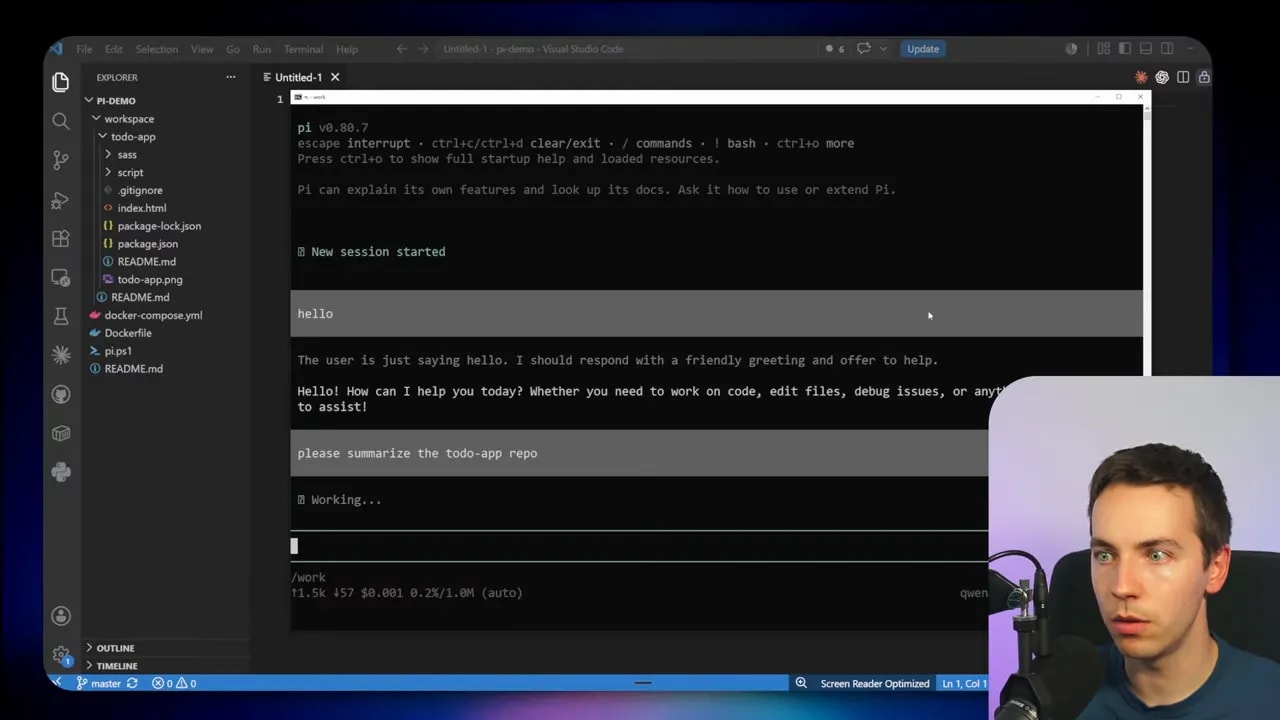
This is a good example of why the minimal tool set matters. Summarizing a repository does not always require web access, sub-agents, MCP connections, or elaborate planning. A small, direct workflow can be enough.
Of course, some tasks need far more than that. That is where Pi’s modular system comes in.
Adding Features Through the Pi Package Catalog
Pi has a package catalog with thousands of available packages. These can add extensions, skills, prompt templates, themes, and other capabilities.
I can browse the Pi extension catalog, sort by popular downloads, and choose the components I actually want.
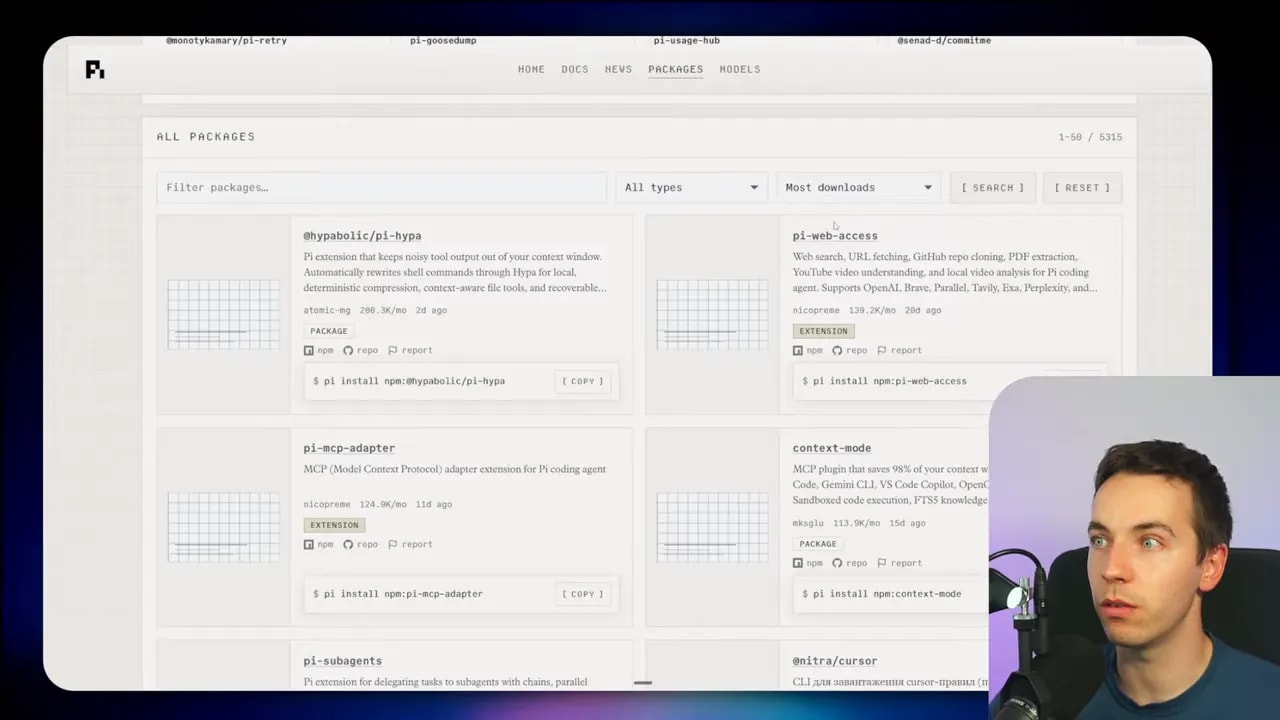
Examples include:
- Web access
- MCP integrations
- Context management tools
- Sub-agent support
- Claude Code-style dynamic workflows
- Prompt templates and skills
The installation pattern is simple:
pi install <package-name>For example, I installed a web-access extension and a sub-agent extension. After starting a new session, those extensions appeared in Pi’s available capabilities.
I could then ask Pi to summarize the to-do application folder while using sub-agents. The agent could delegate parts of the inspection work instead of handling every step alone.
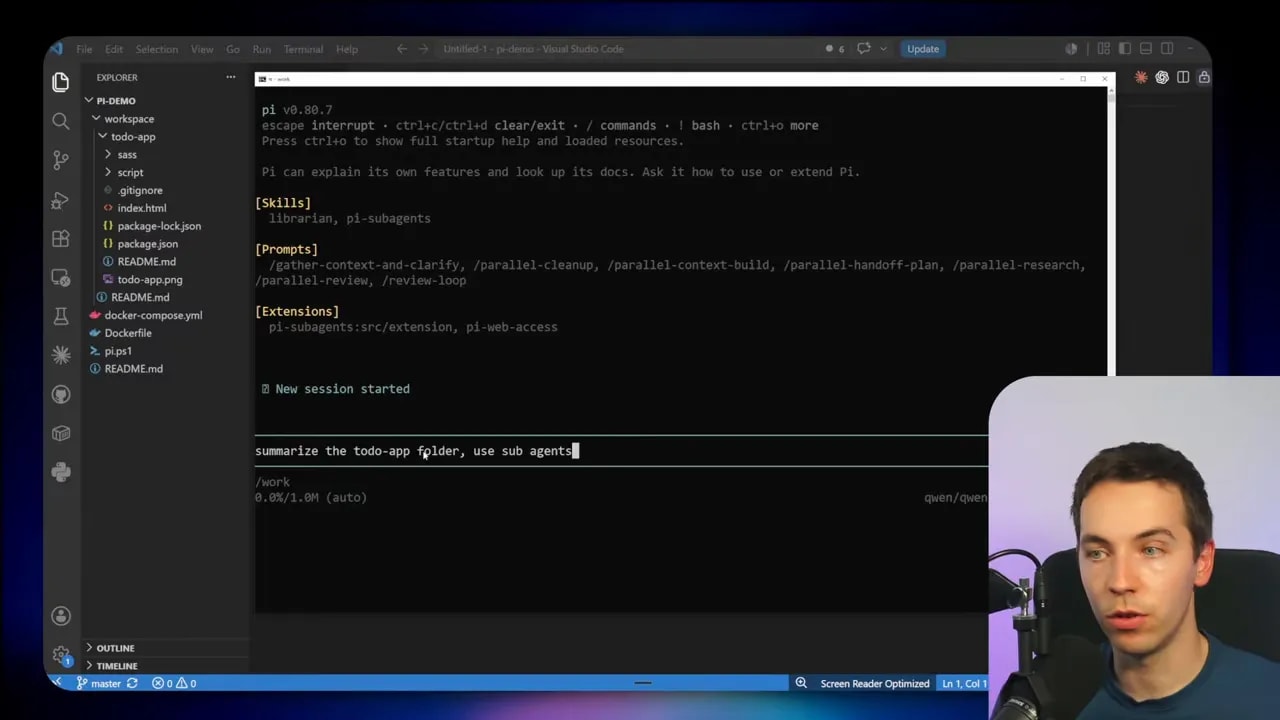
Community extensions have rebuilt many familiar features from Claude Code and Codex. The difference is that Pi treats them as optional modules rather than permanent parts of the core.
There is a downside. Extensions come from different developers with different ideas about behavior and quality. Two extensions can conflict. One may add unexpected context, another may change tool behavior, and a third may make security assumptions that do not fit my environment.
I need to treat installed extensions as real code with real consequences, especially when they can call tools or execute commands.
Pi Extensions Are Just TypeScript Files
The most powerful part of Pi is that I do not have to depend on the package catalog at all.
An extension is simply a TypeScript file in a folder. That makes customization much more accessible than it sounds. Pi can even help write the extension code itself.
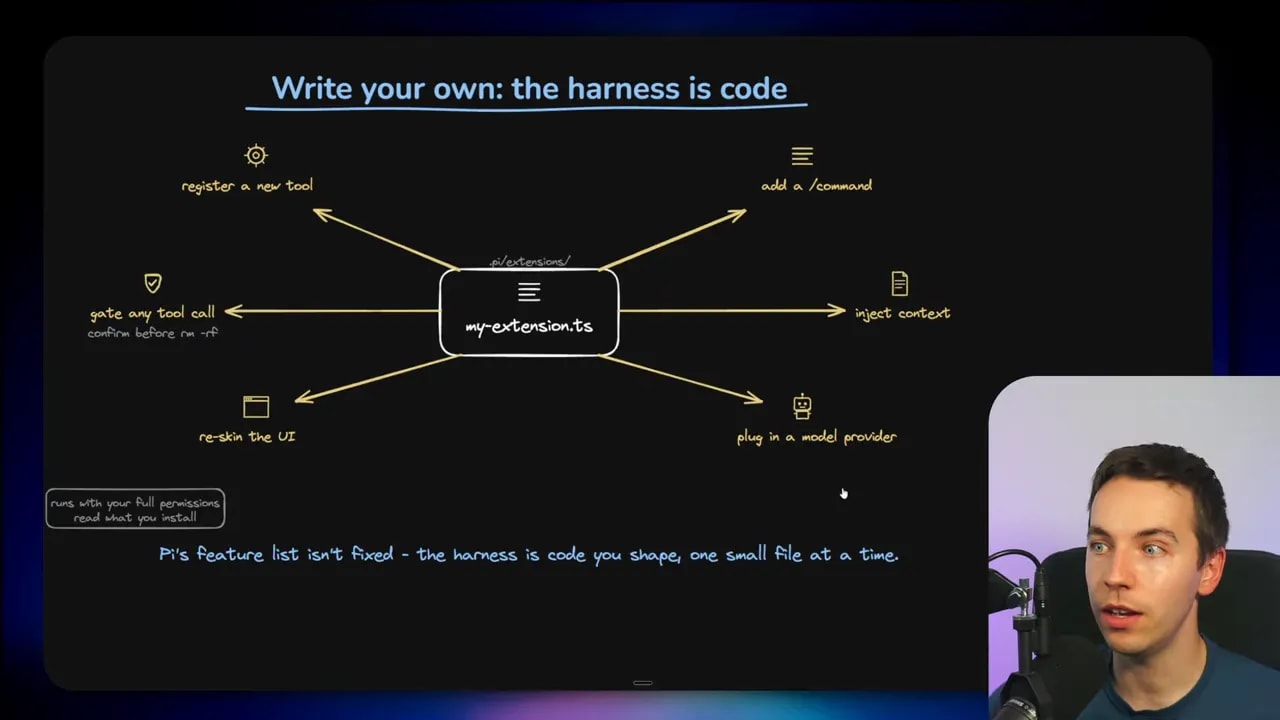
A Pi extension can do a lot:
- Register a new tool for the agent
- Intercept or gate an existing tool call
- Add custom permission behavior
- Inject task-specific context
- Connect a new model provider
- Add custom commands
- Change or reskin the interface
- Implement a specialized workflow for a team or project
This is how many serious Pi users operate. They begin with the minimal core, identify what is missing in their own workflow, and have Pi help them create that missing component.
That creates a different relationship with an agent. Instead of adapting my work to the product’s default behavior, I can shape the product around the work.
For a development team, that could mean adding a custom code-review checklist, controlling which test commands are allowed, injecting internal project conventions, or blocking edits in sensitive folders.
For a local-model setup, it could mean keeping the prompt and tool set lean enough for the model’s available context and capability.
For an enterprise environment, it could mean defining the precise sandbox boundary, logging requirements, and permissions required for internal systems.
Who Should Use Claude Code or Codex?
For most people, especially those who are less technical, Claude Code and Codex remain the better starting point.
They work well because the builders already made many important design decisions. They ship updates continuously. They keep adding capabilities. They include useful safeguards and offer a smoother path from installation to productive work.
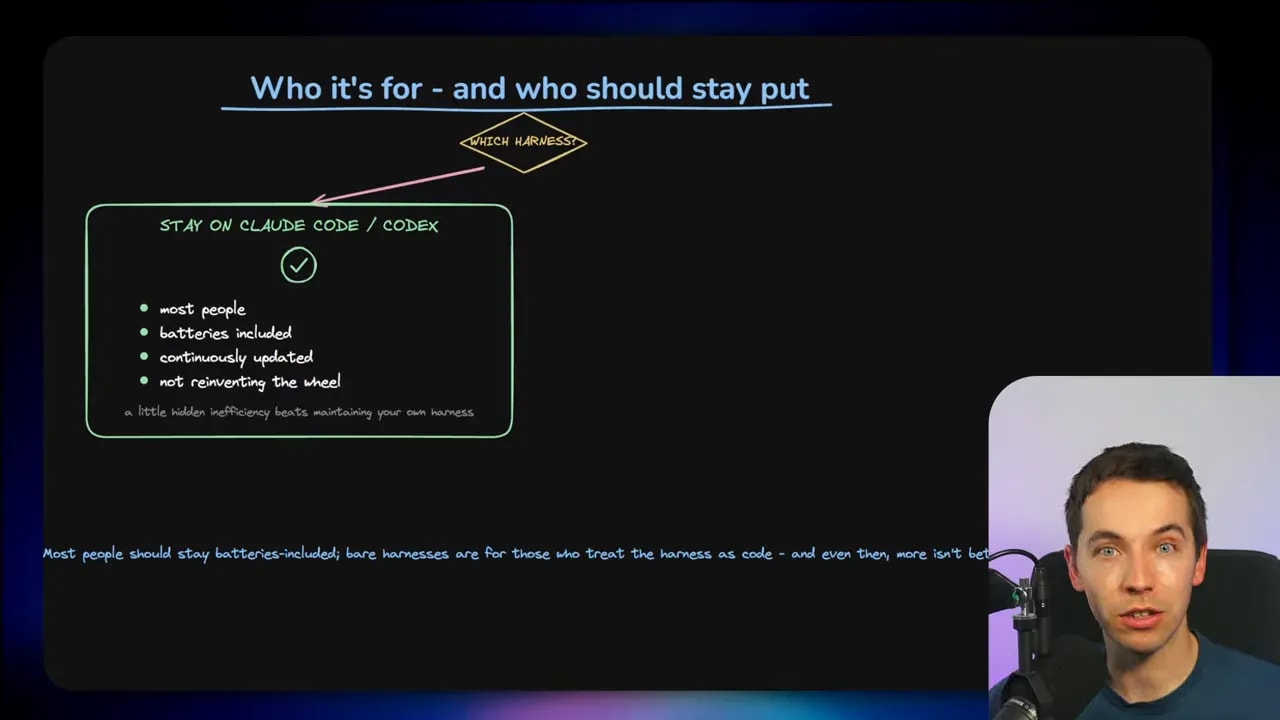
Claude Code or Codex are usually a strong choice if I want:
- A fast setup with few decisions
- Built-in safeguards and permission prompts
- Regular feature updates
- Established workflows for common software tasks
- Support for advanced models without managing the harness myself
- A capable agent without writing extensions or managing containers
There is nothing wrong with choosing the convenient option. In many cases, it is the sensible choice. I should not build a custom harness simply because customization is possible.
Who Should Use Pi?
Pi starts to make more sense for a narrower group of users.
I would consider Pi when I need serious control over the model, the tools, the context, or the environment. This commonly includes power users, developer teams, enterprise setups, and people running models locally.
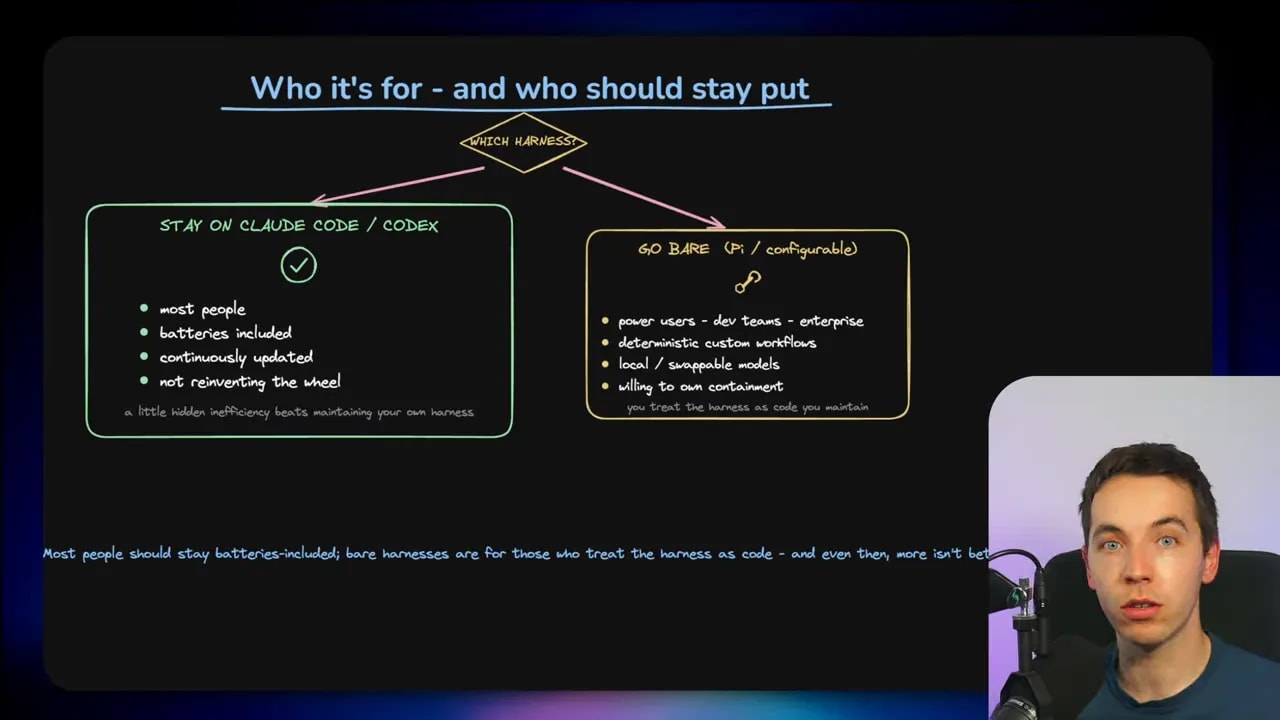
Pi can be a better fit if I need:
- Control over the full coding harness
- A small and inspectable core
- Local model support through an OpenAI-compatible endpoint
- Custom tools or organization-specific workflows
- Explicit sandboxing and security design
- Readable session files and the ability to branch past work
- A lean tool set for smaller models
The key requirement is willingness to own the setup. That means understanding the environment, handling containment, evaluating extensions, and deciding which tools the agent should be allowed to use.
Pi gives me control. It also gives me fewer excuses if the system is poorly configured.
There Is No Universal Best Coding Agent
It is tempting to search for a single winner. That is usually the wrong frame.
There is no universal best coding agent for every model, every project, and every environment. A harness that works brilliantly for a frontier model on a hosted API may be bloated for a local model. A bare system that is perfect for a controlled developer sandbox may be unsuitable for someone who simply wants a safe, dependable coding assistant.
I should test the model and harness pair against my own work. The useful questions are practical:
- Can it understand my repository?
- Does it make correct changes consistently?
- Can it use the tools without getting confused?
- Does it handle tests and errors well?
- How much context and cost does it require?
- Can I trust the permissions and security boundary?
- Can I understand what went wrong when it fails?
Pi matters because it makes harness engineering available to far more people. It shows that the model is only one part of an agentic coding system. The tools, context, permissions, recovery loop, and security model can move the result as much as the name of the model itself.
Claude Code and Codex remain excellent batteries-included options. Pi offers something different: a small core, visible moving parts, and the ability to build the coding environment I actually need.
