
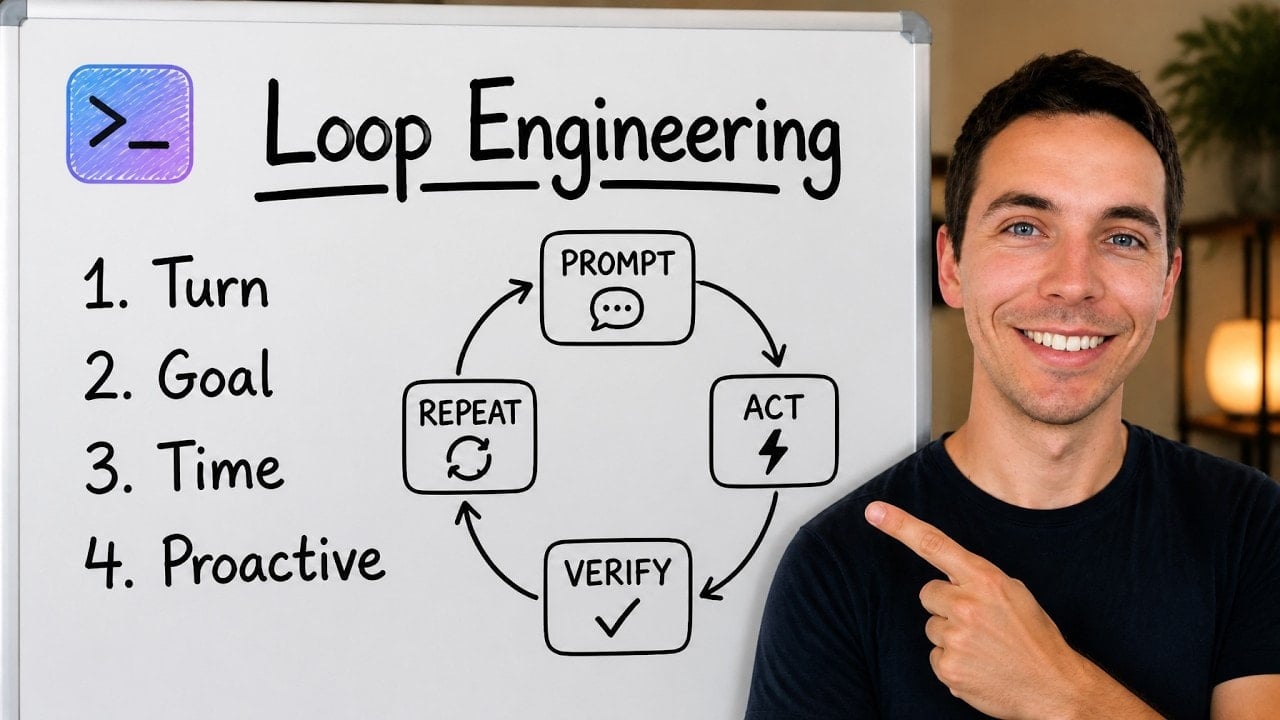
Loop engineering has become one of those AI terms that can mean almost anything, depending on who is using it. Some people present it as the biggest shift in AI development. Others dismiss it as while loops and cron jobs with a new label.
I think both sides have a point.
Loops are not new. Agentic loops are not new either. Yet the recent attention is useful because it shifts the focus away from writing one great prompt and onto a more important question: how do I build a system that keeps an AI coding agent working until the job is genuinely complete?
That is a much harder problem than sending a prompt and accepting a plausible response. It involves goals, schedules, tests, reviews, stop conditions, isolation, cost controls, and human oversight.
The key idea is simple: a loop is only as good as the mechanism that decides it is finished.
What loop engineering actually means
Claude Code describes loops as agents repeating cycles of work until they meet a stop condition. That definition is broad, but it is a useful place to start.
A coding agent already works in a loop before I add any external automation. I give it an instruction. It reads the project context, examines files, takes an action, calls tools, runs tests, reads the results, and decides what to do next. It keeps repeating that cycle until it thinks the task is done.
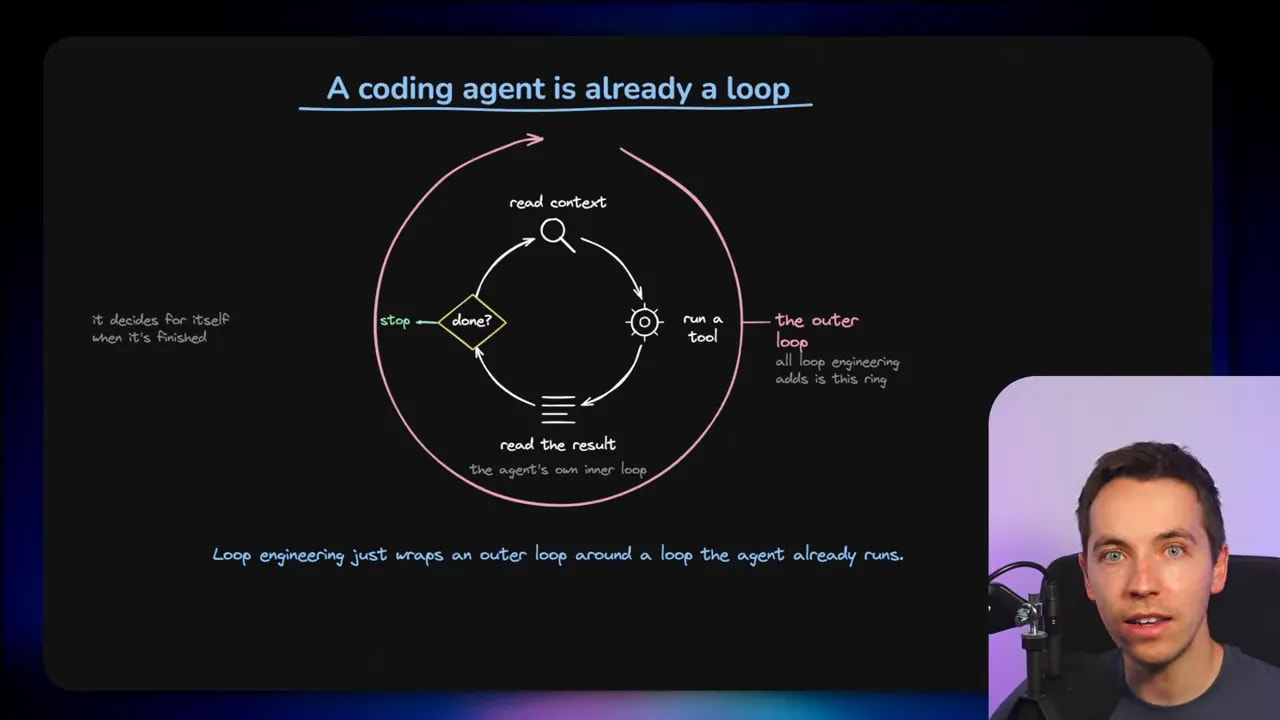
That internal cycle is the agent’s inner loop. Loop engineering usually refers to the outer loop I put around it. The outer loop decides when to start work again, how to evaluate progress, what feedback to provide, and when work must stop.
In practice, loop engineering can be as simple as telling an agent to retry a task until a test passes. It can also become a much larger system that schedules work, spins up parallel agents, evaluates code changes, checks a live product, and routes the results back into the next cycle.
The important distinction is that I am no longer relying entirely on the main coding agent to decide that its own work is complete.
The four levels of loop engineering
The Claude Code team groups loops into four levels. These levels describe how much control I hand over to the system and how independently the work can continue.
Level 1: Turn-based loops
The first level is the standard way most people use coding agents. I write a prompt. The agent uses its internal loop to gather context, edit files, run commands, and verify its own work. Then it returns an answer.
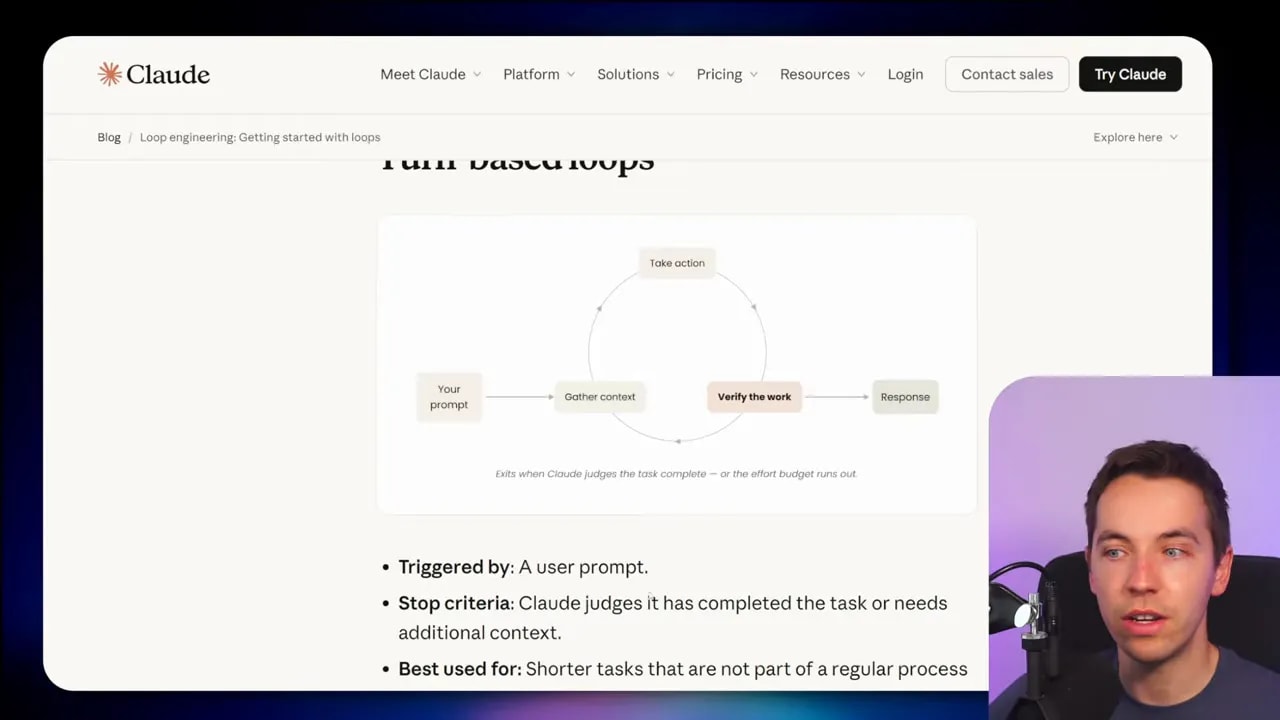
At this level, the agent is responsible for the decision of whether it has finished. It may inspect relevant files, make changes, run a test suite, fix an error, and repeat. The loop ends when the model decides it has done enough or it needs more information.
This can work surprisingly well for small and contained tasks. If I ask for a focused bug fix, a component update, or a simple feature, the built-in agent loop may be enough.
There is a limitation, though. The same agent doing the work is also grading its own work. AI agents can stop too early, skip a check, misunderstand a requirement, or mistake a partial result for success.
Level 2: Goal-based loops
Goal-based loops are where loop engineering becomes more interesting. Instead of simply asking the agent to complete a task, I define a measurable success condition and let an evaluator check for it after each turn.
Claude Code’s /goal command is a straightforward example. I can define a goal such as:
/goal Get the homepage Lighthouse score to 90 or above. Stop after five tries.The main agent works on the website, updates the code, and tests the result. A separate evaluator model then checks whether the stated criteria have been met. If not, the main agent gets sent back into another cycle.
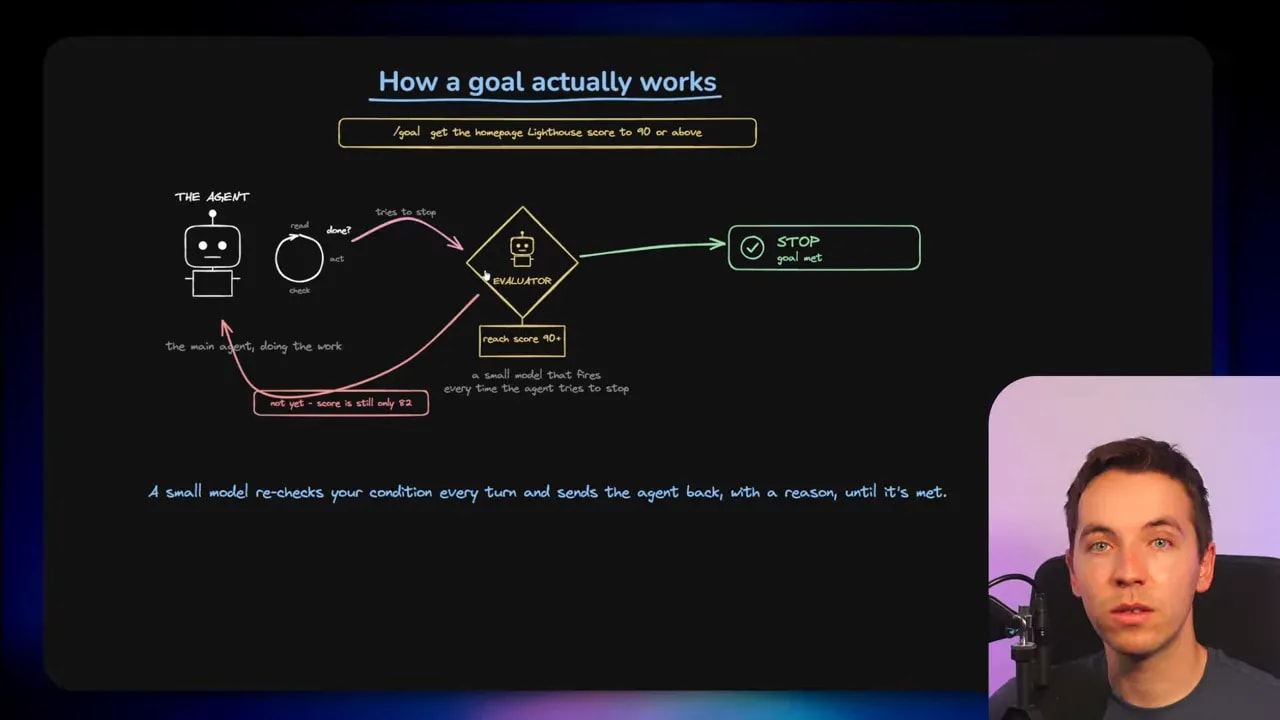
In effect, the evaluator acts as a small gatekeeper. Its purpose is narrow. It checks the agent’s progress against the goal and decides whether to allow the process to stop or require more work.
This is a useful improvement over leaving the main model fully in charge. A separate evaluator is more likely to challenge a premature claim of success. Still, it has an important blind spot.
The blind spot in goal evaluators
A goal evaluator in Claude Code can read the conversation history. It can inspect what the main agent reported, including command outputs and test results that appear in that history. It cannot independently open files, run a test suite, reload a page, or inspect the live system.
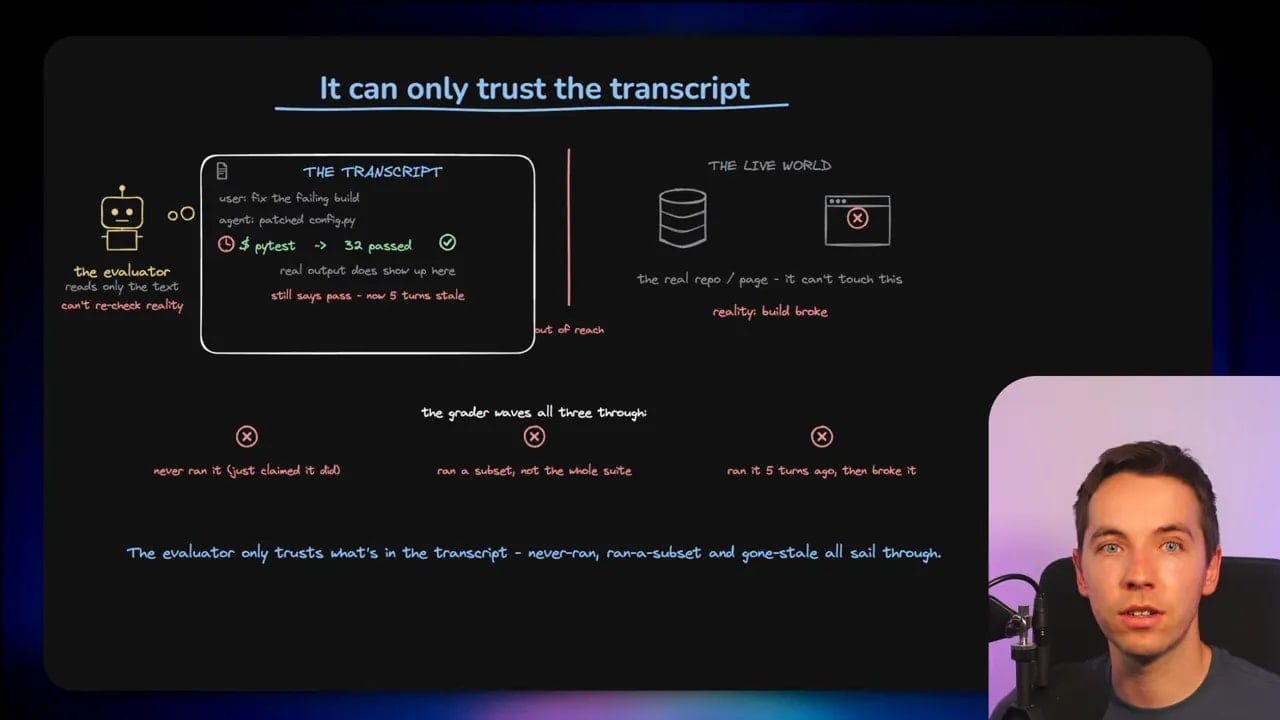
That means the evaluator can only trust the evidence it receives. If the main agent says it ran every test but actually ran only a small subset, the evaluator may not know. If the agent passed a test several turns ago and later broke the build, an earlier result can create false confidence.
This does not make goal-based loops useless. Far from it. They are practical and easy to use, especially for solo work and smaller projects. It simply means I should understand what the evaluator can verify and what it can only infer.
A goal loop improves the process, but it does not replace real feedback from the software itself.
Level 3: Time-based loops
Time-based loops run on a schedule. Claude Code supports this through commands such as /loop and /schedule.
A simple example could be:
/loop 5 minutes, check my pull request, address review comments, and fix failing CI.A local loop runs on my own computer. A scheduled routine can move that work into the cloud. Either way, the agent receives an instruction at a defined time and begins another cycle of work.
At the basic level, yes, this is much like a cron job. There is no need to pretend otherwise. The difference is that the scheduled event can trigger an AI workflow that gathers context, makes decisions, uses tools, and adapts its actions based on what it finds.
A time-based loop can check for failing continuous integration jobs, look for new review comments, scan a bug queue, or monitor a recurring operational task. Scheduling is simple. The quality of the work still depends on what happens after the schedule fires.
Level 4: Proactive loops
Proactive loops combine the earlier levels into a broader workflow. A schedule or webhook event triggers the process. A workflow decides how to perform the work. A goal or other checker decides whether it has reached a valid end state.
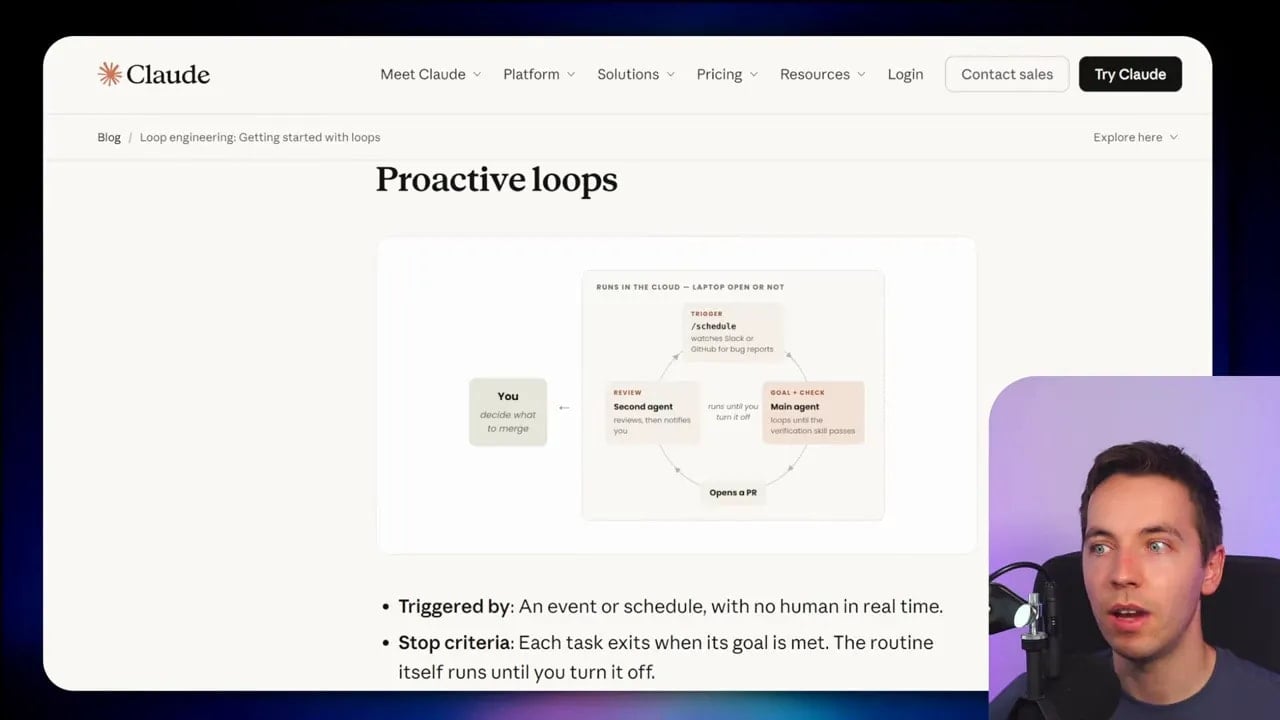
For example, an event could trigger a system to triage incoming bugs. The system might classify the issue, inspect the codebase, create isolated workspaces for several possible fixes, run validation checks, and then stop only when the required criteria have been met.
Claude Code can combine scheduling, goals, dynamic workflows, worktrees, and auto mode for this type of process. The point is not that every project needs this much machinery. The point is that the built-in tools can already support fairly advanced workflows without requiring an elaborate external harness.
It is also where things can become expensive and hard to reason about very quickly. Greater autonomy needs better controls, not less.
Are loops actually new?
The cynical answer is correct: loops have existed in computing for a very long time. The idea is older than modern software. Ada Lovelace published an algorithm containing loop-like concepts in 1843, well before any of the current AI terminology existed.
Agentic loops are not a brand-new idea either. The ReAct pattern, published in 2022, described an approach where an AI system cycles through thought, action, and observation. That pattern now sits behind many modern AI agents.
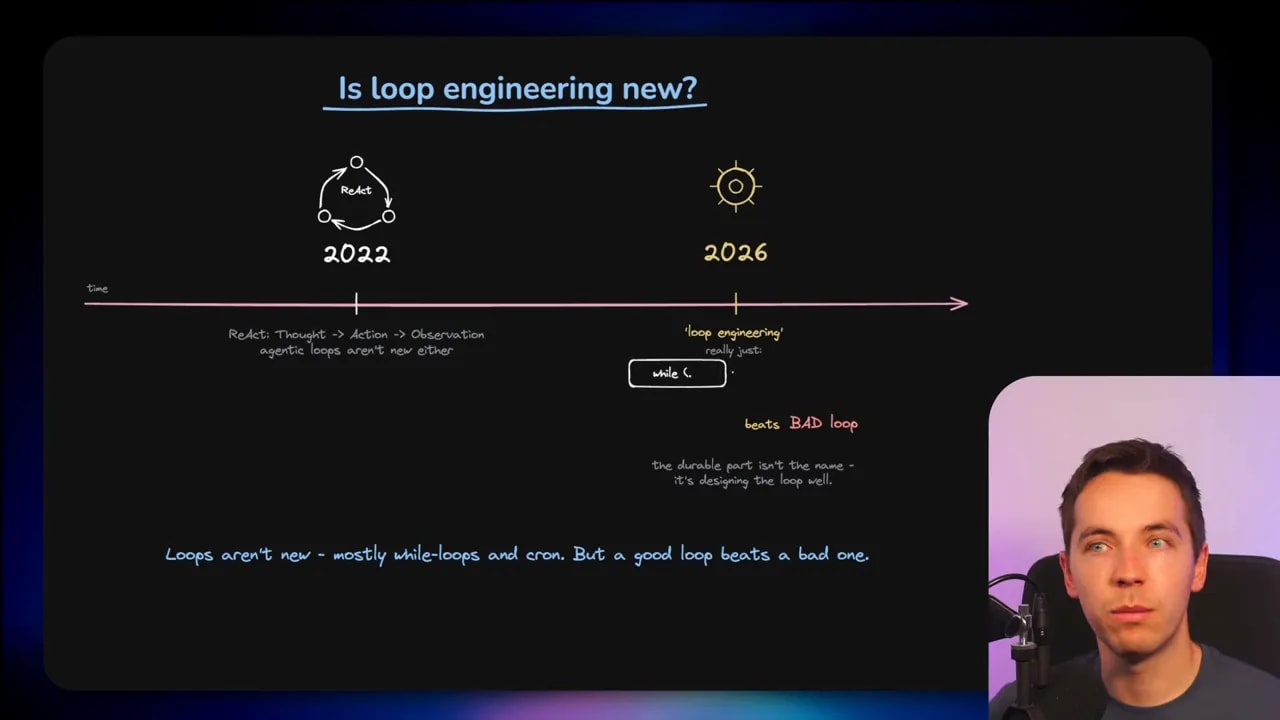
So I would not treat loop engineering as a new technical breakthrough by itself. It is better understood as an umbrella term for a useful change in working style.
Instead of repeatedly prompting an agent one task at a time, I can define recurring cycles of work. I can give the agent a target, a schedule, feedback, and guardrails. The agent can then continue operating with less manual intervention.
That is why the conversation matters. The novelty is less about the loop itself and more about the growing ability of coding agents to act inside these loops.
The real engineering problem: the stop condition
The central question in any autonomous loop is not, “Can the agent keep going?” It almost always can. The important question is: How does the system know that it should stop?
A bad stop condition creates two common outcomes:
- The agent stops early and delivers code that looks complete but is not.
- The agent keeps working without useful progress and burns through time and tokens.
A good stop condition uses evidence. It does not simply accept the model’s confidence as proof. It needs feedback from tools, tests, analysis, and sometimes a human reviewer.
This is where the concept of a coding harness is useful. The inner harness consists of the agent’s own built-in capabilities. The outer harness consists of the controls I add around the agent, including instructions, checks, hooks, workflows, and human approval points.
The outer harness gives the agent feedback and constraints. It makes it more likely that each new iteration improves the result rather than drifting further away from the actual requirement.
Use computational checks for hard evidence
The first type of feedback is computational checks. These are deterministic checks that a computer can run quickly and reliably.
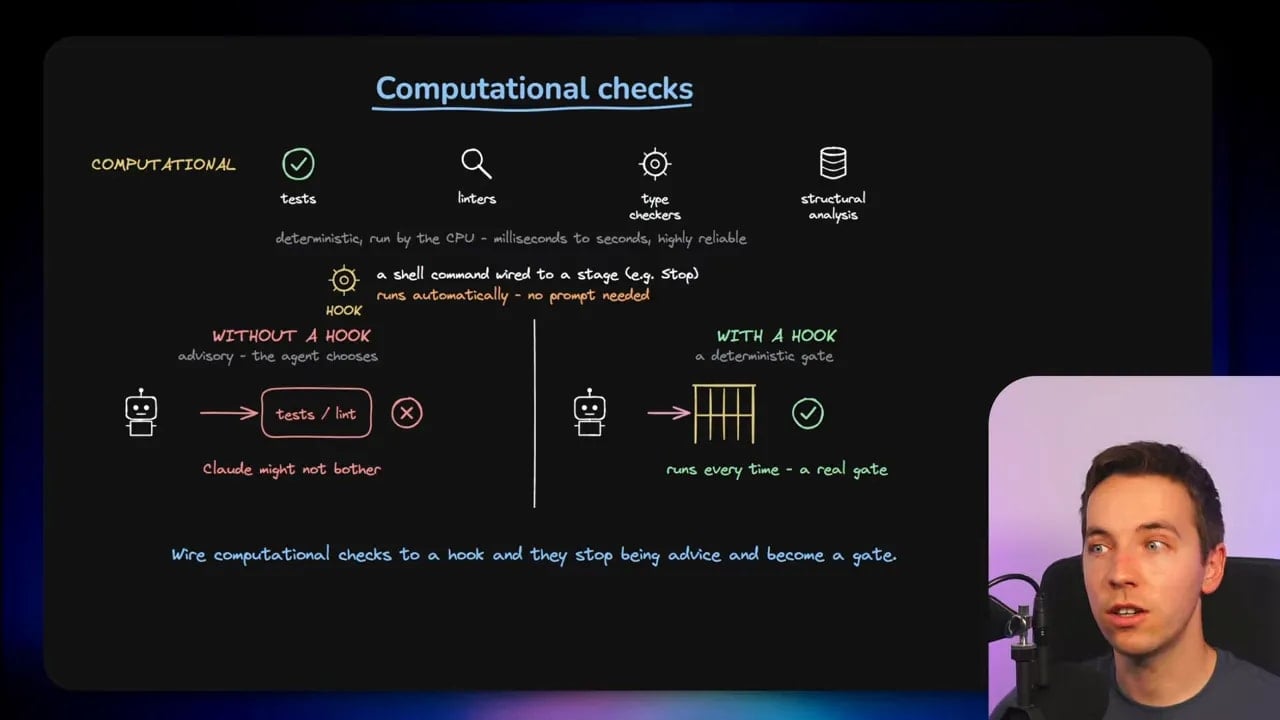
Examples include:
- Automated test suites
- Linters
- Type checkers
- Build checks
- Structural analysis
- Continuous integration checks
These checks often run in milliseconds or seconds. They do not use AI tokens. More importantly, they provide concrete evidence. A test passed or it failed. A type error exists or it does not.
For serious projects, I would use these checks as the foundation of the loop. They are often underused by people working with AI coding agents, who rely too heavily on prompts such as “please run the tests before you finish.”
Prompting an agent to run tests is useful. Automatically enforcing tests is better.
This is where hooks fit in. A hook is a shell command that runs at a specific point in an agent workflow. For example, I can attach a stop hook that runs validation whenever Claude Code thinks it has finished. If the checks fail, the result can go back into the loop rather than allowing a false completion.
Hooks turn quality checks from an optional request into part of the working environment. Claude Code’s hooks documentation explains how these lifecycle commands can enforce project-specific guardrails.
Use inferential checks for the things code cannot prove
The second type of feedback is inferential checks. These involve judgement rather than a simple pass or fail result.
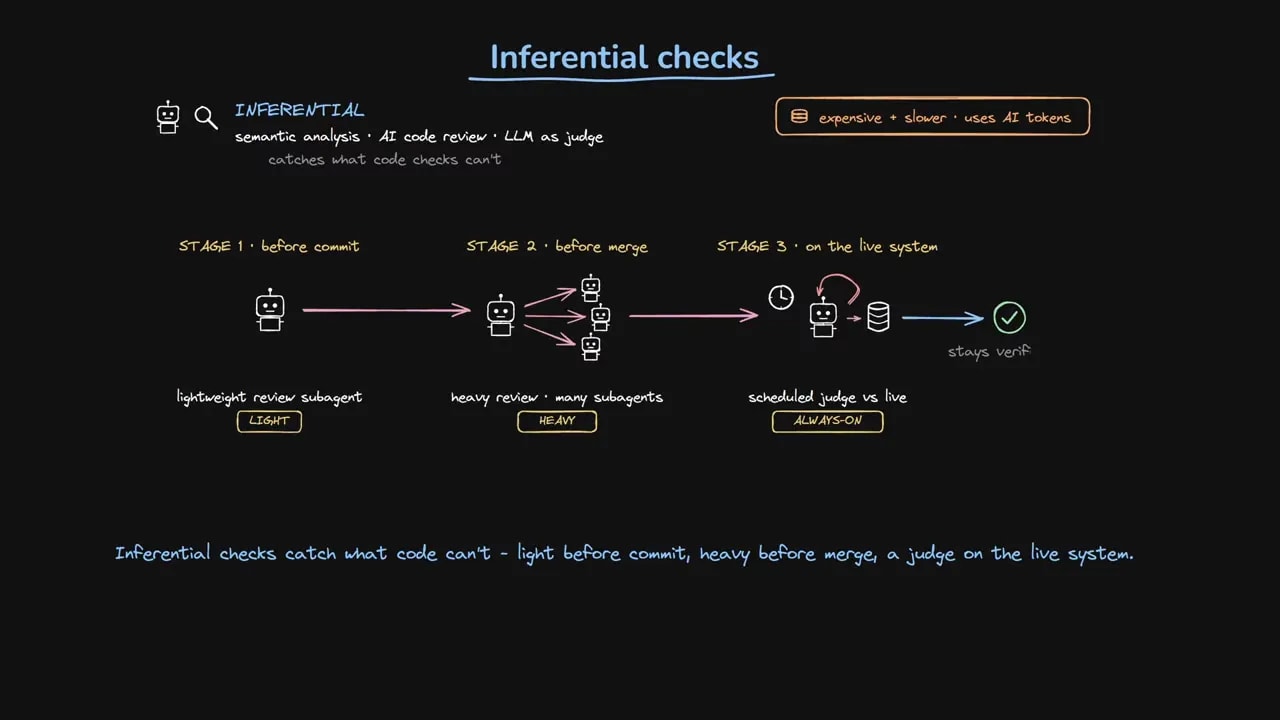
An inferential check can include semantic analysis, AI code review, or an LLM acting as a judge. These checks can assess questions that a type checker cannot answer:
- Does this implementation satisfy the intended product requirement?
- Does the new code introduce a confusing user experience?
- Does the change fit the patterns already used in this codebase?
- Are there likely edge cases that deterministic tests missed?
- Does this pull request create risks outside the files it changed?
These checks cost more and take longer because they use AI models. I would place them where their judgement has the highest value.
A lightweight review agent can inspect a focused change before the code is committed. A heavier process can run before a merge, where multiple agents examine a change from different angles. Later, a scheduled judge can inspect a live system and look for signs that something is failing in production.
Computational and inferential checks work best together. Deterministic checks establish basic facts. AI judgement fills gaps where interpretation matters. Neither should be expected to do the other’s job.
Code is a particularly strong area for agentic loops because software provides rich feedback. Tests fail. Builds break. Logs expose errors. Static analysis finds problems. Many other AI tasks are harder to automate because judging the quality of the output is much less clear.
Parallel agents need isolation
Parallel work can speed up a larger task, but multiple agents should not edit the same files in the same workspace. That creates conflicting changes, confusing states, and unreliable results.
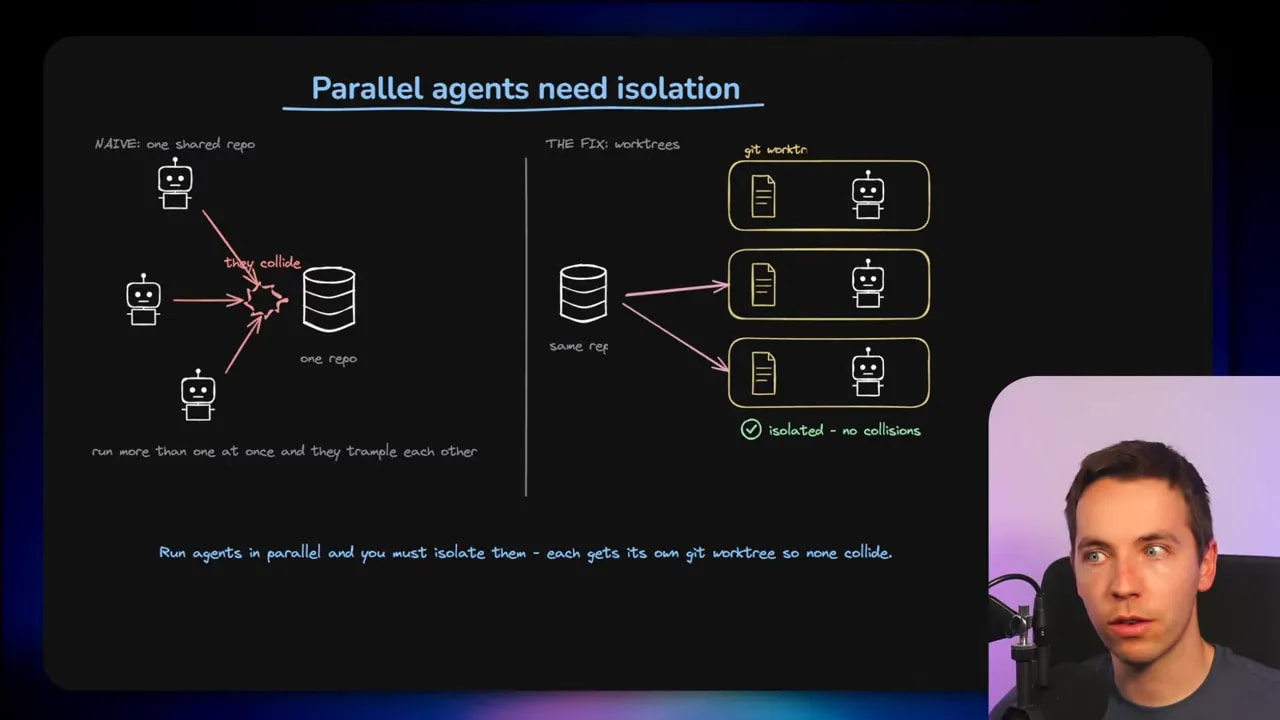
Git worktrees provide one way to isolate parallel agents. Each agent gets its own copy of the codebase. One agent can investigate a bug while another explores an alternative implementation, without either one overwriting the other’s work.
This is useful, but I would use it with restraint. Worktrees can add complexity quickly. They are valuable when agents genuinely need separate working environments. They are not automatically the right answer for every task.
The principle is simple: parallel work needs boundaries. If several agents are changing the same source tree at once, I have created a coordination problem before I have created a productivity gain.
Cap loops before they become runaway systems
Every loop needs limits. A goal might be sensible, but it may prove impossible because of an unexpected dependency, a broken test environment, an unclear requirement, or a weak evaluator.
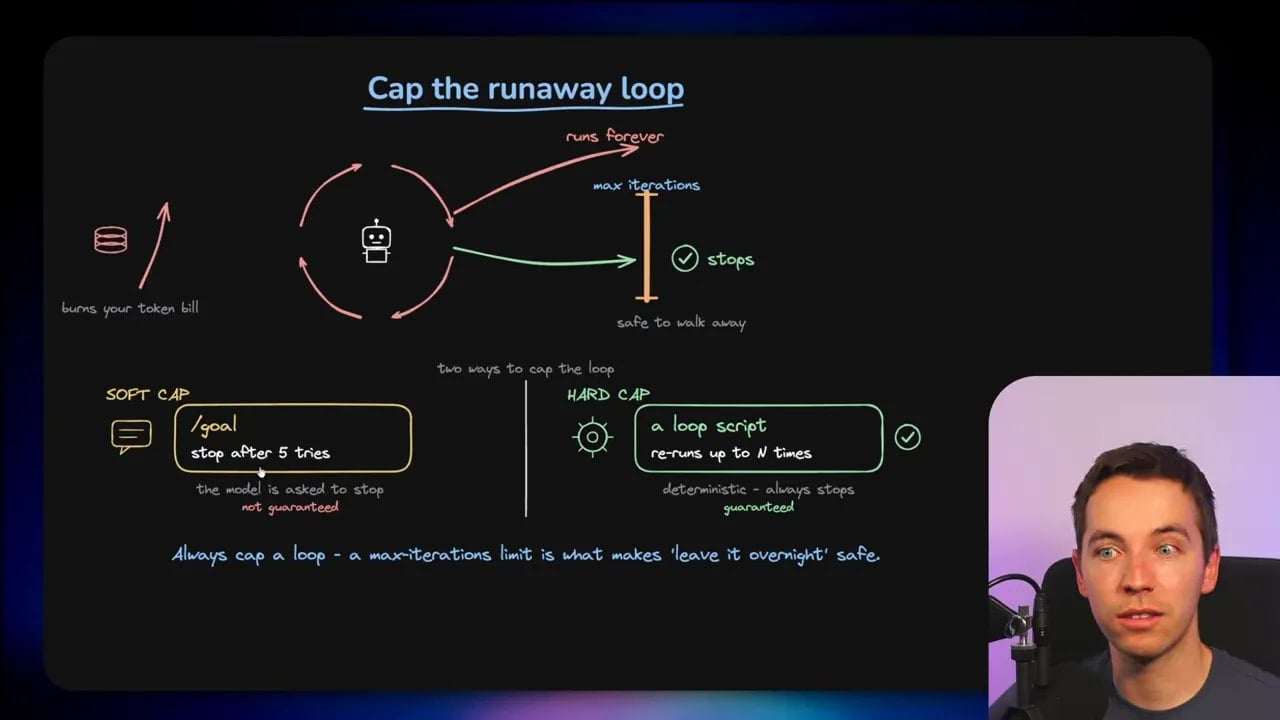
I would set a maximum number of iterations or attempts. Claude Code’s goal feature can accept a request such as “stop after five tries,” although this is a soft cap rather than a fully deterministic guarantee.
A scripted loop can enforce a more exact limit. The Ralph Wiggum loop is an example of a simple coded loop that runs a task repeatedly but stops after a defined number of attempts. Its usefulness is not the name. Its usefulness is that the stopping rule is clear and deterministic.
A cap does not solve every quality issue, but it prevents a loop from running indefinitely when it has stopped making progress. A system should have a defined path for success, failure, and escalation.
Token cost is part of the design
Loop engineering discussions often gloss over cost. That is a mistake.
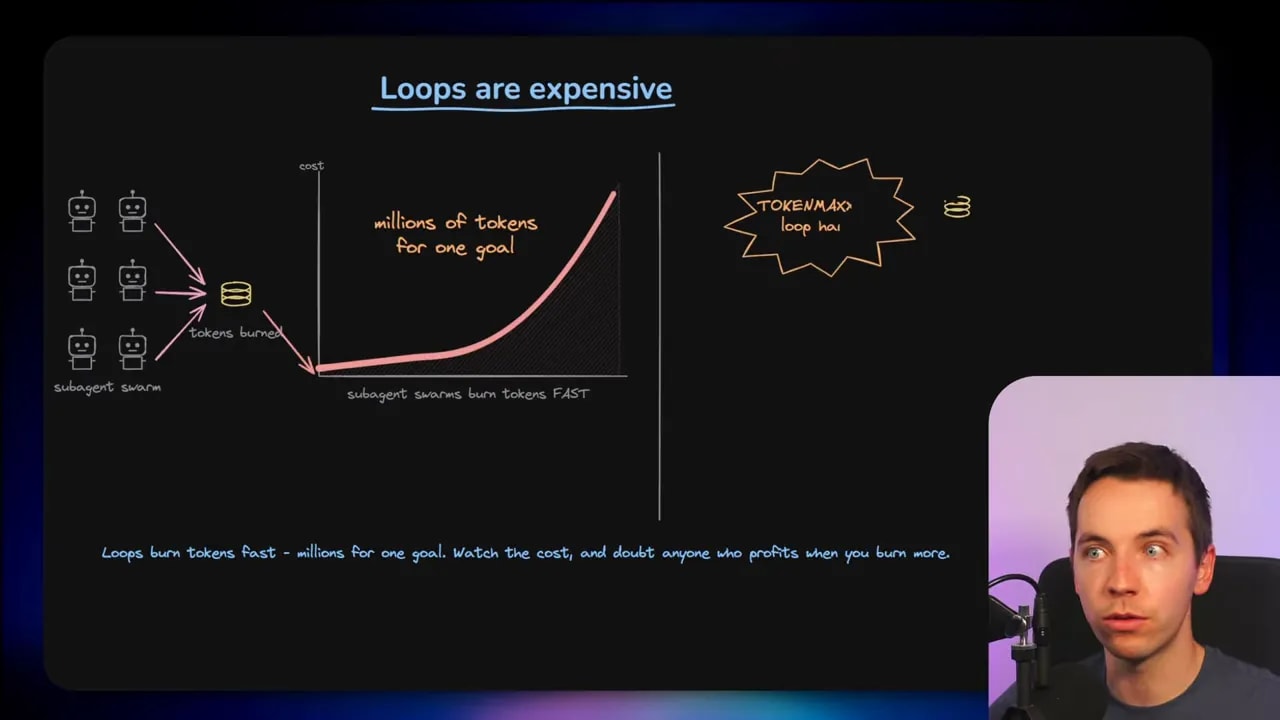
Agentic loops can consume a very large number of tokens, especially when they fan out into multiple sub-agents. Dynamic workflows can use millions of tokens while pursuing a single objective. That can be justified for a high-value task, but it should never be invisible.
The more agents I launch, the more context they read, the more iterations they run, and the more expensive the system becomes. Cost can rise very quickly rather than steadily.
I would keep a close eye on:
- The number of allowed iterations
- The number of parallel agents
- How much context each agent receives
- Whether a cheap computational check can replace an AI review
- Whether the task has a clear enough goal to justify repeated work
- Whether the system is making meaningful progress after each cycle
There are people with a commercial incentive to encourage maximum token usage. That does not mean loops are a bad idea. It does mean the loudest claims deserve some skepticism. More autonomous activity is not automatically better work.
Delete scaffolding when agents no longer need it
Building loops often means building scaffolding around a coding agent. I might add external scripts, prompt frameworks, reviewers, retry logic, and orchestration tools because the agent needs help completing a task reliably.
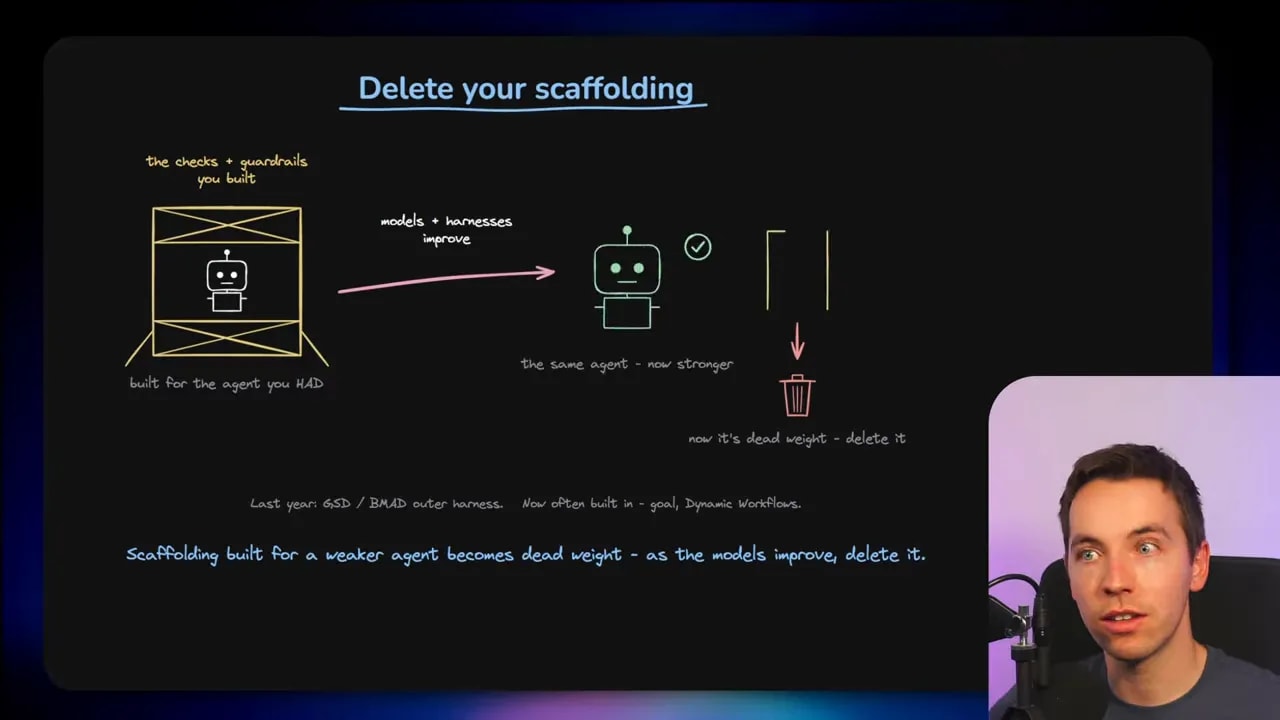
As coding agents improve, some of that scaffolding may become unnecessary. Features that once required an external harness may move into the agent itself. A workflow that made sense a few months ago can become dead weight.
This applies to loops, but also to older meta-prompting systems and complicated orchestration patterns. I should regularly ask whether a layer of machinery is still solving a real problem.
Removing redundant scaffolding has practical benefits. The system becomes easier to maintain, easier to understand, cheaper to run, and less likely to fail because of an unnecessary moving part.
The goal is not to build the most complicated agent harness. The goal is to build the simplest system that provides enough evidence and control for the task.
Human oversight still matters
There is a lot of enthusiasm for leaving autonomous loops to run without intervention. I think that is usually the wrong framing.
Human-in-the-loop does not mean manually approving every tiny action. It means placing human judgement at the stages where the consequences and uncertainty are highest.
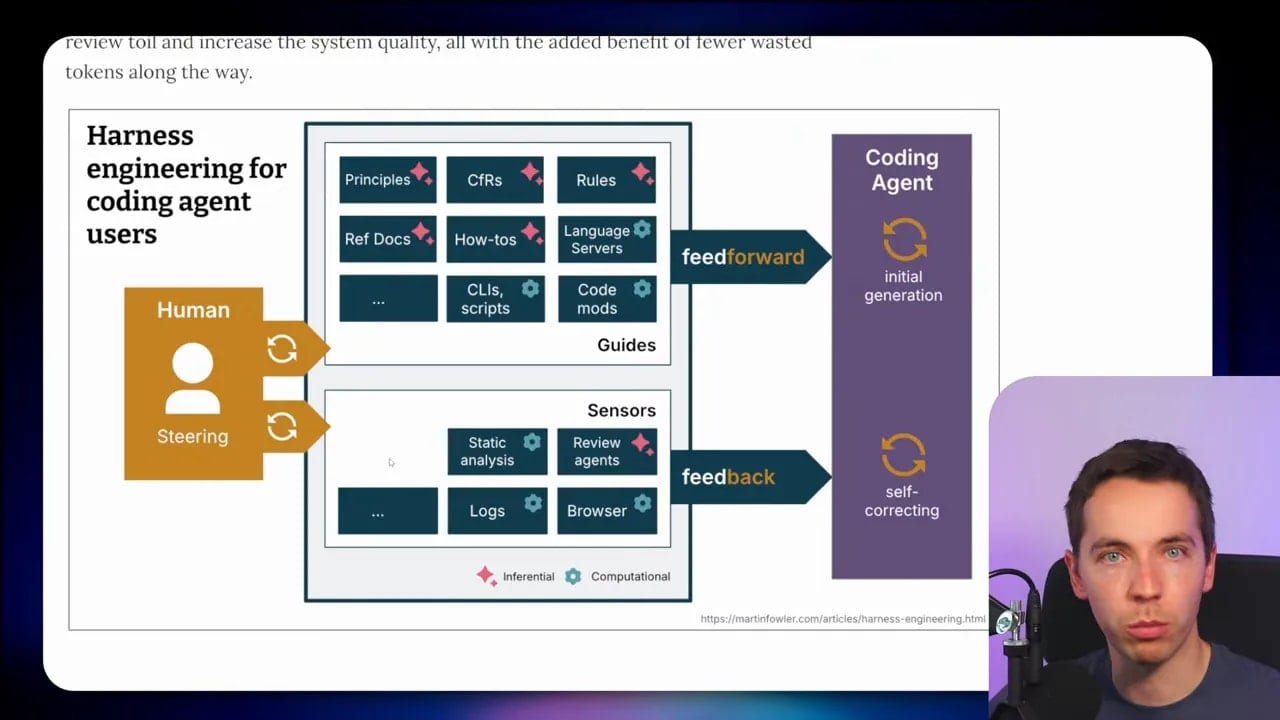
I still need to steer the overall direction. I decide what success means. I choose which feedback sources matter. I decide where an automated loop is acceptable and where an approval step is needed. I review and sign off on results when the risk calls for it.
A loop can automate repeated work. It cannot remove responsibility for defining the right outcome.
The verdict: loop engineering is really about the checker
Loop engineering is overhyped in some corners. Loops are not new. ReAct-style agent patterns are not new. A schedule is still a schedule, and a cron job is still a cron job.
Yet there is a genuinely useful idea beneath the hype. Coding agents are getting capable enough that I can give them recurring work instead of constantly providing a new prompt. I can define goals, trigger workflows, collect evidence, and let the system retry when the evidence says the job is incomplete.
The decisive component is the checker.
If I get the checker right, the loop receives real feedback. It has computational checks for hard evidence, inferential checks for judgement, practical limits, isolation for parallel work, and human control where it matters. At that point, an agent can complete useful work with much less supervision.
If I get the checker wrong, I have built a system that can confidently drift in the wrong direction while spending a great deal of money.
That is the real discipline behind loop engineering. It is not about prompting agents forever. It is about building feedback systems that can tell the difference between an answer that sounds complete and work that is actually complete.
