
I built a set of agentic workflows to see how far coding agents can take routine automation. I wanted to answer a practical question: when should you use a coding agent like Claude Code to generate Python workflows, and when should you stick with visual workflow tools such as n8n? I tested real examples, deployed them to the cloud, added persistence, and connected them back into an existing automation stack.
This article explains what agentic workflows are, shows a repeatable four-step process I used, compares code-first approaches to visual tools, and walks through a working news engine I created that fetches, filters, and delivers AI-related headlines via Telegram. I also describe three practical ways to combine code-based agents with n8n so you keep control, visibility, and the benefits of both worlds.
What I mean by agentic workflows
At the simplest level, an agentic workflow is a workflow that a coding agent creates and runs for you. That often means using a tool like Claude Code to generate Python scripts that execute tasks with minimal human instruction. The same ideas apply to other coding agents too, such as Google’s coding agents or Cursor.
When I talk about agentic workflows I usually mean this pattern: the agent plans the work, writes code, tests it, and then updates a repository so the workflow can be run again and improved over time. The agent acts as an advanced co-pilot. It can:
- Read and edit files on your machine
- Spin up sub-agents for complex sub-tasks
- Run shell commands and talk to external APIs
- Search the web for API docs and implementation details
That capability makes agentic workflows powerful. It also introduces a different set of responsibilities compared with building flows in a visual tool.
The four-step cycle I use: plan, build, test, commit
I use a simple loop whenever I have a new automation idea. It reduces surprises and makes agentic workflows reproducible.
- Plan — Define the functional and technical requirements. Decide inputs, outputs, and deployment targets.
- Build — Let the coding agent scaffold and implement the Python script or small app.
- Test — Run smoke tests, iterate, and let the agent fix errors. Validate outputs manually.
- Commit — Save everything to Git. Version control prevents accidental regressions and creates an audit trail.
That process repeats. Once you have a workflow committed to a repo, you can trigger it on demand, schedule it in the cloud, or let another agent work from that codebase later on.
Where code-first agentic workflows shine
These are the situations where I reach for agentic workflows first:
- Complex logic and data transformations — If a workflow needs complex retrieval patterns, advanced looping, or deep data matching, writing code is usually faster and clearer than wiring dozens of visual nodes.
- Rapidly prototyping multiple similar automations — I can prompt a coding agent to scaffold many similar scripts from a single blueprint, then tweak each one.
- Repeatable deterministic tasks — If the workflow does not require AI in production (for example, pulling API data, transforming it, and saving a spreadsheet), code runs fast and predictably.
- Self-healing pipelines — A coding agent can inspect logs, run tests, and attempt fixes during development. That reduces manual debugging time.
Why you should still use visual workflow tools like n8n
Agentic workflows are powerful, but they introduce trade-offs. Visual tools still matter for these cases:
- Auditability and transparency — Visual flows make it easy for non-technical stakeholders to follow logic step-by-step. Dashboards and node histories are helpful when handing off to clients or teammates.
- Lower barrier to entry — For many integrations, setting up a few built-in nodes in n8n is faster than learning Git, deployment tools, and code debugging.
- Built-in guardrails — Visual tools often let you add human approval or throttling as part of the flow without writing extra code.
- Large integration libraries — n8n and similar platforms provide hundreds of pre-built connectors. If you already have those set up, it’s easy to reuse them.
In short, choose the right tool for the task. Use code when the job requires fine control, advanced logic, or scale. Use visual tools for clarity, rapid client handoffs, and when many integrations are already available.
Common risks with agentic workflows
Before automating with a coding agent, be aware of these typical pitfalls:
- Unexpected external calls — Agents can call APIs or run commands you didn’t intend during testing. That can be risky for sensitive accounts or production systems.
- Black box concerns — If you can’t read code, you’re effectively black box testing. That may be acceptable in some cases, but not for regulated or critical systems.
- Deployment and versioning — You need to understand Git, branches, pushing, and rolling back changes. Agents will commit code, so you must keep an eye on the history.
- No guardrails by default — Human-in-the-loop behavior isn’t automatic. You must design approvals or use a tool like n8n to add them.
Case study: a News Engine that fetches and filters AI headlines
I created an automation that fetches news items from Google News RSS, filters them for high-signal AI content, deduplicates results, and sends summaries to me on Telegram. I used Claude Code as the agentic engine. The whole project followed my four-step loop.
The first step is planning. I described the workflow to the agent and gave a short spec: pull the top 15 Google News RSS results for queries such as “AI news,” “artificial intelligence,” and “AI tools”; remove duplicates; filter out listicles, stock updates, and local news; look for new model announcements, major tool releases, or commentary from industry leaders; and finally send the top seven items by Telegram.
Scaffolding the project
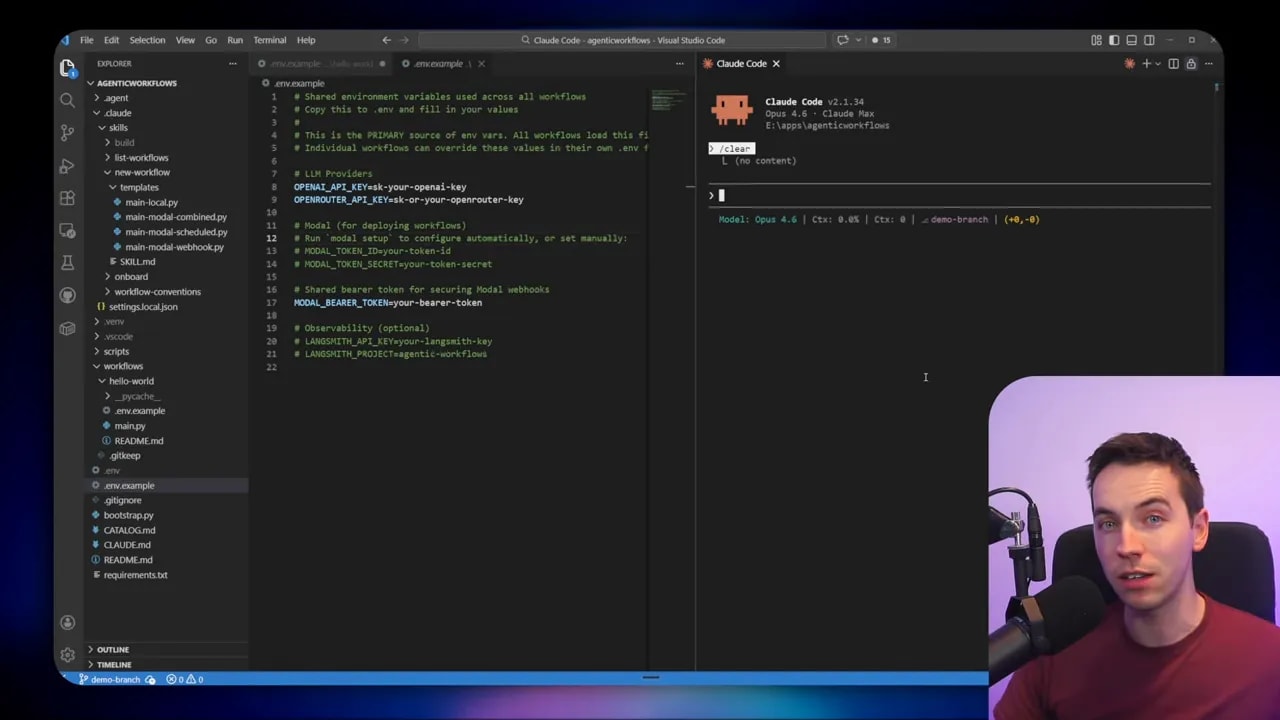
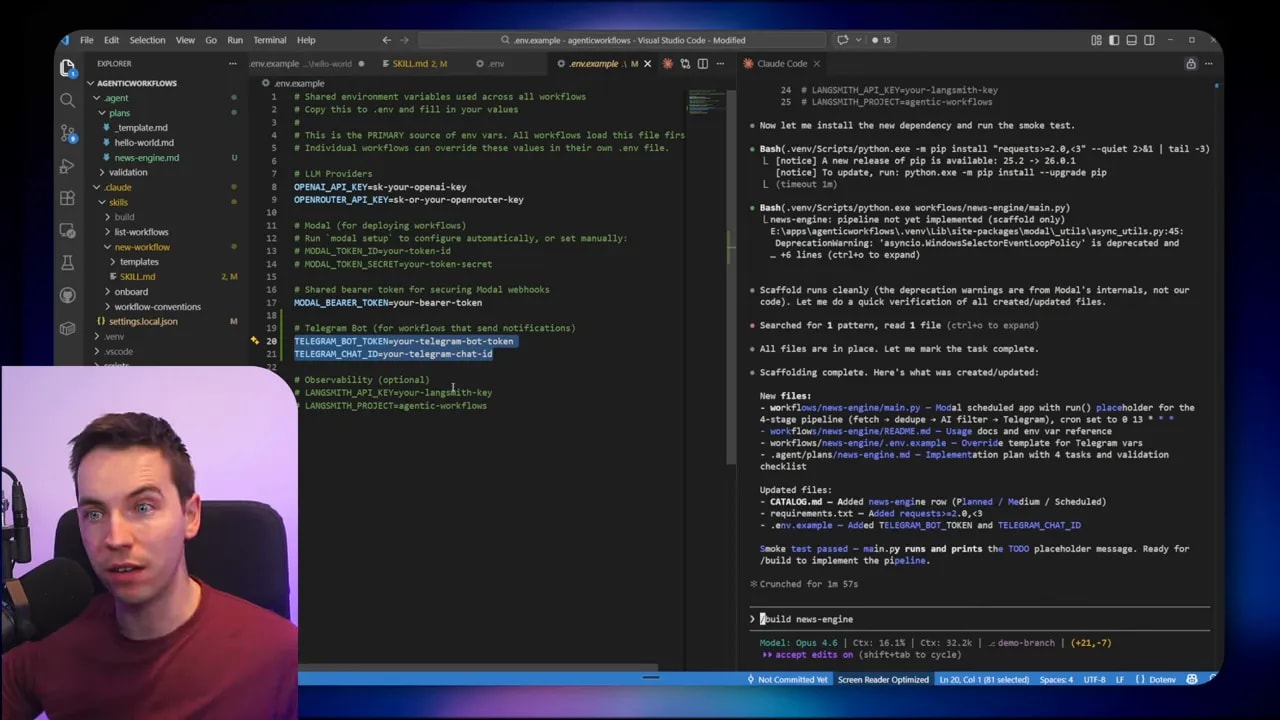
The agent created a folder scaffold with an initial Python file and a README. It added an env.example with the variables it expected. That included fields for the OpenAI key, a Telegram bot token, and a chat ID.
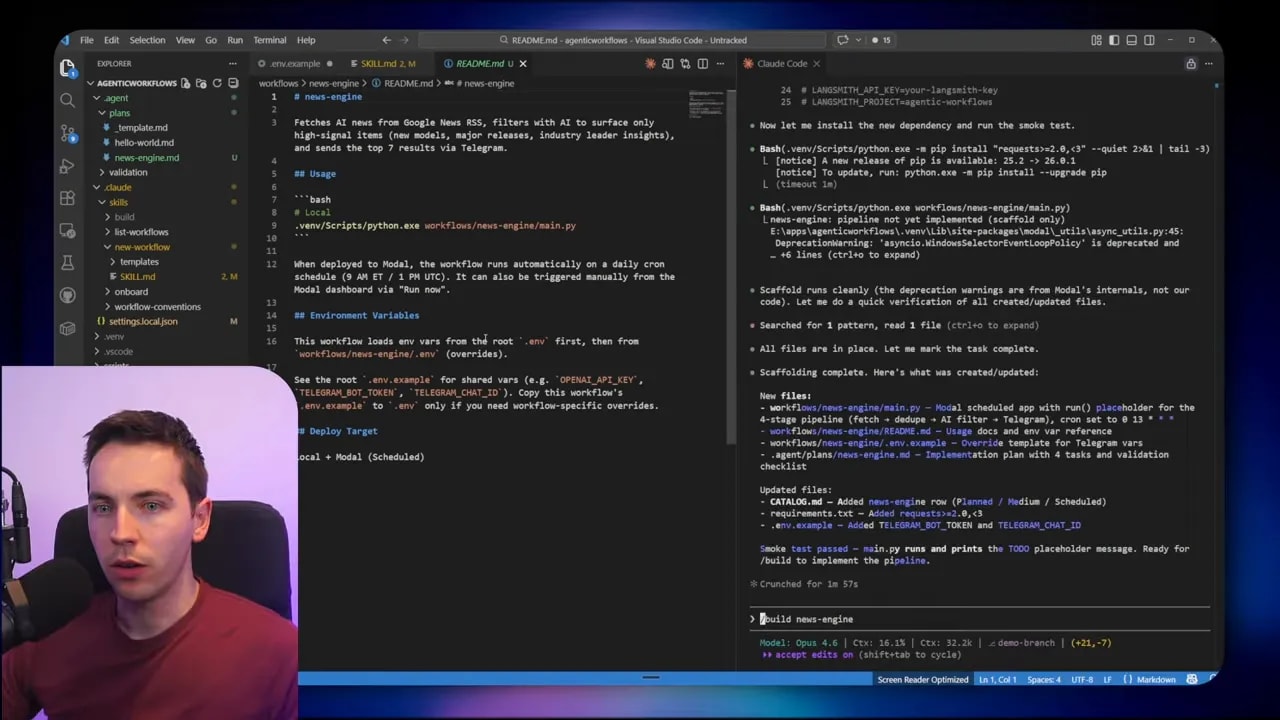
Setting the environment variables is straightforward. Generate an OpenAI API key and paste it in. Create a Telegram bot using Botfather to get its token. Start a chat with your bot and visit the Telegram getUpdates or a simple URL pattern to find the chat ID for that conversation.
Building from the plan
I told the agent to build the news engine. It used the blueprint in the repo to stay on track and produced a working Python script. It also updated a catalog.md that keeps track of planned workflows and their state. The catalog makes it easy to scale the number of workflows I maintain.
Testing the pipeline
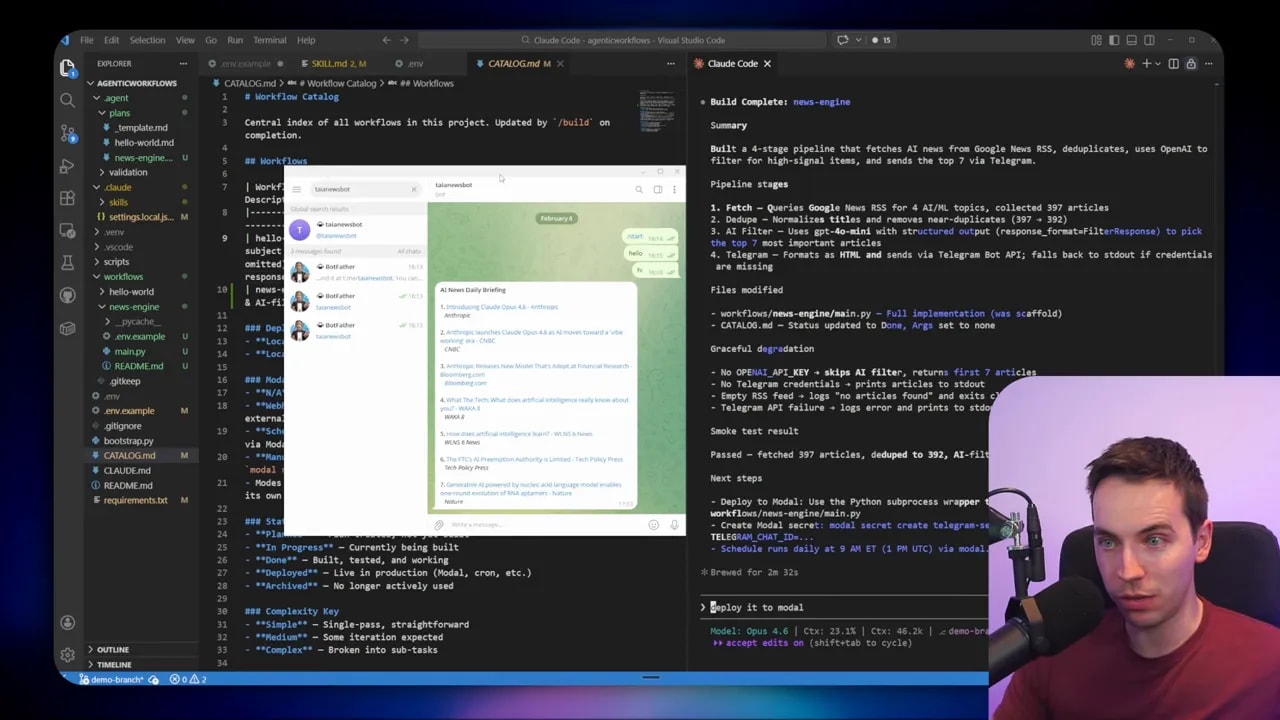
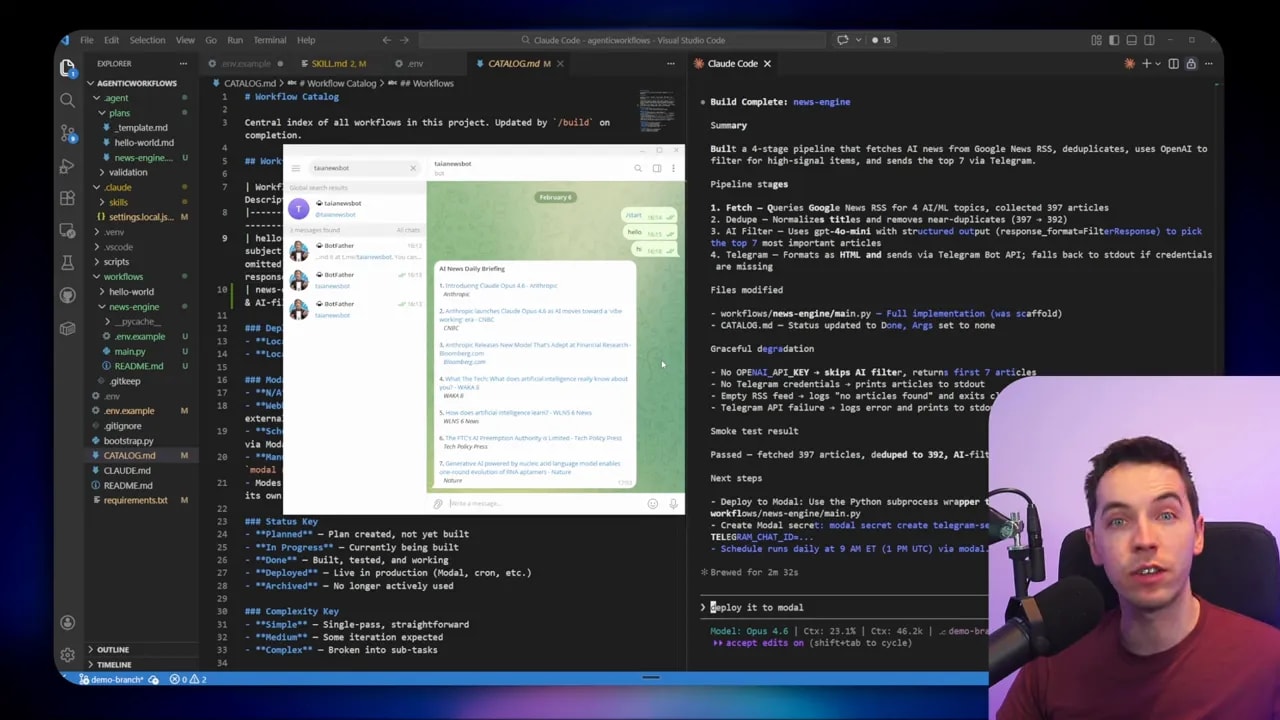
The agent performed a smoke test. It fetched items, filtered them, and delivered a Telegram message. The script worked on the first test run, which was a nice surprise but not guaranteed in every scenario. When tests succeed, you can either iterate on the prompt to tune filtering or proceed to deployment.
Deploying to the cloud
I wanted the news engine to run on a schedule even when my laptop is off. I deployed the script to Modal, a simple serverless runner that integrates well with Python processes. Modal gives a free credit tier that covers many lightweight scheduled tasks. After authenticating from my machine with a small CLI step, the agent pushed the code and created a scheduled job in Modal that runs twice a day.
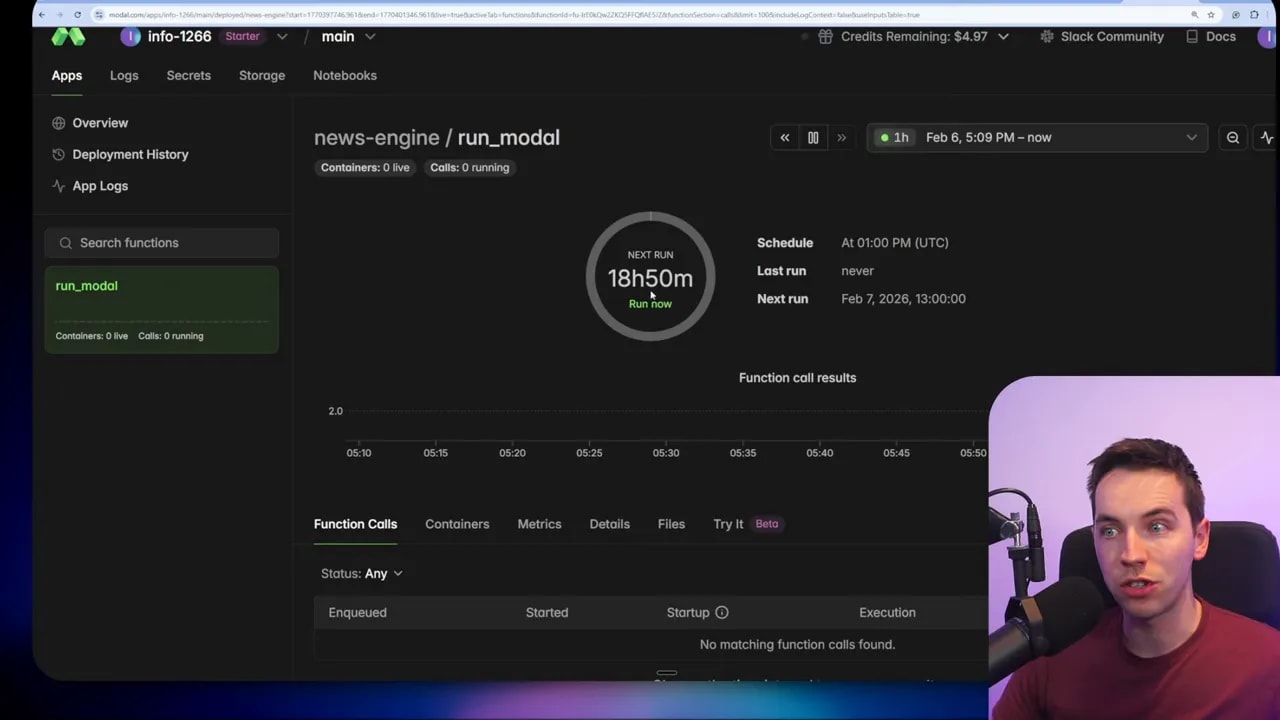
Modal can also expose webhooks secured with bearer tokens. That lets other tools like ClickUp or n8n trigger the workflow in a controlled way if needed. For this project I used scheduled runs only.
Committing to Git
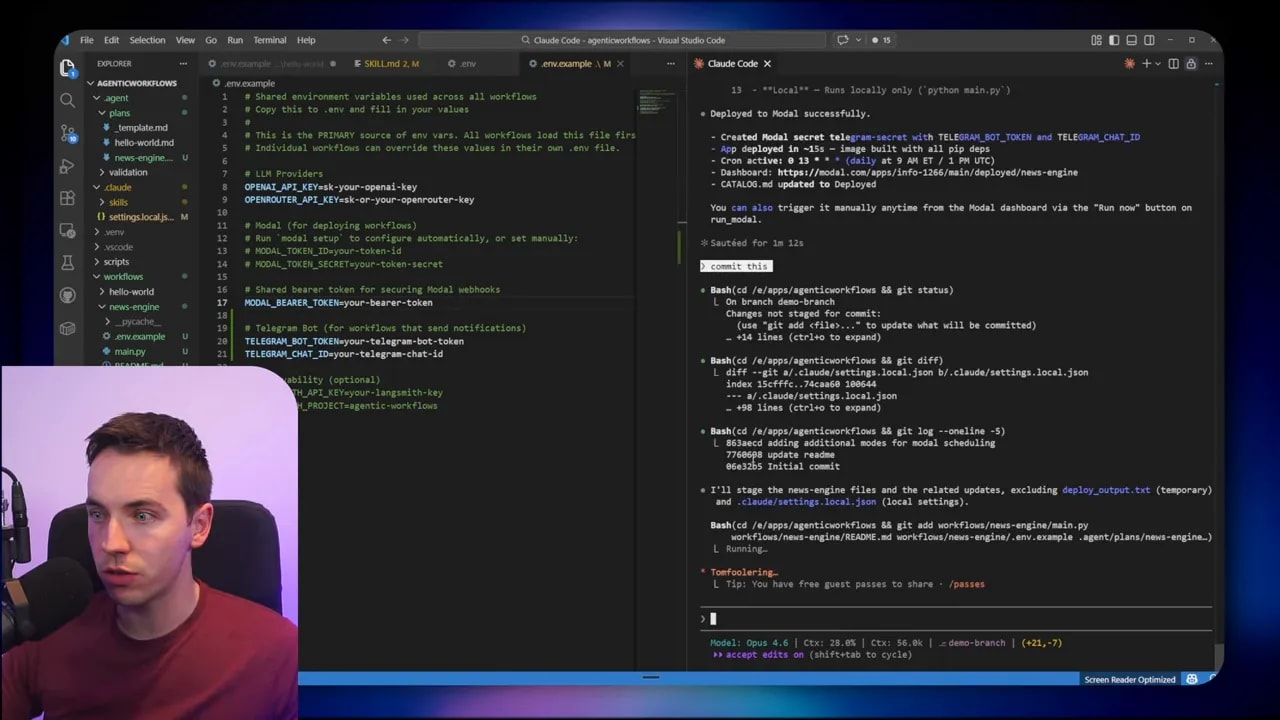
Once the workflow worked, I committed the code. The agent created a descriptive commit message and pushed the branch to a private GitHub repo. Version control is essential. It lets you roll back any changes, share the codebase with other machines, and gives agents a canonical place to work from later.
Adding persistence to avoid repeats
After a few runs, I noticed the same headlines resurfaced. The agent hadn’t deduplicated across runs. To fix that I asked it to add persistence. The simplest solution was to store a small SQLite database in Modal’s storage. SQLite is a single-file database you can query easily.

The agent updated the plan to create a sent_articles table. On each run it checks that table and skips articles already recorded. After sending new items, it inserts them into the table. I downloaded the SQLite file and inspected it with a DB browser to confirm it recorded titles, links, and timestamps. Now the script avoids repeat items across runs.
Other workflows I built
Once you get comfortable with agentic workflows, you can scale patterns rapidly. I created an SEO keyword report flow that pulls top-ranking keywords for multiple domains from an API service, merges results from Google and Bing, and outputs a combined Excel file.
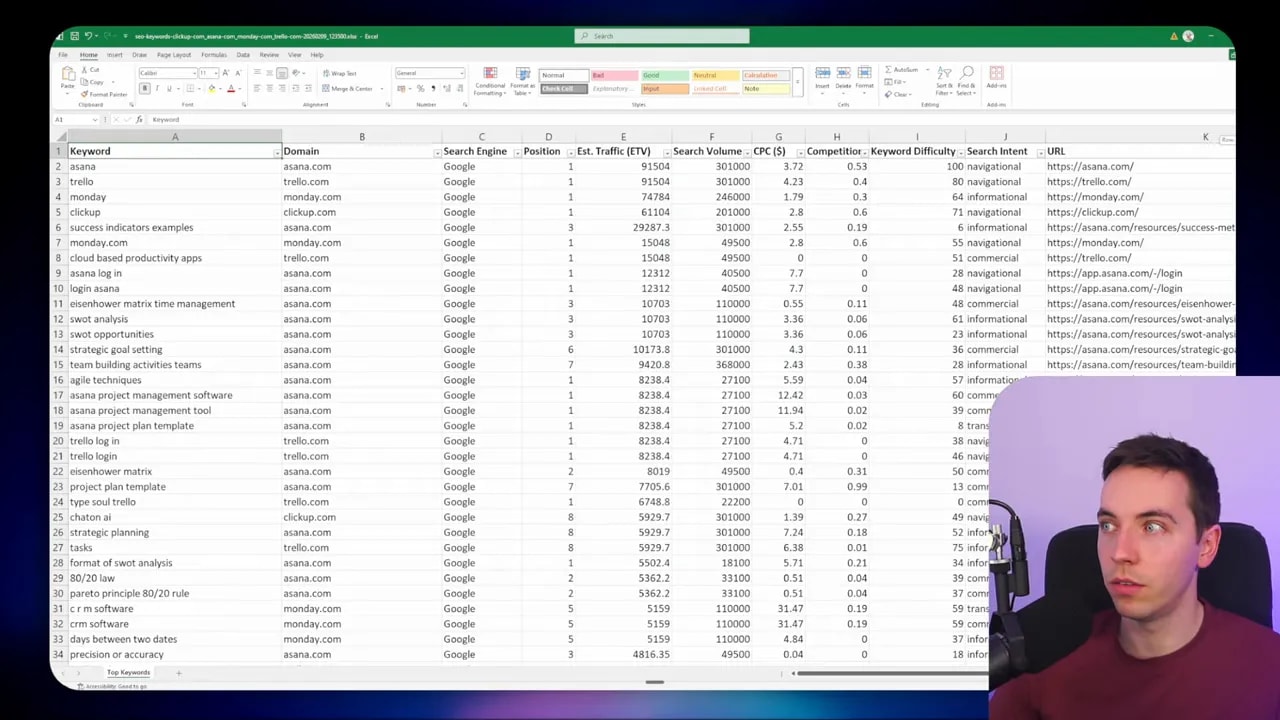
That example highlights a useful advantage: deterministic, non-AI tasks. When a script pulls API data and writes a spreadsheet, no AI calls are necessary when running in production. That makes the workflow fast, predictable, and cheap. The coding agent handled API spec discovery, scaffolding, and a working implementation from a single natural language prompt.
Building small internal apps
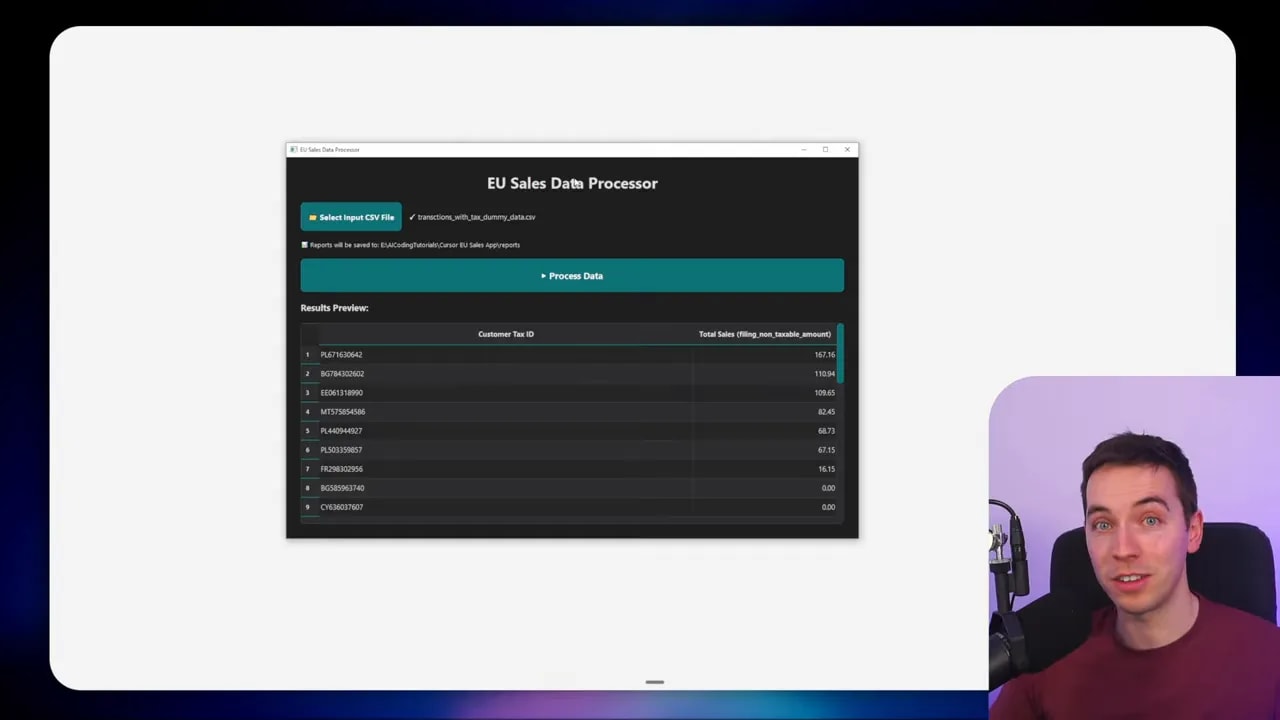
I also asked the agent to wrap a Python script into a tiny desktop app using PySimpleGUI or PyQt. The agent built a simple UI with a file picker, a process button, and an output format option. Now colleagues can double-click an app, pick a CSV, and get the processed output without touching the command line.
Three practical ways to combine agentic workflows with n8n
I often use n8n alongside agentic workflows. Here are three patterns that worked well.
1. Use n8n as a safety and approval layer
If the coding agent needs to perform sensitive actions—sending emails to customers, updating production systems, or making public changes—don’t give it free reign to act directly. Instead:
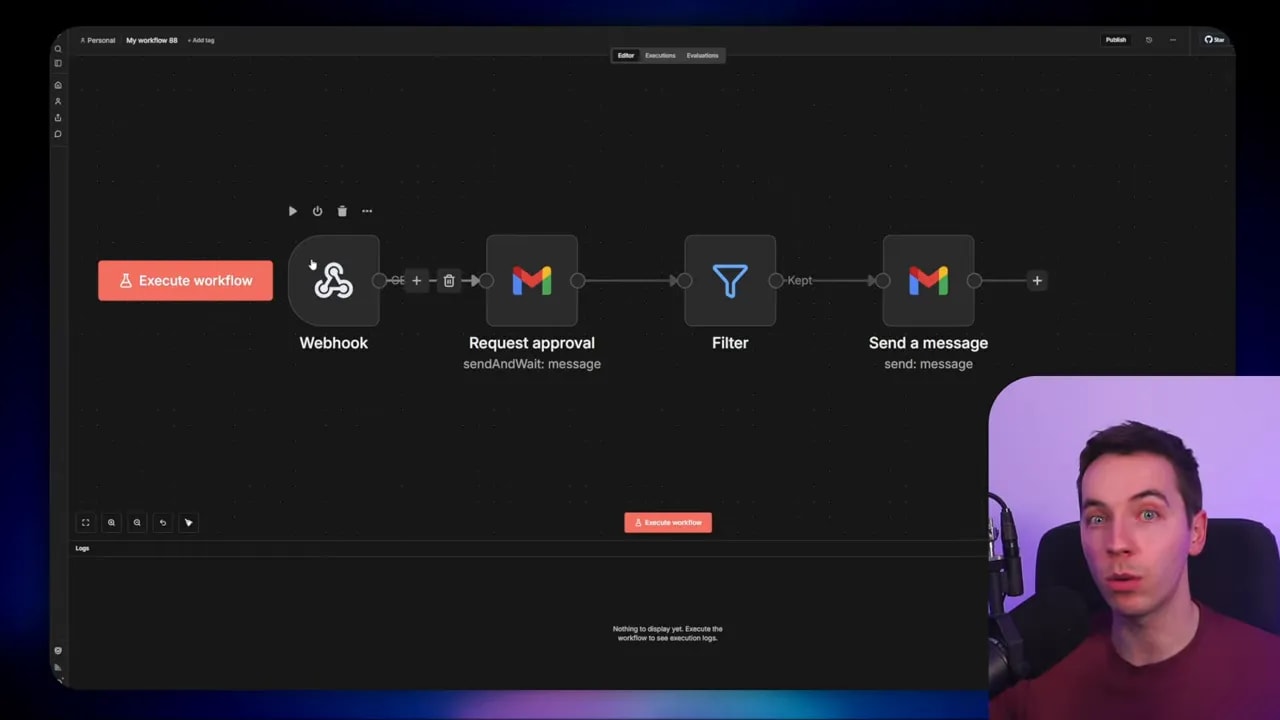
- Have the agent call an n8n webhook with a pre-filled payload.
- Use an n8n node to present a human-in-the-loop approval step.
- Only continue the flow when approval is confirmed.
This approach combines the speed of code with the oversight of visual workflows. It reduces the chance of accidental public actions while keeping automated logic flexible.
2. Let n8n handle integrations that already exist
n8n has hundreds of built-in integrations. If you’ve already connected to services there, keep using them. The agent can call a secure webhook that kicks off an n8n workflow which then uses those existing nodes. This saves time because you don’t need to re-implement connectors in code that are already maintained within n8n.
3. Manage and debug n8n flows programmatically from code
n8n exposes an API (MCP) you can call from code. I used Claude Code to create or update certain n8n nodes programmatically, and to fetch execution logs when debugging. That makes it possible to use code-driven logic to orchestrate changes across many visual flows. It doesn’t replace writing workflows in code, but it can be handy for large maintenance tasks.
Practical tips and guardrails
When I build agentic workflows I follow a set of simple rules to reduce risk and maintenance overhead:
- Use a blueprint — Keep a repository of small blueprint prompts and checklist skills that your agent can follow when creating new workflows. That keeps output consistent.
- Require explicit permissions — Don’t let the agent run with global privileges. Ask it to request permission for web searches or external API calls during the planning phase.
- Version everything — Agents should commit to Git frequently. That makes it easy to audit what changed and roll back when necessary.
- Add persistence appropriately — For repeated tasks that must not duplicate outputs, use a small SQLite file or JSON storage. That’s often simpler than provisioning a full database.
- Test locally before deploying — Run smoke tests and inspect outputs. Small mistakes in logic or poorly formed prompts can lead to noisy or unwanted results if deployed publicly.
- Schedule carefully — If your job scrapes or calls APIs, respect rate limits. Schedule runs accordingly and add exponential backoff on failures.
- Limit production privileges — Use separate API tokens and minimal-permission service accounts for scheduled runs.
Deployment options and when to choose them
You can run agentic workflows in several ways. Each has trade-offs.
- Local execution — Good for ad hoc tasks and quick testing. The agent has full access to local files. You must rely on your machine’s uptime or local scheduling (cron or Task Scheduler).
- Cloud execution (serverless runners like Modal) — Best for scheduled jobs that must run independently. Modal simplifies scheduling, offers storage for small SQLite files, and can expose secure webhooks. There’s minimal ops overhead.
- Containers or cloud VMs — Use these when you need more control over environment, scaling, or long-running processes. That path requires more DevOps work.
In many projects I start local, iterate quickly, then deploy to Modal when I need reliability and scheduling without heavy infrastructure work.
How I tuned filtering and improved signal-to-noise
Filtering is where AI adds the most value in many workflows. I experimented with different approaches to keep only high-signal items:
- Prompt the agent with a clear definition of what constitutes a signal: model releases, product launches, major research papers, or commentary from industry leaders.
- Filter out low-value categories explicitly: listicles, stock market blurbs, local news, and aggregator reposts.
- Use a two-step approach when necessary: first a deterministic filter (keywords, domains), then an AI judgement call to score relevance.
- Maintain a persistence table to avoid re-sending similar items across runs.
That mix gives predictable behavior while still letting AI do what it does best: judgement and summarization.
When agentic workflows will cause friction
There are three common friction points I see when organizations adopt agentic workflows:
- Skill gap — Teams need basic Git literacy, familiarity with deployment tools, and an ability to read and validate generated code.
- Client handoff — If you regularly hand off automations to non-technical clients, n8n-style visual dashboards are easier to train them on.
- Security concerns — Agents that can access files, secrets, or external APIs need strict controls and audit trails. Implement least-privilege access and require explicit approvals for high-risk actions.
If those pain points matter more than the benefits of code-first automation, use a hybrid approach. Keep the heavy logic in agentic workflows but surface decisions and approvals in n8n.
What I recommend you learn first
If you want to build agentic workflows, focus on three practical skills in this order:
- Git basics — Create repos, commit, push, branch, and roll back changes. Agents will touch your repo, so you must understand version history.
- Environment and secrets management — Handle API keys, bot tokens, and secure storage. Never commit secrets to version control.
- Simple cloud deployment — Learn how to deploy a scheduled script to a serverless runner. Modal and similar services make this fast to learn.
With those skills you’ll reduce most of the friction involved in moving from experiments to reliable automations.
Examples of practical prompts and scaffolds
When I start a new workflow I typically give the coding agent a small checklist and a functional spec. The checklist asks the agent to:
- Create a new folder and scaffold a README
- Add an env.example showing required environment values
- Write a main Python script with clear functions
- Add a smoke test and a small test harness
- Create a catalog entry describing schedule and status
A concise spec helps the agent avoid unnecessary choices. For example, with the news engine I specified source (Google News RSS), the number of items to fetch, filtering rules, duplication rules, and output channel (Telegram). That level of structure tends to produce code that works first try.
Final operational checklist I follow
- Review the agent’s plan before build. Confirm it won’t call external systems without permission.
- Run local smoke tests and inspect outputs manually.
- Commit and push working code to Git immediately.
- Deploy to a serverless runner for scheduled tasks, and store small state in SQLite or JSON in cloud storage.
- Add n8n as an approval or integration layer when you need visibility or existing connectors.
Agentic workflows are a powerful tool in my automation toolbox. They let me turn natural language specifications into robust Python workflows that run locally or in the cloud. When combined with a pragmatic approach to permissions, version control, and n8n for safety, they scale beautifully without losing control.
