
Overview
I built a full-featured Agentic RAG application that lets an LLM interact with private company data safely, efficiently, and transparently. The stack is intentionally simple: a React frontend, a Python FastAPI backend, and Supabase for storage, vectors, and auth. I used DocLing for document parsing and LangSmith for observability. The result is a multi-user web app with an ingestion pipeline, hybrid retrieval, tools like text-to-SQL and web search, and nested sub-agents for deep document analysis.
Why retrieval augmented generation still matters
Large models are powerful, but they don’t replace retrieval for private or rapidly changing data. You can’t easily pre-train an LLM on every internal document, and context windows—even very large ones—aren’t a substitute for a retrieval pipeline. RAG remains the practical way to ground AI in private knowledge.
Over the past year RAG evolved into agentic RAG. Instead of relying solely on vector search, an agentic RAG approach mixes strategies: semantic search, keyword search, text-to-SQL for structured data, graph queries for knowledge graphs, and filesystem grep for local files. Agents coordinate those mechanisms and execute complex retrieval plans, often via sub-agents that specialize in a task.
What I built
The project breaks into eight modules. Each module focuses on a specific capability so the system grows incrementally and remains testable.
- Module 1: App shell, auth, baseline chat (managed RAG wrapper)
- Module 2: Document ingestion UI & pipeline, PGVector storage
- Module 3: Record manager (deduplication and incremental updates)
- Module 4: Metadata extraction and filtering
- Module 5: DocLing integration for multi-format parsing
- Module 6: Hybrid search and re-ranking
- Module 7: Additional tools (web search and text-to-SQL with DB-level security)
- Module 8: Sub-agents for full-document analysis and nested tool calls
High-level architecture and design choices
I kept the architecture intentionally straightforward so it remains flexible and portable. The two main runtime components are the frontend and backend, plus Supabase as a managed database, vector store, and file bucket. The backend is Python with FastAPI. The frontend is React with TypeScript and Tailwind CSS. For local experimentation I used LM Studio and Qwen/Quinn 3 models; for cloud I used OpenAI and OpenRouter.
Key patterns I followed:
- Separation of concerns: UI rendering, LLM orchestration, storage, and document parsing are distinct layers.
- Provider abstraction: LLM and embedding providers are configurable so you can swap local and cloud models.
- Observability: Every LLM call and tool invocation is traced to LangSmith for debugging and auditability.
- Security by default: Row-level security and database-level controls protect user data and restrict agent access.
AI development loop: plan, build, validate, iterate
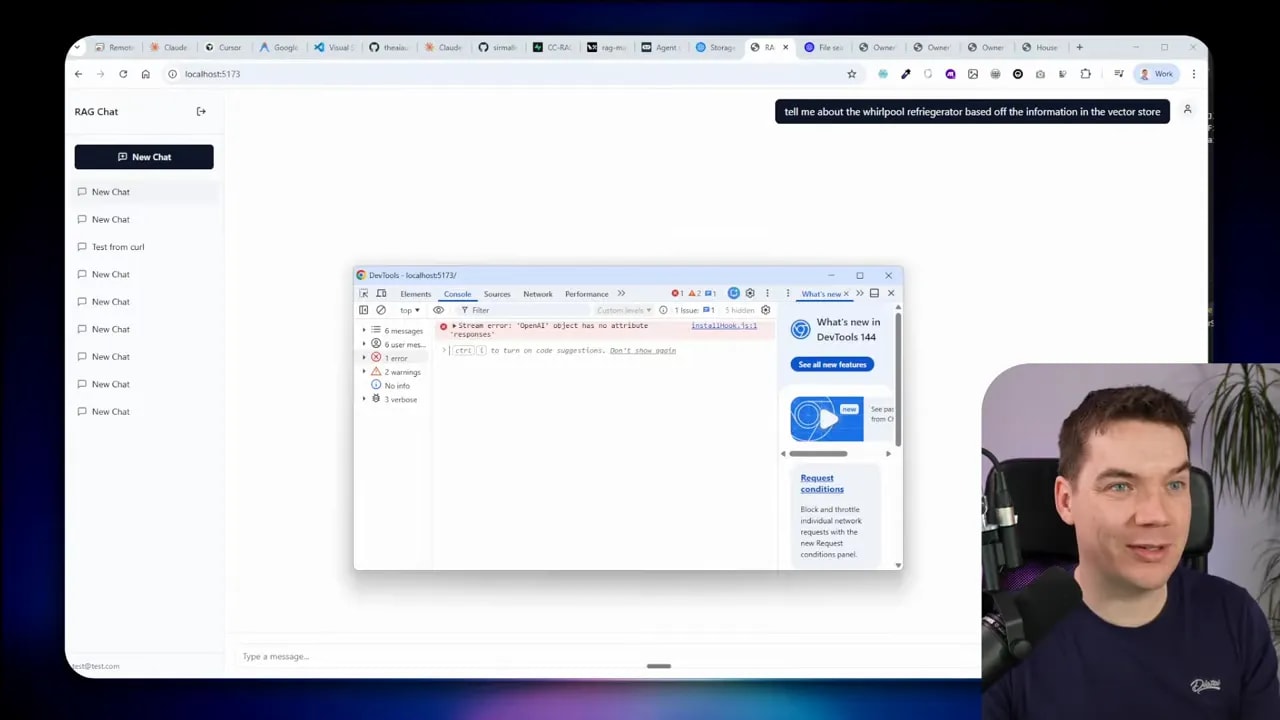
I used an iterative AI dev loop. For each feature, I created a short plan describing acceptance criteria, let the agent implement the tasks, and validated results with automated browser tests and manual checks. That loop helps me identify design issues early—like when tracing didn’t show up, or OpenAI Responses API differences broke observability.
Module-by-module breakdown
Module 1 — App shell and authentication
Goals: user auth, threads, basic chat UI, managed RAG integration.
I used Supabase Auth to provide sign-up and session handling. Row-level security isolates user data. For the first iteration I integrated an existing managed RAG (OpenAI Responses API) to get a working app quickly. That allowed me to focus on UX and flows before building my own ingestion pipeline.
Important checks:
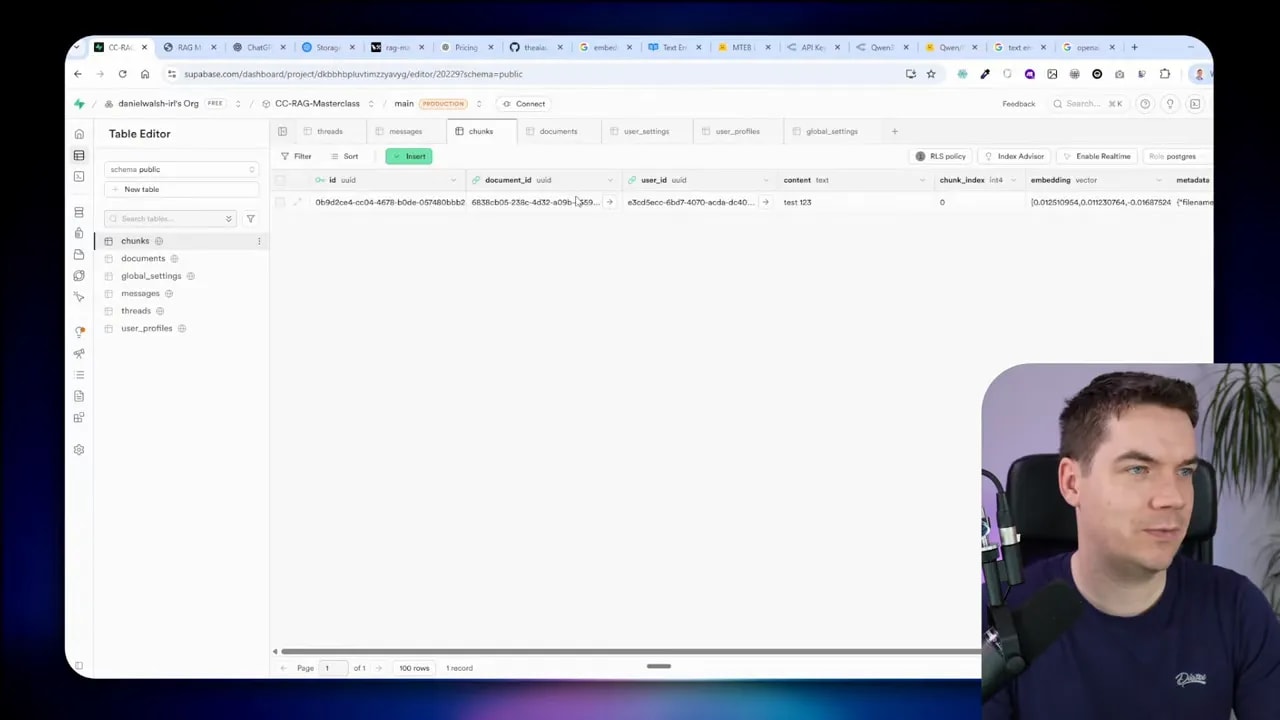
- Ensure migrations create core tables: users, threads, messages, documents, chunks.
- Verify SSE or streaming endpoints for the chat, so responses stream to the UI.
- Add LangSmith tracing keys and test traces on each LLM call.
Module 2 — Document ingestion and bring-your-own retrieval
Goals: a UI to upload documents, chunking, embeddings, storing vectors in PGVector inside Supabase.
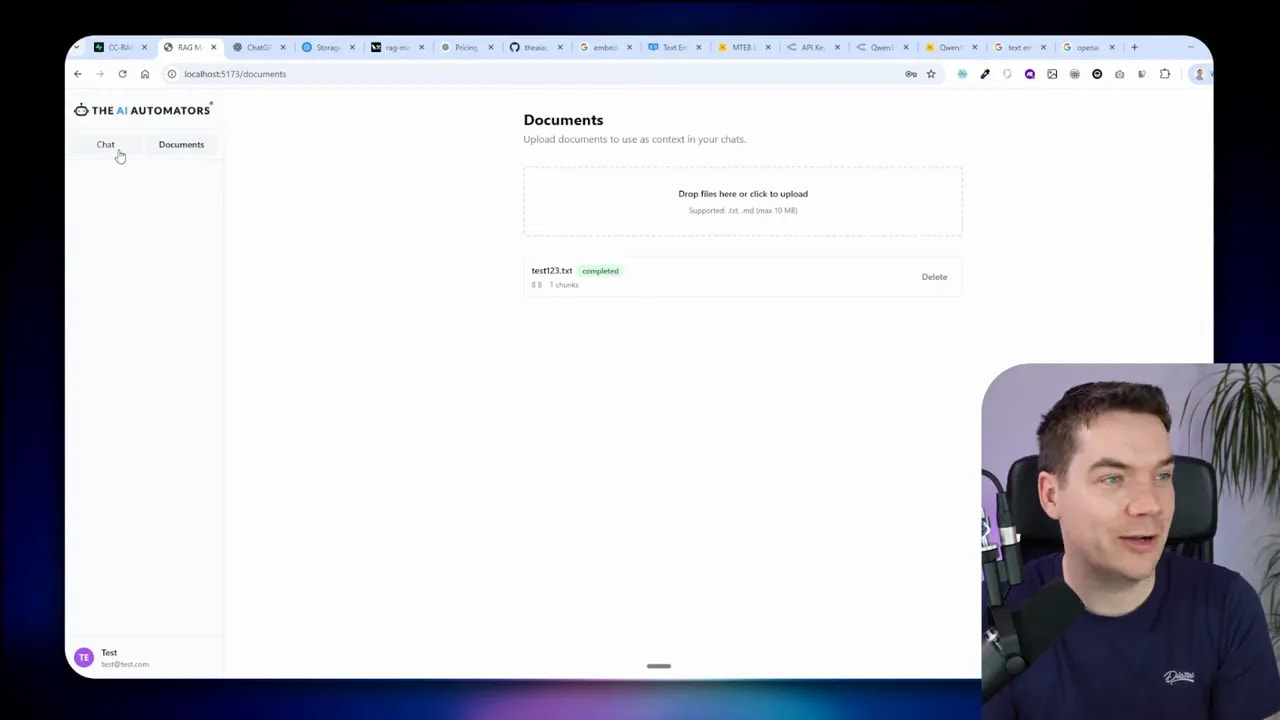
I implemented a drag-and-drop ingestion UI with live status for each file: pending, processing, completed, failed. The backend handles chunking and embedding generation. I store metadata and chunk embeddings in PGVector, plus a storage path that points at Supabase storage buckets.
Design notes:
- Chunk size and overlap matter. Use a conservative chunking strategy, then tune based on retrieval results.
- Embed provider should be configurable and stored in global settings. Never change the embedding model once vectors exist unless you reprocess everything.
- Keep user isolation: save user ID with documents and chunks to enforce RLS.
Module 3 — Record manager (deduplication)
Problem: duplicate uploads create duplicate chunks that pollute retrieval results.
Solution: compute a content hash (e.g. SHA256) at upload. If a file’s hash matches an existing record, skip reprocessing. If the file content changed, delete its old chunks and re-ingest to avoid orphaned chunks.
Edge cases to handle:
- Files with changed metadata but identical content should not trigger re-ingestion.
- Partial updates require careful handling—either reprocess the whole file or implement chunk-level diffing.
Module 4 — Metadata extraction and filtering
I added automated metadata extraction during ingestion. The system uses an LLM to extract a compact JSON schema from the first ~8,000 characters of the document to limit cost. Typical metadata fields include document type, topics, language, version, and product codes.
Metadata improves precision but also adds risk. If the agent over-filters results using metadata, retrieval can return zero hits. I therefore treat metadata as optional filters. The agent must be guided on when to apply metadata. That guidance lives in the system prompt and retrieval strategy (more on that soon).
Module 5 — DocLing for multi-format parsing
DocLing handles PDFs, DOCX, PPTX, and images. It exposes a pipeline you can run locally or proxy to a VLM server for heavy OCR and image understanding. Running DocLing locally requires additional dependencies like PyTorch and may download model weights on first run. I used async processing and batching to keep ingestion from saturating resources.
Performance tips:
- Limit max file size per ingestion job (I used 50 MB).
- Set a max concurrency for parsing tasks to avoid exhausting RAM or GPU.
- Move VLM-heavy parts to a separate server if the ingestion rate is high.
Module 6 — Hybrid search and re-ranking
Semantic similarity is great, but it is not sufficient alone. I implemented hybrid search that combines:
- Keyword / lexical search (Postgres full-text search)
- Vector similarity (PGVector)
- Reciprocal Rank Fusion to combine rankings
- Optional re-ranking with a dedicated model (Cohere or a local re-ranker)
Re-ranking improves precision for short, ambiguous queries. I added observability so every stage emits scores and ranks to LangSmith. The agent selects the search mode based on the query type and available tools.
Module 7 — Tools: web search and text-to-SQL
This is where the system becomes agentic. I built two key tools:
- Web search tool: fallback to external knowledge when docs don’t have the answer. I used Tavily for search, but this is pluggable.
- Text-to-SQL tool: the agent can generate and execute SQL against a specific read-only table. To reduce blast radius I created a dedicated DB user with SELECT-only permission for the target table. The agent can ask follow-up queries and compose results, but it has no write privileges.
Database-level security prevents destructive actions even if the agent produces malicious SQL. This is more robust than relying on runtime validation alone.
-- Example: create a read-only role for the agent
CREATE ROLE rag_reader;
CREATE USER rag_agent WITH PASSWORD 'strong-password';
GRANT rag_reader TO rag_agent;
GRANT SELECT ON public.sales_data TO rag_reader;
-- Use connection string for rag_agent in the backend when executing agent queries
That single change removes the need to sanitize every possible SQL string produced by the agent. The database enforces read-only access.
Module 8 — Sub-agents for full-document analysis
Main agent responsibilities:
- Accept user query
- Plan a retrieval strategy
- Dispatch sub-agents to run more expensive or contextual tasks
- Aggregate results and produce a final answer
Sub-agents let me load an entire document into an isolated LLM context and run focused extraction tasks—summaries, tables of contents, or deep semantic searches—without cluttering the main agent’s context. The UI shows nested tool calls and streaming reasoning so users can follow what the system did.
Observability and debugging with LangSmith
Observability proved essential. I traced prompts, tool calls, model responses, and memory. LangSmith traces let me inspect what retrieval strategy the agent chose, which tools it invoked, and which chunks were returned. That visibility made it possible to correct issues like over-filtering from metadata or silent failures where the LLM returned a tool call but no final synthesis.
Local models vs cloud models
I ran both. Local models (Quinn 3 variants via LM Studio) are very fast on a capable GPU and allow air-gapped deployments. Cloud models are easier to scale and simpler to configure. I designed provider abstraction so the system can switch between OpenAI, OpenRouter, or a local LM without changing the rest of the app.
Key trade-offs:
- Local: lower API cost, full control, but needs hardware and ops work.
- Cloud: easier to bootstrap, managed scaling, but vendor lock-in and operating cost.
Prompting, retrieval strategies, and context management
Good prompting is the glue for agentic RAG. The main agent must do three things reliably:
- Devise a retrieval strategy (which tools to call and in what order)
- Invoke those tools with explicit parameters
- Synthesize the results into a user-friendly answer
Here are rules I used in the system prompt:
- Prefer local documents. If no documents match, call web search.
- When documents are ambiguous, call metadata filters conservatively.
- If a tool returns results, do a final LLM-only call to synthesize an answer.
I also limited tool-call rounds and made that count configurable. When the agent hits the max tool rounds, force one final synthesis call without tools. This prevents situations where the agent stops after a search and never produces a human-readable answer.
Testing, validation, and continuous checks
I built a validation suite using Playwright to automate the core flows: sign-in, file ingestion, chunk creation, vector search, tool calls, and sub-agent analysis. Automating these checks early saved time and caught regressions quickly.
Some testing tips:
- Create test user accounts and document fixtures.
- Keep small, fast tests for smoke checks and a larger suite for nightly runs.
- Log LLM inputs and outputs with LangSmith traces so tests can assert on tool behavior and final answers.
Performance tuning and ingestion bottlenecks
Parsing and embedding at scale can stress CPU, RAM, and GPU. I found these levers useful:
- Batch ingestion and set a small number of concurrent workers for local parsing.
- For heavy OCR and VLM tasks, offload to a dedicated machine with a GPU.
- Cache intermediate results (e.g. parsed text) to avoid re-parsing on retries.
DocLing has asynchronous modes that help. Increasing max concurrent ingestions from 3 to 10 provided gains, but the law of diminishing returns applies. Monitor resource usage and tune batch sizes accordingly.
Security and data isolation
Security is a first-class concern. I applied several controls:
- Row-level security: enforce per-user filters in Supabase so users only see their documents and chunks.
- DB-level roles: create dedicated read-only DB users for text-to-SQL tools. The database enforces permissions even if the agent outputs malicious queries.
- Secrets management: avoid storing API keys in plaintext in the database. Keep secrets in environment variables or a secrets manager and restrict UI access to admin-only settings.
I converted model and embedding configuration into a global admin settings resource. Admins can change provider connection data, while normal users cannot, so the system stays consistent across users.
UI: rendering tool calls, think tags, and sub-agents
Rendering nested tool calls and sub-agent thought processes was one of the trickiest UX pieces. The UI must show a clear sequence of actions:
- User message
- Agent’s plan or think bubble
- Tool calls and streamed results
- Sub-agent activity with streaming reasoning
- Final synthesis
Saving tool call outputs as JSON in the messages table lets the UI reconstruct past sessions and keep tool call history. This is critical for auditability and user trust.
Common pitfalls and how I fixed them
- Over-filtering with metadata: If metadata rules are too strict, the agent returns no results. Fix: make metadata optional and add prompt guidance when to use it.
- Silent tool endings: Agents sometimes finish on a tool call without a final answer. Fix: force a final LLM-only synthesis when a tool call is the last action.
- Mismatched embedding dimensions: Changing embedding dimensions after vectors exist breaks ingestion. Fix: prevent changing embedding model when chunks exist or require a reindex workflow.
- Traces missing in LangSmith: Old or incorrect API wrappers prevented trace streaming. Fix: update to current LLM APIs and ensure tracing calls wrap both streamed and non-streamed responses.
Release process, versioning, and why cautious deployment matters
I committed frequently and tagged releases for each major milestone. The system is in an alpha state: it works end to end, but it needs more load testing, security reviews, and formal CI/CD before a production rollout.
Deployment considerations I plan to cover next:
- Separate dev, staging, and production environments with distinct Supabase instances.
- Formal migration strategy that applies DB schema changes reliably and supports rollbacks.
- Git branching strategy with protected branches and review pipelines for agent-generated code.
Practical checklist to reproduce this setup
- Clone the starter repo and read the PRD and agent plans.
- Create a Supabase project and enable Auth, storage, and Postgres extensions for PGVector.
- Set environment variables for LLM provider keys and LangSmith.
- Run DB migrations to create core tables and indexes for vector columns.
- Start the backend (FastAPI / Uvicorn) and frontend (Vite) dev servers.
- Upload a small set of test documents and validate ingestion, chunking, and embedding records.
- Run Playwright or your browser to test login, ingestion, search, and tool flows.
