
I spent two days building and testing Gemini File Search inside an n8n workflow. Lots of people called it a game changer that will kill traditional RAG systems. After hands-on work I found five critical aspects most people are missing. Some can quietly break a production system if you assume everything is taken care of for you.
This article breaks down how Gemini File Search works, the real trade-offs, practical work patterns I used in n8n, and a concrete checklist you can use to decide whether to adopt it or keep your current RAG stack.
What Gemini File Search actually does
Gemini File Search is a managed feature inside the Gemini API that grounds responses in your documents. It handles ingestion, chunking, embedding, vector storage, semantic search, and then uses the model to generate a grounded answer. In other words, it performs the core pieces that make a Retrieval-Augmented Generation (RAG) system useful, but it does so inside Google’s infrastructure.
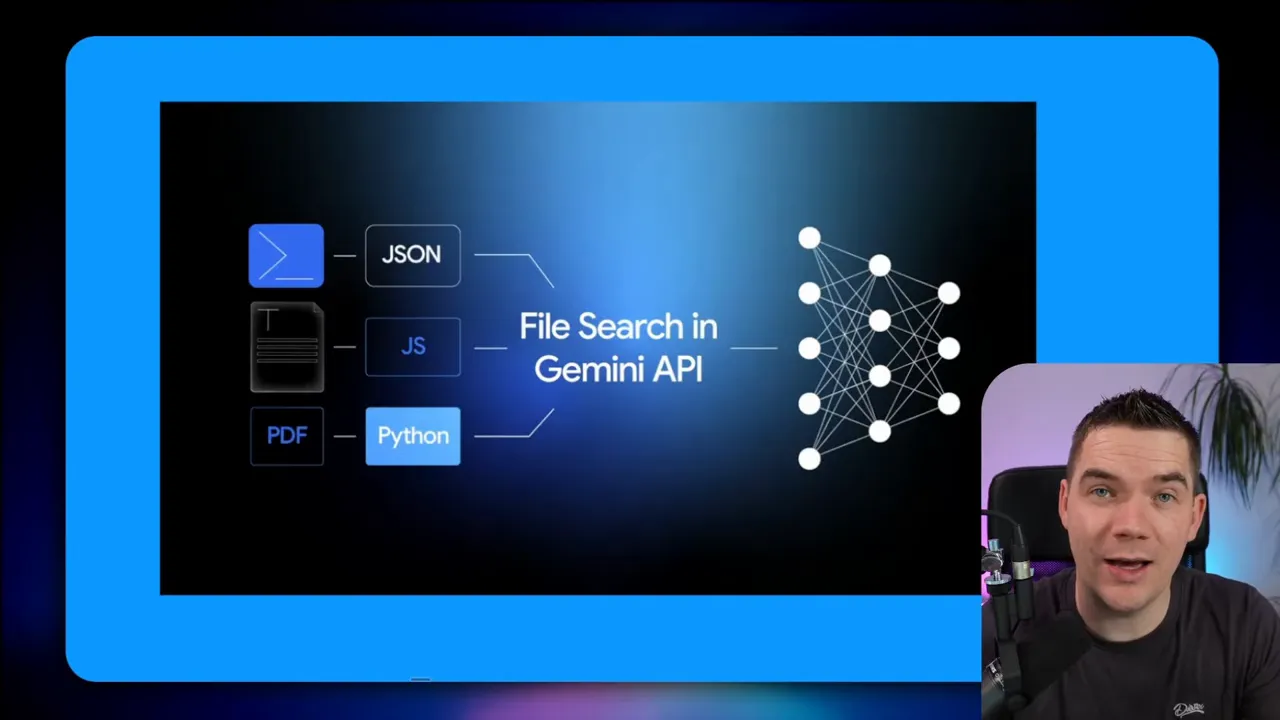
At ingestion time Gemini accepts many file formats, applies OCR when needed, splits content into chunks, creates embeddings, and stores everything in a backend vector store. At query time it transforms your query into an embedding, runs a semantic search over the stored vectors, then uses those retrieved chunks to produce a grounded response.
That fully managed pipeline is the main attraction. You don’t need to provision a vector database like Pinecone, Supabase Vector, or Quadrant. You also don’t need to implement chunking, embedding, and upsert logic yourself. On the surface, that drastically lowers the barrier to building a knowledge-backed chat or document search app.
Pricing mechanics that caught attention
Google’s pricing strategy is simple: storage is effectively free and you pay for embedding tokens during ingestion at 15 cents per one million tokens. Inference cost depends on the model you choose. That model lets early adopters prototype RAG systems quickly without carrying a high monthly storage bill.
By contrast, other providers charge for storage and put more weight on tool call costs at inference time. That swap—free storage, paid ingestion—makes sense if you expect many short-lived prototypes or moderate document volumes. It also helps explain the hype.
Five things people are overlooking
These five points came directly from implementing production-style ingestion and inference flows in n8n. Each one changes how you design a system around Gemini File Search.
- You still need a data pipeline
- It’s a mid-range black box RAG
- No markdown preservation and basic chunking
- Metadata extraction is challenging
- Vendor lock-in and privacy trade-offs
1. You still need a data pipeline
Gemini handles chunking, embeddings, and storage, but it does not handle document management for you. Production knowledge bases need to import thousands of files, keep them current, and avoid duplicates. The API does not perform uniqueness checks or version management for your documents. If you upload the same file multiple times, the system will happily store duplicates and they will pollute retrieval results.
I uploaded the exact same PDF three times. When querying the knowledge base I received duplicate chunks in the retrieval set. That gave the generator multiple copies of the same passage and made results worse instead of better. Duplicate chunks are a classic way to degrade a RAG system because they waste your token budget and confuse the grounding process.
To prevent that you need a lightweight data pipeline focused on record management rather than chunking and embedding. I created an automation that does the following steps:
- List files from a source folder on a schedule.
- Acquire a lock flag so two import jobs don’t run concurrently.
- Download each file and compute a content hash (a fingerprint).
- Check a local record manager for existing document IDs and hashes.
- If the document is new, upload to Gemini File Store and save the returned file ID, doc ID, and hash in the record manager.
- If the document exists but the hash has changed, delete the old doc from the file store and upload the new version, updating the record manager.
- If the hash already exists, skip ingestion and archive the source file.
That pattern is simple but essential. In n8n I used a data table as a record manager. Each row stores: document ID, file name, file hash, and the Gemini file store ID. When a new file arrives the workflow computes the hash and checks the table. If the doc ID exists with the same hash I skip upload. If the doc ID exists but the hash differs I delete the old document in the Gemini file store and replace it with the new version.
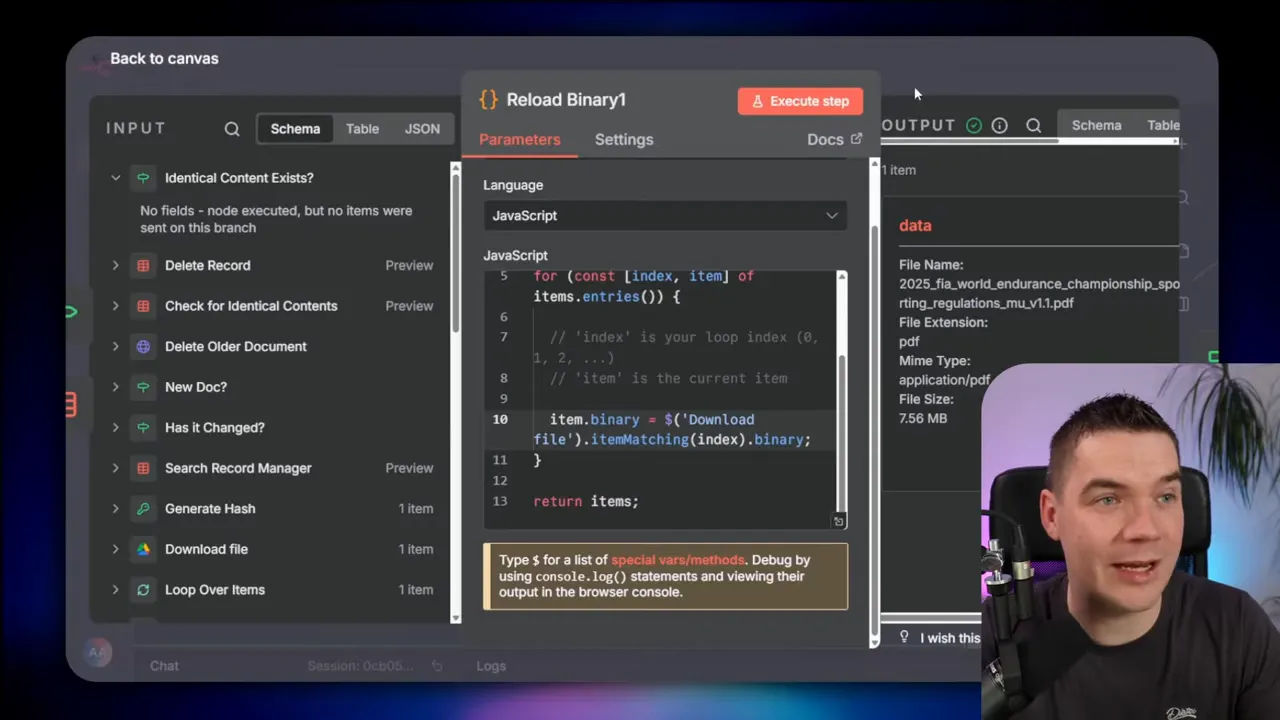
There’s another practical n8n trick I used. The binary of a downloaded file is typically available only to the following node. In a code node I reloaded the binary by using an expression. That allowed me to re-send the exact binary to the upload URL returned by Gemini. It’s a small hack, but it keeps the workflow compact and reliable.
Why this matters
- Duplicate documents produce duplicate chunks and poor responses.
- Version control ensures the knowledge base contains only the latest documents.
- A record manager gives you visibility over what’s stored in the file store.
2. It’s a mid-range black box RAG
Gemini File Search is convenient, but it’s a black box. The system hides chunking, embedding parameters, retrieval strategies, and ranking from you. That can be good: you get something that mostly works without much effort. It can also be limiting when you need to push beyond that “mostly” level.
There are advanced RAG techniques I often use that you cannot tune inside a closed system. For example:
- Hybrid search that combines exact term matching and semantic vectors.
- Contextual embeddings that adapt based on query history or user context.
- Re-ranking layers that use a separate model to score retrieved chunks.
- Context expansion patterns that strategically add related context before generation.
- Structured retrieval for CSVs and databases where semantic search alone falls short.
When you hit the ceiling of what the managed system can do, the only option is to replatform to an architecture you control. That’s a painful break point because you’ll either accept limited performance or rebuild a lot of work to migrate to a custom vector store and retrieval pipeline.
When the black box is fine
If your use case is a straightforward document Q&A, internal knowledge retrieval, or building a first prototype, Gemini File Search will likely get you 80 percent of the way there quickly. If you need precise control over retrieval behavior or advanced multi-step reasoning grounded across many sources, expect to need a customizable RAG implementation.
3. No markdown preservation and basic chunking
Gemini does OCR well. It read scanned PDFs fast and accurately. But there are problems with how it extracts and chunks text. Headings and document hierarchy don’t survive OCR.
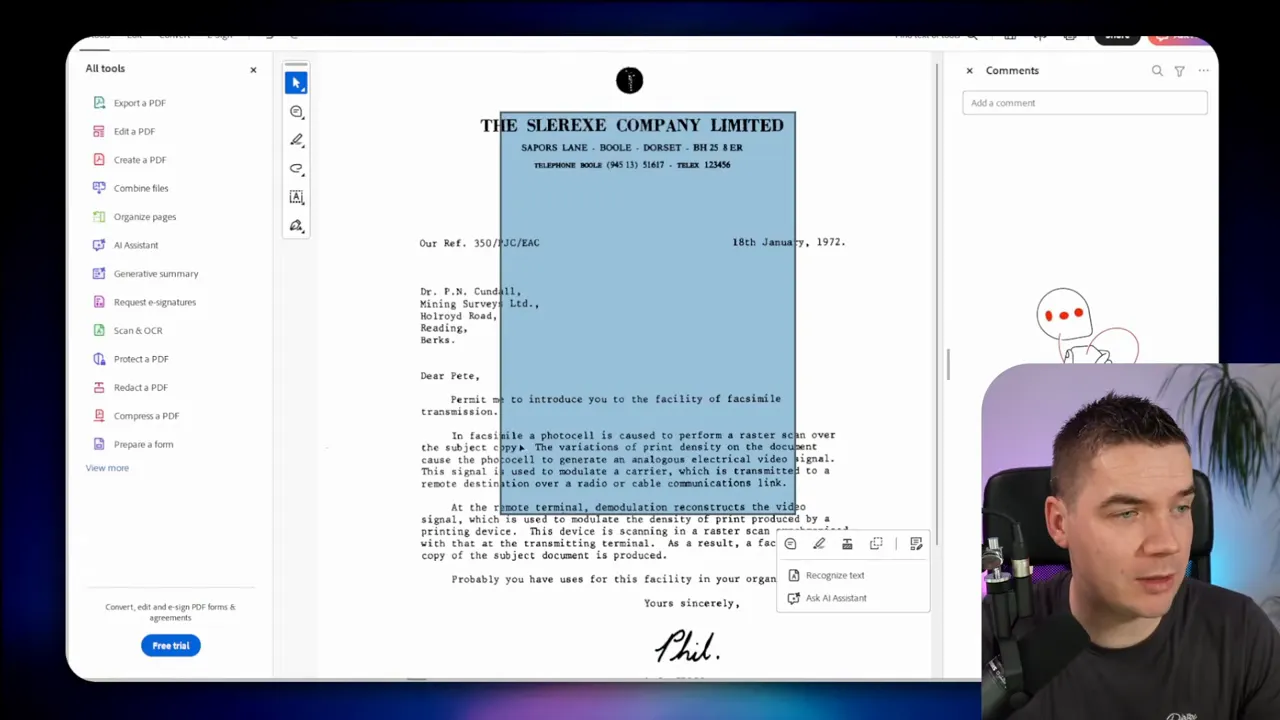
For example a document with H1 and H2 headings showed up in the file store as plain text separated by new lines. That destroys structure such as sections and subsections. I use markdown-aware chunking in my systems to preserve logical boundaries. That helps ensure chunks capture whole units of meaning and reduces the chance of splitting a sentence or cutting halfway through a thought.
I also observed crude chunking behavior. Several chunks began or ended mid-sentence. If you look at any chunk and it starts in the middle of a sentence and finishes halfway through the next, you’ve introduced retrieval noise. The generator receives fragments and lacks clear, self-contained evidence passages for grounding.
Why this is a problem
- Chunks that split sentences lose context and make hallucination more likely.
- Document hierarchy helps pick the right chunk for a question about a section.
- If your use case depends on preserving section-level semantics you’ll need pre-processing to enforce boundaries.
Possible mitigations
- Pre-process files before upload to inject explicit markdown headings where possible.
- Run your own chunking locally and store a copy of the chunks in your own database. However, you can’t upsert your own chunks to Gemini File Search—you’d then be re-implementing parts of RAG yourself.
- Adjust prompts to request section context and make the model conservative in citing evidence.
Because the internal chunking is hidden you don’t know exactly how the system decides breakpoints. That uncertainty forces you to design defensively, particularly for documents that depend on structure like policy manuals, legal contracts, or technical specs.
4. Metadata extraction is hard
Metadata makes retrieval powerful. If you can tag documents with dates, categories, departments, or custom attributes you can filter the candidate set and get much cleaner grounding. I always extract a document summary, dates, and categories with an LLM during ingestion so queries can pass metadata filters at runtime.
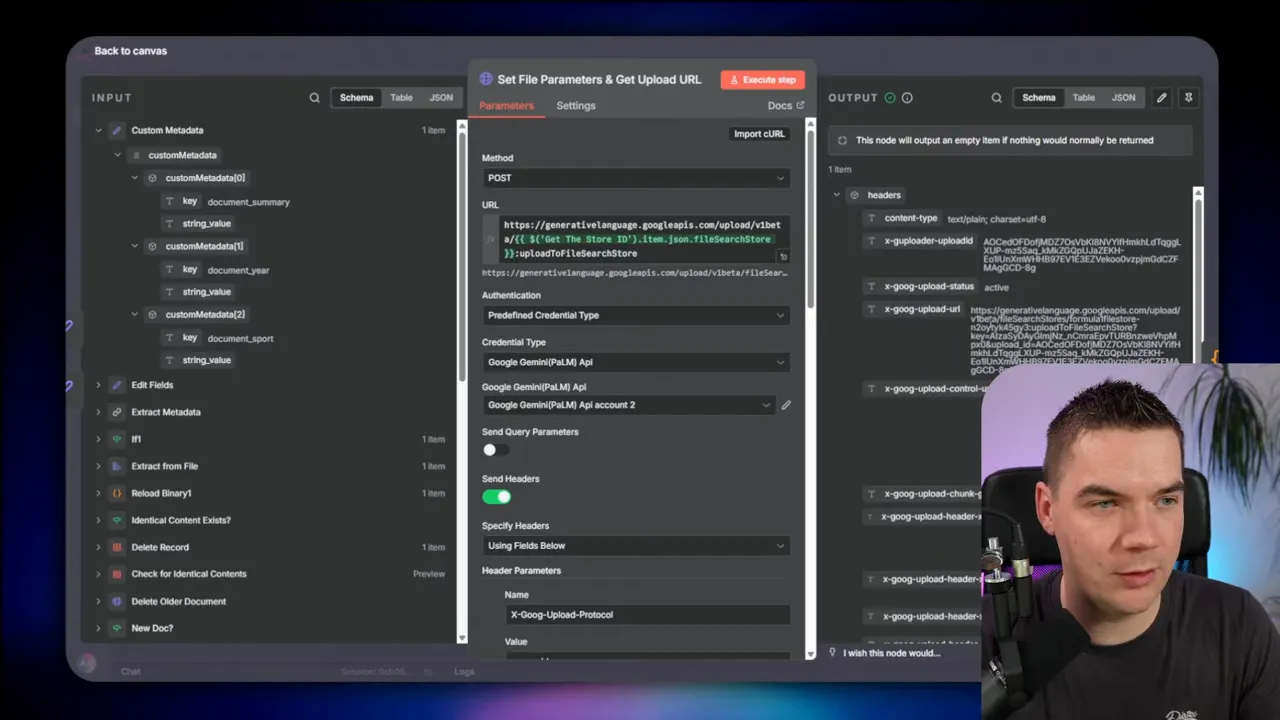
Gemini provides a place to attach metadata at upload time, and the generate content endpoint supports metadata filters. The metadata filtering during query time works well and I used it successfully to narrow search to Formula One documents, for instance.
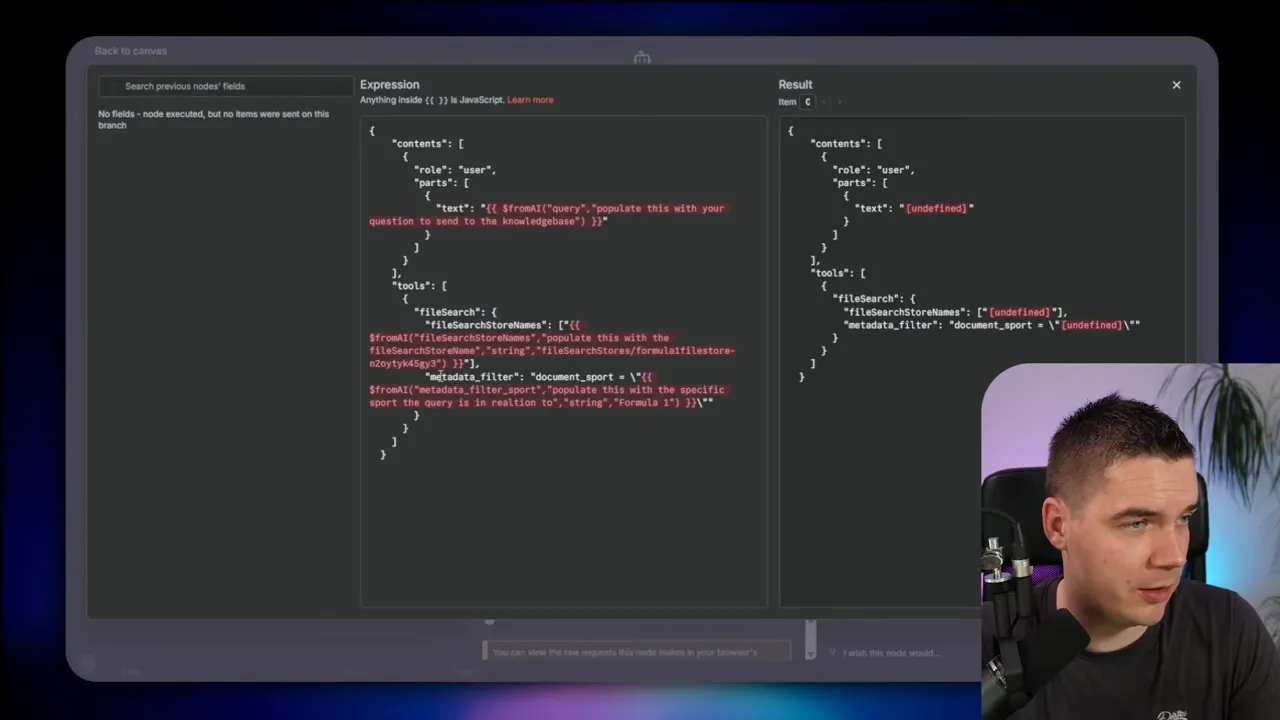
The problem is enrichment. Once Gemini processes a file and creates chunks, there is no API I could find that allows me to retrieve all chunks for a document. That means I can’t fetch the internal chunks to run my own LLM enrichment and then update the chunk metadata. You can call a metadata enrichment endpoint to update chunks or documents if you have their internal identifiers, but you cannot fetch those identifiers in bulk for arbitrary documents.
Practical implications
- You have to extract text yourself if you want to run complex metadata extraction across many file formats.
- That means reintroducing parts of the processing pipeline that Gemini was supposed to abstract away.
- If you rely on the file store alone, you’ll miss opportunities to add rich metadata that improves filtering and result quality.
Workarounds I used
- Keep a separate copy of extracted text in my own store at ingestion time. I run an LLM over that copy to produce summary, dates, tags, and other metadata. I then attach the metadata to the file during upload so it can be used in filters at query time.
- Use the available metadata enrichment endpoint to update document-level fields when I know the internal IDs to update. That’s useful if you plan ahead and store chunk IDs in your record manager during ingestion.
- Design your agent to ask clarifying questions so it can select the right metadata filter at query time. That reduces dependence on perfect metadata extraction.
Without a straightforward endpoint for fetching chunks you’ll spend extra time maintaining separate extraction logic or keeping local copies of processed text if you want advanced metadata and enrichment workflows.
5. Vendor lock-in and privacy trade-offs
Using a hosted file search ties your data to that vendor’s infrastructure. That has practical consequences that go beyond the technical.
Considerations you must cover before choosing a hosted file store:
- Data residency and retention: How long will the vendor keep your data? Where will it be stored?
- Privacy and sensitive data: Will you be storing personally identifiable information or regulated data? That requires legal and compliance review.
- GDPR and regional regulations: Does the vendor support deletion requests, data portability, and audit logs in a way that satisfies your legal obligations?
- Model constraints: Gemini File Search ties you to specific Gemini models for inference. You can’t mix OpenAI models with Gemini file store data without re-ingesting or re-architecting.
The convenience of a managed system is real. It cuts infrastructure overhead and reduces operational burden. The trade-off is that your corporate knowledge base sits on someone else’s property. You need to decide whether that cost is acceptable for your business use case.
Integration patterns I used in n8n
I used three main patterns to integrate Gemini File Search into n8n. Each pattern has pros and cons depending on how much control and flexibility you need.
1. Direct API calls to Gemini generate content and file store
This approach bypasses n8n’s AI agent node and calls the Gemini endpoints directly. I passed custom payloads for metadata filters, tool calls, and generation parameters. This is the most flexible approach and it lets me build exactly the payload I want.
When to use it
- You want fine-grained control over the generate payload.
- You need to attach custom metadata filters at inference time.
- You want to build a single agent that handles both dialogue state and file-backed retrieval in a custom way.
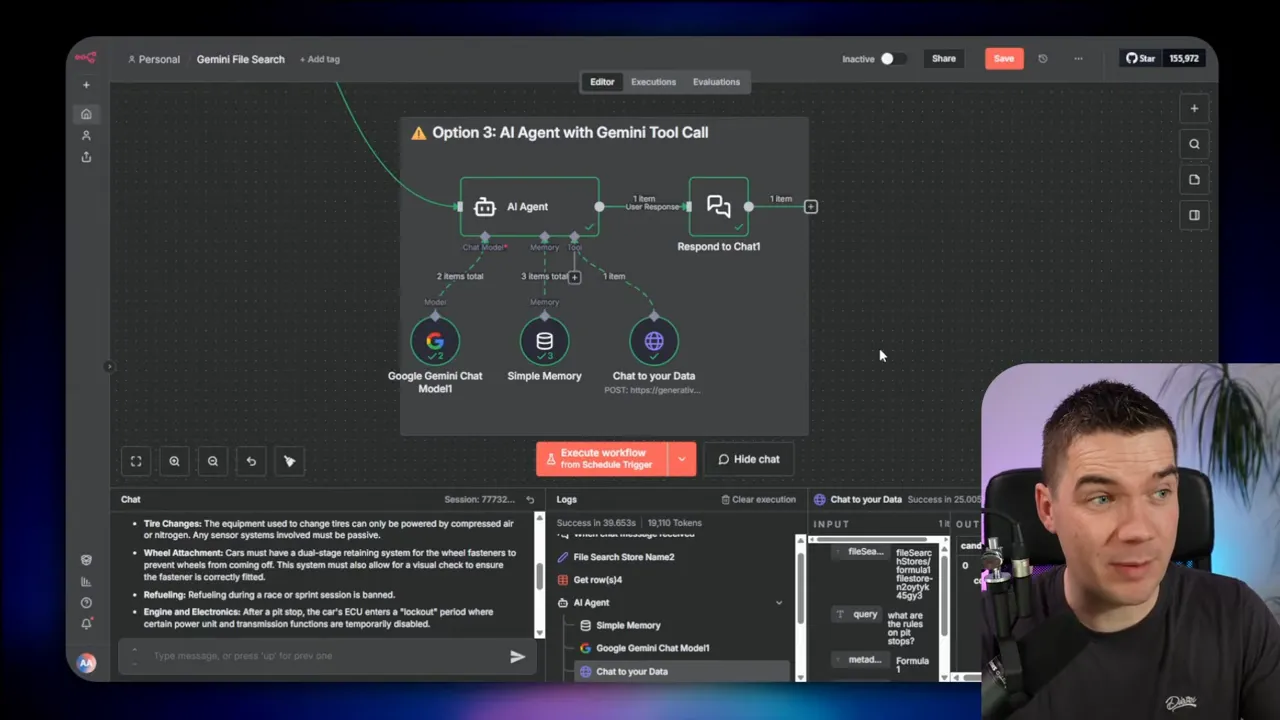
2. Use n8n’s AI agent node and call Gemini as a tool (sub-agent)
I set up a main n8n agent that handled user conversation and called a separate Gemini agent that had the file store attached. In this pattern Gemini File Search acts as an expert tool or sub-agent the main agent consults.
Advantages
- Fits n8n’s tool-calling model and keeps the agent logic modular.
- Good when you want the main agent to orchestrate calls to several tools, one of which is file search.
Drawbacks
- It adds an extra hop and more complexity because you have multiple agents coordinating.
- n8n’s AI agent node did not yet support direct file store integration at the time I tested, so I relied on the sub-agent pattern.
3. Use a dedicated Gemini node (future-proof option)
n8n released a dedicated Gemini node that simplifies calls to the Gemini API. At the time it did not support file search stores, but it’s likely that future updates will add that capability. That node will probably be the simplest way to connect file search to agents when it supports store names and file tooling directly.
Which pattern should you pick?
- Choose direct API calls when you need full control over prompts, metadata filters, and payloads.
- Use the AI agent node when you want n8n to manage multi-tool orchestration and you can accept the sub-agent pattern.
- Plan to migrate to the dedicated Gemini node when it supports file stores to simplify workflows.
Pricing comparison and decision guidance
Price often drives adoption. Gemini File Search’s pricing—no storage fee and 15 cents per one million tokens for embeddings—makes small-to-medium scale usage cheap to experiment with. That model favors rapid prototyping and proof-of-concept deployments.
Other providers charge for storage plus a tool call cost at inference. For example, some charge a few dollars per gigabyte per month and a price per file search call. If your workload includes frequent queries against a large document set, storage fees can add up. Gemini’s pricing flips that equation: you pay more at ingestion and less for sitting storage.
How to decide
- For prototypes or knowledge bases with modest document churn, Gemini’s model is attractive.
- If you have very large document volumes and frequent query traffic, run a cost model using expected ingestion token counts, query rates, and model inference costs.
- Factor in migration costs. If you plan to move off a hosted file search later, include the replatforming effort in your decision.
- Always consider compliance costs and legal sign-offs; those often outweigh small price differentials.
Practical checklist for deploying Gemini File Search
Use this checklist if you plan to build production RAG functionality on top of Gemini File Search. I used it as a template when creating my n8n workflows.
- Define scope: Decide which file types and document sources will be ingested and who will access them.
- Set up a record manager: Create a table that stores document ID, file name, content hash, Gemini file store ID, and ingestion timestamp.
- Implement deduplication: Compute a cryptographic hash for each file and check the record manager before uploading. Skip identical files.
- Handle versioning: If a file changes, delete the old document in the file store and upload the new one. Update your record manager.
- Extract text for enrichment: Keep a local copy of extracted text so you can run LLMs to create summaries, dates, tags, and other metadata.
- Attach metadata at upload: Push metadata into the upload payload so you can use metadata filters at query time.
- Decide integration pattern: Use direct API calls for flexibility, agent tool calls for modularity, or the dedicated node when it supports file stores.
- Plan for privacy and compliance: Review storage, retention, deletion, and PII handling policies with legal/compliance teams.
- Monitor retrieval quality: Log retrieved chunks and grounding supports to detect duplicate or irrelevant evidence.
- Set an exit strategy: Prepare for replatforming if you outgrow the managed system. Keep your extracted text and record manager portable.
Where this fits in the RAG landscape
Managed file search inside a model provider simplifies many tasks. That makes it a very attractive option for companies that want a fast path to production and can accept some loss of fine-grained control. It fills a gap between naive RAG hacks and fully custom retrieval systems.
If you need full control over retrieval, ranking, and context assembly, stick with a custom stack. If you need speed, low operational overhead, and can accept limited observability and a vendor’s data custody model, Gemini File Search can accelerate delivery.
It’s not a magic replacement for all RAG work. It’s a practical tool with trade-offs. Your decision should be based on expected scale, need for advanced retrieval features, regulatory constraints, and how much future migration risk you can tolerate.
“You probably still need a data pipeline.”
That sentence captures what I found. The pipeline changes when the provider handles chunking and embeddings, but you still need robust record management, metadata extraction, and compliance checks to run a reliable production system.
Implementing managed file search will make many projects faster to start. It will not erase the need for careful design. My n8n automations reflect that balance: they let the provider handle heavy lifting while I keep ownership over document lifecycle, metadata, and query-time filters.
The system will work well for a wide range of teams. For those who need higher fidelity retrieval, structured access, or full custody of their embedding data, a custom RAG architecture remains the best choice. Either way, know the trade-offs before you build on top of a managed file store.
